

How to Scrape Cheapflights | Flight Data Web Scraper
Learn how to scrape real-time flight prices, routes, and airline data from Cheapflights. Expert guide on bypassing anti-bots with Python and Automatio.
Free to start: 1,000 credits, no card, nothing to install.
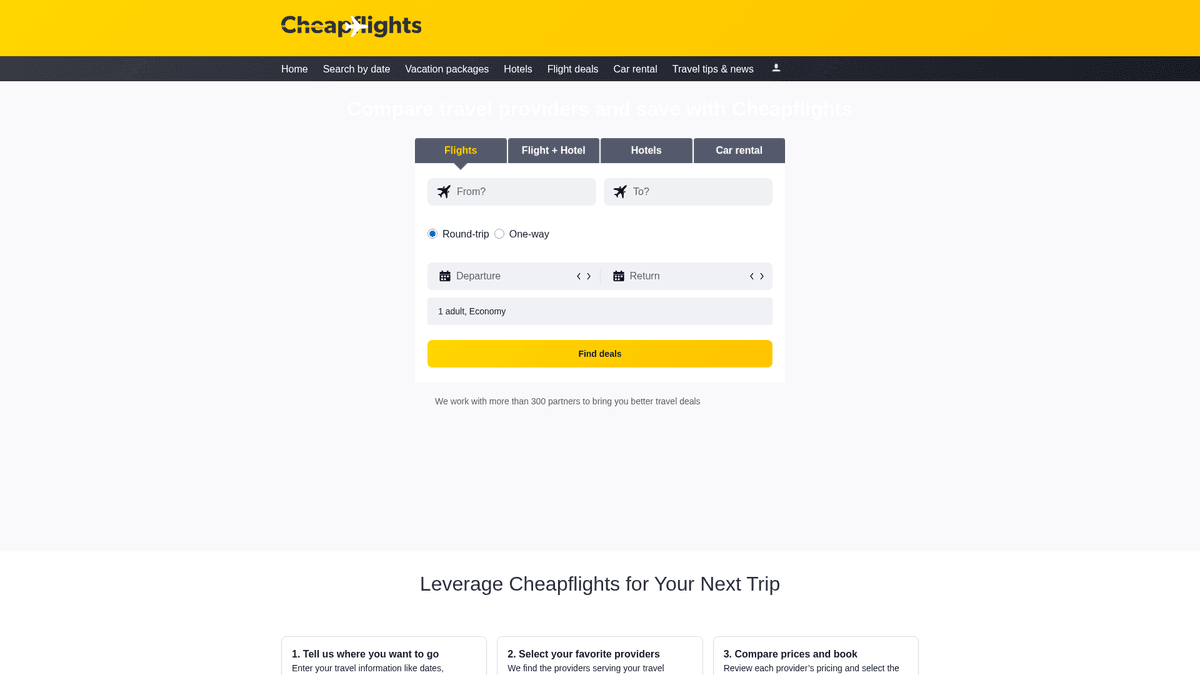
About Cheapflights
Learn what Cheapflights offers and what valuable data can be extracted from it.
Cheapflights is a premier travel metasearch engine owned by Booking Holdings and operated as a sister brand to Kayak. It functions as a massive aggregator, scanning hundreds of airlines, travel agencies, and booking platforms to find the best airfares, hotels, and car rental deals. Unlike a direct booking site, Cheapflights focuses on price comparison, often redirecting users to provider websites to complete their transactions.
Data from Cheapflights is highly valuable because it represents the pulse of global travel pricing. For businesses, this data enables competitive benchmarking, the creation of deal-alert apps, and deep market research into aviation trends. Because travel prices fluctuate by the minute, the site employs aggressive protection to prevent automated scraping from degrading performance or creating imbalances.
By extracting this information at scale, developers can build tools that predict price drops or find hidden flight deals across thousands of routes. However, successfully scraping the platform requires a robust approach to handle dynamic content and sophisticated bot detection systems.
Why Scrape Cheapflights?
Discover the business value and use cases for extracting data from Cheapflights.
Real-Time Pricing Intelligence
Monitor flight price fluctuations across hundreds of airlines to identify the best booking windows and stay ahead of market shifts.
Competitor Fare Comparison
Help travel agencies and airlines benchmark their rates against industry leaders by aggregating data from diverse travel partners.
Aggregator Feed Generation
Power niche travel apps, price-drop notification services, and specialized deal websites with a steady stream of fresh airfare data.
Historical Trend Forecasting
Build a comprehensive database of seasonal travel costs to predict future price spikes and identify long-term economic patterns in aviation.
Route Frequency Analysis
Track the frequency of flights and layover patterns between specific city pairs to assess market demand and carrier dominance.
Scraping Challenges
Technical challenges you may encounter when scraping Cheapflights.
Sophisticated Anti-Bot Protection
The site employs Akamai and DataDome to detect automated traffic through advanced behavioral analysis and browser fingerprinting.
TLS and JA3 Fingerprinting
Security systems check the low-level TLS handshake of the connection, blocking standard scraping libraries that don't mimic real browser signatures.
Dynamic AJAX Content
Search results are loaded asynchronously via JavaScript, meaning static HTML parsers will fail to see any flight listings without a rendering engine.
Localized IP Geofencing
Prices and availability vary significantly based on the user's geographical location, necessitating the use of high-quality residential proxies.
Scrape Cheapflights with AI
No coding required. Extract data in minutes with AI-powered automation.
How It Works
Describe What You Need
Tell the AI what data you want to extract from Cheapflights. Just type it in plain language — no coding or selectors needed.
AI Extracts the Data
Our artificial intelligence navigates Cheapflights, handles dynamic content, and extracts exactly what you asked for.
Get Your Data
Receive clean, structured data ready to export as CSV, JSON, or send directly to your apps and workflows.
Why Use AI for Scraping
No-Code Web Scrapers for Cheapflights
Point-and-click alternatives to AI-powered scraping
Several no-code tools like Browse.ai, Octoparse, Axiom, and ParseHub can help you scrape Cheapflights. These tools use visual interfaces to select elements, but they come with trade-offs compared to AI-powered solutions.
Typical Workflow with No-Code Tools
Common Challenges
Learning curve
Understanding selectors and extraction logic takes time
Selectors break
Website changes can break your entire workflow
Dynamic content issues
JavaScript-heavy sites often require complex workarounds
CAPTCHA limitations
Most tools require manual intervention for CAPTCHAs
IP blocking
Aggressive scraping can get your IP banned
Code Examples
import requests
from bs4 import BeautifulSoup

# Note: Cheapflights uses Cloudflare; requests might require specialized headers or a session.
url = 'https://www.cheapflights.com/flights-to-london/new-york/'
headers = {
    'User-Agent': 'Mozilla/5.0 (Windows NT 10.0; Win64; x64) AppleWebKit/537.36 (KHTML, like Gecko) Chrome/119.0.0.0 Safari/537.36',
    'Accept-Language': 'en-US,en;q=0.9'
}

try:
    response = requests.get(url, headers=headers)
    if response.status_code == 200:
        soup = BeautifulSoup(response.text, 'html.parser')
        title = soup.find('title').text
        print(f'Page Title: {title}')
    else:
        print(f'Failed to retrieve data. Status code: {response.status_code}')
except Exception as e:
    print(f'Error occurred: {e}')
When to Use
Best for static HTML pages where content is loaded server-side. The fastest and simplest approach when JavaScript rendering isn't required.
Advantages
- ●Fastest execution (no browser overhead)
- ●Lowest resource consumption
- ●Easy to parallelize with asyncio
- ●Great for APIs and static pages
Limitations
- ●Cannot execute JavaScript
- ●Fails on SPAs and dynamic content
- ●May struggle with complex anti-bot systems
import asyncio
from playwright.async_api import async_playwright

async def scrape_cheapflights():
    async with async_playwright() as p:
        # Launching with a real-looking browser context
        browser = await p.chromium.launch(headless=True)
        page = await browser.new_page(user_agent='Mozilla/5.0 (Windows NT 10.0; Win64; x64) Chrome/119.0.0.0')

        # Navigate to a specific flight search result
        await page.goto('https://www.cheapflights.com/flights/NYC-LON/2026-06-15')

        # Wait for flight results to load dynamically
        try:
            await page.wait_for_selector('.resultWrapper', timeout=15000)
            flights = await page.query_selector_all('.resultWrapper')
            for flight in flights[:5]:
                price = await flight.query_selector('.price-text')
                print(f'Found flight price: {await price.inner_text()}')
        except:
            print('Flight results did not load or were blocked.')

        await browser.close()

asyncio.run(scrape_cheapflights())
When to Use
Use when content loads dynamically via JavaScript, or when you need to interact with the page (clicks, scrolls, form fills). Handles modern anti-bot detection better.
Advantages
- ●Executes JavaScript like a real browser
- ●Handles SPAs and dynamic content
- ●Better anti-bot evasion with stealth plugins
- ●Can take screenshots and PDFs
Limitations
- ●Slower than HTTP requests
- ●Higher memory/CPU usage
- ●More complex to set up
import scrapy

class CheapflightsSpider(scrapy.Spider):
    name = 'cheapflights_spider'
    start_urls = ['https://www.cheapflights.com/flights/']

    def parse(self, response):
        # Scrapy is best for crawling links; for search results, use Scrapy-Playwright
        for item in response.css('.destination-card'):
            yield {
                'destination': item.css('.city-name::text').get(),
                'price': item.css('.price-value::text').get(),
                'route': item.css('.route-info::text').get(),
            }
When to Use
Ideal for large-scale crawling projects that need to scrape thousands of pages. Built-in support for rate limiting, retries, and data pipelines.
Advantages
- ●Built for scale (millions of pages)
- ●Automatic request throttling
- ●Built-in data export pipelines
- ●Middleware system for proxies/headers
Limitations
- ●Steeper learning curve
- ●Overkill for small projects
- ●No native JavaScript rendering
const puppeteer = require('puppeteer-extra');
const StealthPlugin = require('puppeteer-extra-plugin-stealth');
puppeteer.use(StealthPlugin());

(async () => {
  const browser = await puppeteer.launch({ headless: true });
  const page = await browser.newPage();

  // Navigate to a search result
  await page.goto('https://www.cheapflights.com/flights/SFO-TYO/2026-08-20');

  // Wait for the dynamic flight cards to appear
  await page.waitForSelector('.resultWrapper', { timeout: 10000 });

  const results = await page.evaluate(() => {
    return Array.from(document.querySelectorAll('.resultWrapper')).map(el => ({
      price: el.querySelector('.price-text')?.innerText,
      airline: el.querySelector('.codeshare-airline-name')?.innerText
    }));
  });

  console.log(results);
  await browser.close();
})();
When to Use
Choose this if you're in a Node.js/JavaScript ecosystem or need tight integration with frontend tools. Similar capabilities to Playwright.
Advantages
- ●Native JavaScript/TypeScript support
- ●Chrome DevTools Protocol access
- ●Large ecosystem and community
- ●Good for JS-heavy projects
Limitations
- ●Chrome-only (vs Playwright's multi-browser)
- ●Similar overhead to Playwright
- ●Less mature stealth options
What You Can Do With Cheapflights Data
Explore practical applications and insights from Cheapflights data.
Dynamic Price Tracker
Travel agencies can monitor specific routes and alert users when prices drop below a target threshold.
How to implement:
- 1Schedule daily scrapes for popular flight routes.
- 2Store pricing history in a central database.
- 3Trigger automated email notifications when target prices are met.
Use Automatio to extract data from Cheapflights and build these applications without writing code.
Market Trend Analysis
Aviation analysts use aggregated data to understand seasonal demand and airline pricing strategies.
How to implement:
- 1Collect monthly average price data for key global corridors.
- 2Correlate price fluctuations with major events or fuel price changes.
- 3Visualize trends to provide business intelligence for travel startups.
Use Automatio to extract data from Cheapflights and build these applications without writing code.
Error Fare Detection
Identify massive pricing mistakes made by airlines to offer exclusive deals to premium subscribers.
How to implement:
- 1Scrape all departures from major international hubs every 30 minutes.
- 2Use statistical analysis to identify prices that fall far outside standard deviations.
- 3Manually verify and publish error fares to a deal platform.
Use Automatio to extract data from Cheapflights and build these applications without writing code.
Competitive Pricing Dashboard
Airlines can use aggregated data to adjust their own fares in real-time against competitors.
How to implement:
- 1Scrape competitor fares on overlapping routes multiple times a day.
- 2Inject scraped data into an internal pricing engine via API.
- 3Automatically update seat prices to maintain market competitiveness.
Use Automatio to extract data from Cheapflights and build these applications without writing code.
Travel Content Generation
Automatically generate Best Time to Book guides based on historical price data.
How to implement:
- 1Scrape and aggregate yearly price data for specific destinations.
- 2Identify the cheapest and most expensive months to visit.
- 3Generate automated infographics and blog posts to drive SEO traffic.
Use Automatio to extract data from Cheapflights and build these applications without writing code.
Supercharge your workflow with AI Automation
Automatio combines the power of AI agents, web automation, and smart integrations to help you accomplish more in less time.
What to get right first
Expert advice for successfully extracting data from Cheapflights.
Use Residential Proxies
Avoid data center IPs, as they are flagged almost instantly by Akamai; residential proxies provide the high trust scores needed for successful extraction.
Monitor Internal APIs
Use the browser's Network tab to identify background XHR or GraphQL requests, which often contain more structured data than the visible HTML.
Capture Session Cookies
Run an initial handshake session on the home page to acquire valid 'FT' cookies, which are required for subsequent search result pages to load correctly.
Implement Random Delays
Mimic human browsing patterns by adding randomized pauses between searches to prevent triggering rate-limiting and behavioral security triggers.
Match User-Agents with TLS
Ensure your browser's User-Agent string exactly matches the JA3 fingerprint of your scraper to avoid being flagged for inconsistent client signatures.
Related Web Scraping
Frequently Asked Questions
Find answers to common questions about Cheapflights
Is it legal to scrape Cheapflights?
Scraping publicly available pricing and route data for market research is generally permissible in many jurisdictions, provided it does not disrupt the service. However, commercial redistribution of the data may violate the site's Terms of Service, so you should consult legal counsel regarding your specific use case.
Does Cheapflights have an official API?
Yes, Cheapflights offers an API through the Kayak Affiliate Network. This official route typically requires an application process and is geared toward booking integrations rather than high-volume data analysis or custom scraping needs.
How can I avoid being blocked by Cheapflights?
To stay undetected, use tools that manage TLS fingerprints (JA3) and rotate through high-quality residential proxies. It is also essential to use a headless browser that can execute JavaScript and handle session cookies just like a real user would.
What format is the scraped data available in?
Data is typically extracted into structured formats such as JSON, CSV, or XML. This allows for easy integration into spreadsheets, business intelligence platforms, or custom pricing algorithms.
How often should I scrape for accurate pricing?
Because flight prices are highly volatile, scraping every 4-8 hours is usually sufficient for trend analysis. For real-time deal alerts, you may need to increase frequency to every 15-30 minutes for specific high-priority routes.
What proxies work best for Cheapflights?
Residential proxies are the most effective because they provide IP addresses from real home networks, making them much harder for Akamai and DataDome to identify as automated bots compared to data center IPs.
Do I need to manage cookies manually?
Cheapflights relies on 'FT' cookies for session validation during searches. Using a scraper that supports persistent browser sessions or cookie management is crucial to ensure that the results load successfully across multiple pages.
Can I scrape localized prices from international versions?
Yes, by targeting regional subdomains like .co.uk or .de and using proxies from those specific countries, you can extract localized pricing and airline options that are unique to those markets.