

How to Scrape Fiverr | Fiverr Web Scraper Guide
Learn how to scrape Fiverr to extract gig details, freelancer profiles, and market prices. Bypass PerimeterX and Cloudflare for powerful market research.
Free to start: 1,000 credits, no card, nothing to install.
About Fiverr
Learn what Fiverr offers and what valuable data can be extracted from it.
The World's Largest Creative Marketplace
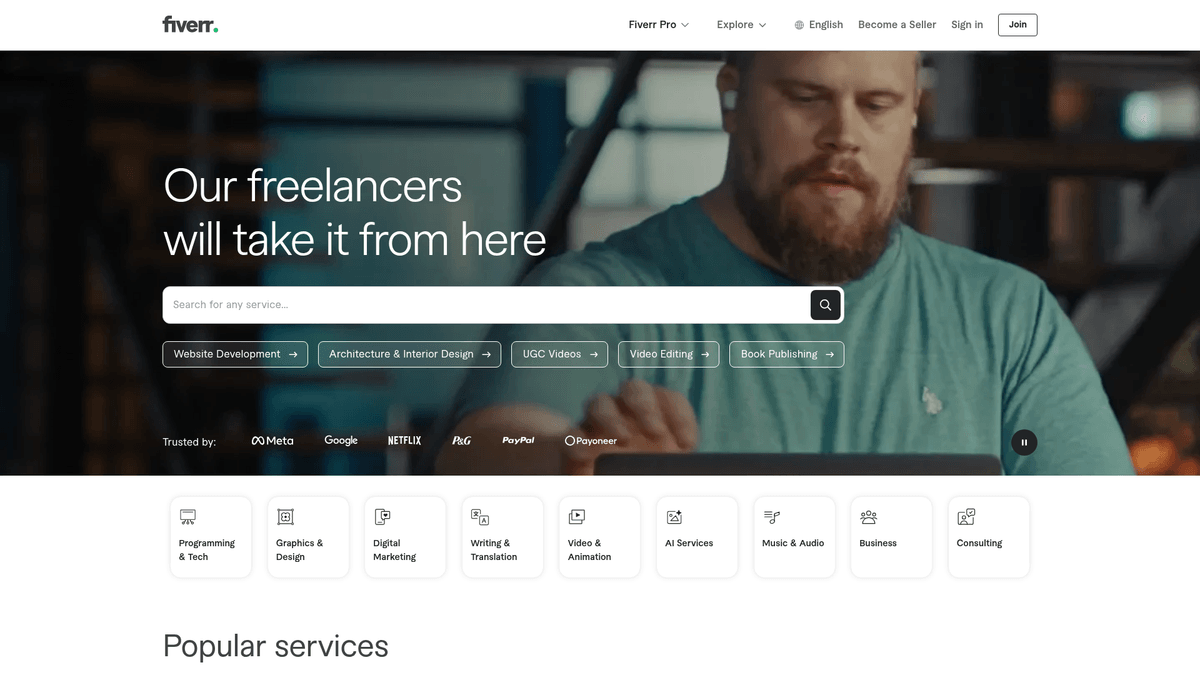
Fiverr is a leading global marketplace for freelance services, connecting businesses with independent professionals offering digital services across hundreds of categories, including graphic design, digital marketing, programming, and video editing. Founded in 2010, the platform has standardized service offerings into 'gigs' with transparent pricing and delivery structures.
Data-Rich Ecosystem for Market Analysis
The website contains millions of active listings, providing a rich source of data on market trends, service demand, and freelancer performance metrics. Scraping Fiverr is highly valuable for conducting market research, monitoring competitor pricing, and identifying high-quality talent for specific niches. By extracting gig titles, prices, and user reviews, companies can gain actionable insights into prevailing market rates.
Strategic Value of Fiverr Data
For businesses, scraping this data is essential for lead generation and building comprehensive directories of specialized service providers. It allows agencies to benchmark their own pricing against global standards and track the emergence of new service categories like AI Prompt Engineering or Metaverse development.
Why Scrape Fiverr?
Discover the business value and use cases for extracting data from Fiverr.
Real-Time Pricing Intelligence
Monitor thousands of gig listings to determine the market rate for specific digital services and adjust your own agency pricing dynamically.
Lead Generation for Agencies
Identify high-performing freelancers who can serve as white-label partners or reliable subcontractors for large-scale client projects.
Niche Opportunity Discovery
Analyze the ratio of reviews to active gigs across categories to find underserved niches with high demand and low competition.
Competitor Strategy Tracking
Follow the top-rated sellers in your industry to see how they package their services, structure their descriptions, and handle tiered pricing.
Market Sentiment Analysis
Scrape thousands of user reviews to identify common customer pain points and gaps in current service offerings.
Scraping Challenges
Technical challenges you may encounter when scraping Fiverr.
PerimeterX Security Barriers
Fiverr employs HUMAN Security (PerimeterX) which utilizes advanced behavioral analysis to detect and block even the most sophisticated automated browsers.
Dynamic Content Rendering
The platform is built on a modern JavaScript framework that requires full page execution to reveal pricing tiers, delivery times, and seller metrics.
Obfuscated Element Selectors
Fiverr frequently updates its DOM structure and uses randomized CSS class names to break static scrapers that rely on traditional selectors.
Aggressive IP Throttling
Sequential requests from the same IP address quickly trigger a 403 Forbidden error or a mandatory 'Press and Hold' CAPTCHA challenge.
Scrape Fiverr with AI
No coding required. Extract data in minutes with AI-powered automation.
How It Works
Describe What You Need
Tell the AI what data you want to extract from Fiverr. Just type it in plain language — no coding or selectors needed.
AI Extracts the Data
Our artificial intelligence navigates Fiverr, handles dynamic content, and extracts exactly what you asked for.
Get Your Data
Receive clean, structured data ready to export as CSV, JSON, or send directly to your apps and workflows.
Why Use AI for Scraping
No-Code Web Scrapers for Fiverr
Point-and-click alternatives to AI-powered scraping
Several no-code tools like Browse.ai, Octoparse, Axiom, and ParseHub can help you scrape Fiverr. These tools use visual interfaces to select elements, but they come with trade-offs compared to AI-powered solutions.
Typical Workflow with No-Code Tools
Common Challenges
Learning curve
Understanding selectors and extraction logic takes time
Selectors break
Website changes can break your entire workflow
Dynamic content issues
JavaScript-heavy sites often require complex workarounds
CAPTCHA limitations
Most tools require manual intervention for CAPTCHAs
IP blocking
Aggressive scraping can get your IP banned
Code Examples
import requests
from bs4 import BeautifulSoup

# Note: This basic example will likely be blocked by PerimeterX without residential proxies
url = 'https://www.fiverr.com/search/gigs?query=logo+design'
headers = {
    'User-Agent': 'Mozilla/5.0 (Windows NT 10.0; Win64; x64) AppleWebKit/537.36 (KHTML, like Gecko) Chrome/119.0.0.0 Safari/537.36',
    'Accept-Language': 'en-US,en;q=0.9'
}

try:
    response = requests.get(url, headers=headers, timeout=10)
    if response.status_code == 200:
        soup = BeautifulSoup(response.content, 'html.parser')
        # Selectors on Fiverr change frequently
        gigs = soup.select('.gig-card-layout')
        for gig in gigs:
            title = gig.select_one('h3').text.strip() if gig.select_one('h3') else 'N/A'
            price = gig.select_one('.price').text.strip() if gig.select_one('.price') else 'N/A'
            print(f'Title: {title} | Price: {price}')
    else:
        print(f'Blocked or error: Status {response.status_code}')
except Exception as e:
    print(f'Request failed: {e}')
When to Use
Best for static HTML pages where content is loaded server-side. The fastest and simplest approach when JavaScript rendering isn't required.
Advantages
- ●Fastest execution (no browser overhead)
- ●Lowest resource consumption
- ●Easy to parallelize with asyncio
- ●Great for APIs and static pages
Limitations
- ●Cannot execute JavaScript
- ●Fails on SPAs and dynamic content
- ●May struggle with complex anti-bot systems
from playwright.sync_api import sync_playwright

def scrape_fiverr():
    with sync_playwright() as p:
        # Launching with a real-world browser profile is recommended
        browser = p.chromium.launch(headless=True)
        context = browser.new_context(user_agent='Mozilla/5.0 (Windows NT 10.0; Win64; x64) AppleWebKit/537.36')
        page = context.new_page()

        # Navigate to a specific search category
        page.goto('https://www.fiverr.com/search/gigs?query=python+scraping')

        # Wait for gig cards to load in the React frontend
        page.wait_for_selector('.gig-card-layout')

        # Extract data from the page
        gigs = page.query_selector_all('.gig-card-layout')
        for gig in gigs:
            title = gig.query_selector('h3').inner_text()
            price = gig.query_selector('.price').inner_text()
            print({'title': title, 'price': price})

        browser.close()

if __name__ == '__main__':
    scrape_fiverr()
When to Use
Use when content loads dynamically via JavaScript, or when you need to interact with the page (clicks, scrolls, form fills). Handles modern anti-bot detection better.
Advantages
- ●Executes JavaScript like a real browser
- ●Handles SPAs and dynamic content
- ●Better anti-bot evasion with stealth plugins
- ●Can take screenshots and PDFs
Limitations
- ●Slower than HTTP requests
- ●Higher memory/CPU usage
- ●More complex to set up
import scrapy

class FiverrSpider(scrapy.Spider):
    name = 'fiverr_spider'
    start_urls = ['https://www.fiverr.com/search/gigs?query=video+editing']

    def parse(self, response):
        # Fiverr requires custom middleware for JS rendering (like Scrapy-Playwright)
        for gig in response.css('.gig-card-layout'):
            yield {
                'title': gig.css('h3::text').get(),
                'seller': gig.css('.seller-name a::text').get(),
                'price': gig.css('.price::text').get(),
                'rating': gig.css('.rating-score::text').get()
            }

        # Simple pagination handling
        next_page = response.css('a.pagination-next::attr(href)').get()
        if next_page:
            yield response.follow(next_page, self.parse)
When to Use
Ideal for large-scale crawling projects that need to scrape thousands of pages. Built-in support for rate limiting, retries, and data pipelines.
Advantages
- ●Built for scale (millions of pages)
- ●Automatic request throttling
- ●Built-in data export pipelines
- ●Middleware system for proxies/headers
Limitations
- ●Steeper learning curve
- ●Overkill for small projects
- ●No native JavaScript rendering
const puppeteer = require('puppeteer-extra');
const StealthPlugin = require('puppeteer-extra-plugin-stealth');
puppeteer.use(StealthPlugin());

(async () => {
  const browser = await puppeteer.launch({ headless: true });
  const page = await browser.newPage();

  await page.goto('https://www.fiverr.com/search/gigs?query=copywriting');

  // Wait for the dynamic React content to render
  await page.waitForSelector('.gig-card-layout');

  const results = await page.evaluate(() => {
    const items = document.querySelectorAll('.gig-card-layout');
    return Array.from(items).map(item => ({
      title: item.querySelector('h3')?.innerText,
      price: item.querySelector('.price')?.innerText,
      seller: item.querySelector('.seller-name')?.innerText
    }));
  });

  console.log(results);
  await browser.close();
})();
When to Use
Choose this if you're in a Node.js/JavaScript ecosystem or need tight integration with frontend tools. Similar capabilities to Playwright.
Advantages
- ●Native JavaScript/TypeScript support
- ●Chrome DevTools Protocol access
- ●Large ecosystem and community
- ●Good for JS-heavy projects
Limitations
- ●Chrome-only (vs Playwright's multi-browser)
- ●Similar overhead to Playwright
- ●Less mature stealth options
What You Can Do With Fiverr Data
Explore practical applications and insights from Fiverr data.
Service Pricing Benchmark
Companies use Fiverr data to set competitive rates for their own freelance services or agency offerings.
How to implement:
- 1Scrape the top 100 gigs in your specific niche (e.g., Logo Design).
- 2Extract the starting prices and package tiers.
- 3Calculate the average, median, and top-tier pricing.
- 4Adjust your service fees to align with the current market value.
Use Automatio to extract data from Fiverr and build these applications without writing code.
SaaS Lead Generation
SaaS founders scrape Fiverr to identify high-volume freelancers who might need tools for invoicing, project management, or AI generation.
How to implement:
- 1Identify categories that use specific software (e.g., Video Editors for storage tools).
- 2Extract active seller usernames and profile links.
- 3Filter for 'Pro' or 'Top-Rated' status to find established businesses.
- 4Reach out with tailored solutions to improve their workflow efficiency.
Use Automatio to extract data from Fiverr and build these applications without writing code.
Trending Skill Analysis
Market researchers track the volume of gig listings to identify which digital skills are growing in popularity.
How to implement:
- 1Perform monthly scrapes of new categories like 'AI Prompt Engineering'.
- 2Count the total number of listings and growth percentage.
- 3Monitor the average number of reviews for top gigs to gauge demand.
- 4Generate reports for investors or educational platforms on high-demand skills.
Use Automatio to extract data from Fiverr and build these applications without writing code.
Competitor Talent Discovery
Recruiters use scraped data to find high-performing freelancers for full-time roles or specialized contract work.
How to implement:
- 1Search for specific technical keywords (e.g., 'React Native Developer').
- 2Extract profiles with high ratings and multiple repeat buyers.
- 3Review seller portfolio images and response metrics.
- 4Create a database of vetted candidates for future projects.
Use Automatio to extract data from Fiverr and build these applications without writing code.
Supercharge your workflow with AI Automation
Automatio combines the power of AI agents, web automation, and smart integrations to help you accomplish more in less time.
What to get right first
Expert advice for successfully extracting data from Fiverr.
Prioritize Residential Proxies
Fiverr blocks datacenter IPs almost instantly; always use residential proxies that rotate frequently to maintain a high success rate.
Target Category Pages First
Scraping results from category and subcategory URLs is generally more stable and yields better structured data than high-frequency search terms.
Implement Random Delays
Avoid a fixed scraping rhythm; use random wait times between 3 and 15 seconds to simulate a natural browsing pattern and avoid triggering rate limits.
Scrape Public Data Only
Avoid logging into an account while scraping. Publicly available gig data is sufficient for most research and protects your main account from being banned.
Rotate User-Agent Strings
Switch between various modern desktop and mobile User-Agents to prevent the platform from identifying your scraper via browser fingerprinting.
Related Web Scraping
Upwork Scraper: Jobs, Budgets and Proposals in a table
How to Scrape Guru.com: A Comprehensive Web Scraping Guide
How to Scrape Freelancer.com: A Complete Technical Guide

How to Scrape Toptal | Toptal Web Scraper Guide
How to Scrape Arc.dev: The Complete Guide to Remote Job Data
Indeed Scraper: Job Titles, Pay and Companies in a Table
How to Scrape We Work Remotely: The Ultimate Guide
Frequently Asked Questions
Find answers to common questions about Fiverr
Is it legal to scrape data from Fiverr?
Scraping publicly available data from Fiverr, such as gig titles and prices, is generally legal for market research purposes in many jurisdictions. However, you must ensure you are not collecting private personal information or violating data privacy laws like GDPR, and you should avoid actions that could disrupt their service.
Does Fiverr provide an official API for developers?
Fiverr has a 'Fiverr Enterprise' API platform, but it is restricted to official partners and enterprise clients for managing their internal hiring workflows. It is not an open data API, which is why most researchers use web scraping to gather comprehensive market insights.
How can I avoid getting blocked while scraping Fiverr?
To avoid blocks, use a combination of residential proxies, headless browsers with stealth capabilities, and a human-like request frequency. Tools that handle JavaScript rendering and cookie management automatically are far more successful than simple HTTP request scripts.
What is the best format to save scraped Fiverr data?
CSV and JSON are the most common formats for Fiverr data. CSV is ideal for simple pricing spreadsheets, while JSON is better for nested data like seller reviews or multiple service package details.
How often should I scrape Fiverr for pricing updates?
For most niches, a weekly or bi-weekly scrape is sufficient to capture significant market shifts. Highly competitive categories like Logo Design or Content Writing might require daily monitoring to catch trending sellers and price adjustments.
Can I scrape seller email addresses and phone numbers?
No, Fiverr strictly prohibits the exchange of contact information outside of their platform to prevent off-platform transactions. As a result, this data is not present in the public HTML of the website and cannot be scraped.
What type of proxies work best for Fiverr?
Static or rotating residential proxies are the only reliable option for Fiverr. Datacenter proxies are typically flagged by their security provider, PerimeterX, resulting in immediate CAPTCHAs or 403 errors.
Do I need to render JavaScript to see the prices?
Yes, Fiverr uses a dynamic frontend where much of the content, including pricing tiers and some seller statistics, is loaded via JavaScript. A scraper that only reads the initial HTML source will miss significant amounts of data.