

How to Scrape Toptal | Toptal Web Scraper Guide
Extract elite freelancer profiles, verified skills, and career histories from Toptal. Learn to bypass anti-bot measures to gather high-quality talent data.
Free to start: 1,000 credits, no card, nothing to install.
About Toptal
Learn what Toptal offers and what valuable data can be extracted from it.
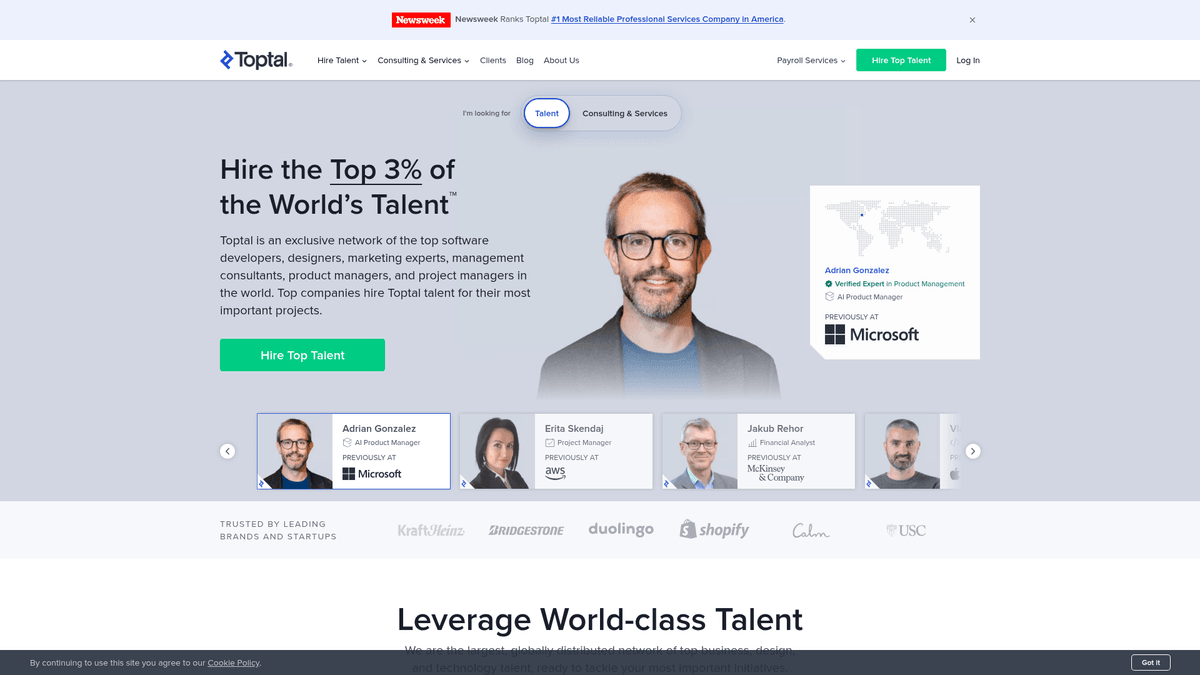
Toptal is an exclusive, remote-first network that connects businesses with the top 3% of freelance software developers, designers, finance experts, and product managers worldwide. Unlike general marketplaces, Toptal utilizes a rigorous screening process to ensure only elite professionals are admitted.
The website hosts a comprehensive directory of high-value professional profiles, including detailed career histories, specialized skills, and verified expertise tags. For organizations looking to perform deep market analysis or benchmark professional standards, Toptal offers a goldmine of structured, high-quality data.
Scraping Toptal is particularly valuable for identifying emerging skill trends and understanding the qualifications required for top-tier technical roles. Because the talent pool is expertly vetted, the data extracted is significantly more reliable and detailed than that found on generic job boards.
Why Scrape Toptal?
Discover the business value and use cases for extracting data from Toptal.
Elite Talent Acquisition
Identify and track high-level freelance leads within the top 3 percent of global talent for recruitment and project sourcing.
Market Benchmarking
Analyze profile descriptions and skill sets to establish global compensation and expertise standards for senior technical roles.
Technology Trend Tracking
Monitor the most prevalent frameworks and languages among top-tier professionals to predict future industry shifts and demands.
Competitor Intelligence
Evaluate the specialized expertise available on Toptal to compare service offerings against other premium talent marketplaces.
Geographic Labor Insights
Discover where elite remote talent is concentrated to optimize regional hiring strategies and international office placements.
Credential Analysis
Study the specific certifications and career paths of vetted experts to refine internal candidate screening and training processes.
Scraping Challenges
Technical challenges you may encounter when scraping Toptal.
Advanced Bot Detection
Toptal utilizes sophisticated Cloudflare and DataDome protections that can identify and block automated requests almost instantly.
Dynamic Content Loading
The website is built using React, meaning talent profiles and skill lists are rendered via JavaScript and often invisible to simple HTML parsers.
Aggressive Rate Limiting
Sending too many requests in a short period triggers security challenges or immediate IP blacklisting to protect profile data.
Navigation Dependencies
Deep profile details often require specific user interactions like scrolling or clicking to trigger the background API calls that load content.
Frontend Variability
Periodic updates to the site's DOM structure and CSS classes require frequent maintenance of custom scraping scripts and selectors.
Scrape Toptal with AI
No coding required. Extract data in minutes with AI-powered automation.
How It Works
Describe What You Need
Tell the AI what data you want to extract from Toptal. Just type it in plain language — no coding or selectors needed.
AI Extracts the Data
Our artificial intelligence navigates Toptal, handles dynamic content, and extracts exactly what you asked for.
Get Your Data
Receive clean, structured data ready to export as CSV, JSON, or send directly to your apps and workflows.
Why Use AI for Scraping
No-Code Web Scrapers for Toptal
Point-and-click alternatives to AI-powered scraping
Several no-code tools like Browse.ai, Octoparse, Axiom, and ParseHub can help you scrape Toptal. These tools use visual interfaces to select elements, but they come with trade-offs compared to AI-powered solutions.
Typical Workflow with No-Code Tools
Common Challenges
Learning curve
Understanding selectors and extraction logic takes time
Selectors break
Website changes can break your entire workflow
Dynamic content issues
JavaScript-heavy sites often require complex workarounds
CAPTCHA limitations
Most tools require manual intervention for CAPTCHAs
IP blocking
Aggressive scraping can get your IP banned
Code Examples
import requests
from bs4 import BeautifulSoup

# Headers are crucial to mimic a real browser to avoid instant Cloudflare blocks
headers = {
    'User-Agent': 'Mozilla/5.0 (Windows NT 10.0; Win64; x64) AppleWebKit/537.36 (KHTML, like Gecko) Chrome/91.0.4472.124 Safari/537.36',
    'Accept-Language': 'en-US,en;q=0.9'
}

url = 'https://www.toptal.com/developers/all'

try:
    # Sending request with headers
    response = requests.get(url, headers=headers)
    response.raise_for_status()

    soup = BeautifulSoup(response.text, 'html.parser')

    # Toptal uses dynamic classes, but we look for common talent containers
    talents = soup.select('.talent-card')

    for talent in talents:
        name = talent.select_one('.talent-name').text.strip() if talent.select_one('.talent-name') else 'N/A'
        role = talent.select_one('.talent-title').text.strip() if talent.select_one('.talent-title') else 'N/A'
        print(f'Expert: {name} - Role: {role}')

except requests.exceptions.RequestException as e:
    print(f'Error scraping Toptal: {e}')
When to Use
Best for static HTML pages where content is loaded server-side. The fastest and simplest approach when JavaScript rendering isn't required.
Advantages
- ●Fastest execution (no browser overhead)
- ●Lowest resource consumption
- ●Easy to parallelize with asyncio
- ●Great for APIs and static pages
Limitations
- ●Cannot execute JavaScript
- ●Fails on SPAs and dynamic content
- ●May struggle with complex anti-bot systems
import asyncio
from playwright.async_api import async_playwright

async def scrape_toptal():
    async with async_playwright() as p:
        # Launching a headed or headless browser with stealth settings
        browser = await p.chromium.launch(headless=True)
        context = await browser.new_context(user_agent='Mozilla/5.0')
        page = await context.new_page()

        # Navigate to a specific talent category
        await page.goto('https://www.toptal.com/developers/python', wait_until='networkidle')

        # Wait for the talent cards to render via JavaScript
        await page.wait_for_selector('.talent-card')

        # Extract details
        talents = await page.query_selector_all('.talent-card')
        for talent in talents:
            name_el = await talent.query_selector('.talent-name')
            name = await name_el.inner_text() if name_el else 'Unknown'
            print(f'Freelancer: {name}')

        await browser.close()

asyncio.run(scrape_toptal())
When to Use
Use when content loads dynamically via JavaScript, or when you need to interact with the page (clicks, scrolls, form fills). Handles modern anti-bot detection better.
Advantages
- ●Executes JavaScript like a real browser
- ●Handles SPAs and dynamic content
- ●Better anti-bot evasion with stealth plugins
- ●Can take screenshots and PDFs
Limitations
- ●Slower than HTTP requests
- ●Higher memory/CPU usage
- ●More complex to set up
import scrapy

class ToptalSpider(scrapy.Spider):
    name = 'toptal_spider'
    start_urls = ['https://www.toptal.com/designers/all']

    # Recommended: Use a Middleware for rotating user agents and handling Cloudflare
    custom_settings = {
        'USER_AGENT': 'Mozilla/5.0 (Windows NT 10.0; Win64; x64) Chrome/110.0.0.0 Safari/537.36',
        'CONCURRENT_REQUESTS': 1,
        'DOWNLOAD_DELAY': 3
    }

    def parse(self, response):
        # Loop through cards using CSS selectors
        for talent in response.css('.talent-card'):
            yield {
                'name': talent.css('.talent-name::text').get().strip(),
                'title': talent.css('.talent-title::text').get().strip(),
                'skills': talent.css('.skill-tag::text').getall()
            }

        # Handle pagination (if 'Load More' is visible as a link)
        next_page = response.css('a.next-page::attr(href)').get()
        if next_page:
            yield response.follow(next_page, self.parse)
When to Use
Ideal for large-scale crawling projects that need to scrape thousands of pages. Built-in support for rate limiting, retries, and data pipelines.
Advantages
- ●Built for scale (millions of pages)
- ●Automatic request throttling
- ●Built-in data export pipelines
- ●Middleware system for proxies/headers
Limitations
- ●Steeper learning curve
- ●Overkill for small projects
- ●No native JavaScript rendering
const puppeteer = require('puppeteer');

(async () => {
  const browser = await puppeteer.launch({ headless: true });
  const page = await browser.newPage();

  // Mimic a real user
  await page.setUserAgent('Mozilla/5.0 (Macintosh; Intel Mac OS X 10_15_7) AppleWebKit/537.36');

  await page.goto('https://www.toptal.com/product-managers', { waitUntil: 'networkidle2' });

  const data = await page.evaluate(() => {
    const cards = document.querySelectorAll('.talent-card');
    return Array.from(cards).map(card => ({
      name: card.querySelector('.talent-name')?.innerText,
      location: card.querySelector('.location')?.innerText
    }));
  });

  console.log(data);
  await browser.close();
})();
When to Use
Choose this if you're in a Node.js/JavaScript ecosystem or need tight integration with frontend tools. Similar capabilities to Playwright.
Advantages
- ●Native JavaScript/TypeScript support
- ●Chrome DevTools Protocol access
- ●Large ecosystem and community
- ●Good for JS-heavy projects
Limitations
- ●Chrome-only (vs Playwright's multi-browser)
- ●Similar overhead to Playwright
- ●Less mature stealth options
What You Can Do With Toptal Data
Explore practical applications and insights from Toptal data.
Elite Talent Benchmarking
Recruitment agencies can analyze Toptal profiles to define the gold standard for specific technical roles.
How to implement:
- 1Extract profiles of top-rated experts in a niche like 'DevOps'.
- 2Identify the most common certifications and years of experience.
- 3Create a competency matrix to evaluate other candidates in the market.
Use Automatio to extract data from Toptal and build these applications without writing code.
Skill Trend Analysis
Tech training providers can identify which emerging technologies the top 3% of experts are adopting.
How to implement:
- 1Scrape skill tags from the profiles of recently joined freelancers.
- 2Compare the frequency of these tags against historical data to find growth trends.
- 3Adjust educational curriculum to focus on these high-value, high-demand skills.
Use Automatio to extract data from Toptal and build these applications without writing code.
Global Labor Market Research
Economists and businesses can study the geographic distribution of high-end freelance labor.
How to implement:
- 1Extract location data and specialization tags from thousands of profiles.
- 2Map the density of specific skills (e.g., AI Engineering) across different countries.
- 3Identify regions with an untapped supply of elite remote talent for expansion.
Use Automatio to extract data from Toptal and build these applications without writing code.
Competitive Talent Mapping
Companies can identify where the best developers are coming from (previous companies).
How to implement:
- 1Scrape the employment history section of public Toptal profiles.
- 2Aggregate the data to see which Fortune 500 companies lose talent to the freelance pool.
- 3Use these insights for targeted outbound recruiting strategies.
Use Automatio to extract data from Toptal and build these applications without writing code.
Freelance SEO Optimization
Freelancers can use data from successful Toptal profiles to optimize their own professional presence.
How to implement:
- 1Scrape bios and project descriptions from highly visible profiles.
- 2Analyze the keywords and structure used in these descriptions.
- 3Optimize personal LinkedIn or portfolio sites using similar high-conversion language.
Use Automatio to extract data from Toptal and build these applications without writing code.
Supercharge your workflow with AI Automation
Automatio combines the power of AI agents, web automation, and smart integrations to help you accomplish more in less time.
What to get right first
Expert advice for successfully extracting data from Toptal.
Prioritize Residential Proxies
Use high-quality residential IP addresses to appear as a legitimate home user and avoid the high block rates associated with data centers.
Simulate Human Scrolling
Many talent profile elements only render when they enter the viewport, so implement smooth scrolling to ensure all data is loaded.
Randomize Interaction Delays
Introduce variable wait times between actions to prevent your traffic patterns from appearing like a predictable automated bot.
Target Specific Categories
Scrape specialized sub-directories like python-developers instead of global lists to manage smaller, more relevant data batches.
Rotate Real User-Agents
Cycle through a pool of current browser strings to ensure your scraper's digital fingerprint looks like a common web visitor.
Monitor for Challenges
Set up alerts for status codes like 403 or 429 so you can pause operations before a permanent IP ban occurs.
Related Web Scraping
How to Scrape Freelancer.com: A Complete Technical Guide
Upwork Scraper: Jobs, Budgets and Proposals in a table
How to Scrape Arc.dev: The Complete Guide to Remote Job Data
How to Scrape Guru.com: A Comprehensive Web Scraping Guide
How to Scrape Fiverr | Fiverr Web Scraper Guide
Indeed Scraper: Job Titles, Pay and Companies in a Table
How to Scrape We Work Remotely: The Ultimate Guide
Frequently Asked Questions
Find answers to common questions about Toptal
Is it legal to scrape Toptal?
Scraping publicly accessible data such as professional names and skills is generally legal for research and lead generation in many jurisdictions. However, you must respect privacy laws like GDPR and avoid scraping private, non-public data or violating Toptal's Terms of Service at scale.
Does Toptal have an official API?
No, Toptal does not provide an official public API for developers to access their directory or talent profiles. Programmatic access to their high-quality professional data requires the use of web scraping or browser automation tools.
How to avoid getting blocked by Toptal?
To avoid blocks, use a headless browser that can handle JavaScript and Cloudflare challenges while rotating high-quality residential proxies. Mimicking human behavior through random delays and smooth scrolling is also essential for long-term success.
What format is the scraped data in?
The data can be exported in several formats, with JSON and CSV being the most common. JSON is particularly useful for Toptal data because it can represent nested structures like lists of technical skills and work histories.
How often should I scrape Toptal?
Since Toptal's network of elite freelancers does not change as rapidly as general job boards, a weekly or monthly crawl is usually sufficient. Frequent daily scraping may increase the risk of detection without providing significant new data updates.
What proxies work best for Toptal?
Residential proxies are the only reliable option for Toptal because they look like genuine home internet connections. Data center proxies are easily identified and blocked by Toptal's sophisticated anti-bot security layers.
Can I scrape contact information from Toptal?
Toptal does not display direct contact information like email addresses or phone numbers on their public profiles. Scraping is limited to the professional details, skills, and bios that are publicly visible to all site visitors.
Do I need to be logged in to scrape?
Most talent categories and summaries are available without an account. While logging in might reveal more details, it significantly increases the risk of account suspension if Toptal's systems detect automated activity.