

How to Scrape Maven.com for Course and Instructor Data
Learn how to scrape Maven.com to extract course details, instructor bios, pricing, and syllabi. Perfect for competitive analysis and ed-tech market research.
Free to start: 1,000 credits, no card, nothing to install.
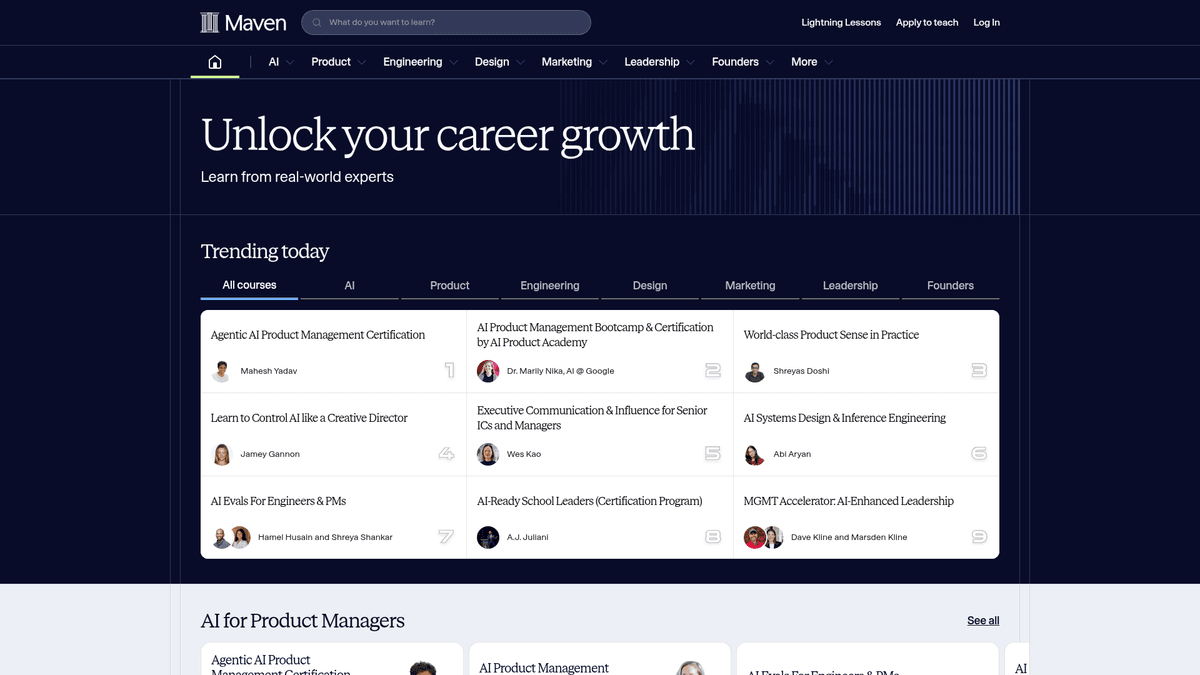
About Maven
Learn what Maven offers and what valuable data can be extracted from it.
The Leader in Cohort-Based Learning
Maven is a premier online education platform specializing in cohort-based courses (CBCs) taught by industry leaders and world-class experts. Founded by Gagan Biyani and Wes Kao, the site has become the go-to marketplace for high-stakes professional education that emphasizes live interaction, community, and practical application over passive video consumption.
Rich Professional Data
The platform hosts a vast directory of courses spanning technology, business, design, and management. Each listing is highly structured, providing detailed information on syllabus modules, instructor credentials (often from Tier-1 tech companies), pricing tiers, and specific cohort start dates. Because Maven utilizes a modern tech stack (Next.js), much of this data is rendered dynamically, making it a goldmine for those who know how to extract structured web data.
Strategic Market Value
For businesses in the ed-tech and HR sectors, scraping Maven.com offers unparalleled insights into the creator economy and professional training trends. It allows for the tracking of emerging skill demands, competitive pricing analysis, and the identification of top-tier talent who are successfully monetizing their expertise through educational products.
Why Scrape Maven?
Discover the business value and use cases for extracting data from Maven.
Competitive Pricing Analysis
Monitor and compare high-ticket cohort pricing across professional niches to optimize your own course revenue strategy.
Educational Trend Research
Identify emerging technologies and skills, such as AI and Machine Learning, that are currently commanding the highest student interest.
Instructor Lead Generation
Find and qualify world-class subject matter experts from top-tier tech companies for potential recruitment, partnerships, or speaking engagements.
Curriculum Benchmarking
Extract detailed syllabus modules to understand the depth and breadth of content required to build industry-leading professional courses.
Market Demand Assessment
Analyze student enrollment windows and cohort frequencies to determine which professional development topics are truly thriving.
Content Aggregation
Build comprehensive directories or internal recommendation engines for corporate learning and development departments.
Scraping Challenges
Technical challenges you may encounter when scraping Maven.
Next.js Dynamic Rendering
Maven uses Next.js for its front-end, meaning course data is often hydrated via JavaScript after the initial page load.
Cloudflare Bot Mitigation
The platform employs Cloudflare's security layer, which can detect and block automated requests that lack proper browser fingerprinting.
Lazy Loading and Infinite Scroll
Course discovery pages often utilize infinite scroll, requiring an automation tool that can simulate user scrolling to reveal all listings.
Complex Nested Data
Extracting structured data from deeply nested syllabus components and instructor biographies requires sophisticated CSS or XPath selectors.
Scrape Maven with AI
No coding required. Extract data in minutes with AI-powered automation.
How It Works
Describe What You Need
Tell the AI what data you want to extract from Maven. Just type it in plain language — no coding or selectors needed.
AI Extracts the Data
Our artificial intelligence navigates Maven, handles dynamic content, and extracts exactly what you asked for.
Get Your Data
Receive clean, structured data ready to export as CSV, JSON, or send directly to your apps and workflows.
Why Use AI for Scraping
No-Code Web Scrapers for Maven
Point-and-click alternatives to AI-powered scraping
Several no-code tools like Browse.ai, Octoparse, Axiom, and ParseHub can help you scrape Maven. These tools use visual interfaces to select elements, but they come with trade-offs compared to AI-powered solutions.
Typical Workflow with No-Code Tools
Common Challenges
Learning curve
Understanding selectors and extraction logic takes time
Selectors break
Website changes can break your entire workflow
Dynamic content issues
JavaScript-heavy sites often require complex workarounds
CAPTCHA limitations
Most tools require manual intervention for CAPTCHAs
IP blocking
Aggressive scraping can get your IP banned
Code Examples
import requests
from bs4 import BeautifulSoup
import json

url = 'https://maven.com/courses'
headers = {
    'User-Agent': 'Mozilla/5.0 (Windows NT 10.0; Win64; x64) AppleWebKit/537.36 (KHTML, like Gecko) Chrome/119.0.0.0 Safari/537.36'
}

try:
    response = requests.get(url, headers=headers)
    response.raise_for_status()
    soup = BeautifulSoup(response.text, 'html.parser')

    # Maven stores its state in a JSON script tag
    script_tag = soup.find('script', id='__NEXT_DATA__')
    if script_tag:
        data = json.loads(script_tag.string)
        print('Successfully extracted course JSON data.')
    else:
        # Fallback: Scrape titles from HTML
        for title in soup.select('h3'):
            print(f'Course Found: {title.get_text(strip=True)}')
except Exception as e:
    print(f'Error: {e}')
When to Use
Best for static HTML pages where content is loaded server-side. The fastest and simplest approach when JavaScript rendering isn't required.
Advantages
- ●Fastest execution (no browser overhead)
- ●Lowest resource consumption
- ●Easy to parallelize with asyncio
- ●Great for APIs and static pages
Limitations
- ●Cannot execute JavaScript
- ●Fails on SPAs and dynamic content
- ●May struggle with complex anti-bot systems
from playwright.sync_api import sync_playwright

def run():
    with sync_playwright() as p:
        browser = p.chromium.launch(headless=True)
        page = browser.new_page()
        page.goto('https://maven.com/courses')

        # Wait for the courses to render
        page.wait_for_selector('h3')

        # Scroll down to trigger lazy loading
        page.evaluate('window.scrollBy(0, 1000)')

        # Extract data
        courses = page.query_selector_all('div[class*="CourseCard"]')
        for course in courses:
            title = course.query_selector('h3').inner_text()
            print(f'Scraped: {title}')

        browser.close()

run()
When to Use
Use when content loads dynamically via JavaScript, or when you need to interact with the page (clicks, scrolls, form fills). Handles modern anti-bot detection better.
Advantages
- ●Executes JavaScript like a real browser
- ●Handles SPAs and dynamic content
- ●Better anti-bot evasion with stealth plugins
- ●Can take screenshots and PDFs
Limitations
- ●Slower than HTTP requests
- ●Higher memory/CPU usage
- ●More complex to set up
import scrapy

class MavenSpider(scrapy.Spider):
    name = 'maven_spider'
    start_urls = ['https://maven.com/courses']

    def parse(self, response):
        for course in response.css('div[class*="CourseCard"]'):
            yield {
                'title': course.css('h3::text').get(),
                'instructor': course.css('span[class*="InstructorName"]::text').get(),
                'price': course.css('div[class*="Price"]::text').get()
            }

        # Pagination logic (next page link if available)
        next_page = response.css('a[aria-label="Next page"]::attr(href)').get()
        if next_page:
            yield response.follow(next_page, self.parse)
When to Use
Ideal for large-scale crawling projects that need to scrape thousands of pages. Built-in support for rate limiting, retries, and data pipelines.
Advantages
- ●Built for scale (millions of pages)
- ●Automatic request throttling
- ●Built-in data export pipelines
- ●Middleware system for proxies/headers
Limitations
- ●Steeper learning curve
- ●Overkill for small projects
- ●No native JavaScript rendering
const puppeteer = require('puppeteer');

(async () => {
  const browser = await puppeteer.launch();
  const page = await browser.newPage();
  await page.goto('https://maven.com/courses', { waitUntil: 'networkidle2' });

  const results = await page.evaluate(() => {
    return Array.from(document.querySelectorAll('h3')).map(el => el.innerText);
  });

  console.log('Courses:', results);
  await browser.close();
})();
When to Use
Choose this if you're in a Node.js/JavaScript ecosystem or need tight integration with frontend tools. Similar capabilities to Playwright.
Advantages
- ●Native JavaScript/TypeScript support
- ●Chrome DevTools Protocol access
- ●Large ecosystem and community
- ●Good for JS-heavy projects
Limitations
- ●Chrome-only (vs Playwright's multi-browser)
- ●Similar overhead to Playwright
- ●Less mature stealth options
What You Can Do With Maven Data
Explore practical applications and insights from Maven data.
Ed-Tech Market Intelligence
Educational platforms use Maven data to see which cohort topics are trending and how many students are enrolling.
How to implement:
- 1Scrape course categories and student counts weekly.
- 2Identify the fastest-growing categories based on new course launches.
- 3Analyze common keywords in high-rated syllabi to inform curriculum design.
Use Automatio to extract data from Maven and build these applications without writing code.
Competitive Pricing Benchmarking
Course creators can use the data to ensure their pricing is competitive relative to instructor seniority and course length.
How to implement:
- 1Extract pricing and duration for all courses in a specific niche.
- 2Calculate the average cost per hour across various categories.
- 3Adjust your own price points to match the market-leading cohorts.
Use Automatio to extract data from Maven and build these applications without writing code.
Strategic Instructor Recruitment
Conferences and training companies use this data to find vetted experts who have already proven their teaching ability.
How to implement:
- 1Filter for instructors with high course ratings and positive testimonials.
- 2Scrape instructor job titles and current companies (e.g., Google, Stripe).
- 3Export a list of prospects for speaking engagements or consulting outreach.
Use Automatio to extract data from Maven and build these applications without writing code.
Skill-Gap Analysis for HR
HR teams monitor Maven to see what the 'next big thing' in corporate training is for their employees.
How to implement:
- 1Monitor new course titles and module descriptions for emerging technologies.
- 2Track which courses are being taught by senior executives at competitor firms.
- 3Use findings to update internal learning and development programs.
Use Automatio to extract data from Maven and build these applications without writing code.
Supercharge your workflow with AI Automation
Automatio combines the power of AI agents, web automation, and smart integrations to help you accomplish more in less time.
What to get right first
Expert advice for successfully extracting data from Maven.
Parse the JSON Script Tag
Maven often stores its page data in a __NEXT_DATA__ script tag; parsing this JSON directly is much faster and more accurate than parsing HTML.
Use Residential Proxies
To avoid being flagged by Cloudflare, use rotating residential proxies that make your scraping requests appear as legitimate home users.
Target Category Directories
Instead of scraping the entire site, focus on specific category URLs like /courses/product-management for more manageable and relevant data sets.
Scroll Before Extracting
Ensure your scraper includes a 'Scroll' action to trigger the loading of all course cards on the discovery pages before starting the extraction.
Include Random Delays
Mimic human browsing patterns by adding randomized wait times between page navigations to lower the risk of IP-based rate limiting.
Monitor for CSS Changes
As a modern platform, Maven updates its UI frequently; use resilient selectors that target data attributes rather than volatile class names.
Related Web Scraping
GitHub Scraper: Repos, Stars and Languages in a table
How to Scrape Pollen.com: Local Allergy Data Extraction Guide
Worldometer Scraper: Population and Median Age in a table
Wikipedia Scraper: Titles, Sizes and Edit Dates in a table
How to Scrape Weather.com: A Guide to Weather Data Extraction

How to Scrape Britannica: Educational Data Web Scraper
How to Scrape Poll-Maker: A Comprehensive Web Scraping Guide

MakerWorld Scraper: Models, Downloads and Likes in a table
Frequently Asked Questions
Find answers to common questions about Maven
Is it legal to scrape Maven.com?
Scraping public data such as course titles, instructor names, and prices for research or competitive analysis is generally legal. However, you should always avoid scraping private student data and respect Maven's Terms of Service and robots.txt files.
Does Maven have an official API?
Currently, Maven does not offer a public, documented API for third-party developers to access its course catalog. This makes web scraping the most reliable method for gathering structured data at scale.
How do I handle Cloudflare when scraping Maven?
To bypass Cloudflare, you should use a browser-based automation tool like Automatio or Playwright that correctly manages cookies and browser fingerprinting. Combining this with high-quality rotating residential proxies significantly reduces the chance of detection.
What is the best format to save Maven course data?
JSON is typically the best format because course data is often nested, particularly for syllabi and instructor credentials. If you are only tracking prices and titles, a CSV format is often easier for use in tools like Excel or Google Sheets.
How often should I scrape course data from Maven?
Since cohorts are typically scheduled on a monthly or quarterly basis, a weekly scrape is usually sufficient to capture new listings. For pricing intelligence, bi-weekly scrapes will help you track any promotional discounts or tiered pricing changes.
Can I scrape instructor contact information?
Maven does not usually list private emails or phone numbers on public pages. However, you can scrape their LinkedIn profile links and professional headlines, which can then be used for outreach via professional networking platforms.
Does Maven use infinite scroll?
Yes, many of Maven's directory and category pages use infinite scroll to load more content. Your scraping tool must be capable of simulating a user scroll down the page to ensure all available courses are visible before extraction.
What proxies work best for Maven?
Residential proxies are highly recommended because they provide IPs from actual home users, making them much harder for Cloudflare to flag than datacenter proxies. Using a rotating pool of these IPs ensures higher success rates during large-scale crawls.