

How to Scrape Poll-Maker: A Comprehensive Web Scraping Guide
Learn how to scrape Poll-Maker.com for real-time results and vote counts. Master techniques to bypass Cloudflare and handle dynamic JS content effectively.
Free to start: 1,000 credits, no card, nothing to install.
About Poll-Maker
Learn what Poll-Maker offers and what valuable data can be extracted from it.
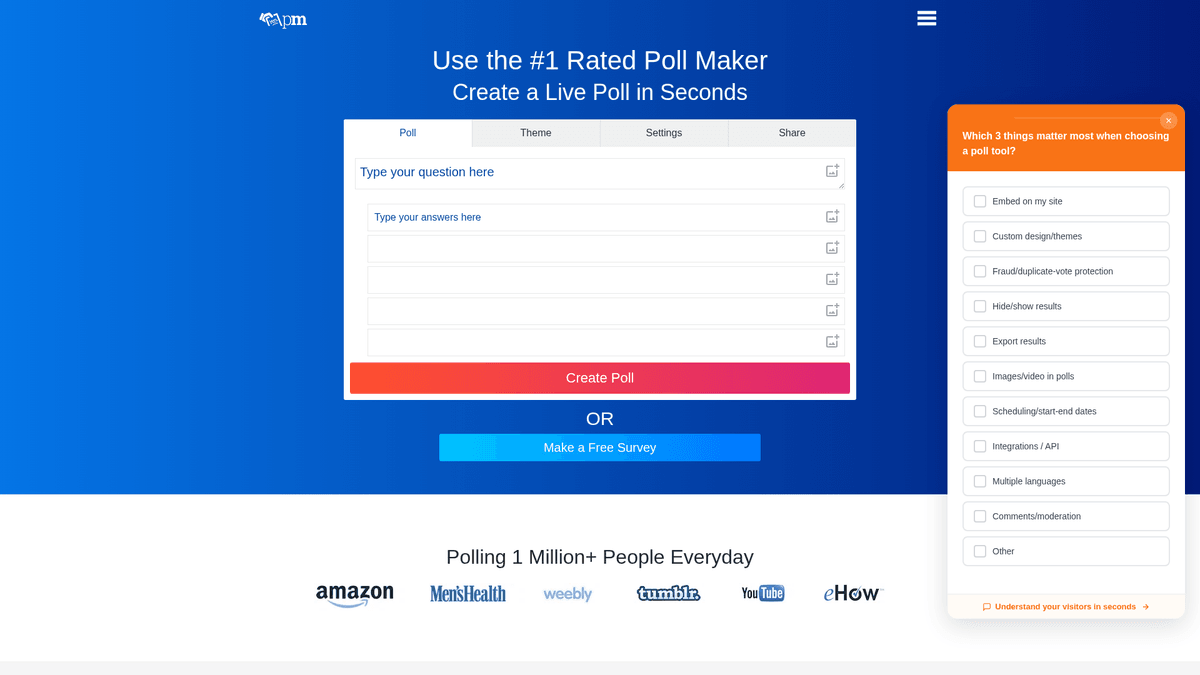
Poll-Maker is a premier online platform designed for the creation and management of interactive polls, surveys, and quizzes. Used by millions of creators, including journalists, educators, and marketers, the site serves as a vital tool for capturing real-time public sentiment and feedback on a global scale.
The website hosts a massive variety of data, ranging from simple binary choice polls to complex image-based surveys. Each poll page typically contains the central question, multiple choice options, and real-time results including total vote counts and percentage distributions. Because results are updated live, the site relies heavily on dynamic JavaScript rendering.
For researchers and data scientists, scraping Poll-Maker provides access to raw public opinion data that is otherwise difficult to aggregate. This data is essential for sentiment analysis, market trend forecasting, and competitive intelligence, allowing users to track how opinions shift over time without manual data entry or account restrictions.
Why Scrape Poll-Maker?
Discover the business value and use cases for extracting data from Poll-Maker.
Public Sentiment Tracking
Collect aggregated data from viral polls to understand public opinion on trending social, political, or commercial topics in real-time.
Competitor Benchmarking
Analyze the engagement and feedback levels on competitor-led surveys to identify market gaps and refine your own product strategy.
Academic Research
Gather large-scale datasets for sociological or behavioral studies, allowing for the analysis of diverse voting patterns across various categories.
Market Trend Identification
Monitor the 'Directory' and 'Trending' sections to spot emerging consumer interests and topics gaining traction before they hit mainstream media.
Content Strategy Optimization
Identify which question formats and topics generate the most interaction to inform your own social media and editorial content planning.
Historical Vote Analysis
Extract data at regular intervals to track how vote counts and percentage distributions change over time during live events or product launches.
Scraping Challenges
Technical challenges you may encounter when scraping Poll-Maker.
Aggressive Cloudflare Shielding
The site uses Cloudflare to detect and block automated traffic, often requiring advanced browser fingerprinting and stealth headers to pass.
JavaScript Dependency
Poll results, interactive charts, and dynamic updates are rendered via client-side JavaScript, making standard HTML parsers ineffective for data extraction.
Variable Poll Layouts
The platform offers multiple poll themes and structures, meaning CSS selectors can differ significantly between a standard list poll and an image-based quiz.
Rate Limiting and IP Bans
Frequent requests to the same poll results page or the directory can trigger temporary IP blocks, necessitating the use of high-quality proxy rotation.
Anti-Scraping Captchas
Intermittent challenges such as reCAPTCHA or Turnstile may appear during high-volume scraping sessions, requiring a tool capable of solving or bypassing these hurdles.
Scrape Poll-Maker with AI
No coding required. Extract data in minutes with AI-powered automation.
How It Works
Describe What You Need
Tell the AI what data you want to extract from Poll-Maker. Just type it in plain language — no coding or selectors needed.
AI Extracts the Data
Our artificial intelligence navigates Poll-Maker, handles dynamic content, and extracts exactly what you asked for.
Get Your Data
Receive clean, structured data ready to export as CSV, JSON, or send directly to your apps and workflows.
Why Use AI for Scraping
No-Code Web Scrapers for Poll-Maker
Point-and-click alternatives to AI-powered scraping
Several no-code tools like Browse.ai, Octoparse, Axiom, and ParseHub can help you scrape Poll-Maker. These tools use visual interfaces to select elements, but they come with trade-offs compared to AI-powered solutions.
Typical Workflow with No-Code Tools
Common Challenges
Learning curve
Understanding selectors and extraction logic takes time
Selectors break
Website changes can break your entire workflow
Dynamic content issues
JavaScript-heavy sites often require complex workarounds
CAPTCHA limitations
Most tools require manual intervention for CAPTCHAs
IP blocking
Aggressive scraping can get your IP banned
Code Examples
import requests
from bs4 import BeautifulSoup

# Note: This basic method often fails due to Cloudflare protection
url = "https://www.poll-maker.com/results123456"
headers = {
    "User-Agent": "Mozilla/5.0 (Windows NT 10.0; Win64; x64) AppleWebKit/537.36 (KHTML, like Gecko) Chrome/91.0.4472.124 Safari/537.36"
}

try:
    response = requests.get(url, headers=headers)
    # Check for successful response; Cloudflare may return 403
    if response.status_code == 200:
        soup = BeautifulSoup(response.text, 'html.parser')
        question = soup.find('h1').text.strip()
        print(f"Question: {question}")
    else:
        print(f"Blocked or Error: Status {response.status_code}")
except Exception as e:
    print(f"Request failed: {e}")
When to Use
Best for static HTML pages where content is loaded server-side. The fastest and simplest approach when JavaScript rendering isn't required.
Advantages
- ●Fastest execution (no browser overhead)
- ●Lowest resource consumption
- ●Easy to parallelize with asyncio
- ●Great for APIs and static pages
Limitations
- ●Cannot execute JavaScript
- ●Fails on SPAs and dynamic content
- ●May struggle with complex anti-bot systems
from playwright.sync_api import sync_playwright

def scrape_poll_results():
    with sync_playwright() as p:
        # Launching a real browser to handle Cloudflare and JS
        browser = p.chromium.launch(headless=True)
        page = browser.new_page()
        page.goto("https://www.poll-maker.com/results123456")

        # Wait for the result rows to load via JavaScript
        page.wait_for_selector(".result-row", timeout=10000)

        results = []
        rows = page.locator(".result-row").all()
        for row in rows:
            results.append({
                "option": row.locator(".option-name").inner_text(),
                "votes": row.locator(".vote-count").inner_text()
            })

        print(results)
        browser.close()

scrape_poll_results()
When to Use
Use when content loads dynamically via JavaScript, or when you need to interact with the page (clicks, scrolls, form fills). Handles modern anti-bot detection better.
Advantages
- ●Executes JavaScript like a real browser
- ●Handles SPAs and dynamic content
- ●Better anti-bot evasion with stealth plugins
- ●Can take screenshots and PDFs
Limitations
- ●Slower than HTTP requests
- ●Higher memory/CPU usage
- ●More complex to set up
import scrapy

class PollMakerSpider(scrapy.Spider):
    name = 'poll_maker'
    start_urls = ['https://www.poll-maker.com/results123456']

    def parse(self, response):
        # Scrapy alone cannot handle the dynamic JS results
        # Use a middleware like scrapy-playwright for this site
        yield {
            'poll_title': response.css('h1::text').get(),
            'raw_html_meta': response.css('meta[name="description"]::attr(content)').get()
        }
When to Use
Ideal for large-scale crawling projects that need to scrape thousands of pages. Built-in support for rate limiting, retries, and data pipelines.
Advantages
- ●Built for scale (millions of pages)
- ●Automatic request throttling
- ●Built-in data export pipelines
- ●Middleware system for proxies/headers
Limitations
- ●Steeper learning curve
- ●Overkill for small projects
- ●No native JavaScript rendering
const puppeteer = require('puppeteer');

(async () => {
  const browser = await puppeteer.launch();
  const page = await browser.newPage();

  // Navigate to the results page
  await page.goto('https://www.poll-maker.com/results123456', { waitUntil: 'networkidle2' });

  // Extract results from the DOM after JS execution
  const pollData = await page.evaluate(() => {
    const items = Array.from(document.querySelectorAll('.result-row'));
    return items.map(item => ({
      label: item.querySelector('.option-name').innerText,
      count: item.querySelector('.vote-count').innerText
    }));
  });

  console.log(pollData);
  await browser.close();
})();
When to Use
Choose this if you're in a Node.js/JavaScript ecosystem or need tight integration with frontend tools. Similar capabilities to Playwright.
Advantages
- ●Native JavaScript/TypeScript support
- ●Chrome DevTools Protocol access
- ●Large ecosystem and community
- ●Good for JS-heavy projects
Limitations
- ●Chrome-only (vs Playwright's multi-browser)
- ●Similar overhead to Playwright
- ●Less mature stealth options
What You Can Do With Poll-Maker Data
Explore practical applications and insights from Poll-Maker data.
Brand Sentiment Analysis
Companies benefit from tracking public perception by scraping polls related to their brand and competitors.
How to implement:
- 1Keyword search for brand-relevant polls.
- 2Regularly extract vote distributions and option text.
- 3Apply sentiment scores to the poll options.
- 4Aggregate results into a monthly brand health report.
Use Automatio to extract data from Poll-Maker and build these applications without writing code.
Market Trend Forecasting
Retailers can identify emerging consumer preferences by monitoring high-traffic polls in specific categories.
How to implement:
- 1Scrape top-trending polls in lifestyle or technology categories.
- 2Track shifts in winning options over a 30-day period.
- 3Cross-reference winning options with current inventory levels.
- 4Adjust procurement strategies based on identified trends.
Use Automatio to extract data from Poll-Maker and build these applications without writing code.
Journalistic Data Enrichment
News agencies use real-time poll data to provide interactive context for breaking news stories.
How to implement:
- 1Monitor polls related to ongoing political or social events.
- 2Extract live vote counts every hour during peak news cycles.
- 3Export data to visualization tools like D3.js or Flourish.
- 4Embed live data charts directly into news articles.
Use Automatio to extract data from Poll-Maker and build these applications without writing code.
Competitive Product Research
Product managers can evaluate the popularity of rival features by analyzing user-generated polls on feature sets.
How to implement:
- 1Identify polls comparing specific product features.
- 2Collect vote counts for each feature mentioned in the options.
- 3Analyze the ratio of positive to negative feedback in poll comments.
- 4Prioritize the development of features that show high user preference in polls.
Use Automatio to extract data from Poll-Maker and build these applications without writing code.
Academic Behavioral Studies
Social scientists use large-scale poll datasets to study digital voting behaviors and opinion polarization.
How to implement:
- 1Bulk scrape polls across multiple diverse categories.
- 2Anonymize and clean the data for statistical analysis.
- 3Correlate participation volume with poll categories to identify high-engagement topics.
- 4Publish findings on digital discourse and public opinion trends.
Use Automatio to extract data from Poll-Maker and build these applications without writing code.
Supercharge your workflow with AI Automation
Automatio combines the power of AI agents, web automation, and smart integrations to help you accomplish more in less time.
What to get right first
Expert advice for successfully extracting data from Poll-Maker.
Analyze XHR Requests
Inspect the Network tab while loading a results page to find internal JSON endpoints that may provide cleaner data than the raw HTML.
Target Results URLs Directly
Where possible, scrape the '/results' path of a poll rather than the voting page to avoid accidental votes and find structured data containers.
Use Stealth Browsing
Enable stealth features to hide your automated browser's identity, preventing Cloudflare from flagging your session based on fingerprinting.
Implement Random Delays
Add wait steps of 3 to 10 seconds between page loads to simulate human browsing patterns and reduce the risk of triggering rate limits.
Prioritize Residential Proxies
Using residential IPs is highly recommended over data center IPs, as they are far less likely to be blacklisted by the site's security firewall.
Handle Modal Popups
Ensure your scraping workflow includes logic to close GDPR or newsletter popups that can occasionally overlay and block access to the data.
Related Web Scraping
GitHub Scraper: Repos, Stars and Languages in a table
Worldometer Scraper: Population and Median Age in a table

How to Scrape Britannica: Educational Data Web Scraper
How to Scrape Pollen.com: Local Allergy Data Extraction Guide
Wikipedia Scraper: Titles, Sizes and Edit Dates in a table
How to Scrape Weather.com: A Guide to Weather Data Extraction
How to Scrape Maven.com for Course and Instructor Data
MakerWorld Scraper: Models, Downloads and Likes in a table
Frequently Asked Questions
Find answers to common questions about Poll-Maker
Is it legal to scrape Poll-maker.com?
Scraping publicly accessible data from Poll-maker is generally legal for research and personal use in most jurisdictions. However, you should always avoid scraping private or password-protected polls and ensure your scraping frequency does not disrupt the website's performance.
Does Poll-maker.com have an official API?
No, Poll-maker does not offer a public API for programmatic data access. This means that web scraping or browser automation tools like Automatio are the primary methods for extracting large volumes of poll data.
How can I avoid getting blocked by Cloudflare?
To bypass Cloudflare on Poll-maker, use a scraper that supports residential proxies and headless browser automation with stealth plugins. Rotating your IP address and mimicking human-like interaction patterns will also significantly reduce detection risk.
What format will the scraped data be in?
Most scraping tools allow you to export the extracted poll data into structured formats like JSON, CSV, or Excel. This makes it easy to import the results into data analysis tools like Python Pandas or Google Sheets.
How often should I scrape a specific poll for results?
The frequency depends on the poll's velocity. For high-traffic trending polls, scraping every 15-60 minutes captures real-time shifts, while for general market research, a daily or weekly update is usually sufficient.
Does Poll-maker require JavaScript for scraping?
Yes, Poll-maker is highly dependent on JavaScript to display its results and charts. If you use a simple HTML scraper without a JavaScript engine, you will likely find empty containers where the vote counts should be.
What are the best proxies for scraping Poll-maker?
Residential proxies are the best choice because they use IP addresses assigned to real home users. These are much harder for anti-bot systems like Cloudflare to identify compared to cheaper data center proxies.
Can I scrape polls in the directory by category?
Yes, you can configure your scraper to navigate specific category pages in the Poll-maker directory. This allows you to collect data specifically for niches like politics, entertainment, or technology.