
How to Scrape Budget Bytes: Extract Recipe and Cost Data
Learn how to scrape Budget Bytes to extract recipe ingredients, nutritional facts, and cost-per-serving data. Perfect for meal planning and price analysis.
Anti-Bot Protection Detected
- Cloudflare
- Enterprise-grade WAF and bot management. Uses JavaScript challenges, CAPTCHAs, and behavioral analysis. Requires browser automation with stealth settings.
- Rate Limiting
- Limits requests per IP/session over time. Can be bypassed with rotating proxies, request delays, and distributed scraping.
- Request Throttling
About Budget Bytes
Learn what Budget Bytes offers and what valuable data can be extracted from it.
The Budget-Friendly Culinary Authority
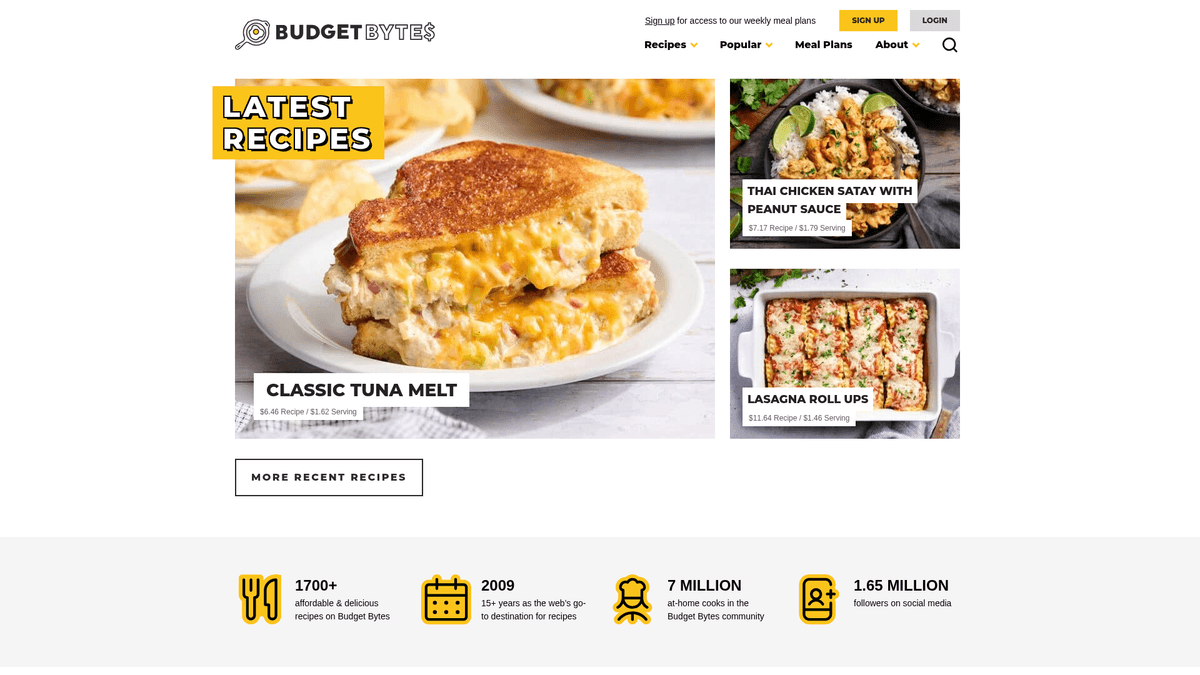
Budget Bytes is a highly popular culinary website dedicated to providing delicious recipes designed for small budgets. Founded by Beth Moncel in 2009, the platform has become a go-to resource for students, families, and anyone looking to minimize food waste while maximizing flavor. The site is famous for its meticulous cost breakdowns, calculating the price of every ingredient to provide a total recipe cost and cost per serving.
Comprehensive Recipe Data
The website contains over 1,700 recipes ranging from meal prep bowls and one-pot meals to vegetarian and slow-cooker options. Each listing includes detailed ingredients, step-by-step photography, nutritional information, and user reviews. This structured approach makes the site a treasure trove of data for those interested in the intersection of gastronomy and economics.
Why Scraping Budget Bytes Matters
Scraping this data is incredibly valuable for several reasons. It allows for the aggregation of low-cost meal ideas, the tracking of food inflation through ingredient cost analysis, and the creation of datasets for nutritional research. Developers of meal-planning apps and grocery comparison tools often use this data to provide users with affordable, healthy options based on real-world price points.
Why Scrape Budget Bytes?
Discover the business value and use cases for extracting data from Budget Bytes.
Cost Analysis and Inflation Tracking
Extract granular cost-per-serving data to analyze how grocery prices for specific ingredients fluctuate over time.
Meal Planning App Integration
Populate health and fitness applications with a database of verified, budget-conscious recipes including full nutritional profiles.
Macro-Nutrient Optimization
Aggregate recipe data to help users identify meals that provide the highest protein or nutrient density for the lowest possible cost.
Automated Grocery Lists
Scrape ingredient lists and quantities to build smart shopping tools that estimate total bill costs before users leave home.
Trend Identification
Analyze which low-cost ingredients are trending across popular recipes to inform content creation for food blogs or marketing.
Dietary Filter Research
Gather data on specialty diets like vegan or gluten-free recipes specifically targeted at low-income demographics for public health studies.
Scraping Challenges
Technical challenges you may encounter when scraping Budget Bytes.
Cloudflare Protection
The site uses Cloudflare security, which can lead to 403 Forbidden errors if the scraper doesn't provide valid browser fingerprints.
WP-JSON Rate Limiting
While the WordPress REST API is accessible, aggressive polling for 1,700+ recipes can trigger temporary IP blocks or throttling.
Nested Data Extraction
Recipe details like individual ingredient prices are often nested within specific WordPress Recipe Maker blocks requiring precise CSS selectors.
String to Float Conversion
Cost data is formatted as text strings with currency symbols, necessitating regex cleanup to transform them into usable numerical data.
Scrape Budget Bytes with AI
No coding required. Extract data in minutes with AI-powered automation.
How It Works
Describe What You Need
Tell the AI what data you want to extract from Budget Bytes. Just type it in plain language — no coding or selectors needed.
AI Extracts the Data
Our artificial intelligence navigates Budget Bytes, handles dynamic content, and extracts exactly what you asked for.
Get Your Data
Receive clean, structured data ready to export as CSV, JSON, or send directly to your apps and workflows.
Why Use AI for Scraping
AI makes it easy to scrape Budget Bytes without writing any code. Our AI-powered platform uses artificial intelligence to understand what data you want — just describe it in plain language and the AI extracts it automatically.
How to scrape with AI:
- Describe What You Need: Tell the AI what data you want to extract from Budget Bytes. Just type it in plain language — no coding or selectors needed.
- AI Extracts the Data: Our artificial intelligence navigates Budget Bytes, handles dynamic content, and extracts exactly what you asked for.
- Get Your Data: Receive clean, structured data ready to export as CSV, JSON, or send directly to your apps and workflows.
Why use AI for scraping:
- No-Code Visual Selection: Map complex recipe elements like nutrition labels and ingredient lists instantly using the point-and-click interface.
- Built-in Anti-Bot Handling: Automatio manages browser headers and fingerprints automatically to bypass Cloudflare challenges without manual configuration.
- Scheduled Synchronization: Set your scraper to run weekly to automatically capture new recipes and updated price calculations as they are published.
- Seamless Data Export: Streamline your workflow by sending scraped recipe data directly to Google Sheets, Webhooks, or a custom API endpoint.
No-Code Web Scrapers for Budget Bytes
Point-and-click alternatives to AI-powered scraping
Several no-code tools like Browse.ai, Octoparse, Axiom, and ParseHub can help you scrape Budget Bytes. These tools use visual interfaces to select elements, but they come with trade-offs compared to AI-powered solutions.
Typical Workflow with No-Code Tools
Common Challenges
Learning curve
Understanding selectors and extraction logic takes time
Selectors break
Website changes can break your entire workflow
Dynamic content issues
JavaScript-heavy sites often require complex workarounds
CAPTCHA limitations
Most tools require manual intervention for CAPTCHAs
IP blocking
Aggressive scraping can get your IP banned
No-Code Web Scrapers for Budget Bytes
Several no-code tools like Browse.ai, Octoparse, Axiom, and ParseHub can help you scrape Budget Bytes. These tools use visual interfaces to select elements, but they come with trade-offs compared to AI-powered solutions.
Typical Workflow with No-Code Tools
- Install browser extension or sign up for the platform
- Navigate to the target website and open the tool
- Point-and-click to select data elements you want to extract
- Configure CSS selectors for each data field
- Set up pagination rules to scrape multiple pages
- Handle CAPTCHAs (often requires manual solving)
- Configure scheduling for automated runs
- Export data to CSV, JSON, or connect via API
Common Challenges
- Learning curve: Understanding selectors and extraction logic takes time
- Selectors break: Website changes can break your entire workflow
- Dynamic content issues: JavaScript-heavy sites often require complex workarounds
- CAPTCHA limitations: Most tools require manual intervention for CAPTCHAs
- IP blocking: Aggressive scraping can get your IP banned
Code Examples
import requests
from bs4 import BeautifulSoup

# Target URL
url = 'https://www.budgetbytes.com/creamy-mushroom-pasta/'

# Standard headers to mimic a browser
headers = {
    'User-Agent': 'Mozilla/5.0 (Windows NT 10.0; Win64; x64) AppleWebKit/537.36 (KHTML, like Gecko) Chrome/91.0.4472.124 Safari/537.36'
}

try:
    response = requests.get(url, headers=headers)
    response.raise_for_status()
    soup = BeautifulSoup(response.text, 'html.parser')

    # Extract basic recipe data
    data = {
        'title': soup.find('h1').get_text(strip=True),
        'cost_per': soup.find('span', class_='cost-per').get_text(strip=True) if soup.find('span', class_='cost-per') else 'N/A',
        'ingredients': [li.get_text(strip=True) for li in soup.find_all('li', class_='wprm-recipe-ingredient')]
    }

    print(data)
except Exception as e:
    print(f'Error: {e}')
When to Use
Best for static HTML pages where content is loaded server-side. The fastest and simplest approach when JavaScript rendering isn't required.
Advantages
- ●Fastest execution (no browser overhead)
- ●Lowest resource consumption
- ●Easy to parallelize with asyncio
- ●Great for APIs and static pages
Limitations
- ●Cannot execute JavaScript
- ●Fails on SPAs and dynamic content
- ●May struggle with complex anti-bot systems
How to Scrape Budget Bytes with Code
Python + Requests
import requests
from bs4 import BeautifulSoup
# Target URL
url = 'https://www.budgetbytes.com/creamy-mushroom-pasta/'
# Standard headers to mimic a browser
headers = {
'User-Agent': 'Mozilla/5.0 (Windows NT 10.0; Win64; x64) AppleWebKit/537.36 (KHTML, like Gecko) Chrome/91.0.4472.124 Safari/537.36'
}
try:
response = requests.get(url, headers=headers)
response.raise_for_status()
soup = BeautifulSoup(response.text, 'html.parser')
# Extract basic recipe data
data = {
'title': soup.find('h1').get_text(strip=True),
'cost_per': soup.find('span', class_='cost-per').get_text(strip=True) if soup.find('span', class_='cost-per') else 'N/A',
'ingredients': [li.get_text(strip=True) for li in soup.find_all('li', class_='wprm-recipe-ingredient')]
}
print(data)
except Exception as e:
print(f'Error: {e}')Python + Playwright
import asyncio
from playwright.async_api import async_playwright

async def scrape_budget_bytes():
    async with async_playwright() as p:
        # Launch browser
        browser = await p.chromium.launch(headless=True)
        page = await browser.new_page()

        # Navigate to a recipe page
        await page.goto('https://www.budgetbytes.com/one-pot-creamy-mushroom-pasta/')

        # Wait for the recipe container to load
        await page.wait_for_selector('.wprm-recipe-container')

        # Extract data via page.evaluate
        recipe_data = await page.evaluate('''() => {
            return {
                title: document.querySelector('.wprm-recipe-name')?.innerText,
                total_cost: document.querySelector('.wprm-recipe-cost')?.innerText,
                calories: document.querySelector('.wprm-nutrition-label-text-nutrition-value-calories')?.innerText
            }
        }''')

        print(recipe_data)
        await browser.close()

asyncio.run(scrape_budget_bytes())Python + Scrapy
import scrapy

class BudgetBytesSpider(scrapy.Spider):
    name = 'budget_bytes'
    # Using the WordPress REST API for cleaner data extraction
    start_urls = ['https://www.budgetbytes.com/wp-json/wp/v2/posts?per_page=20']

    def parse(self, response):
        posts = response.json()
        for post in posts:
            yield {
                'id': post.get('id'),
                'title': post.get('title', {}).get('rendered'),
                'url': post.get('link'),
                'published_date': post.get('date'),
                'slug': post.get('slug')
            }

        # Follow pagination if available in headers
# (Logic omitted for brevity)Node.js + Puppeteer
const puppeteer = require('puppeteer');

(async () => {
  const browser = await puppeteer.launch();
  const page = await browser.newPage();

  // Set user agent to avoid basic blocks
  await page.setUserAgent('Mozilla/5.0 (Windows NT 10.0; Win64; x64) AppleWebKit/537.36 (KHTML, like Gecko) Chrome/95.0.4638.69 Safari/537.36');

  await page.goto('https://www.budgetbytes.com/one-pot-creamy-mushroom-pasta/', { waitUntil: 'networkidle2' });

  const data = await page.evaluate(() => {
    const title = document.querySelector('.wprm-recipe-name')?.textContent;
    const costPerServing = document.querySelector('.cost-per')?.textContent;
    const items = Array.from(document.querySelectorAll('.wprm-recipe-ingredient')).map(i => i.textContent.trim());
    return { title, costPerServing, items };
  });

  console.log(data);
  await browser.close();
})();What You Can Do With Budget Bytes Data
Explore practical applications and insights from Budget Bytes data.
Food Price Inflation Tracker
Monitor real-time changes in grocery costs by scraping ingredient-level pricing across various recipe categories.
How to implement:
- 1Schedule a weekly scrape of the cost-per-serving field for top 100 recipes.
- 2Compare values month-over-month to identify the highest rising categories.
- 3Visualize the correlation between specific ingredients (like eggs or dairy) and recipe totals.
Use Automatio to extract data from Budget Bytes and build these applications without writing code.
What You Can Do With Budget Bytes Data
- Food Price Inflation Tracker
Monitor real-time changes in grocery costs by scraping ingredient-level pricing across various recipe categories.
- Schedule a weekly scrape of the cost-per-serving field for top 100 recipes.
- Compare values month-over-month to identify the highest rising categories.
- Visualize the correlation between specific ingredients (like eggs or dairy) and recipe totals.
- Smart Meal Planner App
Populate a database for a nutrition app that suggests recipes based on a user's strict daily budget.
- Scrape recipe names, cost-per-serving, and dietary tags (Vegan, GF).
- Filter recipes that fall under a $2 per serving threshold.
- Export data to an API for mobile app consumption.
- Macro-to-Cost Optimizer
Find the best 'protein-per-dollar' recipes to help athletes or fitness enthusiasts on a budget.
- Extract both nutritional data (protein grams) and recipe cost data.
- Calculate a custom Protein/Cost ratio for every entry.
- Rank recipes to find the most efficient high-protein budget meals.
- Inventory Management Suggestion Engine
Help users reduce food waste by identifying recipes based on common pantry ingredients extracted from the site.
- Scrape and normalize the ingredient lists into a searchable database.
- Allow users to input ingredients they have on hand.
- Match user input against scraped data to suggest the lowest-cost meal to make next.
Supercharge your workflow with AI Automation
Automatio combines the power of AI agents, web automation, and smart integrations to help you accomplish more in less time.
What to get right first
Expert advice for successfully extracting data from Budget Bytes.
Leverage JSON-LD Schema
Check the script tags with type 'application/ld+json'; they contain structured recipe data that is much cleaner than raw HTML.
Use Residential Proxies
Avoid datacenter IPs which are frequently blocked by Cloudflare; residential proxies appear as real users and ensure higher success rates.
Target WPRM Selectors
Look for class names starting with '.wprm-recipe-' to maintain consistency across different recipe posts regardless of the page layout.
Implement Request Throttling
Set a delay of at least 2-3 seconds between requests to avoid triggering the server's rate-limiting protections.
Handle Lazy Loading
If you are scraping step-by-step images, ensure your tool triggers a scroll or wait event to load all media elements correctly.
Regex for Price Isolation
Use regular expressions to strip '$' signs and text from cost fields so they can be saved as float values for calculations.
Related Web Scraping

How to Scrape GitHub | The Ultimate 2025 Technical Guide

How to Scrape Pollen.com: Local Allergy Data Extraction Guide

How to Scrape Britannica: Educational Data Web Scraper

How to Scrape RethinkEd: A Technical Data Extraction Guide

How to Scrape Wikipedia: The Ultimate Web Scraping Guide

How to Scrape Weather.com: A Guide to Weather Data Extraction

How to Scrape Worldometers for Real-Time Global Statistics

How to Scrape American Museum of Natural History (AMNH)
Frequently Asked Questions
Find answers to common questions about Budget Bytes