
How to Scrape RethinkEd: A Technical Data Extraction Guide
Learn how to scrape RethinkEd to extract K-12 curriculum data, wellness resources, and EdTech success stories. Handle Cloudflare and dynamic JS content.
Anti-Bot Protection Detected
- Cloudflare
- Enterprise-grade WAF and bot management. Uses JavaScript challenges, CAPTCHAs, and behavioral analysis. Requires browser automation with stealth settings.
- Google reCAPTCHA
- Google's CAPTCHA system. v2 requires user interaction, v3 runs silently with risk scoring. Can be solved with CAPTCHA services.
- Rate Limiting
- Limits requests per IP/session over time. Can be bypassed with rotating proxies, request delays, and distributed scraping.
- IP Blocking
- Blocks known datacenter IPs and flagged addresses. Requires residential or mobile proxies to circumvent effectively.
- Browser Fingerprinting
- Identifies bots through browser characteristics: canvas, WebGL, fonts, plugins. Requires spoofing or real browser profiles.
About RethinkEd
Learn what RethinkEd offers and what valuable data can be extracted from it.
RethinkEd: A Leader in K-12 Educational Support
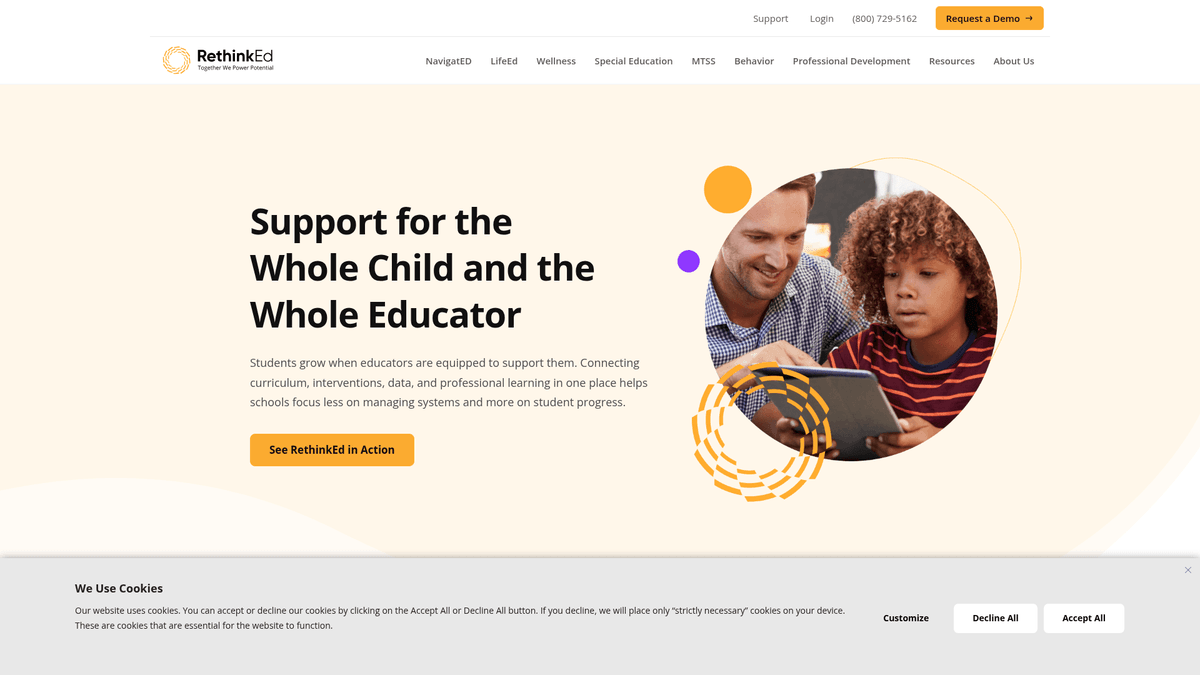
RethinkEd is a comprehensive digital platform managed by Rethink Autism, Inc., specializing in supporting the academic and behavioral needs of students. The site serves as a central hub for educators and administrators, offering evidence-based curricula for Social-Emotional Learning (SEL), mental health, and special education management. It is a critical resource for K-12 districts aiming to improve student outcomes through data-driven interventions.
Data-Rich Educational Resources
The website contains significant datasets including specialized K-12 academic curriculum descriptions, wellness skill frameworks, and detailed success stories from school districts across the US. Additionally, it hosts a vast library of blogs, webinars, and technical documentation that detail the infrastructure of modern educational technology. The platform frequently updates its content to reflect the latest standards in special education and mental health support.
Strategic Value of RethinkEd Data
For EdTech developers and educational researchers, scraping RethinkEd provides insights into market trends and intervention strategies. By analyzing their wellness curriculum and district outcomes, organizations can perform deep competitive analysis and develop better-informed educational products. This data is invaluable for benchmarking services against industry-leading benchmarks in student wellness and teacher professional development.
Why Scrape RethinkEd?
Discover the business value and use cases for extracting data from RethinkEd.
Automated IEP Reporting
Extracting student progress data allows for the automated generation of Individualized Education Program reports, eliminating hours of manual data entry for special education staff.
Curriculum Compliance Auditing
Scraping the lesson library enables district administrators to audit social-emotional learning coverage against state standards and identify gaps in educational materials.
Behavioral Trend Analysis
Consolidating behavioral log data into external databases helps researchers identify historical patterns and environmental triggers for students across entire districts.
EdTech Market Research
Educational consultants can monitor RethinkEd's module updates and resource additions to benchmark industry-leading SEL and mental health frameworks.
System Interoperability
Scraping serves as a vital bridge to sync curriculum metadata and student performance metrics between RethinkEd and other school management systems like PowerSchool or Infinite Campus.
Professional Development Tracking
Automating the collection of teacher training participation data allows HR departments to monitor staff compliance with state-mandated certifications.
Scraping Challenges
Technical challenges you may encounter when scraping RethinkEd.
Secure Authentication Layers
Most valuable student data is protected behind a secure login portal that requires robust session management and CSRF token handling to maintain access.
Dynamic Dashboard Rendering
The platform relies heavily on modern JavaScript frameworks and Elementor, meaning data is often loaded asynchronously after the initial page structure is served.
Aggressive Bot Detection
RethinkEd uses Cloudflare and reCAPTCHA to protect sensitive data, which can result in immediate IP bans for scrapers that do not mimic human-like browser behavior.
Complex DOM Structures
Interactive elements such as nested dropdowns and modals for behavioral logging make it difficult to identify stable CSS selectors for reliable long-term scraping.
Data Privacy Compliance
Extraction must be handled with extreme care to remain compliant with HIPAA and FERPA regulations when processing student-identifiable information.
Scrape RethinkEd with AI
No coding required. Extract data in minutes with AI-powered automation.
How It Works
Describe What You Need
Tell the AI what data you want to extract from RethinkEd. Just type it in plain language — no coding or selectors needed.
AI Extracts the Data
Our artificial intelligence navigates RethinkEd, handles dynamic content, and extracts exactly what you asked for.
Get Your Data
Receive clean, structured data ready to export as CSV, JSON, or send directly to your apps and workflows.
Why Use AI for Scraping
AI makes it easy to scrape RethinkEd without writing any code. Our AI-powered platform uses artificial intelligence to understand what data you want — just describe it in plain language and the AI extracts it automatically.
How to scrape with AI:
- Describe What You Need: Tell the AI what data you want to extract from RethinkEd. Just type it in plain language — no coding or selectors needed.
- AI Extracts the Data: Our artificial intelligence navigates RethinkEd, handles dynamic content, and extracts exactly what you asked for.
- Get Your Data: Receive clean, structured data ready to export as CSV, JSON, or send directly to your apps and workflows.
Why use AI for scraping:
- Visual Authentication Handling: Automatio easily manages the multi-step login processes and MFA challenges required to access the RethinkEd portal without writing complex scripts.
- Headless Browser Rendering: The tool fully renders React-based UI elements and Elementor components, ensuring that hidden or late-loading data is always captured accurately.
- Intelligent Request Throttling: Automatio automatically varies the speed of requests and interaction patterns, helping your scraper bypass rate limits and behavioral detection systems.
- No-Code Data Mapping: Easily map complicated dashboard tables and curriculum grids to structured JSON or CSV formats using a simple point-and-click interface.
- Cloud-Based Scheduling: Set your extraction tasks to run nightly or weekly to ensure that your external reports always reflect the most recent student progress updates.
No-Code Web Scrapers for RethinkEd
Point-and-click alternatives to AI-powered scraping
Several no-code tools like Browse.ai, Octoparse, Axiom, and ParseHub can help you scrape RethinkEd. These tools use visual interfaces to select elements, but they come with trade-offs compared to AI-powered solutions.
Typical Workflow with No-Code Tools
Common Challenges
Learning curve
Understanding selectors and extraction logic takes time
Selectors break
Website changes can break your entire workflow
Dynamic content issues
JavaScript-heavy sites often require complex workarounds
CAPTCHA limitations
Most tools require manual intervention for CAPTCHAs
IP blocking
Aggressive scraping can get your IP banned
No-Code Web Scrapers for RethinkEd
Several no-code tools like Browse.ai, Octoparse, Axiom, and ParseHub can help you scrape RethinkEd. These tools use visual interfaces to select elements, but they come with trade-offs compared to AI-powered solutions.
Typical Workflow with No-Code Tools
- Install browser extension or sign up for the platform
- Navigate to the target website and open the tool
- Point-and-click to select data elements you want to extract
- Configure CSS selectors for each data field
- Set up pagination rules to scrape multiple pages
- Handle CAPTCHAs (often requires manual solving)
- Configure scheduling for automated runs
- Export data to CSV, JSON, or connect via API
Common Challenges
- Learning curve: Understanding selectors and extraction logic takes time
- Selectors break: Website changes can break your entire workflow
- Dynamic content issues: JavaScript-heavy sites often require complex workarounds
- CAPTCHA limitations: Most tools require manual intervention for CAPTCHAs
- IP blocking: Aggressive scraping can get your IP banned
Code Examples
import requests
from bs4 import BeautifulSoup

# Define headers to mimic a real browser session
headers = {
    'User-Agent': 'Mozilla/5.0 (Windows NT 10.0; Win64; x64) AppleWebKit/537.36 (KHTML, like Gecko) Chrome/120.0.0.0 Safari/537.36',
    'Accept-Language': 'en-US,en;q=0.9'
}

url = 'https://www.rethinked.com/resources/'

try:
    # Sending request to the resource hub
    response = requests.get(url, headers=headers, timeout=15)

    if response.status_code == 200:
        soup = BeautifulSoup(response.text, 'html.parser')
        # Locate resource articles within the grid
        articles = soup.find_all('article')
        for article in articles:
            title = article.find('h2')
            if title:
                print(f'Resource Found: {title.get_text(strip=True)}')
    else:
        print(f'Access Denied. Status Code: {response.status_code}. Cloudflare may be blocking the script.')
except Exception as e:
    print(f'Connection Error: {e}')
When to Use
Best for static HTML pages where content is loaded server-side. The fastest and simplest approach when JavaScript rendering isn't required.
Advantages
- ●Fastest execution (no browser overhead)
- ●Lowest resource consumption
- ●Easy to parallelize with asyncio
- ●Great for APIs and static pages
Limitations
- ●Cannot execute JavaScript
- ●Fails on SPAs and dynamic content
- ●May struggle with complex anti-bot systems
How to Scrape RethinkEd with Code
Python + Requests
import requests
from bs4 import BeautifulSoup
# Define headers to mimic a real browser session
headers = {
'User-Agent': 'Mozilla/5.0 (Windows NT 10.0; Win64; x64) AppleWebKit/537.36 (KHTML, like Gecko) Chrome/120.0.0.0 Safari/537.36',
'Accept-Language': 'en-US,en;q=0.9'
}
url = 'https://www.rethinked.com/resources/'
try:
# Sending request to the resource hub
response = requests.get(url, headers=headers, timeout=15)
if response.status_code == 200:
soup = BeautifulSoup(response.text, 'html.parser')
# Locate resource articles within the grid
articles = soup.find_all('article')
for article in articles:
title = article.find('h2')
if title:
print(f'Resource Found: {title.get_text(strip=True)}')
else:
print(f'Access Denied. Status Code: {response.status_code}. Cloudflare may be blocking the script.')
except Exception as e:
print(f'Connection Error: {e}')Python + Playwright
import asyncio
from playwright.async_api import async_playwright

async def scrape_rethinked():
    async with async_playwright() as p:
        # Launch a headed or headless browser
        browser = await p.chromium.launch(headless=True)
        # Create a new context with custom User-Agent
        context = await browser.new_context(
            user_agent='Mozilla/5.0 (Windows NT 10.0; Win64; x64) AppleWebKit/537.36 (KHTML, like Gecko) Chrome/121.0.0.0 Safari/537.36'
        )
        page = await context.new_page()

        # Navigate to the Success Stories page
        await page.goto('https://www.rethinked.com/success-stories/', wait_until='networkidle')

        # Wait for Elementor post items to render
        await page.wait_for_selector('.elementor-post__title')

        stories = await page.query_selector_all('.elementor-post__title')
        for story in stories:
            text = await story.inner_text()
            print(f'Success Story: {text.strip()}')

        await browser.close()

asyncio.run(scrape_rethinked())Python + Scrapy
import scrapy

class RethinkEdSpider(scrapy.Spider):
    name = 'rethink_spider'
    allowed_domains = ['rethinked.com']
    start_urls = ['https://www.rethinked.com/resources/']

    def parse(self, response):
        # Iterate through Elementor post elements
        for item in response.css('article.elementor-post'):
            yield {
                'title': item.css('h2.elementor-post__title a::text').get(default='').strip(),
                'link': item.css('a.elementor-post__read-more::attr(href)').get(),
                'category': item.css('.elementor-post__badge::text').get(),
                'excerpt': item.css('.elementor-post__excerpt p::text').get(),
            }

        # Follow pagination link for next page
        next_page = response.css('a.next.page-numbers::attr(href)').get()
        if next_page:
yield response.follow(next_page, self.parse)Node.js + Puppeteer
const puppeteer = require('puppeteer');

(async () => {
  const browser = await puppeteer.launch({ headless: true });
  const page = await browser.newPage();

  // Set a realistic User-Agent
  await page.setUserAgent('Mozilla/5.0 (Macintosh; Intel Mac OS X 10_15_7) AppleWebKit/537.36 (KHTML, like Gecko) Chrome/120.0.0.0 Safari/537.36');

  try {
    await page.goto('https://www.rethinked.com/resources/', { waitUntil: 'networkidle2' });

    // Extract data from the page content
    const resources = await page.evaluate(() => {
      const items = Array.from(document.querySelectorAll('article'));
      return items.map(el => ({
        title: el.querySelector('h2')?.innerText.trim(),
        url: el.querySelector('a')?.href,
        badge: el.querySelector('.elementor-post__badge')?.innerText.trim()
      }));
    });

    console.log(resources);
  } catch (err) {
    console.error('Scraping failed:', err);
  } finally {
    await browser.close();
  }
})();What You Can Do With RethinkEd Data
Explore practical applications and insights from RethinkEd data.
Curriculum Benchmarking
Educational publishers can compare their SEL and academic curricula against RethinkEd's evidence-based models.
How to implement:
- 1Extract module descriptions and learning objectives from curriculum pages.
- 2Categorize content by grade level and subject area.
- 3Analyze keyword density to identify core educational focus areas.
Use Automatio to extract data from RethinkEd and build these applications without writing code.
What You Can Do With RethinkEd Data
- Curriculum Benchmarking
Educational publishers can compare their SEL and academic curricula against RethinkEd's evidence-based models.
- Extract module descriptions and learning objectives from curriculum pages.
- Categorize content by grade level and subject area.
- Analyze keyword density to identify core educational focus areas.
- District Sales Prospecting
EdTech sales teams can identify school districts that are already investing in high-quality digital interventions.
- Scrape the Success Stories section for district names and locations.
- Extract specific results and pain points mentioned in case studies.
- Use this data to tailor outreach for complementary educational services.
- Mental Health Trend Analysis
Researchers can track the evolution of mental health and wellness topics in K-12 education.
- Collect titles and summaries from all blog posts in the Wellness category.
- Perform sentiment analysis on webinar transcripts or descriptions.
- Map the frequency of specific terms like 'resilience' or 'anxiety' over time.
- Technical SEO Monitoring
Competitors can track RethinkEd's content marketing strategy to improve their own search engine rankings.
- Monitor the Resources hub for new blog posts and whitepapers.
- Scrape meta titles and descriptions to identify target keywords.
- Track the volume of content published per category to determine their focus.
- Professional Development Database
Education agencies can compile a library of webinars and articles for training purposes.
- Extract titles, descriptions, and categories for all professional development videos.
- Scrape author information to identify industry subject matter experts.
- Store data in a searchable repository for internal staff training.
Supercharge your workflow with AI Automation
Automatio combines the power of AI agents, web automation, and smart integrations to help you accomplish more in less time.
What to get right first
Expert advice for successfully extracting data from RethinkEd.
Prioritize Residential Proxies
Use residential IP addresses to avoid being flagged by Cloudflare's security filters, which often block standard datacenter IP ranges used by scrapers.
Analyze XHR Network Traffic
Use browser developer tools to find the JSON endpoints that RethinkEd uses to populate its dashboards; these are often much easier to scrape than the raw HTML.
Implement Session Persistence
Store and reuse your authentication cookies across multiple scraping sessions to reduce the number of login attempts and avoid triggering security alerts.
Randomize Interaction Delays
Add 2-5 second random wait times between page transitions and clicks to mimic a teacher's real navigation pattern through the resource hub.
Target District-Level Filters
If you have administrative access, apply filters within the platform before scraping to isolate specific schools or grade levels, reducing the total amount of data to process.
Maintain Browser Fingerprinting
Ensure your scraper uses a realistic User-Agent and matches common browser header patterns to pass advanced bot detection checks.
Related Web Scraping

How to Scrape GitHub | The Ultimate 2025 Technical Guide

How to Scrape Pollen.com: Local Allergy Data Extraction Guide

How to Scrape Britannica: Educational Data Web Scraper

How to Scrape Worldometers for Real-Time Global Statistics

How to Scrape Wikipedia: The Ultimate Web Scraping Guide

How to Scrape Weather.com: A Guide to Weather Data Extraction

How to Scrape American Museum of Natural History (AMNH)
How to Scrape Poll-Maker: A Comprehensive Web Scraping Guide
Frequently Asked Questions
Find answers to common questions about RethinkEd