
How to Scrape Pollen.com: Local Allergy Data Extraction Guide
Learn how to scrape Pollen.com for localized allergy forecasts, pollen levels, and top allergens. Get daily health data for research and monitoring apps.
Anti-Bot Protection Detected
- Cloudflare
- Enterprise-grade WAF and bot management. Uses JavaScript challenges, CAPTCHAs, and behavioral analysis. Requires browser automation with stealth settings.
- Rate Limiting
- Limits requests per IP/session over time. Can be bypassed with rotating proxies, request delays, and distributed scraping.
- IP Blocking
- Blocks known datacenter IPs and flagged addresses. Requires residential or mobile proxies to circumvent effectively.
- AngularJS Rendering
About Pollen.com
Learn what Pollen.com offers and what valuable data can be extracted from it.
Comprehensive Allergy Data for the US
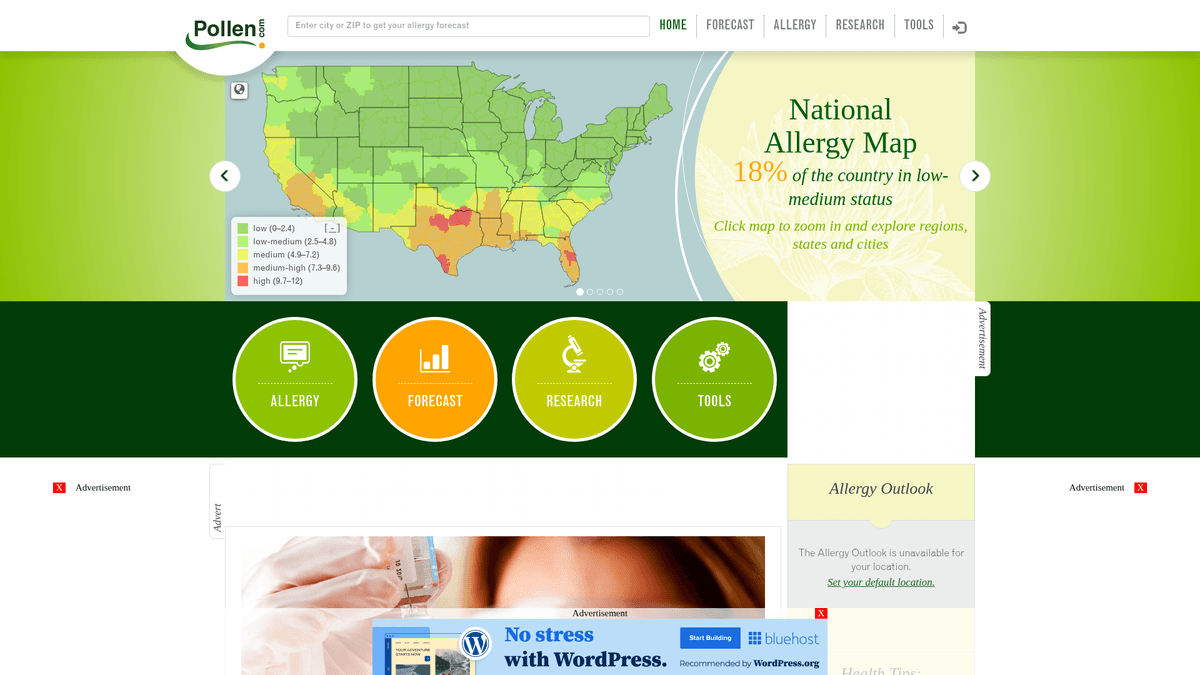
Pollen.com is a leading environmental health portal providing highly localized allergy information and forecasts across the United States. Owned and operated by IQVIA, a prominent health data analytics firm, the platform offers specific pollen counts and allergen types based on ZIP codes. It serves as a critical resource for individuals managing seasonal respiratory conditions and medical professionals tracking environmental health trends.
Valuable Data for Public Health
The website contains structured data including a pollen index ranging from 0 to 12, categories of top allergens such as trees, weeds, and grasses, and detailed 5-day forecasts. For developers and researchers, this data provides insight into regional environmental triggers and historical allergy patterns that are difficult to aggregate from general weather sites.
Business and Research Utility
Scraping Pollen.com is valuable for building health-monitoring applications, optimizing pharmaceutical supply chains for allergy medications, and conducting academic research on the impacts of climate change on pollination cycles. By automating the extraction of these data points, organizations can provide real-time value to allergy sufferers nationwide.
Why Scrape Pollen.com?
Discover the business value and use cases for extracting data from Pollen.com.
Build Localized Health Alerts
Scraping allows developers to create personalized notification systems that warn users when allergen levels in their specific zip code reach dangerous thresholds.
Pharmaceutical Demand Forecasting
Retailers and pharmacies use this data to predict spikes in antihistamine sales by correlating localized pollen levels with consumer buying patterns.
Environmental Impact Research
Collecting long-term data on predominant allergen species helps scientists track how climate change is shifting the timing and intensity of pollination seasons.
Content for News and Weather Portals
Media outlets can enrich their local weather reports by integrating real-time allergy forecasts, providing high-value health information to their readers.
Smart Home IoT Integration
Automated data extraction enables smart home systems to trigger air purification or HVAC filtration protocols when outdoor pollen counts are high.
Real Estate Environmental Insights
Property listing sites can add an allergy score to neighborhoods, helping sensitive homebuyers evaluate the air quality of potential locations.
Scraping Challenges
Technical challenges you may encounter when scraping Pollen.com.
AngularJS Dynamic Rendering
The site heavily relies on AngularJS to populate pollen indices and charts, meaning standard HTTP clients will only see empty containers without full browser execution.
Cloudflare Anti-Bot Measures
Pollen.com utilizes Cloudflare to detect and block automated traffic, requiring advanced header management and browser fingerprinting to maintain access.
Massive ZIP Code Iteration
Gathering national data requires iterating through thousands of individual ZIP codes, which can quickly trigger rate limits or IP bans if not managed correctly.
Volatility of Internal API Endpoints
While data is fetched via internal JSON endpoints, these are undocumented and can change structure during site updates, potentially breaking fragile scrapers.
Scrape Pollen.com with AI
No coding required. Extract data in minutes with AI-powered automation.
How It Works
Describe What You Need
Tell the AI what data you want to extract from Pollen.com. Just type it in plain language — no coding or selectors needed.
AI Extracts the Data
Our artificial intelligence navigates Pollen.com, handles dynamic content, and extracts exactly what you asked for.
Get Your Data
Receive clean, structured data ready to export as CSV, JSON, or send directly to your apps and workflows.
Why Use AI for Scraping
AI makes it easy to scrape Pollen.com without writing any code. Our AI-powered platform uses artificial intelligence to understand what data you want — just describe it in plain language and the AI extracts it automatically.
How to scrape with AI:
- Describe What You Need: Tell the AI what data you want to extract from Pollen.com. Just type it in plain language — no coding or selectors needed.
- AI Extracts the Data: Our artificial intelligence navigates Pollen.com, handles dynamic content, and extracts exactly what you asked for.
- Get Your Data: Receive clean, structured data ready to export as CSV, JSON, or send directly to your apps and workflows.
Why use AI for scraping:
- Automatic JS Execution: Automatio natively renders the AngularJS application, ensuring all dynamic pollen charts and index values are fully visible and ready for extraction.
- Seamless ZIP Code Looping: The visual looping feature allows you to input a CSV of thousands of ZIP codes and automatically navigate to each page to pull data without manual effort.
- Smart Proxy Rotation: Automatio handles IP rotation and residential proxy management internally, allowing you to bypass Cloudflare and rate limits effortlessly at scale.
- Scheduled Morning Runs: Set your scraper to run every morning automatically to capture the daily update, ensuring your database always reflects the freshest allergen forecasts.
No-Code Web Scrapers for Pollen.com
Point-and-click alternatives to AI-powered scraping
Several no-code tools like Browse.ai, Octoparse, Axiom, and ParseHub can help you scrape Pollen.com. These tools use visual interfaces to select elements, but they come with trade-offs compared to AI-powered solutions.
Typical Workflow with No-Code Tools
Common Challenges
Learning curve
Understanding selectors and extraction logic takes time
Selectors break
Website changes can break your entire workflow
Dynamic content issues
JavaScript-heavy sites often require complex workarounds
CAPTCHA limitations
Most tools require manual intervention for CAPTCHAs
IP blocking
Aggressive scraping can get your IP banned
No-Code Web Scrapers for Pollen.com
Several no-code tools like Browse.ai, Octoparse, Axiom, and ParseHub can help you scrape Pollen.com. These tools use visual interfaces to select elements, but they come with trade-offs compared to AI-powered solutions.
Typical Workflow with No-Code Tools
- Install browser extension or sign up for the platform
- Navigate to the target website and open the tool
- Point-and-click to select data elements you want to extract
- Configure CSS selectors for each data field
- Set up pagination rules to scrape multiple pages
- Handle CAPTCHAs (often requires manual solving)
- Configure scheduling for automated runs
- Export data to CSV, JSON, or connect via API
Common Challenges
- Learning curve: Understanding selectors and extraction logic takes time
- Selectors break: Website changes can break your entire workflow
- Dynamic content issues: JavaScript-heavy sites often require complex workarounds
- CAPTCHA limitations: Most tools require manual intervention for CAPTCHAs
- IP blocking: Aggressive scraping can get your IP banned
Code Examples
import requests
from bs4 import BeautifulSoup

# Note: This captures static news metadata.
# Core forecast data requires JavaScript rendering or direct internal API access.
url = 'https://www.pollen.com/forecast/current/pollen/20001'
headers = {
    'User-Agent': 'Mozilla/5.0 (Windows NT 10.0; Win64; x64) AppleWebKit/537.36'
}

try:
    response = requests.get(url, headers=headers)
    response.raise_for_status()
    soup = BeautifulSoup(response.text, 'html.parser')

    # Extract basic news titles from the sidebar
    news = [a.text.strip() for a in soup.select('article h2 a')]
    print(f'Latest Allergy News: {news}')
except Exception as e:
    print(f'Error occurred: {e}')
When to Use
Best for static HTML pages where content is loaded server-side. The fastest and simplest approach when JavaScript rendering isn't required.
Advantages
- ●Fastest execution (no browser overhead)
- ●Lowest resource consumption
- ●Easy to parallelize with asyncio
- ●Great for APIs and static pages
Limitations
- ●Cannot execute JavaScript
- ●Fails on SPAs and dynamic content
- ●May struggle with complex anti-bot systems
How to Scrape Pollen.com with Code
Python + Requests
import requests
from bs4 import BeautifulSoup
# Note: This captures static news metadata.
# Core forecast data requires JavaScript rendering or direct internal API access.
url = 'https://www.pollen.com/forecast/current/pollen/20001'
headers = {
'User-Agent': 'Mozilla/5.0 (Windows NT 10.0; Win64; x64) AppleWebKit/537.36'
}
try:
response = requests.get(url, headers=headers)
response.raise_for_status()
soup = BeautifulSoup(response.text, 'html.parser')
# Extract basic news titles from the sidebar
news = [a.text.strip() for a in soup.select('article h2 a')]
print(f'Latest Allergy News: {news}')
except Exception as e:
print(f'Error occurred: {e}')Python + Playwright
from playwright.sync_api import sync_playwright

def run(playwright):
    browser = playwright.chromium.launch(headless=True)
    page = browser.new_page()
    # Navigate to a specific ZIP code forecast
    page.goto('https://www.pollen.com/forecast/current/pollen/20001')

    # Wait for AngularJS to render the dynamic pollen index
    page.wait_for_selector('.forecast-level')

    data = {
        'pollen_index': page.inner_text('.forecast-level'),
        'status': page.inner_text('.forecast-level-desc'),
        'allergens': [el.inner_text() for el in page.query_selector_all('.top-allergen-item span')]
    }

    print(f'Data for 20001: {data}')
    browser.close()

with sync_playwright() as playwright:
run(playwright)Python + Scrapy
import scrapy

class PollenSpider(scrapy.Spider):
    name = 'pollen_spider'
    start_urls = ['https://www.pollen.com/forecast/current/pollen/20001']

    def parse(self, response):
        # For dynamic content, use Scrapy-Playwright or similar middleware
        # This standard parse method handles static elements like headlines
        yield {
            'url': response.url,
            'page_title': response.css('title::text').get(),
            'news_headlines': response.css('article h2 a::text').getall()
}Node.js + Puppeteer
const puppeteer = require('puppeteer');

(async () => {
  const browser = await puppeteer.launch();
  const page = await browser.newPage();

  // Set User-Agent to mimic a real browser
  await page.setUserAgent('Mozilla/5.0 (Windows NT 10.0; Win64; x64)');

  await page.goto('https://www.pollen.com/forecast/current/pollen/20001');

  // Wait for the dynamic forecast level to appear
  await page.waitForSelector('.forecast-level');

  const data = await page.evaluate(() => ({
    pollenIndex: document.querySelector('.forecast-level')?.innerText,
    description: document.querySelector('.forecast-level-desc')?.innerText,
    location: document.querySelector('h1')?.innerText
  }));

  console.log(data);
  await browser.close();
})();What You Can Do With Pollen.com Data
Explore practical applications and insights from Pollen.com data.
Personalized Allergy Alerts
Mobile health apps can provide users with real-time notifications when pollen counts reach high levels in their specific area.
How to implement:
- 1Scrape daily forecasts for user-submitted ZIP codes
- 2Identify when the pollen index crosses a 'High' (7.3+) threshold
- 3Send automated push notifications or SMS alerts to the user
Use Automatio to extract data from Pollen.com and build these applications without writing code.
What You Can Do With Pollen.com Data
- Personalized Allergy Alerts
Mobile health apps can provide users with real-time notifications when pollen counts reach high levels in their specific area.
- Scrape daily forecasts for user-submitted ZIP codes
- Identify when the pollen index crosses a 'High' (7.3+) threshold
- Send automated push notifications or SMS alerts to the user
- Medication Demand Forecasting
Pharmaceutical retailers can optimize their stock levels by correlating local pollen spikes with predicted antihistamine demand.
- Extract 5-day forecast data across major metropolitan regions
- Identify upcoming periods of high allergen activity
- Coordinate inventory distribution to local pharmacies before the peak hits
- Real Estate Environmental Scoring
Property listing sites can add an 'Allergy Rating' to help sensitive buyers evaluate neighborhood air quality.
- Aggregate historical pollen data for specific city neighborhoods
- Calculate an average annual pollen intensity score
- Display the score as a custom feature on the real estate detail page
- Climate Change Research
Environmental scientists can track the length and intensity of pollination seasons over time to study climate impacts.
- Scrape daily pollen species and indices throughout the spring and fall seasons
- Compare the start and end dates of pollination with historical averages
- Analyze the data for trends indicating longer or more intense allergy seasons
Supercharge your workflow with AI Automation
Automatio combines the power of AI agents, web automation, and smart integrations to help you accomplish more in less time.
What to get right first
Expert advice for successfully extracting data from Pollen.com.
Use Direct URL Logic
Skip the home search page and navigate directly to the URL pattern /forecast/current/pollen/[zipcode] to reduce navigation steps and server load.
Identify XHR Requests
Use browser developer tools to find the specific JSON endpoints the site calls; hitting these directly is significantly faster than parsing the full HTML DOM.
Sync with Daily Updates
Pollen.com typically updates their counts once per day in the early morning; scraping once every 24 hours is optimal to avoid redundant requests.
Implement Random Delays
To avoid fingerprinting, add a random wait time of 3 to 7 seconds between each ZIP code lookup to mimic a human user browsing the site.
Prioritize Residential Proxies
Standard data center IPs are often flagged by health data providers; using residential proxies provides the highest success rate when scraping large regions.
Related Web Scraping

How to Scrape GitHub | The Ultimate 2025 Technical Guide

How to Scrape RethinkEd: A Technical Data Extraction Guide

How to Scrape Britannica: Educational Data Web Scraper

How to Scrape Worldometers for Real-Time Global Statistics

How to Scrape Wikipedia: The Ultimate Web Scraping Guide

How to Scrape Weather.com: A Guide to Weather Data Extraction

How to Scrape American Museum of Natural History (AMNH)
How to Scrape Poll-Maker: A Comprehensive Web Scraping Guide
Frequently Asked Questions
Find answers to common questions about Pollen.com