
How to Scrape Poll-Maker: A Comprehensive Web Scraping Guide
Learn how to scrape Poll-Maker.com for real-time results and vote counts. Master techniques to bypass Cloudflare and handle dynamic JS content effectively.
Anti-Bot Protection Detected
- Cloudflare
- Enterprise-grade WAF and bot management. Uses JavaScript challenges, CAPTCHAs, and behavioral analysis. Requires browser automation with stealth settings.
- Rate Limiting
- Limits requests per IP/session over time. Can be bypassed with rotating proxies, request delays, and distributed scraping.
- IP Blocking
- Blocks known datacenter IPs and flagged addresses. Requires residential or mobile proxies to circumvent effectively.
- CAPTCHA
- Challenge-response test to verify human users. Can be image-based, text-based, or invisible. Often requires third-party solving services.
- Browser Fingerprinting
- Identifies bots through browser characteristics: canvas, WebGL, fonts, plugins. Requires spoofing or real browser profiles.
About Poll-Maker
Learn what Poll-Maker offers and what valuable data can be extracted from it.
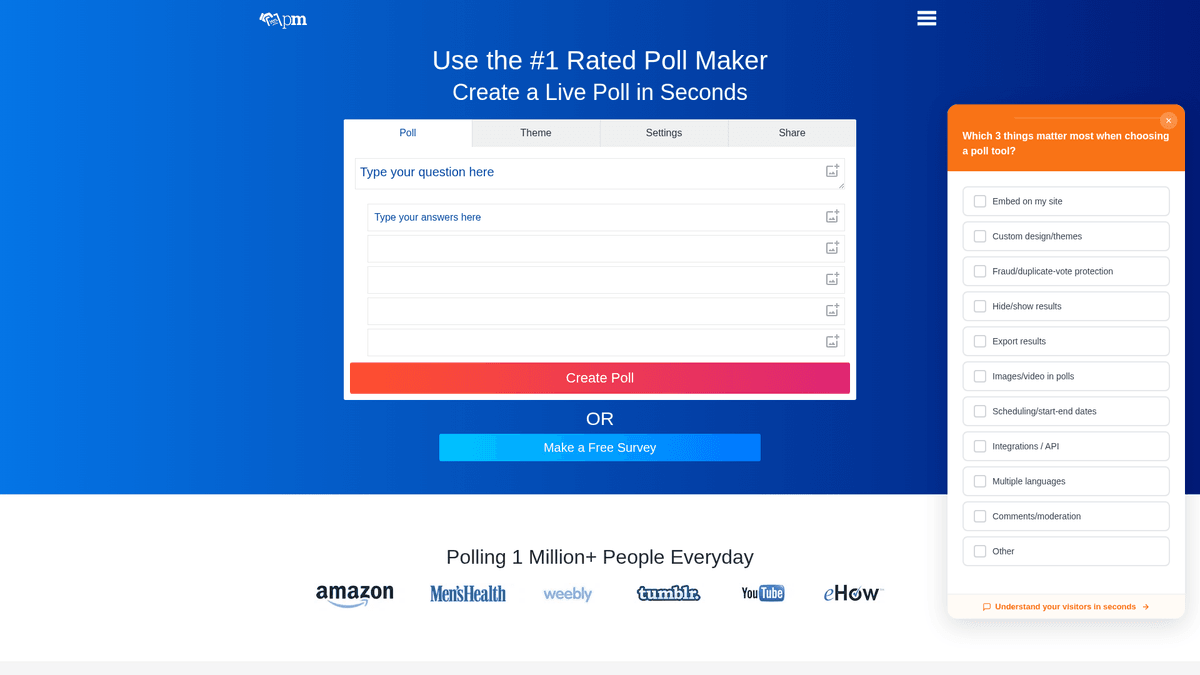
Poll-Maker is a premier online platform designed for the creation and management of interactive polls, surveys, and quizzes. Used by millions of creators, including journalists, educators, and marketers, the site serves as a vital tool for capturing real-time public sentiment and feedback on a global scale.
The website hosts a massive variety of data, ranging from simple binary choice polls to complex image-based surveys. Each poll page typically contains the central question, multiple choice options, and real-time results including total vote counts and percentage distributions. Because results are updated live, the site relies heavily on dynamic JavaScript rendering.
For researchers and data scientists, scraping Poll-Maker provides access to raw public opinion data that is otherwise difficult to aggregate. This data is essential for sentiment analysis, market trend forecasting, and competitive intelligence, allowing users to track how opinions shift over time without manual data entry or account restrictions.
Why Scrape Poll-Maker?
Discover the business value and use cases for extracting data from Poll-Maker.
Public Sentiment Tracking
Collect aggregated data from viral polls to understand public opinion on trending social, political, or commercial topics in real-time.
Competitor Benchmarking
Analyze the engagement and feedback levels on competitor-led surveys to identify market gaps and refine your own product strategy.
Academic Research
Gather large-scale datasets for sociological or behavioral studies, allowing for the analysis of diverse voting patterns across various categories.
Market Trend Identification
Monitor the 'Directory' and 'Trending' sections to spot emerging consumer interests and topics gaining traction before they hit mainstream media.
Content Strategy Optimization
Identify which question formats and topics generate the most interaction to inform your own social media and editorial content planning.
Historical Vote Analysis
Extract data at regular intervals to track how vote counts and percentage distributions change over time during live events or product launches.
Scraping Challenges
Technical challenges you may encounter when scraping Poll-Maker.
Aggressive Cloudflare Shielding
The site uses Cloudflare to detect and block automated traffic, often requiring advanced browser fingerprinting and stealth headers to pass.
JavaScript Dependency
Poll results, interactive charts, and dynamic updates are rendered via client-side JavaScript, making standard HTML parsers ineffective for data extraction.
Variable Poll Layouts
The platform offers multiple poll themes and structures, meaning CSS selectors can differ significantly between a standard list poll and an image-based quiz.
Rate Limiting and IP Bans
Frequent requests to the same poll results page or the directory can trigger temporary IP blocks, necessitating the use of high-quality proxy rotation.
Anti-Scraping Captchas
Intermittent challenges such as reCAPTCHA or Turnstile may appear during high-volume scraping sessions, requiring a tool capable of solving or bypassing these hurdles.
Scrape Poll-Maker with AI
No coding required. Extract data in minutes with AI-powered automation.
How It Works
Describe What You Need
Tell the AI what data you want to extract from Poll-Maker. Just type it in plain language — no coding or selectors needed.
AI Extracts the Data
Our artificial intelligence navigates Poll-Maker, handles dynamic content, and extracts exactly what you asked for.
Get Your Data
Receive clean, structured data ready to export as CSV, JSON, or send directly to your apps and workflows.
Why Use AI for Scraping
AI makes it easy to scrape Poll-Maker without writing any code. Our AI-powered platform uses artificial intelligence to understand what data you want — just describe it in plain language and the AI extracts it automatically.
How to scrape with AI:
- Describe What You Need: Tell the AI what data you want to extract from Poll-Maker. Just type it in plain language — no coding or selectors needed.
- AI Extracts the Data: Our artificial intelligence navigates Poll-Maker, handles dynamic content, and extracts exactly what you asked for.
- Get Your Data: Receive clean, structured data ready to export as CSV, JSON, or send directly to your apps and workflows.
Why use AI for scraping:
- Zero-Coding Bot Creation: Build a sophisticated scraper for Poll-maker.com simply by clicking on the elements you want to extract, such as vote counts and questions.
- Automated JS Execution: Automatio fully renders JavaScript, ensuring that even the most complex interactive results and charts are loaded and visible before extraction begins.
- Integrated Proxy Management: Avoid Cloudflare blocks and rate limits with built-in residential proxy rotation that masks your scraping activity as legitimate user traffic.
- Recurring Extraction Schedules: Set up automated tasks to scrape specific polls every hour or day, allowing you to capture historical shifts in public sentiment without manual intervention.
- Dynamic Pagination Handling: Effortlessly navigate through the site's directory or search results using Automatio's advanced pagination logic for infinite scroll or numbered lists.
No-Code Web Scrapers for Poll-Maker
Point-and-click alternatives to AI-powered scraping
Several no-code tools like Browse.ai, Octoparse, Axiom, and ParseHub can help you scrape Poll-Maker. These tools use visual interfaces to select elements, but they come with trade-offs compared to AI-powered solutions.
Typical Workflow with No-Code Tools
Common Challenges
Learning curve
Understanding selectors and extraction logic takes time
Selectors break
Website changes can break your entire workflow
Dynamic content issues
JavaScript-heavy sites often require complex workarounds
CAPTCHA limitations
Most tools require manual intervention for CAPTCHAs
IP blocking
Aggressive scraping can get your IP banned
No-Code Web Scrapers for Poll-Maker
Several no-code tools like Browse.ai, Octoparse, Axiom, and ParseHub can help you scrape Poll-Maker. These tools use visual interfaces to select elements, but they come with trade-offs compared to AI-powered solutions.
Typical Workflow with No-Code Tools
- Install browser extension or sign up for the platform
- Navigate to the target website and open the tool
- Point-and-click to select data elements you want to extract
- Configure CSS selectors for each data field
- Set up pagination rules to scrape multiple pages
- Handle CAPTCHAs (often requires manual solving)
- Configure scheduling for automated runs
- Export data to CSV, JSON, or connect via API
Common Challenges
- Learning curve: Understanding selectors and extraction logic takes time
- Selectors break: Website changes can break your entire workflow
- Dynamic content issues: JavaScript-heavy sites often require complex workarounds
- CAPTCHA limitations: Most tools require manual intervention for CAPTCHAs
- IP blocking: Aggressive scraping can get your IP banned
Code Examples
import requests
from bs4 import BeautifulSoup

# Note: This basic method often fails due to Cloudflare protection
url = "https://www.poll-maker.com/results123456"
headers = {
    "User-Agent": "Mozilla/5.0 (Windows NT 10.0; Win64; x64) AppleWebKit/537.36 (KHTML, like Gecko) Chrome/91.0.4472.124 Safari/537.36"
}

try:
    response = requests.get(url, headers=headers)
    # Check for successful response; Cloudflare may return 403
    if response.status_code == 200:
        soup = BeautifulSoup(response.text, 'html.parser')
        question = soup.find('h1').text.strip()
        print(f"Question: {question}")
    else:
        print(f"Blocked or Error: Status {response.status_code}")
except Exception as e:
    print(f"Request failed: {e}")
When to Use
Best for static HTML pages where content is loaded server-side. The fastest and simplest approach when JavaScript rendering isn't required.
Advantages
- ●Fastest execution (no browser overhead)
- ●Lowest resource consumption
- ●Easy to parallelize with asyncio
- ●Great for APIs and static pages
Limitations
- ●Cannot execute JavaScript
- ●Fails on SPAs and dynamic content
- ●May struggle with complex anti-bot systems
How to Scrape Poll-Maker with Code
Python + Requests
import requests
from bs4 import BeautifulSoup
# Note: This basic method often fails due to Cloudflare protection
url = "https://www.poll-maker.com/results123456"
headers = {
"User-Agent": "Mozilla/5.0 (Windows NT 10.0; Win64; x64) AppleWebKit/537.36 (KHTML, like Gecko) Chrome/91.0.4472.124 Safari/537.36"
}
try:
response = requests.get(url, headers=headers)
# Check for successful response; Cloudflare may return 403
if response.status_code == 200:
soup = BeautifulSoup(response.text, 'html.parser')
question = soup.find('h1').text.strip()
print(f"Question: {question}")
else:
print(f"Blocked or Error: Status {response.status_code}")
except Exception as e:
print(f"Request failed: {e}")Python + Playwright
from playwright.sync_api import sync_playwright

def scrape_poll_results():
    with sync_playwright() as p:
        # Launching a real browser to handle Cloudflare and JS
        browser = p.chromium.launch(headless=True)
        page = browser.new_page()
        page.goto("https://www.poll-maker.com/results123456")

        # Wait for the result rows to load via JavaScript
        page.wait_for_selector(".result-row", timeout=10000)

        results = []
        rows = page.locator(".result-row").all()
        for row in rows:
            results.append({
                "option": row.locator(".option-name").inner_text(),
                "votes": row.locator(".vote-count").inner_text()
            })

        print(results)
        browser.close()

scrape_poll_results()Python + Scrapy
import scrapy

class PollMakerSpider(scrapy.Spider):
    name = 'poll_maker'
    start_urls = ['https://www.poll-maker.com/results123456']

    def parse(self, response):
        # Scrapy alone cannot handle the dynamic JS results
        # Use a middleware like scrapy-playwright for this site
        yield {
            'poll_title': response.css('h1::text').get(),
            'raw_html_meta': response.css('meta[name="description"]::attr(content)').get()
}Node.js + Puppeteer
const puppeteer = require('puppeteer');

(async () => {
  const browser = await puppeteer.launch();
  const page = await browser.newPage();

  // Navigate to the results page
  await page.goto('https://www.poll-maker.com/results123456', { waitUntil: 'networkidle2' });

  // Extract results from the DOM after JS execution
  const pollData = await page.evaluate(() => {
    const items = Array.from(document.querySelectorAll('.result-row'));
    return items.map(item => ({
      label: item.querySelector('.option-name').innerText,
      count: item.querySelector('.vote-count').innerText
    }));
  });

  console.log(pollData);
  await browser.close();
})();What You Can Do With Poll-Maker Data
Explore practical applications and insights from Poll-Maker data.
Brand Sentiment Analysis
Companies benefit from tracking public perception by scraping polls related to their brand and competitors.
How to implement:
- 1Keyword search for brand-relevant polls.
- 2Regularly extract vote distributions and option text.
- 3Apply sentiment scores to the poll options.
- 4Aggregate results into a monthly brand health report.
Use Automatio to extract data from Poll-Maker and build these applications without writing code.
What You Can Do With Poll-Maker Data
- Brand Sentiment Analysis
Companies benefit from tracking public perception by scraping polls related to their brand and competitors.
- Keyword search for brand-relevant polls.
- Regularly extract vote distributions and option text.
- Apply sentiment scores to the poll options.
- Aggregate results into a monthly brand health report.
- Market Trend Forecasting
Retailers can identify emerging consumer preferences by monitoring high-traffic polls in specific categories.
- Scrape top-trending polls in lifestyle or technology categories.
- Track shifts in winning options over a 30-day period.
- Cross-reference winning options with current inventory levels.
- Adjust procurement strategies based on identified trends.
- Journalistic Data Enrichment
News agencies use real-time poll data to provide interactive context for breaking news stories.
- Monitor polls related to ongoing political or social events.
- Extract live vote counts every hour during peak news cycles.
- Export data to visualization tools like D3.js or Flourish.
- Embed live data charts directly into news articles.
- Competitive Product Research
Product managers can evaluate the popularity of rival features by analyzing user-generated polls on feature sets.
- Identify polls comparing specific product features.
- Collect vote counts for each feature mentioned in the options.
- Analyze the ratio of positive to negative feedback in poll comments.
- Prioritize the development of features that show high user preference in polls.
- Academic Behavioral Studies
Social scientists use large-scale poll datasets to study digital voting behaviors and opinion polarization.
- Bulk scrape polls across multiple diverse categories.
- Anonymize and clean the data for statistical analysis.
- Correlate participation volume with poll categories to identify high-engagement topics.
- Publish findings on digital discourse and public opinion trends.
Supercharge your workflow with AI Automation
Automatio combines the power of AI agents, web automation, and smart integrations to help you accomplish more in less time.
What to get right first
Expert advice for successfully extracting data from Poll-Maker.
Analyze XHR Requests
Inspect the Network tab while loading a results page to find internal JSON endpoints that may provide cleaner data than the raw HTML.
Target Results URLs Directly
Where possible, scrape the '/results' path of a poll rather than the voting page to avoid accidental votes and find structured data containers.
Use Stealth Browsing
Enable stealth features to hide your automated browser's identity, preventing Cloudflare from flagging your session based on fingerprinting.
Implement Random Delays
Add wait steps of 3 to 10 seconds between page loads to simulate human browsing patterns and reduce the risk of triggering rate limits.
Prioritize Residential Proxies
Using residential IPs is highly recommended over data center IPs, as they are far less likely to be blacklisted by the site's security firewall.
Handle Modal Popups
Ensure your scraping workflow includes logic to close GDPR or newsletter popups that can occasionally overlay and block access to the data.
Related Web Scraping

How to Scrape GitHub | The Ultimate 2025 Technical Guide

How to Scrape RethinkEd: A Technical Data Extraction Guide

How to Scrape Britannica: Educational Data Web Scraper

How to Scrape Pollen.com: Local Allergy Data Extraction Guide

How to Scrape Wikipedia: The Ultimate Web Scraping Guide

How to Scrape Weather.com: A Guide to Weather Data Extraction

How to Scrape Worldometers for Real-Time Global Statistics

How to Scrape American Museum of Natural History (AMNH)
Frequently Asked Questions
Find answers to common questions about Poll-Maker