
How to Scrape Weather.com: A Guide to Weather Data Extraction
Learn how to scrape real-time weather data, forecasts, and air quality from Weather.com. Discover techniques to bypass Akamai and extract global...
Anti-Bot Protection Detected
- Akamai Bot Manager
- Advanced bot detection using device fingerprinting, behavior analysis, and machine learning. One of the most sophisticated anti-bot systems.
- Browser Fingerprinting
- Identifies bots through browser characteristics: canvas, WebGL, fonts, plugins. Requires spoofing or real browser profiles.
- Rate Limiting
- Limits requests per IP/session over time. Can be bypassed with rotating proxies, request delays, and distributed scraping.
- IP Blocking
- Blocks known datacenter IPs and flagged addresses. Requires residential or mobile proxies to circumvent effectively.
- Browser Fingerprinting
- Identifies bots through browser characteristics: canvas, WebGL, fonts, plugins. Requires spoofing or real browser profiles.
About Weather.com
Learn what Weather.com offers and what valuable data can be extracted from it.
Global Meteorological Authority
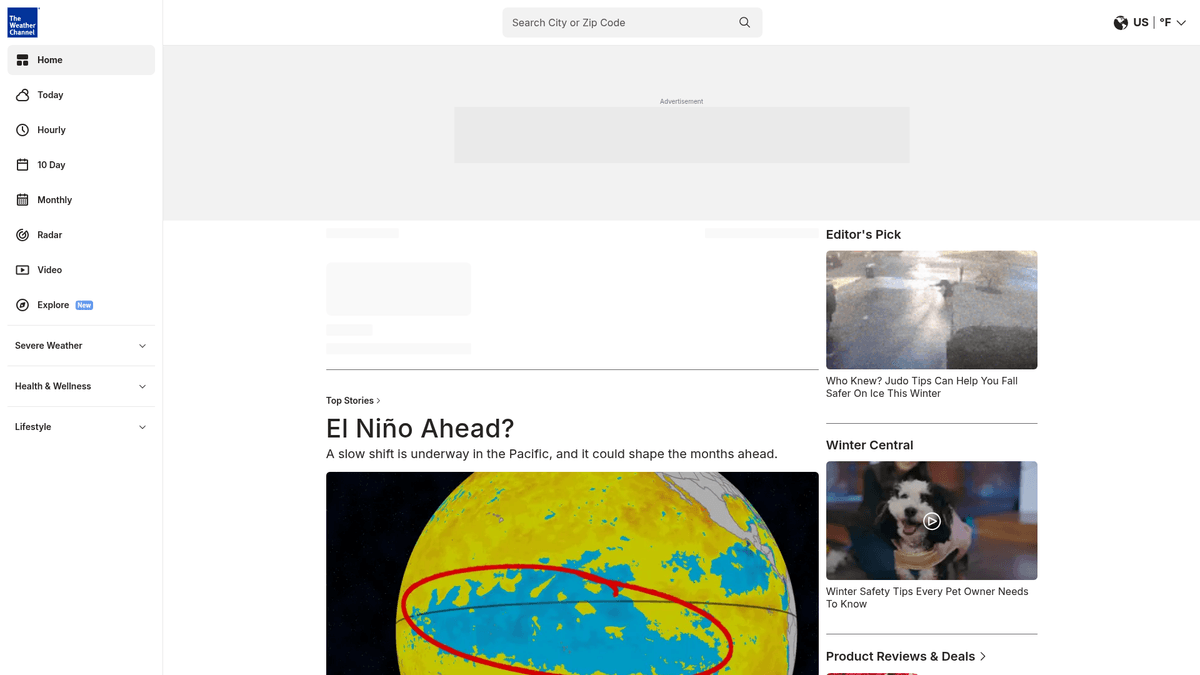
Weather.com, the digital flagship of The Weather Channel and owned by The Weather Company (an IBM subsidiary), is one of the world's most sophisticated weather forecasting platforms. It provides hyper-localized data ranging from hourly temperature fluctuations to 10-day forecasts, severe weather alerts, and high-resolution radar imagery for millions of locations worldwide.
Comprehensive Atmospheric Insights
The platform goes beyond basic temperature, offering structured data on air quality indices (AQI), UV radiation levels, allergy risks (pollen counts), and even flu activity trackers. This vast repository of environmental metrics is generated through proprietary forecasting models and a global network of sensors, making it a primary source for both consumer planning and enterprise-level risk management.
Strategic Value of Weather Data
Scraping Weather.com is invaluable for industries where atmospheric conditions dictate operational success. From agriculture and logistics to renewable energy and retail, automated data extraction allows businesses to build predictive models, optimize supply chains, and mitigate weather-related financial risks with real-time accuracy.
Why Scrape Weather.com?
Discover the business value and use cases for extracting data from Weather.com.
Supply Chain Resilience
Extract real-time severe weather alerts to proactively adjust logistics routes and prevent transit delays caused by storms or extreme temperatures.
Precision Agriculture
Monitor hyper-local rainfall and humidity data to automate irrigation schedules and optimize the application of weather-sensitive fertilizers.
Energy Demand Forecasting
Collect hourly temperature and 'Feels Like' data to predict utility load surges and manage power distribution more effectively during seasonal peaks.
Retail Merchandising Strategy
Analyze upcoming weather trends to align inventory levels and marketing campaigns for seasonal products like winter gear or cooling appliances.
Insurance Risk Modeling
Gather historical and real-time meteorological data to validate property damage claims and refine localized risk assessment models for underwriters.
Public Health Monitoring
Scrape air quality and pollen indices to power health-focused applications that alert sensitive populations to environmental risks in their area.
Scraping Challenges
Technical challenges you may encounter when scraping Weather.com.
Akamai Bot Management
The site uses Akamai's sophisticated detection systems which analyze TLS fingerprints and browser behavior to block automated scripts immediately.
Asynchronous React Rendering
Content is loaded dynamically via JavaScript after the initial page load, meaning simple HTTP clients will only receive an empty shell without the data.
IP-Based Localization
Weather.com serves different data and measurement units based on the requester's IP address, necessitating the use of specific regional proxies.
Frequent Selector Shifts
CSS class names are obfuscated and regenerated during build cycles, making it difficult to maintain stable scrapers using standard CSS selectors.
Aggressive Rate Limiting
The platform monitors request frequency per IP and will temporarily ban users who attempt to scrape high volumes of location data in a short window.
Scrape Weather.com with AI
No coding required. Extract data in minutes with AI-powered automation.
How It Works
Describe What You Need
Tell the AI what data you want to extract from Weather.com. Just type it in plain language — no coding or selectors needed.
AI Extracts the Data
Our artificial intelligence navigates Weather.com, handles dynamic content, and extracts exactly what you asked for.
Get Your Data
Receive clean, structured data ready to export as CSV, JSON, or send directly to your apps and workflows.
Why Use AI for Scraping
AI makes it easy to scrape Weather.com without writing any code. Our AI-powered platform uses artificial intelligence to understand what data you want — just describe it in plain language and the AI extracts it automatically.
How to scrape with AI:
- Describe What You Need: Tell the AI what data you want to extract from Weather.com. Just type it in plain language — no coding or selectors needed.
- AI Extracts the Data: Our artificial intelligence navigates Weather.com, handles dynamic content, and extracts exactly what you asked for.
- Get Your Data: Receive clean, structured data ready to export as CSV, JSON, or send directly to your apps and workflows.
Why use AI for scraping:
- Full JavaScript Capability: Automatio's browser-based engine fully renders the React components, ensuring all meteorological metrics are visible and extractable.
- Visual Selection Logic: Easily map data fields by clicking on elements like the UV index or wind speed, bypassing the need to decode obfuscated HTML class names.
- Built-in Proxy Rotation: Utilize high-quality residential proxies directly within your workflow to scrape local weather data for any zip code without being detected.
- Automated Scheduling: Set up your scraping tasks to run every hour or day, maintaining a fresh feed of weather data without manual intervention.
- No-Code Workflow Builder: Create complex extraction patterns for thousands of global locations using a visual interface, eliminating the need for Python or Node.js maintenance.
No-Code Web Scrapers for Weather.com
Point-and-click alternatives to AI-powered scraping
Several no-code tools like Browse.ai, Octoparse, Axiom, and ParseHub can help you scrape Weather.com. These tools use visual interfaces to select elements, but they come with trade-offs compared to AI-powered solutions.
Typical Workflow with No-Code Tools
Common Challenges
Learning curve
Understanding selectors and extraction logic takes time
Selectors break
Website changes can break your entire workflow
Dynamic content issues
JavaScript-heavy sites often require complex workarounds
CAPTCHA limitations
Most tools require manual intervention for CAPTCHAs
IP blocking
Aggressive scraping can get your IP banned
No-Code Web Scrapers for Weather.com
Several no-code tools like Browse.ai, Octoparse, Axiom, and ParseHub can help you scrape Weather.com. These tools use visual interfaces to select elements, but they come with trade-offs compared to AI-powered solutions.
Typical Workflow with No-Code Tools
- Install browser extension or sign up for the platform
- Navigate to the target website and open the tool
- Point-and-click to select data elements you want to extract
- Configure CSS selectors for each data field
- Set up pagination rules to scrape multiple pages
- Handle CAPTCHAs (often requires manual solving)
- Configure scheduling for automated runs
- Export data to CSV, JSON, or connect via API
Common Challenges
- Learning curve: Understanding selectors and extraction logic takes time
- Selectors break: Website changes can break your entire workflow
- Dynamic content issues: JavaScript-heavy sites often require complex workarounds
- CAPTCHA limitations: Most tools require manual intervention for CAPTCHAs
- IP blocking: Aggressive scraping can get your IP banned
Code Examples
import requests
from bs4 import BeautifulSoup

# Note: Weather.com uses Akamai; simple requests are often blocked.
# We use a real User-Agent to try and pass basic filters.
headers = {
    'User-Agent': 'Mozilla/5.0 (Windows NT 10.0; Win64; x64) AppleWebKit/537.36 (KHTML, like Gecko) Chrome/119.0.0.0 Safari/537.36',
    'Accept-Language': 'en-US,en;q=0.9'
}

url = 'https://weather.com/weather/today/l/USNY0996:1:US'

try:
    response = requests.get(url, headers=headers)
    if response.status_code == 200:
        soup = BeautifulSoup(response.text, 'html.parser')
        # Use data-testid as CSS classes are dynamic
        temp = soup.find('span', {'data-testid': 'TemperatureValue'})
        if temp:
            print(f'Current Temperature: {temp.text}')
        else:
            print('Element not found. The site likely requires JavaScript rendering.')
    else:
        print(f'Failed to retrieve data: Status Code {response.status_code}')
except Exception as e:
    print(f'Error: {e}')
When to Use
Best for static HTML pages where content is loaded server-side. The fastest and simplest approach when JavaScript rendering isn't required.
Advantages
- ●Fastest execution (no browser overhead)
- ●Lowest resource consumption
- ●Easy to parallelize with asyncio
- ●Great for APIs and static pages
Limitations
- ●Cannot execute JavaScript
- ●Fails on SPAs and dynamic content
- ●May struggle with complex anti-bot systems
How to Scrape Weather.com with Code
Python + Requests
import requests
from bs4 import BeautifulSoup
# Note: Weather.com uses Akamai; simple requests are often blocked.
# We use a real User-Agent to try and pass basic filters.
headers = {
'User-Agent': 'Mozilla/5.0 (Windows NT 10.0; Win64; x64) AppleWebKit/537.36 (KHTML, like Gecko) Chrome/119.0.0.0 Safari/537.36',
'Accept-Language': 'en-US,en;q=0.9'
}
url = 'https://weather.com/weather/today/l/USNY0996:1:US'
try:
response = requests.get(url, headers=headers)
if response.status_code == 200:
soup = BeautifulSoup(response.text, 'html.parser')
# Use data-testid as CSS classes are dynamic
temp = soup.find('span', {'data-testid': 'TemperatureValue'})
if temp:
print(f'Current Temperature: {temp.text}')
else:
print('Element not found. The site likely requires JavaScript rendering.')
else:
print(f'Failed to retrieve data: Status Code {response.status_code}')
except Exception as e:
print(f'Error: {e}')Python + Playwright
from playwright.sync_api import sync_playwright

def scrape_weather():
    with sync_playwright() as p:
        # Launching a headed or headless browser to handle Akamai and React
        browser = p.chromium.launch(headless=True)
        page = browser.new_page()

        # Navigate to a specific location (New York City in this case)
        page.goto('https://weather.com/weather/today/l/USNY0996:1:US')

        # Wait for the specific React-rendered element to appear
        page.wait_for_selector('[data-testid="TemperatureValue"]')

        # Extract data using stable data-testid attributes
        data = {
            'temp': page.inner_text('[data-testid="TemperatureValue"]'),
            'location': page.inner_text('h1[class*="CurrentConditions"]'),
            'details': page.inner_text('[data-testid="precipPhrase"]')
        }

        print(f"Weather for {data['location']}: {data['temp']} - {data['details']}")
        browser.close()

scrape_weather()Python + Scrapy
import scrapy

class WeatherSpider(scrapy.Spider):
    name = 'weather_spider'
    start_urls = ['https://weather.com/weather/today/l/USNY0996:1:US']

    def parse(self, response):
        # Scrapy alone cannot handle the JS rendering on Weather.com
        # Integration with Scrapy-Playwright or Scrapy-Splash is required
        yield {
            'location': response.css('h1[class*="CurrentConditions"]::text').get(),
            'temperature': response.css('[data-testid="TemperatureValue"]::text').get(),
            'humidity': response.xpath('//span[@data-testid="PercentageValue"]/text()').get(),
            'uv_index': response.css('[data-testid="uvIndexValue"]::text').get()
}Node.js + Puppeteer
const puppeteer = require('puppeteer');

(async () => {
  const browser = await puppeteer.launch();
  const page = await browser.newPage();

  // Set a realistic User-Agent to avoid immediate block
  await page.setUserAgent('Mozilla/5.0 (Windows NT 10.0; Win64; x64) AppleWebKit/537.36 (KHTML, like Gecko) Chrome/119.0.0.0 Safari/537.36');

  await page.goto('https://weather.com/weather/today/l/USNY0996:1:US', { waitUntil: 'networkidle2' });

  // Extracting data using the document evaluation
  const weatherData = await page.evaluate(() => {
    const temp = document.querySelector('[data-testid="TemperatureValue"]')?.innerText;
    const location = document.querySelector('h1[class*="CurrentConditions"]')?.innerText;
    return { temp, location };
  });

  console.log(weatherData);
  await browser.close();
})();What You Can Do With Weather.com Data
Explore practical applications and insights from Weather.com data.
Supply Chain Risk Mitigation
Logistics companies can use scraped weather data to predict delays and reroute shipments before storms hit.
How to implement:
- 1Scrape real-time severe weather alerts and wind speeds for key shipping routes.
- 2Cross-reference weather data with current fleet GPS locations.
- 3Automatically notify dispatchers to reroute vehicles away from high-risk weather zones.
Use Automatio to extract data from Weather.com and build these applications without writing code.
What You Can Do With Weather.com Data
- Supply Chain Risk Mitigation
Logistics companies can use scraped weather data to predict delays and reroute shipments before storms hit.
- Scrape real-time severe weather alerts and wind speeds for key shipping routes.
- Cross-reference weather data with current fleet GPS locations.
- Automatically notify dispatchers to reroute vehicles away from high-risk weather zones.
- Agricultural Yield Optimization
Farmers and AgTech firms can automate irrigation systems by tracking precise evaporation and rainfall forecasts.
- Extract daily precipitation probability and humidity levels for specific farm coordinates.
- Feed the data into a centralized soil management platform.
- Adjust automated irrigation timers to save water when significant rain is forecasted.
- Dynamic Retail Merchandising
E-commerce retailers can adjust their homepage features based on the local weather of the visitor (e.g., showing umbrellas vs sunglasses).
- Scrape 10-day forecasts for major metropolitan areas.
- Categorize regions by weather type (Rainy, Sunny, Heatwave).
- Update website product recommendations and email marketing triggers based on regional forecasts.
- Energy Load Prediction
Utility companies analyze 'Feels Like' temperatures to anticipate surges in air conditioning or heating demand.
- Collect hourly 'Feels Like' temperature data for a specific service grid.
- Compare real-time data against historical consumption patterns.
- Issue grid-balancing commands to prevent power outages during extreme temperature peaks.
- Health & Allergy Alert Services
Wellness apps can provide personalized daily alerts for users with asthma or seasonal allergies.
- Scrape high-resolution pollen counts (Tree, Grass, Weed) and AQI metrics.
- Segment data by zip code or city.
- Push automated mobile notifications to users when levels exceed a certain threshold.
Supercharge your workflow with AI Automation
Automatio combines the power of AI agents, web automation, and smart integrations to help you accomplish more in less time.
What to get right first
Expert advice for successfully extracting data from Weather.com.
Leverage data-testid Attributes
Always target 'data-testid' attributes for your selectors as these remain stable even when the visual CSS classes are updated or obfuscated.
Utilize JSON-LD Scripts
Look for 'application/ld+json' blocks in the page source; these often contain structured meteorological data that is significantly easier to parse.
Rotate Geographic Proxies
Match your proxy location to the zip code or city you are scraping to ensure the site returns the correct local units and regional forecasts.
Simulate Human Interactions
Incorporate slight delays and occasional mouse movements into your scraper to better mimic a real user and bypass behavioral detection.
Monitor Network Responses
Inspect the Network tab for XHR requests that return raw JSON data, which can often be intercepted to get cleaner data than scraping the HTML UI.
Set Custom User Agents
Always use a modern, realistic User-Agent string from a common browser like Chrome or Safari to avoid being flagged by basic filter lists.
Related Web Scraping

How to Scrape GitHub | The Ultimate 2025 Technical Guide

How to Scrape American Museum of Natural History (AMNH)

How to Scrape RethinkEd: A Technical Data Extraction Guide

How to Scrape Wikipedia: The Ultimate Web Scraping Guide

How to Scrape Pollen.com: Local Allergy Data Extraction Guide

How to Scrape Britannica: Educational Data Web Scraper

How to Scrape Worldometers for Real-Time Global Statistics
How to Scrape Poll-Maker: A Comprehensive Web Scraping Guide
Frequently Asked Questions
Find answers to common questions about Weather.com