
How to Scrape Worldometers for Real-Time Global Statistics
Learn how to scrape Worldometers to extract real-time population data, COVID-19 statistics, and global environmental metrics for research and analysis.
Anti-Bot Protection Detected
- Rate Limiting
- Limits requests per IP/session over time. Can be bypassed with rotating proxies, request delays, and distributed scraping.
- IP Blocking
- Blocks known datacenter IPs and flagged addresses. Requires residential or mobile proxies to circumvent effectively.
- User-Agent Filtering
- 403 Forbidden Errors
- Cloudflare
- Enterprise-grade WAF and bot management. Uses JavaScript challenges, CAPTCHAs, and behavioral analysis. Requires browser automation with stealth settings.
About Worldometers
Learn what Worldometers offers and what valuable data can be extracted from it.
Comprehensive Global Data Platform
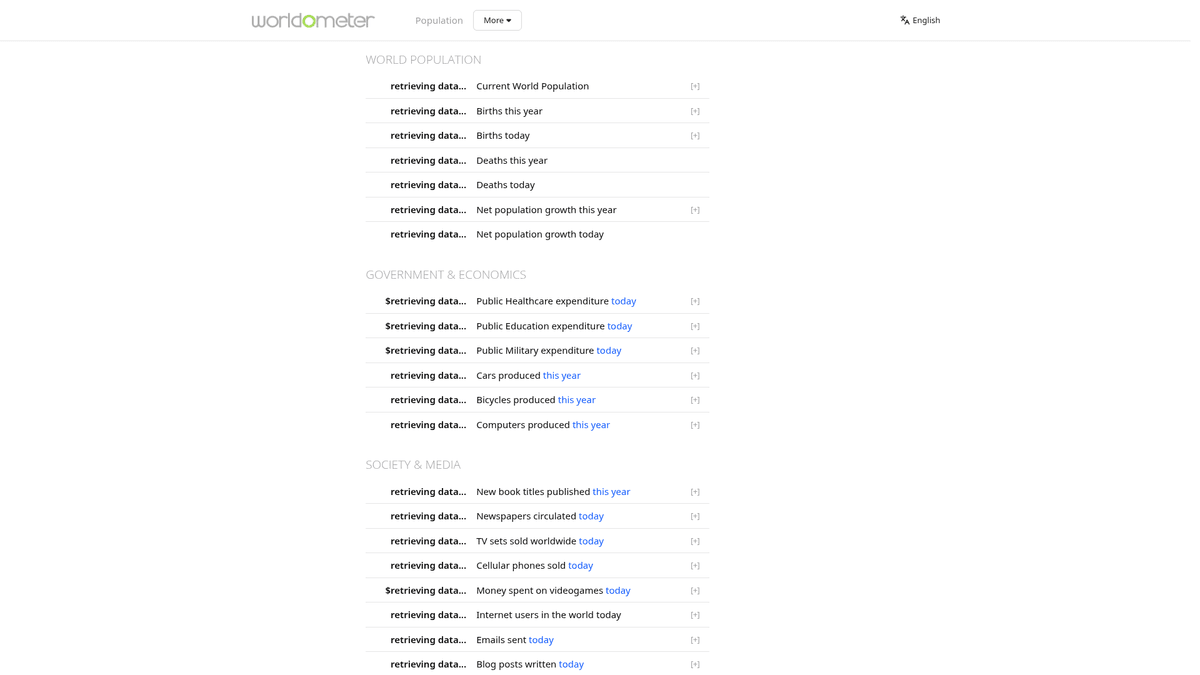
Worldometers is a highly regarded reference website that provides real-time statistics for a vast array of global topics. Operated by an international team of researchers and developers, it is widely recognized for its live counters and meticulously updated data tables. The platform serves as a critical resource for journalists, researchers, and government agencies who need current global data.
Diverse Data Categories
The website hosts data ranging from world population and government expenditures to environmental metrics and health statistics. During the global pandemic, it became a primary source for COVID-19 tracking, offering granular data on cases, deaths, and testing across hundreds of countries. This depth of information makes it a goldmine for those performing longitudinal studies.
Value of Scraping Worldometers
Scraping Worldometers allows developers and analysts to build real-time dashboards and perform historical trend analysis. Because the site aggregates data from hundreds of official sources, extracting this information programmatically saves thousands of hours of manual collection, enabling automated reporting and sophisticated data-driven insights.
Why Scrape Worldometers?
Discover the business value and use cases for extracting data from Worldometers.
Real-Time Metric Monitoring
Scrape live counters to track second-by-second changes in global population, births, and deaths for time-sensitive reporting.
Centralized Global Health Data
Extract comprehensive health statistics for over 200 countries from a single source, saving hours of manual data collection from local government sites.
Historical Trend Benchmarking
Capture daily or hourly snapshots of world indicators to build custom historical datasets for demographic and economic trend analysis.
Macro-Economic Signal Tracking
Monitor global energy consumption, car production, and government spending as leading indicators for financial market forecasting.
Educational and Research Datasets
Gather clean, tabular data for academic papers, student projects, or infographics regarding global environmental and social shifts.
Automated News Feed Integration
Feed live global statistics directly into automated news tickers or social media bots for real-time public interest updates.
Scraping Challenges
Technical challenges you may encounter when scraping Worldometers.
Dynamic JavaScript Rendering
The site uses internal scripts (like RTSp.js) to update counters in real-time, requiring a scraper that can execute JavaScript to capture accurate values.
Aggressive 403 Forbidden Errors
Worldometer blocks most standard bot requests that lack realistic browser headers, specifically targeting missing User-Agent and Accept-Language strings.
Complex Table Architectures
Data tables often contain hidden rows for 'Yesterday' or 'Total' aggregates that use duplicate IDs, making simple CSS selector targeting difficult.
Cloudflare and Rate Limiting
High-frequency requests quickly trigger Cloudflare protection, resulting in CAPTCHAs or temporary IP bans if requests aren't properly distributed.
Numeric Data Sanitization
All data points contain formatting characters like commas, plus signs, and spaces that must be programmatically cleaned before the data is useful for analysis.
Scrape Worldometers with AI
No coding required. Extract data in minutes with AI-powered automation.
How It Works
Describe What You Need
Tell the AI what data you want to extract from Worldometers. Just type it in plain language — no coding or selectors needed.
AI Extracts the Data
Our artificial intelligence navigates Worldometers, handles dynamic content, and extracts exactly what you asked for.
Get Your Data
Receive clean, structured data ready to export as CSV, JSON, or send directly to your apps and workflows.
Why Use AI for Scraping
AI makes it easy to scrape Worldometers without writing any code. Our AI-powered platform uses artificial intelligence to understand what data you want — just describe it in plain language and the AI extracts it automatically.
How to scrape with AI:
- Describe What You Need: Tell the AI what data you want to extract from Worldometers. Just type it in plain language — no coding or selectors needed.
- AI Extracts the Data: Our artificial intelligence navigates Worldometers, handles dynamic content, and extracts exactly what you asked for.
- Get Your Data: Receive clean, structured data ready to export as CSV, JSON, or send directly to your apps and workflows.
Why use AI for scraping:
- Built-in Browser Emulation: Automatio natively handles JavaScript execution, ensuring live-updating counters are captured correctly without extra coding.
- Automated Header Management: The platform automatically rotates modern User-Agents to prevent the common 403 Forbidden errors that plague simple Python scripts.
- Point-and-Click Selector Tools: Easily select specific cells in massive statistical tables while visually excluding continent-level aggregates or hidden 'yesterday' rows.
- Scheduling and Direct Export: Set up recurring tasks to snapshot global data and sync it directly to Google Sheets or a Webhook for live dashboard updates.
No-Code Web Scrapers for Worldometers
Point-and-click alternatives to AI-powered scraping
Several no-code tools like Browse.ai, Octoparse, Axiom, and ParseHub can help you scrape Worldometers. These tools use visual interfaces to select elements, but they come with trade-offs compared to AI-powered solutions.
Typical Workflow with No-Code Tools
Common Challenges
Learning curve
Understanding selectors and extraction logic takes time
Selectors break
Website changes can break your entire workflow
Dynamic content issues
JavaScript-heavy sites often require complex workarounds
CAPTCHA limitations
Most tools require manual intervention for CAPTCHAs
IP blocking
Aggressive scraping can get your IP banned
No-Code Web Scrapers for Worldometers
Several no-code tools like Browse.ai, Octoparse, Axiom, and ParseHub can help you scrape Worldometers. These tools use visual interfaces to select elements, but they come with trade-offs compared to AI-powered solutions.
Typical Workflow with No-Code Tools
- Install browser extension or sign up for the platform
- Navigate to the target website and open the tool
- Point-and-click to select data elements you want to extract
- Configure CSS selectors for each data field
- Set up pagination rules to scrape multiple pages
- Handle CAPTCHAs (often requires manual solving)
- Configure scheduling for automated runs
- Export data to CSV, JSON, or connect via API
Common Challenges
- Learning curve: Understanding selectors and extraction logic takes time
- Selectors break: Website changes can break your entire workflow
- Dynamic content issues: JavaScript-heavy sites often require complex workarounds
- CAPTCHA limitations: Most tools require manual intervention for CAPTCHAs
- IP blocking: Aggressive scraping can get your IP banned
Code Examples
import requests
from bs4 import BeautifulSoup

# Headers are required to prevent a 403 Forbidden error
headers = {
    'User-Agent': 'Mozilla/5.0 (Windows NT 10.0; Win64; x64) AppleWebKit/537.36 (KHTML, like Gecko) Chrome/115.0.0.0 Safari/537.36'
}

url = 'https://www.worldometers.info/coronavirus/'

try:
    response = requests.get(url, headers=headers)
    response.raise_for_status()
    soup = BeautifulSoup(response.text, 'html.parser')

    # Locate the main statistics table
    table = soup.find('table', id='main_table_countries_today')
    rows = table.find_all('tr')[9:20] # Skipping header and aggregate rows

    for row in rows:
        cells = row.find_all('td')
        if len(cells) > 1:
            country = cells[1].text.strip()
            cases = cells[2].text.strip()
            print(f'Country: {country} | Total Cases: {cases}')
except Exception as e:
    print(f'Scraping failed: {e}')
When to Use
Best for static HTML pages where content is loaded server-side. The fastest and simplest approach when JavaScript rendering isn't required.
Advantages
- ●Fastest execution (no browser overhead)
- ●Lowest resource consumption
- ●Easy to parallelize with asyncio
- ●Great for APIs and static pages
Limitations
- ●Cannot execute JavaScript
- ●Fails on SPAs and dynamic content
- ●May struggle with complex anti-bot systems
How to Scrape Worldometers with Code
Python + Requests
import requests
from bs4 import BeautifulSoup
# Headers are required to prevent a 403 Forbidden error
headers = {
'User-Agent': 'Mozilla/5.0 (Windows NT 10.0; Win64; x64) AppleWebKit/537.36 (KHTML, like Gecko) Chrome/115.0.0.0 Safari/537.36'
}
url = 'https://www.worldometers.info/coronavirus/'
try:
response = requests.get(url, headers=headers)
response.raise_for_status()
soup = BeautifulSoup(response.text, 'html.parser')
# Locate the main statistics table
table = soup.find('table', id='main_table_countries_today')
rows = table.find_all('tr')[9:20] # Skipping header and aggregate rows
for row in rows:
cells = row.find_all('td')
if len(cells) > 1:
country = cells[1].text.strip()
cases = cells[2].text.strip()
print(f'Country: {country} | Total Cases: {cases}')
except Exception as e:
print(f'Scraping failed: {e}')Python + Playwright
from playwright.sync_api import sync_playwright

def run_scraper():
    with sync_playwright() as p:
        # Launch a headless browser to handle dynamic counters
        browser = p.chromium.launch(headless=True)
        page = browser.new_page()
        page.goto('https://www.worldometers.info/')

        # Wait for the population counter element to be visible
        page.wait_for_selector('.r-counter span')

        # Extract the live text from the counter
        current_pop = page.inner_text('.r-counter span')
        print(f'Current World Population: {current_pop}')

        browser.close()

run_scraper()Python + Scrapy
import scrapy

class WorldometerSpider(scrapy.Spider):
    name = 'world_spider'
    start_urls = ['https://www.worldometers.info/coronavirus/']

    def parse(self, response):
        # Use CSS selectors to target the table rows
        rows = response.css('table#main_table_countries_today tr')
        for row in rows[9:50]: # Process the top 40 countries
            yield {
                'country': row.css('td:nth-child(2) ::text').get(),
                'total_cases': row.css('td:nth-child(3) ::text').get(),
                'total_deaths': row.css('td:nth-child(5) ::text').get(),
                'new_cases': row.css('td:nth-child(4) ::text').get()
}Node.js + Puppeteer
const puppeteer = require('puppeteer');

(async () => {
  const browser = await puppeteer.launch();
  const page = await browser.newPage();

  // Set User-Agent to avoid detection
  await page.setUserAgent('Mozilla/5.0 (Windows NT 10.0; Win64; x64) AppleWebKit/537.36 (KHTML, like Gecko) Chrome/115.0.0.0 Safari/537.36');

  await page.goto('https://www.worldometers.info/world-population/population-by-country/');

  const countryData = await page.evaluate(() => {
    const rows = Array.from(document.querySelectorAll('table#example2 tr'));
    return rows.slice(1, 11).map(row => ({
      country: row.cells[1]?.innerText,
      population: row.cells[2]?.innerText
    }));
  });

  console.log(countryData);
  await browser.close();
})();What You Can Do With Worldometers Data
Explore practical applications and insights from Worldometers data.
Public Health Monitoring Dashboards
Healthcare organizations can create real-time visualizations to track the spread of infectious diseases across borders.
How to implement:
- 1Scrape health statistic tables every hour
- 2Clean and format the data into a structured CSV or JSON file
- 3Connect the data file to a dashboard tool like Power BI for live updates
Use Automatio to extract data from Worldometers and build these applications without writing code.
What You Can Do With Worldometers Data
- Public Health Monitoring Dashboards
Healthcare organizations can create real-time visualizations to track the spread of infectious diseases across borders.
- Scrape health statistic tables every hour
- Clean and format the data into a structured CSV or JSON file
- Connect the data file to a dashboard tool like Power BI for live updates
- Demographic Growth Analysis
Urban planners and economists can use population growth rates to predict future resource needs and infrastructure development.
- Extract population and density metrics for specific regions
- Calculate growth velocity by comparing snapshots over several months
- Correlate population density with local economic indicators
- Environmental Impact Reporting
Non-profits can track real-time CO2 emissions and forest loss to create impactful climate change awareness campaigns.
- Scrape the 'Environment' section of Worldometers daily
- Archive the data to build a longitudinal dataset of emission rates
- Generate automated weekly reports for social media and newsletters
- Automated Financial Intelligence
Investors can monitor government spending and economic metrics as proxy indicators for national economic health.
- Target specific economic counters like 'Public Education Expenditure'
- Export data to a central database for cross-referencing with market performance
- Set up alerts for significant deviations in global spending patterns
- Educational Data Visualizations
Educators can use live global data to create interactive statistics lessons for students using real-world numbers.
- Scrape diverse metrics across health, energy, and population
- Provide students with clean datasets for classroom analysis projects
- Use the live counters to demonstrate the concept of 'rate of change'
Supercharge your workflow with AI Automation
Automatio combines the power of AI agents, web automation, and smart integrations to help you accomplish more in less time.
What to get right first
Expert advice for successfully extracting data from Worldometers.
Target Stable rel Attributes
Instead of volatile CSS classes, target elements using the 'rel' attribute (e.g., [rel='current_population']) which the site uses for script-based updates.
Filter Hidden Table Rows
When scraping tables, check the 'style' or 'class' attributes to exclude rows that are hidden or contain continent-level summaries to avoid data duplication.
Implement Staggered Wait Times
Allow at least 2-3 seconds after the page loads for the JavaScript counters to synchronize with the server before extracting the text.
Clean Data During Extraction
Use formatting tools to strip characters like ',' and '+' at the source so your exported CSV or JSON contains pure numeric values.
Monitor for ID Changes
Worldometer occasionally updates its table IDs (e.g., from 'main_table' to 'main_table_countries_today'), so set up alerts for selector failures.
Use Residential Proxies
For high-frequency polling of real-time stats, use residential proxies to mimic legitimate global traffic and avoid Cloudflare flags.
Related Web Scraping

How to Scrape GitHub | The Ultimate 2025 Technical Guide

How to Scrape Pollen.com: Local Allergy Data Extraction Guide

How to Scrape Britannica: Educational Data Web Scraper

How to Scrape RethinkEd: A Technical Data Extraction Guide

How to Scrape Wikipedia: The Ultimate Web Scraping Guide

How to Scrape Weather.com: A Guide to Weather Data Extraction

How to Scrape American Museum of Natural History (AMNH)
How to Scrape Poll-Maker: A Comprehensive Web Scraping Guide
Frequently Asked Questions
Find answers to common questions about Worldometers