
How to Scrape JWB Rental Homes: Real Estate Data Extraction Guide
Learn how to scrape JWB Rental Homes for property listings, rent prices, and availability in Jacksonville, FL. Automate real estate market analysis with ease.
Anti-Bot Protection Detected
- Cloudflare
- Enterprise-grade WAF and bot management. Uses JavaScript challenges, CAPTCHAs, and behavioral analysis. Requires browser automation with stealth settings.
- Rate Limiting
- Limits requests per IP/session over time. Can be bypassed with rotating proxies, request delays, and distributed scraping.
- Dynamic Content Loading
- Iframe Embedding
About JWB Rental Homes
Learn what JWB Rental Homes offers and what valuable data can be extracted from it.
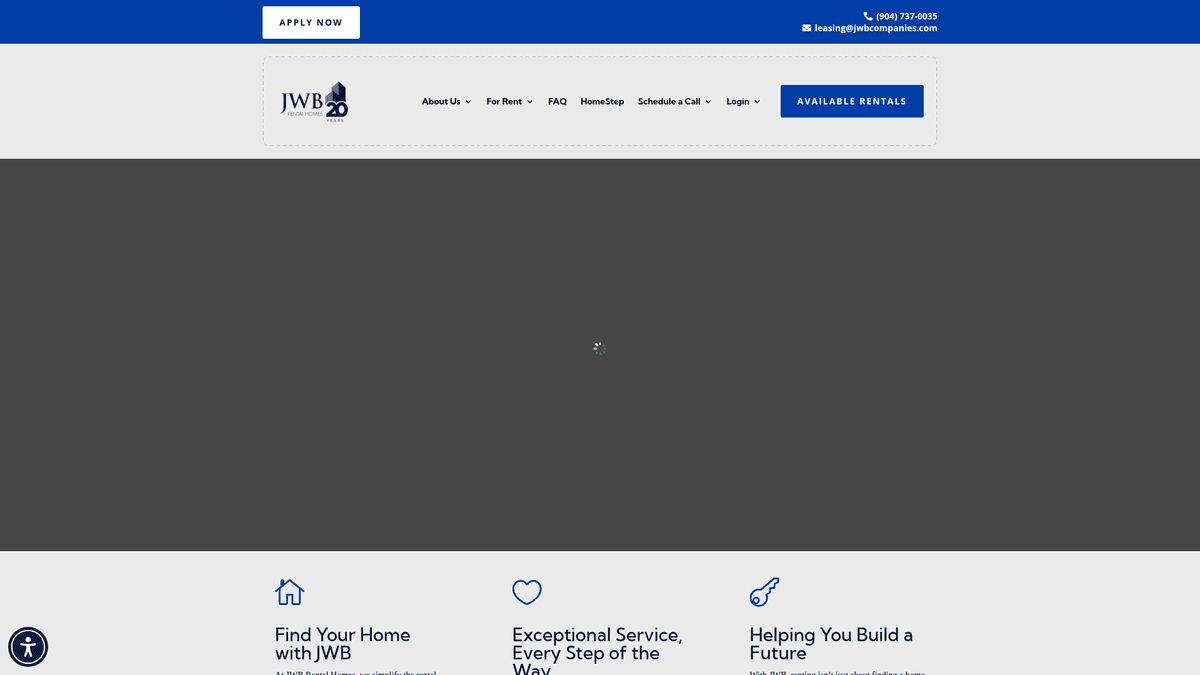
JWB Rental Homes is a leading property management and real estate investment firm located in Jacksonville, Florida. They manage a vast portfolio of thousands of single-family homes and townhomes throughout the Northeast Florida region. The website acts as a centralized marketplace where prospective tenants can search for available rentals, view detailed property photos, and initiate the application process via an integrated digital platform.
The listings on the site are data-rich, providing specific details such as exact street addresses, monthly rental rates, bedroom and bathroom counts, and total square footage. A unique aspect of their business model showcased on the site is the JWB HomeStep program, which incentivizes long-term renting by allowing tenants to build equity toward a future home purchase with JWB.
Extracting data from JWB Rental Homes is exceptionally valuable for real estate investors, hedge funds, and local market analysts. By scraping this site, users can monitor rental inventory velocity, benchmark regional price trends, and gather granular neighborhood-level data in one of Florida's fastest-growing residential markets.
Why Scrape JWB Rental Homes?
Discover the business value and use cases for extracting data from JWB Rental Homes.
Jacksonville Market Benchmarking
Obtain real-time rental rates and occupancy data from one of the largest property management portfolios in the Jacksonville area.
ROI & Yield Analysis
Identify high-performing neighborhoods by comparing listing prices against square footage and property features to calculate investment yields.
Lead Generation for Services
Identify property locations to target for home maintenance, landscaping, or cleaning service marketing based on high rental density.
Competitive Strategy Monitoring
Track JWB's amenity standards and leasing incentives, such as the HomeStep equity program, to remain competitive in the Northeast Florida market.
Historical Trend Tracking
Monitor how long properties stay on the market to calculate turnover rates and emerging demand in specific zip codes.
HUD Availability Tracking
Easily identify subsidized housing inventory by scraping properties flagged as 'HUD eligible' in their detailed narrative descriptions.
Scraping Challenges
Technical challenges you may encounter when scraping JWB Rental Homes.
Iframe/Widget Content
Property listings are often embedded via Tenant Turner frames, requiring a scraper to target the frame source rather than the main page DOM.
Dynamic Content Rendering
The site uses JavaScript to render listing details and 'unfold' long descriptions, making static HTML extraction methods ineffective.
Cloudflare Protection
Advanced anti-bot measures like Cloudflare are present, which can trigger challenges or IP blocks if request patterns appear automated.
Narrative Data Extraction
Key property features are often buried in narrative paragraphs rather than structured tables, requiring text parsing to isolate amenities.
Rate Limiting
Frequent requests to property detail pages can trigger server-side limitations, resulting in 429 or 403 errors for unauthorized crawlers.
Scrape JWB Rental Homes with AI
No coding required. Extract data in minutes with AI-powered automation.
How It Works
Describe What You Need
Tell the AI what data you want to extract from JWB Rental Homes. Just type it in plain language — no coding or selectors needed.
AI Extracts the Data
Our artificial intelligence navigates JWB Rental Homes, handles dynamic content, and extracts exactly what you asked for.
Get Your Data
Receive clean, structured data ready to export as CSV, JSON, or send directly to your apps and workflows.
Why Use AI for Scraping
AI makes it easy to scrape JWB Rental Homes without writing any code. Our AI-powered platform uses artificial intelligence to understand what data you want — just describe it in plain language and the AI extracts it automatically.
How to scrape with AI:
- Describe What You Need: Tell the AI what data you want to extract from JWB Rental Homes. Just type it in plain language — no coding or selectors needed.
- AI Extracts the Data: Our artificial intelligence navigates JWB Rental Homes, handles dynamic content, and extracts exactly what you asked for.
- Get Your Data: Receive clean, structured data ready to export as CSV, JSON, or send directly to your apps and workflows.
Why use AI for scraping:
- Iframe Handling: Automatio easily detects and interacts with embedded frames from Tenant Turner to extract the underlying property data without code.
- Automatic Proxy Rotation: Avoid Cloudflare blocks and rate limits with Automatio's built-in residential proxy management system that mimics human traffic.
- No-Code Visual Selector: Target complex property descriptions and specific amenity keywords without writing complicated regular expressions or custom scripts.
- Scheduled Monitoring: Set up daily crawls to capture new listings as soon as they go live or identify precisely when a property is marked as rented.
- Seamless Data Export: Instantly convert unstructured listing text into clean CSV or JSON files for immediate business analysis or CRM integration.
No-Code Web Scrapers for JWB Rental Homes
Point-and-click alternatives to AI-powered scraping
Several no-code tools like Browse.ai, Octoparse, Axiom, and ParseHub can help you scrape JWB Rental Homes. These tools use visual interfaces to select elements, but they come with trade-offs compared to AI-powered solutions.
Typical Workflow with No-Code Tools
Common Challenges
Learning curve
Understanding selectors and extraction logic takes time
Selectors break
Website changes can break your entire workflow
Dynamic content issues
JavaScript-heavy sites often require complex workarounds
CAPTCHA limitations
Most tools require manual intervention for CAPTCHAs
IP blocking
Aggressive scraping can get your IP banned
No-Code Web Scrapers for JWB Rental Homes
Several no-code tools like Browse.ai, Octoparse, Axiom, and ParseHub can help you scrape JWB Rental Homes. These tools use visual interfaces to select elements, but they come with trade-offs compared to AI-powered solutions.
Typical Workflow with No-Code Tools
- Install browser extension or sign up for the platform
- Navigate to the target website and open the tool
- Point-and-click to select data elements you want to extract
- Configure CSS selectors for each data field
- Set up pagination rules to scrape multiple pages
- Handle CAPTCHAs (often requires manual solving)
- Configure scheduling for automated runs
- Export data to CSV, JSON, or connect via API
Common Challenges
- Learning curve: Understanding selectors and extraction logic takes time
- Selectors break: Website changes can break your entire workflow
- Dynamic content issues: JavaScript-heavy sites often require complex workarounds
- CAPTCHA limitations: Most tools require manual intervention for CAPTCHAs
- IP blocking: Aggressive scraping can get your IP banned
Code Examples
import requests
from bs4 import BeautifulSoup

# Target URL for JWB rental listings
url = 'https://www.jwbrentalhomes.com/houses-for-rent/'

# Browser-like headers to avoid basic detection
headers = {
    'User-Agent': 'Mozilla/5.0 (Windows NT 10.0; Win64; x64) AppleWebKit/537.36 (KHTML, like Gecko) Chrome/119.0.0.0 Safari/537.36'
}

try:
    response = requests.get(url, headers=headers)
    response.raise_for_status()
    soup = BeautifulSoup(response.text, 'html.parser')

    # Finding property titles/addresses
    listings = soup.find_all('h4')
    for listing in listings:
        address = listing.get_text(strip=True)
        link = listing.find('a')['href'] if listing.find('a') else 'N/A'
        print(f'Property Found: {address} - {link}')
except Exception as e:
    print(f'An error occurred: {e}')
When to Use
Best for static HTML pages where content is loaded server-side. The fastest and simplest approach when JavaScript rendering isn't required.
Advantages
- ●Fastest execution (no browser overhead)
- ●Lowest resource consumption
- ●Easy to parallelize with asyncio
- ●Great for APIs and static pages
Limitations
- ●Cannot execute JavaScript
- ●Fails on SPAs and dynamic content
- ●May struggle with complex anti-bot systems
How to Scrape JWB Rental Homes with Code
Python + Requests
import requests
from bs4 import BeautifulSoup
# Target URL for JWB rental listings
url = 'https://www.jwbrentalhomes.com/houses-for-rent/'
# Browser-like headers to avoid basic detection
headers = {
'User-Agent': 'Mozilla/5.0 (Windows NT 10.0; Win64; x64) AppleWebKit/537.36 (KHTML, like Gecko) Chrome/119.0.0.0 Safari/537.36'
}
try:
response = requests.get(url, headers=headers)
response.raise_for_status()
soup = BeautifulSoup(response.text, 'html.parser')
# Finding property titles/addresses
listings = soup.find_all('h4')
for listing in listings:
address = listing.get_text(strip=True)
link = listing.find('a')['href'] if listing.find('a') else 'N/A'
print(f'Property Found: {address} - {link}')
except Exception as e:
print(f'An error occurred: {e}')Python + Playwright
import asyncio
from playwright.async_api import async_playwright

async def scrape_jwb():
    async with async_playwright() as p:
        # Launching browser with JS support
        browser = await p.chromium.launch(headless=True)
        page = await browser.new_page()

        # Navigate to the search results page
        await page.goto('https://www.jwbrentalhomes.com/houses-for-rent/')

        # Wait for the property grid to load dynamically
        await page.wait_for_selector('h4')

        # Extract address and price data
        properties = await page.query_selector_all('div.property-item')
        for prop in properties:
            title = await prop.query_selector('h4')
            address = await title.inner_text()
            print(f'Listing: {address.strip()}')

        await browser.close()

asyncio.run(scrape_jwb())Python + Scrapy
import scrapy

class JwbSpider(scrapy.Spider):
    name = 'jwb_spider'
    start_urls = ['https://www.jwbrentalhomes.com/houses-for-rent/']

    def parse(self, response):
        # Iterate through property containers
        for listing in response.css('div.property-item'):
            yield {
                'address': listing.css('h4 a::text').get(),
                'link': response.urljoin(listing.css('h4 a::attr(href)').get()),
                'price': listing.css('.rent-amount::text').get(),
                'beds': listing.css('.beds::text').get()
            }

        # Simple pagination handling
        next_page = response.css('a.next-page::attr(href)').get()
        if next_page:
yield response.follow(next_page, self.parse)Node.js + Puppeteer
const puppeteer = require('puppeteer');

(async () => {
  const browser = await puppeteer.launch();
  const page = await browser.newPage();

  // Navigate to JWB and wait for the network to idle
  await page.goto('https://www.jwbrentalhomes.com/houses-for-rent/', { waitUntil: 'networkidle2' });

  const listings = await page.evaluate(() => {
    const items = Array.from(document.querySelectorAll('h4'));
    return items.map(item => ({
      address: item.innerText.trim(),
      url: item.querySelector('a')?.href
    }));
  });

  console.log(listings);
  await browser.close();
})();What You Can Do With JWB Rental Homes Data
Explore practical applications and insights from JWB Rental Homes data.
Competitive Rent Analysis
Property managers use this data to ensure their own rental units are priced correctly relative to JWB's large portfolio.
How to implement:
- 1Scrape active listings in specific zip codes including price and bedroom count.
- 2Calculate the average price per square foot for each neighborhood.
- 3Compare results with internal portfolio data to justify rent increases or decreases.
Use Automatio to extract data from JWB Rental Homes and build these applications without writing code.
What You Can Do With JWB Rental Homes Data
- Competitive Rent Analysis
Property managers use this data to ensure their own rental units are priced correctly relative to JWB's large portfolio.
- Scrape active listings in specific zip codes including price and bedroom count.
- Calculate the average price per square foot for each neighborhood.
- Compare results with internal portfolio data to justify rent increases or decreases.
- Market Entry Research
Real estate investors identify emerging high-rent areas by tracking JWB's expansion into new Northeast Florida suburbs.
- Regularly scrape the full listing directory to identify new geographic areas.
- Map listing density against historical data to see where JWB is investing most heavily.
- Analyze vacancy durations to determine which neighborhoods have the highest tenant demand.
- Lead Gen for Service Providers
Companies offering moving, cleaning, or landscaping services can use new 'Available Soon' listings as high-intent leads.
- Scrape listings that have a status of 'Coming Soon' or 'Available Now'.
- Extract property addresses and neighborhood locations.
- Deploy localized marketing or direct mail campaigns to those specific residential areas.
- Historical Appreciation Tracking
Analysts track how rental prices for the same property or street change over multiple years.
- Store scraped listing data in a persistent database with timestamps.
- Match recurring addresses across different scrape sessions.
- Generate reports on annual rent appreciation across different Jacksonville sub-markets.
- Amenity Trend Monitoring
Developers use listing descriptions to see which home features (e.g., smart locks, stainless steel) are becoming standard.
- Extract property descriptions and amenity lists using keyword matching.
- Quantify the percentage of homes offering specific features at different price points.
- Use findings to prioritize renovation budgets for better ROI.
Supercharge your workflow with AI Automation
Automatio combines the power of AI agents, web automation, and smart integrations to help you accomplish more in less time.
What to get right first
Expert advice for successfully extracting data from JWB Rental Homes.
Crawl Tenant Turner Direct Links
Since JWB embeds listings from app.tenantturner.com, scraping that source directly often provides cleaner data than the WordPress wrapper.
Identify HUD-Eligible Tags
Include a logic check for the 'HUD eligible' keyword in descriptions to track subsidized housing availability in North Jacksonville.
Use Residential Proxies
Avoid detection by rotating residential proxies located in the Florida region to make your requests appear as local user traffic.
Implement Randomized Delays
Mimic human browsing behavior by introducing a 3-7 second delay between property clicks to prevent triggering anti-bot security.
Check Availability Status Regularly
Monitor property pages for changes in the 'Availability' field to identify how quickly units are being occupied in specific sub-markets.
Parse Numeric Bed/Bath Data
Listing text often combines bed and bath info; use text cleaning tools to separate these into numeric columns for easier analysis.
Related Web Scraping
How to Scrape Century 21 Property Listings
How to Scrape Locations Hawaii | Locations Hawaii Web Scraper
How to Scrape Century 21: A Technical Real Estate Guide
How to Scrape HotPads: A Complete Guide to Extracting Rental Data

How to Scrape Sacramento Delta Property Management
How to Scrape LivePiazza: Philadelphia Real Estate Scraper
How to Scrape RE/MAX (remax.com) Real Estate Listings
How to Scrape Homes.com: Real Estate Data Extraction Guide
Frequently Asked Questions
Find answers to common questions about JWB Rental Homes