
How to Scrape OnTheMarket | OnTheMarket Web Scraper
Learn how to scrape OnTheMarket to extract UK property listings, prices, and agent data. Essential guide for real estate investors and market analysts.
Anti-Bot Protection Detected
- Cloudflare
- Enterprise-grade WAF and bot management. Uses JavaScript challenges, CAPTCHAs, and behavioral analysis. Requires browser automation with stealth settings.
- CloudFront
- Rate Limiting
- Limits requests per IP/session over time. Can be bypassed with rotating proxies, request delays, and distributed scraping.
- IP Blocking
- Blocks known datacenter IPs and flagged addresses. Requires residential or mobile proxies to circumvent effectively.
- Google reCAPTCHA
- Google's CAPTCHA system. v2 requires user interaction, v3 runs silently with risk scoring. Can be solved with CAPTCHA services.
About OnTheMarket
Learn what OnTheMarket offers and what valuable data can be extracted from it.
Marketplace Overview
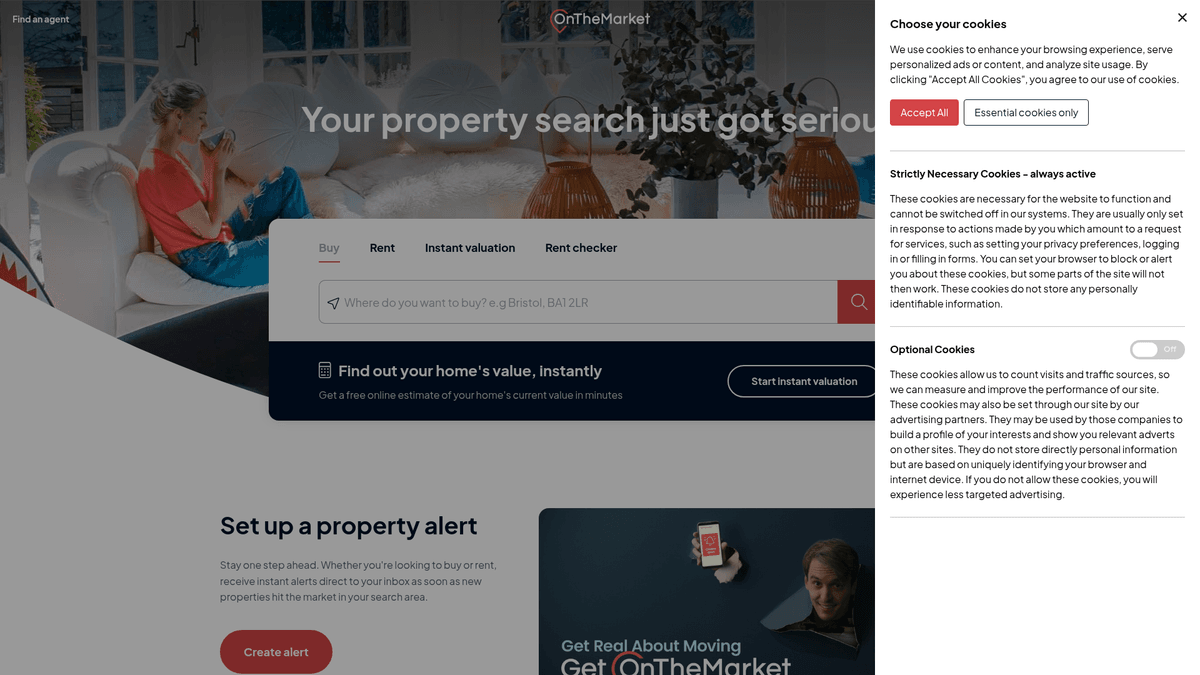
OnTheMarket is a premier UK property portal, launched in 2015 and currently majority-owned by the CoStar Group. It serves as a vital platform for estate agents to list residential and commercial properties for sale and rent across the United Kingdom. The site is a primary competitor to Rightmove and Zoopla, distinguished by its unique listing terms.
Data Availability
The platform hosts a massive repository of structured real estate information, including asking prices, detailed property specifications, high-resolution imagery, and floor plans. A significant feature is the "Only With Us" label, where properties appear on OnTheMarket 24 hours or more before being listed on other major portals, providing a distinct time advantage for data collection.
Scraping Potential
For real estate professionals and investors, scraping this platform is highly valuable for market analysis and trend tracking. Accessing this data at scale allows for the creation of automated valuation models (AVMs), competitive inventory monitoring, and the identification of motivated sellers through price drop detection without manual effort.
Why Scrape OnTheMarket?
Discover the business value and use cases for extracting data from OnTheMarket.
Access Exclusive 24-Hour Listings
OnTheMarket features an 'Only With Us' tag for properties listed exclusively on their platform for 24 hours before other portals. Scraping this data allows investors to identify and act on new opportunities before they reach the wider market.
Granular Market Trend Analysis
Extracting historical price changes and reduction dates helps analysts identify market cooling or heating in specific UK postcodes. This structured data is essential for building predictive models for property value fluctuations.
Estate Agent Performance Tracking
By monitoring which agencies list the most properties and how quickly those listings move to 'Under Offer' status, competitors can gain insights into local agency market share and efficiency.
Lead Generation for B2B Services
Companies providing home staging, photography, or legal services can use scraped data to identify recently listed properties and the agencies representing them. This allows for highly targeted outreach based on real-time activity.
Automated Valuation Model Training
Collecting property attributes such as floor area, tenure, and proximity to stations provides the raw material needed to train machine learning models. These models help fintech and proptech companies provide instant appraisal tools.
Regional Demand Mapping
Scraping listing volumes across different regions like London, Manchester, and Birmingham allows researchers to map national property demand. This data helps urban planners and developers understand where new housing is most needed.
Scraping Challenges
Technical challenges you may encounter when scraping OnTheMarket.
Advanced Anti-Bot Firewalls
OnTheMarket utilizes robust security layers like Cloudflare and Akamai to detect and block automated traffic. Simple HTTP requests often result in 403 Forbidden errors or immediate IP blacklisting.
JavaScript-Heavy Rendering
The website is built using modern frameworks like React and Next.js, meaning content is rendered dynamically. Scrapers that cannot execute JavaScript will fail to see property prices, descriptions, and agent details.
Sophisticated Data Obfuscation
Key data points like phone numbers and exact coordinates are often hidden within complex JSON script tags rather than raw HTML. This requires scrapers to locate and parse internal state objects like window.__OTM_DATA__.
Dynamic Element Selectors
The platform frequently updates its front-end code, leading to changes in CSS class names and ID patterns. Static scrapers based on fixed selectors often break, requiring constant maintenance and updates.
Scrape OnTheMarket with AI
No coding required. Extract data in minutes with AI-powered automation.
How It Works
Describe What You Need
Tell the AI what data you want to extract from OnTheMarket. Just type it in plain language — no coding or selectors needed.
AI Extracts the Data
Our artificial intelligence navigates OnTheMarket, handles dynamic content, and extracts exactly what you asked for.
Get Your Data
Receive clean, structured data ready to export as CSV, JSON, or send directly to your apps and workflows.
Why Use AI for Scraping
AI makes it easy to scrape OnTheMarket without writing any code. Our AI-powered platform uses artificial intelligence to understand what data you want — just describe it in plain language and the AI extracts it automatically.
How to scrape with AI:
- Describe What You Need: Tell the AI what data you want to extract from OnTheMarket. Just type it in plain language — no coding or selectors needed.
- AI Extracts the Data: Our artificial intelligence navigates OnTheMarket, handles dynamic content, and extracts exactly what you asked for.
- Get Your Data: Receive clean, structured data ready to export as CSV, JSON, or send directly to your apps and workflows.
Why use AI for scraping:
- Effortless Anti-Bot Navigation: Automatio is designed to bypass modern security measures like Cloudflare without requiring complex coding or manual header manipulation. It manages browser fingerprints and cookies to appear as a legitimate human user.
- Automated Residential Proxy Rotation: By integrating high-quality UK residential proxies, Automatio ensures your scraping requests originate from real local home-seeker IPs. This significantly reduces the risk of rate limiting and permanent IP bans.
- Visual Data Selection: You can select the property data you want to extract—such as price, agent, or tenure—by simply clicking on them in the browser. This eliminates the need to inspect complex HTML source code or write brittle XPath selectors.
- Reliable Schedule-Based Scraping: Automatio allows you to set up recurring scraping tasks that run daily or even hourly. This is perfect for capturing 'Only With Us' listings the moment they go live, giving you a consistent competitive advantage.
No-Code Web Scrapers for OnTheMarket
Point-and-click alternatives to AI-powered scraping
Several no-code tools like Browse.ai, Octoparse, Axiom, and ParseHub can help you scrape OnTheMarket. These tools use visual interfaces to select elements, but they come with trade-offs compared to AI-powered solutions.
Typical Workflow with No-Code Tools
Common Challenges
Learning curve
Understanding selectors and extraction logic takes time
Selectors break
Website changes can break your entire workflow
Dynamic content issues
JavaScript-heavy sites often require complex workarounds
CAPTCHA limitations
Most tools require manual intervention for CAPTCHAs
IP blocking
Aggressive scraping can get your IP banned
No-Code Web Scrapers for OnTheMarket
Several no-code tools like Browse.ai, Octoparse, Axiom, and ParseHub can help you scrape OnTheMarket. These tools use visual interfaces to select elements, but they come with trade-offs compared to AI-powered solutions.
Typical Workflow with No-Code Tools
- Install browser extension or sign up for the platform
- Navigate to the target website and open the tool
- Point-and-click to select data elements you want to extract
- Configure CSS selectors for each data field
- Set up pagination rules to scrape multiple pages
- Handle CAPTCHAs (often requires manual solving)
- Configure scheduling for automated runs
- Export data to CSV, JSON, or connect via API
Common Challenges
- Learning curve: Understanding selectors and extraction logic takes time
- Selectors break: Website changes can break your entire workflow
- Dynamic content issues: JavaScript-heavy sites often require complex workarounds
- CAPTCHA limitations: Most tools require manual intervention for CAPTCHAs
- IP blocking: Aggressive scraping can get your IP banned
Code Examples
import requests
from bs4 import BeautifulSoup

# OnTheMarket uses Cloudflare; standard requests often get 403 Forbidden
url = 'https://www.onthemarket.com/for-sale/property/london/'
headers = {
    'User-Agent': 'Mozilla/5.0 (Windows NT 10.0; Win64; x64) AppleWebKit/537.36 (KHTML, like Gecko) Chrome/119.0.0.0 Safari/537.36'
}

try:
    response = requests.get(url, headers=headers)
    response.raise_for_status()
    soup = BeautifulSoup(response.text, 'html.parser')
    # Selectors may change; look for list items containing results
    listings = soup.select('li[id^="result-"]')
    for item in listings:
        price = item.select_one('a.text-xl').text.strip() if item.select_one('a.text-xl') else 'N/A'
        address = item.select_one('address').text.strip() if item.select_one('address') else 'N/A'
        print(f'Price: {price} | Address: {address}')
except Exception as e:
    print(f'Scraping failed: {e}')
When to Use
Best for static HTML pages where content is loaded server-side. The fastest and simplest approach when JavaScript rendering isn't required.
Advantages
- ●Fastest execution (no browser overhead)
- ●Lowest resource consumption
- ●Easy to parallelize with asyncio
- ●Great for APIs and static pages
Limitations
- ●Cannot execute JavaScript
- ●Fails on SPAs and dynamic content
- ●May struggle with complex anti-bot systems
How to Scrape OnTheMarket with Code
Python + Requests
import requests
from bs4 import BeautifulSoup
# OnTheMarket uses Cloudflare; standard requests often get 403 Forbidden
url = 'https://www.onthemarket.com/for-sale/property/london/'
headers = {
'User-Agent': 'Mozilla/5.0 (Windows NT 10.0; Win64; x64) AppleWebKit/537.36 (KHTML, like Gecko) Chrome/119.0.0.0 Safari/537.36'
}
try:
response = requests.get(url, headers=headers)
response.raise_for_status()
soup = BeautifulSoup(response.text, 'html.parser')
# Selectors may change; look for list items containing results
listings = soup.select('li[id^="result-"]')
for item in listings:
price = item.select_one('a.text-xl').text.strip() if item.select_one('a.text-xl') else 'N/A'
address = item.select_one('address').text.strip() if item.select_one('address') else 'N/A'
print(f'Price: {price} | Address: {address}')
except Exception as e:
print(f'Scraping failed: {e}')Python + Playwright
from playwright.sync_api import sync_playwright

def scrape_otm():
    with sync_playwright() as p:
        browser = p.chromium.launch(headless=True)
        # Use a stealth-like context
        context = browser.new_context(user_agent='Mozilla/5.0 (Windows NT 10.0; Win64; x64) AppleWebKit/537.36')
        page = context.new_page()
        page.goto('https://www.onthemarket.com/for-sale/property/london/', wait_until='networkidle')

        # Wait for the results to hydrate
        page.wait_for_selector('li[id^="result-"]')

        listings = page.query_selector_all('li[id^="result-"]')
        for prop in listings:
            title = prop.query_selector('.text-sm.text-denim').inner_text()
            price = prop.query_selector('.text-xl.font-bold').inner_text()
            print({'title': title, 'price': price})

        browser.close()

scrape_otm()Python + Scrapy
import scrapy

class OnTheMarketSpider(scrapy.Spider):
    name = 'otm'
    start_urls = ['https://www.onthemarket.com/for-sale/property/london/']

    def parse(self, response):
        # Targets the main listing container list items
        for item in response.css('li[id^="result-"]'):
            yield {
                'price': item.css('.text-xl.font-bold::text').get(),
                'address': item.css('address span::text').get(),
                'agency': item.css('img::attr(alt)').get(),
                'link': response.urljoin(item.css('a::attr(href)').get())
            }

        next_page = response.css('link[rel="next"]::attr(href)').get()
        if next_page:
yield response.follow(next_page, self.parse)Node.js + Puppeteer
const puppeteer = require('puppeteer');

(async () => {
  const browser = await puppeteer.launch({ headless: true });
  const page = await browser.newPage();
  await page.setUserAgent('Mozilla/5.0 (Windows NT 10.0; Win64; x64) AppleWebKit/537.36');
  await page.goto('https://www.onthemarket.com/for-sale/property/london/', { waitUntil: 'networkidle2' });

  const data = await page.evaluate(() => {
    return Array.from(document.querySelectorAll('li[id^="result-"]')).map(li => ({
      price: li.querySelector('.text-xl')?.innerText.trim(),
      address: li.querySelector('address')?.innerText.trim()
    }));
  });

  console.log(data);
  await browser.close();
})();What You Can Do With OnTheMarket Data
Explore practical applications and insights from OnTheMarket data.
UK High-Yield Rental Scouting
Buy-to-let investors can identify properties with high potential ROI by comparing rental and sale data.
How to implement:
- 1Scrape sale listings and rental listings for the same postcodes.
- 2Match property types and bedroom counts to calculate yields.
- 3Identify areas where the price-to-rent ratio is most favorable.
- 4Filter for 'Only With Us' listings to secure deals before the wider market.
Use Automatio to extract data from OnTheMarket and build these applications without writing code.
What You Can Do With OnTheMarket Data
- UK High-Yield Rental Scouting
Buy-to-let investors can identify properties with high potential ROI by comparing rental and sale data.
- Scrape sale listings and rental listings for the same postcodes.
- Match property types and bedroom counts to calculate yields.
- Identify areas where the price-to-rent ratio is most favorable.
- Filter for 'Only With Us' listings to secure deals before the wider market.
- Automated Market Inventory Reports
Analysts can track the number of new listings versus sold properties to determine market heat.
- Run a daily scrape of listings in major UK cities.
- Count 'New' versus 'Sold STC' or 'Under Offer' labels.
- Calculate the average days-on-market for different price brackets.
- Visualize inventory trends over time in a dashboard.
- Agency Market Share Analysis
Estate agents can track competitor listing volumes to adjust their local marketing strategies.
- Extract the 'Agent Name' from all listings in a specific local authority.
- Aggregate the data to see which agency holds the most listings.
- Monitor agency pricing strategies and commission-based price drops.
- Adjust outreach to vendors based on competitor performance.
- Proptech Valuation API
Startups can build valuation tools using live market data as a primary training source.
- Scrape historical and current listing data including square footage.
- Clean data and handle outliers in price or size.
- Train a regression model to predict property values based on local attributes.
- Provide real-time estimates to users via an external API.
Supercharge your workflow with AI Automation
Automatio combines the power of AI agents, web automation, and smart integrations to help you accomplish more in less time.
What to get right first
Expert advice for successfully extracting data from OnTheMarket.
Parse the Internal OTM Data Script
Instead of parsing complex HTML, look for the script tag containing window.__OTM_DATA__ in the source code. This contains a structured JSON object with all the property details for that page in a much cleaner format.
Use Localized UK Proxies
Since OnTheMarket is a UK-focused site, using proxies based in London or other UK cities will lower the suspicion level of the anti-bot system. Data center IPs from outside the UK are much more likely to be challenged with CAPTCHAs.
Randomize Your Browsing Behavior
Introduce variable delays between page clicks and avoid following a strictly linear scraping path. Mimicking the erratic behavior of a real person looking for a house helps avoid triggering automated traffic alarms.
Target the Search Result JSON API
Observe the network tab while navigating search results to find the internal API endpoints used by the React front-end. Sometimes, hitting these endpoints directly with the right headers can be more efficient than full browser rendering.
Handle the Cookie Consent Wall
Ensure your scraper is configured to programmatically accept or dismiss the cookie consent banner. If the banner isn't cleared, it may overlay key elements and prevent the scraper from interacting with the data.
Monitor for Data Completeness
Some listing details only load as you scroll down the page due to lazy loading. Always ensure your scraper triggers a scroll-to-bottom action to ensure all images and descriptions are fully rendered before extraction.
Related Web Scraping
How to Scrape Century 21 Property Listings

How to Scrape Sacramento Delta Property Management

How to Scrape LivePiazza: Philadelphia Real Estate Scraper
How to Scrape HotPads: A Complete Guide to Extracting Rental Data

How to Scrape Locations Hawaii | Locations Hawaii Web Scraper

How to Scrape RE/MAX (remax.com) Real Estate Listings

How to Scrape Century 21: A Technical Real Estate Guide

How to Scrape Homes.com: Real Estate Data Extraction Guide
Frequently Asked Questions
Find answers to common questions about OnTheMarket