
How to Scrape SeekaHost: A Complete Web Scraping Guide
Learn how to scrape SeekaHost hosting plans, pricing, and domain data. Extract web hosting features and blog content for competitive market analysis.
Anti-Bot Protection Detected
- Cloudflare
- Enterprise-grade WAF and bot management. Uses JavaScript challenges, CAPTCHAs, and behavioral analysis. Requires browser automation with stealth settings.
- Rate Limiting
- Limits requests per IP/session over time. Can be bypassed with rotating proxies, request delays, and distributed scraping.
- User-Agent Blocking
- robots.txt
About SeekaHost
Learn what SeekaHost offers and what valuable data can be extracted from it.
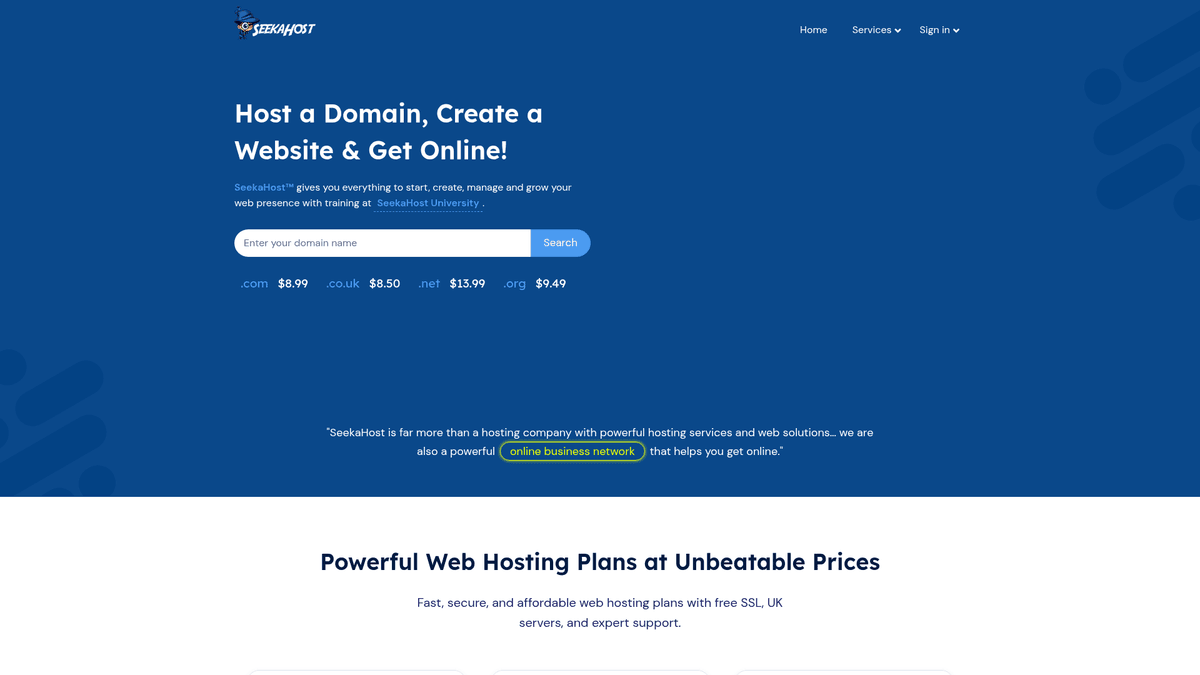
SeekaHost is a prominent global web hosting provider and domain registrar headquartered in London, UK. It offers a diverse range of services including personal, business, VPS, and WordPress hosting. It has gained significant traction in the SEO community for its specialized Private Blog Network (PBN) hosting and SEO-friendly IP solutions.
The website contains structured information regarding various hosting tiers, specific technical specifications like storage and bandwidth, and real-time pricing for hundreds of domain TLDs. It also features a comprehensive blog and the SeekaHost University, which provide a wealth of technical tutorials and digital marketing knowledge.
Scraping SeekaHost is particularly valuable for competitive analysis within the hosting industry. By extracting data from this site, businesses can monitor pricing fluctuations, compare feature sets against competitors, and aggregate high-quality technical content for research or informational purposes.
Why Scrape SeekaHost?
Discover the business value and use cases for extracting data from SeekaHost.
Competitive Pricing Benchmarking
Monitor SeekaHost's WordPress and PBN hosting price points to ensure your hosting reseller services or agency offers remain competitive.
PBN Feature Tracking
Extract specific details on unique IP classes and server locations which are critical for SEO professionals evaluating private blog network hosting.
Domain TLD Market Analysis
Scrape the domain registration page to track pricing trends across hundreds of TLD extensions and identify the best times for bulk domain acquisitions.
SEO Content Strategy Insights
Analyze the SeekaHost blog to identify trending digital marketing topics and SEO strategies that are currently gaining traction in the industry.
Lead Generation for Agencies
Gather hosting plan specifications to identify businesses using specific technologies that might benefit from specialized management or migration services.
Service Location Monitoring
Track the addition of new data centers and server locations to understand SeekaHost's global infrastructure expansion strategy.
Scraping Challenges
Technical challenges you may encounter when scraping SeekaHost.
Cloudflare WAF Protection
SeekaHost uses Cloudflare security, which can trigger CAPTCHAs or block requests that exhibit non-human browsing behavior or lack proper browser headers.
Dynamic Data Rendering
Pricing tables and technical specification lists are often loaded dynamically, requiring JavaScript execution to extract the final rendered data.
Aggressive Rate Limiting
Repeated fast-paced requests to the pricing pages can lead to temporary IP bans, making rotating proxies and human-like delays essential.
Frequent UI Modifications
As a marketing-heavy site, SeekaHost updates its layouts frequently, which can break scrapers that rely on static CSS selectors or fixed HTML structures.
Scrape SeekaHost with AI
No coding required. Extract data in minutes with AI-powered automation.
How It Works
Describe What You Need
Tell the AI what data you want to extract from SeekaHost. Just type it in plain language — no coding or selectors needed.
AI Extracts the Data
Our artificial intelligence navigates SeekaHost, handles dynamic content, and extracts exactly what you asked for.
Get Your Data
Receive clean, structured data ready to export as CSV, JSON, or send directly to your apps and workflows.
Why Use AI for Scraping
AI makes it easy to scrape SeekaHost without writing any code. Our AI-powered platform uses artificial intelligence to understand what data you want — just describe it in plain language and the AI extracts it automatically.
How to scrape with AI:
- Describe What You Need: Tell the AI what data you want to extract from SeekaHost. Just type it in plain language — no coding or selectors needed.
- AI Extracts the Data: Our artificial intelligence navigates SeekaHost, handles dynamic content, and extracts exactly what you asked for.
- Get Your Data: Receive clean, structured data ready to export as CSV, JSON, or send directly to your apps and workflows.
Why use AI for scraping:
- Visual Selection Tool: Easily select complex hosting pricing tables and technical grids using Automatio's point-and-click interface without writing a single line of code.
- Native JavaScript Handling: Automatio automatically renders the dynamic elements of the SeekaHost site, ensuring you capture the actual prices shown to users.
- Smart Anti-Bot Management: Bypass Cloudflare and other security layers using Automatio's built-in browser fingerprinting and advanced proxy rotation features.
- Automated Scheduling: Set your scraper to run on a daily or weekly schedule to automatically update your databases whenever SeekaHost changes their hosting rates or features.
- Direct Google Sheets Sync: Stream the extracted hosting data directly into Google Sheets for immediate use in your competitive analysis dashboards or pricing models.
No-Code Web Scrapers for SeekaHost
Point-and-click alternatives to AI-powered scraping
Several no-code tools like Browse.ai, Octoparse, Axiom, and ParseHub can help you scrape SeekaHost. These tools use visual interfaces to select elements, but they come with trade-offs compared to AI-powered solutions.
Typical Workflow with No-Code Tools
Common Challenges
Learning curve
Understanding selectors and extraction logic takes time
Selectors break
Website changes can break your entire workflow
Dynamic content issues
JavaScript-heavy sites often require complex workarounds
CAPTCHA limitations
Most tools require manual intervention for CAPTCHAs
IP blocking
Aggressive scraping can get your IP banned
No-Code Web Scrapers for SeekaHost
Several no-code tools like Browse.ai, Octoparse, Axiom, and ParseHub can help you scrape SeekaHost. These tools use visual interfaces to select elements, but they come with trade-offs compared to AI-powered solutions.
Typical Workflow with No-Code Tools
- Install browser extension or sign up for the platform
- Navigate to the target website and open the tool
- Point-and-click to select data elements you want to extract
- Configure CSS selectors for each data field
- Set up pagination rules to scrape multiple pages
- Handle CAPTCHAs (often requires manual solving)
- Configure scheduling for automated runs
- Export data to CSV, JSON, or connect via API
Common Challenges
- Learning curve: Understanding selectors and extraction logic takes time
- Selectors break: Website changes can break your entire workflow
- Dynamic content issues: JavaScript-heavy sites often require complex workarounds
- CAPTCHA limitations: Most tools require manual intervention for CAPTCHAs
- IP blocking: Aggressive scraping can get your IP banned
Code Examples
import requests
from bs4 import BeautifulSoup

headers = {
    'User-Agent': 'Mozilla/5.0 (Windows NT 10.0; Win64; x64) AppleWebKit/537.36 (KHTML, like Gecko) Chrome/91.0.4472.124 Safari/537.36'
}

url = 'https://www.seekahost.com/personal-web-hosting/'

try:
    response = requests.get(url, headers=headers, timeout=10)
    response.raise_for_status()
    soup = BeautifulSoup(response.text, 'html.parser')
    plans = soup.find_all('div', class_='pricing-table')
    for plan in plans:
        name = plan.find('h3').get_text(strip=True)
        price = plan.find('span', class_='price').get_text(strip=True)
        print(f'Plan: {name}, Price: {price}')
except Exception as e:
    print(f'Error: {e}')
When to Use
Best for static HTML pages where content is loaded server-side. The fastest and simplest approach when JavaScript rendering isn't required.
Advantages
- ●Fastest execution (no browser overhead)
- ●Lowest resource consumption
- ●Easy to parallelize with asyncio
- ●Great for APIs and static pages
Limitations
- ●Cannot execute JavaScript
- ●Fails on SPAs and dynamic content
- ●May struggle with complex anti-bot systems
How to Scrape SeekaHost with Code
Python + Requests
import requests
from bs4 import BeautifulSoup
headers = {
'User-Agent': 'Mozilla/5.0 (Windows NT 10.0; Win64; x64) AppleWebKit/537.36 (KHTML, like Gecko) Chrome/91.0.4472.124 Safari/537.36'
}
url = 'https://www.seekahost.com/personal-web-hosting/'
try:
response = requests.get(url, headers=headers, timeout=10)
response.raise_for_status()
soup = BeautifulSoup(response.text, 'html.parser')
plans = soup.find_all('div', class_='pricing-table')
for plan in plans:
name = plan.find('h3').get_text(strip=True)
price = plan.find('span', class_='price').get_text(strip=True)
print(f'Plan: {name}, Price: {price}')
except Exception as e:
print(f'Error: {e}')Python + Playwright
from playwright.sync_api import sync_playwright

def scrape_seekahost():
    with sync_playwright() as p:
        browser = p.chromium.launch(headless=True)
        page = browser.new_page()
        page.goto('https://www.seekahost.com/blog/', wait_until='networkidle')
        titles = page.locator('h4 a').all_text_contents()
        for title in titles:
            print(f'Post Title: {title.strip()}')
        browser.close()

if __name__ == '__main__':
scrape_seekahost()Python + Scrapy
import scrapy

class SeekaHostSpider(scrapy.Spider):
    name = 'seekahost_spider'
    start_urls = ['https://www.seekahost.com/blog/']

    def parse(self, response):
        for post in response.css('div.blog-item'):
            yield {
                'title': post.css('h4 a::text').get().strip(),
                'author': post.css('span.author a::text').get(),
                'date': post.css('span.date::text').get(),
            }
        next_page = response.css('a.next::attr(href)').get()
        if next_page:
yield response.follow(next_page, self.parse)Node.js + Puppeteer
const puppeteer = require('puppeteer');

(async () => {
    const browser = await puppeteer.launch();
    const page = await browser.newPage();
    await page.setUserAgent('Mozilla/5.0 (Windows NT 10.0; Win64; x64) AppleWebKit/537.36');
    await page.goto('https://www.seekahost.com/domain-pricing/', { waitUntil: 'networkidle2' });
    const pricingData = await page.evaluate(() => {
        const rows = Array.from(document.querySelectorAll('table tr'));
        return rows.slice(1).map(row => ({
            tld: row.cells[0]?.innerText.trim(),
            price: row.cells[1]?.innerText.trim()
        }));
    });
    console.log(pricingData);
    await browser.close();
})();What You Can Do With SeekaHost Data
Explore practical applications and insights from SeekaHost data.
Hosting Comparison Engine
Create a tool for users to compare SeekaHost's 'cheapest hosting' plans with other major providers.
How to implement:
- 1Scrape SeekaHost plan features and prices daily.
- 2Scrape similar data from competitors like Bluehost.
- 3Normalize data fields like storage and SSL status.
- 4Update a frontend dashboard with a comparison matrix.
Use Automatio to extract data from SeekaHost and build these applications without writing code.
What You Can Do With SeekaHost Data
- Hosting Comparison Engine
Create a tool for users to compare SeekaHost's 'cheapest hosting' plans with other major providers.
- Scrape SeekaHost plan features and prices daily.
- Scrape similar data from competitors like Bluehost.
- Normalize data fields like storage and SSL status.
- Update a frontend dashboard with a comparison matrix.
- SEO Market Intelligence
Analyze trends in specialized PBN (Private Blog Network) hosting pricing and availability.
- Extract pricing for A, B, and C Class IP hosting packages.
- Track availability changes of specific technical services.
- Correlate pricing changes with broader SEO industry shifts.
- Generate a quarterly market report for SEO professionals.
- Automated Content Curator
Aggregate technical tutorials and server management guides for a niche developer community.
- Monitor the SeekaHost blog for new articles.
- Scrape title, full text, and category of new posts.
- Summarize content using AI tools.
- Post summaries to a curated newsletter or Twitter feed.
- Domain Reseller Alerts
Monitor TLD pricing to alert resellers when domain registration costs drop.
- Scrape the Domain Pricing page every 24 hours.
- Compare current prices against a historical database.
- Trigger alerts if a target TLD drops below a specific price.
- Notify resellers via automated Slack or email alerts.
Supercharge your workflow with AI Automation
Automatio combines the power of AI agents, web automation, and smart integrations to help you accomplish more in less time.
What to get right first
Expert advice for successfully extracting data from SeekaHost.
Prioritize Residential Proxies
Using residential IP addresses reduces the risk of being flagged by Cloudflare's security system compared to using standard datacenter proxies.
Use Network Idle Waiting
Always configure your scraper to wait for the network to be idle to ensure all pricing scripts have finished loading before data extraction begins.
Randomize Interaction Delays
Add variable delays between page loads and interactions to mimic a human user browsing the hosting plans and blog sections.
Target XML Sitemaps
For blog scraping, use the site's XML sitemap to get a direct list of all article URLs rather than crawling the main blog pagination repeatedly.
Verify Mobile Viewports
Check if the data is presented more simply on mobile viewports, as some hosting sites simplify their pricing tables for smaller screens.
Capture Metadata and Tags
When scraping the blog, extract category tags and author metadata to better categorize industry trends in your final dataset.
Related Web Scraping

How to Scrape GitHub | The Ultimate 2025 Technical Guide

How to Scrape Pollen.com: Local Allergy Data Extraction Guide

How to Scrape Britannica: Educational Data Web Scraper

How to Scrape RethinkEd: A Technical Data Extraction Guide

How to Scrape Wikipedia: The Ultimate Web Scraping Guide

How to Scrape Weather.com: A Guide to Weather Data Extraction

How to Scrape Worldometers for Real-Time Global Statistics

How to Scrape American Museum of Natural History (AMNH)
Frequently Asked Questions
Find answers to common questions about SeekaHost