
How to Scrape WebElements: Periodic Table Data Guide
Extract precise chemical element data from WebElements. Scrape atomic weights, physical properties, and discovery history for research and AI applications.
About WebElements
Learn what WebElements offers and what valuable data can be extracted from it.
WebElements is a premier online periodic table maintained by Mark Winter at the University of Sheffield. Launched in 1993, it was the first periodic table on the World Wide Web and has since become a high-authority resource for students, academics, and professional chemists. The site offers deep, structured data on every known chemical element, from standard atomic weights to complex electronic configurations.
The value of scraping WebElements lies in its high-quality, peer-reviewed scientific data. For developers building educational tools, researchers conducting trend analysis across the periodic table, or materials scientists training machine learning models, WebElements provides a reliable and technically rich source of truth that is difficult to aggregate manually.
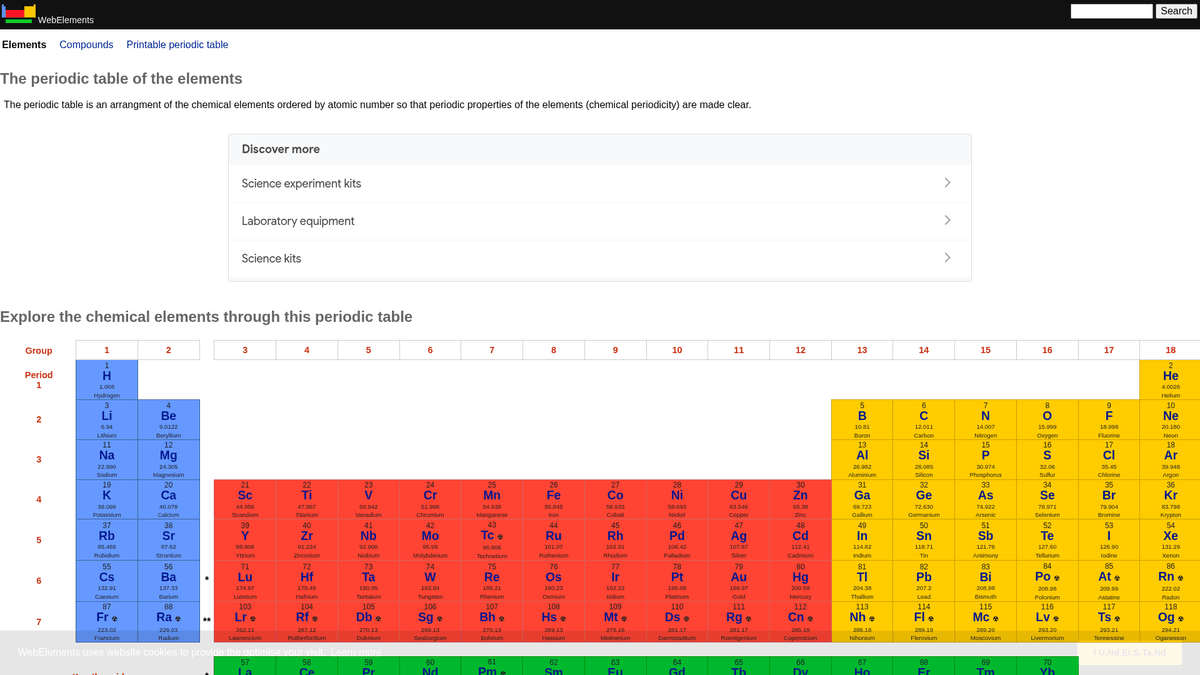
Why Scrape WebElements?
Discover the business value and use cases for extracting data from WebElements.
Scientific Database Population
Aggregate peer-reviewed atomic and chemical data into centralized databases for academic research and large-scale material analysis.
Educational Tool Development
Extract structured facts to power custom periodic table applications, mobile learning platforms, and interactive classroom flashcards.
Predictive Materials Modeling
Gather numerical properties like atomic radii and electronegativity as training features for machine learning models in materials science.
Chemical Informatics Integration
Integrate comprehensive isotope and thermodynamic data directly into laboratory management systems and stoichiometry calculation software.
Historical Scientific Timelines
Collect discovery dates, origin of names, and historical context for all 118 elements to create digital scientific chronologies.
Scraping Challenges
Technical challenges you may encounter when scraping WebElements.
Fragmented Sub-page Structure
Data for a single element is often split across multiple specific sub-URLs like /atoms, /history, or /compounds, requiring a multi-step crawl.
Special Symbol Encoding
Correctly parsing and storing scientific notation, superscripts, subscripts, and Greek characters requires strict UTF-8 handling to avoid data corruption.
Unit Normalization Requirements
Extracting raw numerical data requires programmatically stripping units such as 'pm', 'K', or 'g cm-3' and converting scientific notation into standard floats.
Label-Based Table Variations
Data is stored in generic tables without unique IDs, meaning scrapers must identify fields by checking the text content of labels rather than CSS classes.
Scrape WebElements with AI
No coding required. Extract data in minutes with AI-powered automation.
How It Works
Describe What You Need
Tell the AI what data you want to extract from WebElements. Just type it in plain language — no coding or selectors needed.
AI Extracts the Data
Our artificial intelligence navigates WebElements, handles dynamic content, and extracts exactly what you asked for.
Get Your Data
Receive clean, structured data ready to export as CSV, JSON, or send directly to your apps and workflows.
Why Use AI for Scraping
AI makes it easy to scrape WebElements without writing any code. Our AI-powered platform uses artificial intelligence to understand what data you want — just describe it in plain language and the AI extracts it automatically.
How to scrape with AI:
- Describe What You Need: Tell the AI what data you want to extract from WebElements. Just type it in plain language — no coding or selectors needed.
- AI Extracts the Data: Our artificial intelligence navigates WebElements, handles dynamic content, and extracts exactly what you asked for.
- Get Your Data: Receive clean, structured data ready to export as CSV, JSON, or send directly to your apps and workflows.
Why use AI for scraping:
- Visual Data Mapping: Use a point-and-click interface to map complex chemical properties to specific data fields without writing custom CSS selectors or XPaths.
- Recursive Link Following: Easily configure the tool to visit the main periodic table and automatically follow links to every element and its corresponding sub-pages.
- Automatic Data Cleaning: Utilize built-in formatting tools to automatically strip scientific units and symbols during the extraction process, ensuring clean numerical outputs.
- Scheduled Monitoring: Set the scraper to run automatically at intervals to capture updates to atomic weights or newly discovered properties as IUPAC confirms them.
No-Code Web Scrapers for WebElements
Point-and-click alternatives to AI-powered scraping
Several no-code tools like Browse.ai, Octoparse, Axiom, and ParseHub can help you scrape WebElements. These tools use visual interfaces to select elements, but they come with trade-offs compared to AI-powered solutions.
Typical Workflow with No-Code Tools
Common Challenges
Learning curve
Understanding selectors and extraction logic takes time
Selectors break
Website changes can break your entire workflow
Dynamic content issues
JavaScript-heavy sites often require complex workarounds
CAPTCHA limitations
Most tools require manual intervention for CAPTCHAs
IP blocking
Aggressive scraping can get your IP banned
No-Code Web Scrapers for WebElements
Several no-code tools like Browse.ai, Octoparse, Axiom, and ParseHub can help you scrape WebElements. These tools use visual interfaces to select elements, but they come with trade-offs compared to AI-powered solutions.
Typical Workflow with No-Code Tools
- Install browser extension or sign up for the platform
- Navigate to the target website and open the tool
- Point-and-click to select data elements you want to extract
- Configure CSS selectors for each data field
- Set up pagination rules to scrape multiple pages
- Handle CAPTCHAs (often requires manual solving)
- Configure scheduling for automated runs
- Export data to CSV, JSON, or connect via API
Common Challenges
- Learning curve: Understanding selectors and extraction logic takes time
- Selectors break: Website changes can break your entire workflow
- Dynamic content issues: JavaScript-heavy sites often require complex workarounds
- CAPTCHA limitations: Most tools require manual intervention for CAPTCHAs
- IP blocking: Aggressive scraping can get your IP banned
Code Examples
import requests
from bs4 import BeautifulSoup
import time

# Target URL for a specific element (e.g., Gold)
url = 'https://www.webelements.com/gold/'
headers = {'User-Agent': 'Mozilla/5.0 (Windows NT 10.0; Win64; x64) AppleWebKit/537.36 (KHTML, like Gecko) Chrome/91.0.4472.124 Safari/537.36'}

def scrape_element(element_url):
    try:
        response = requests.get(element_url, headers=headers)
        response.raise_for_status()
        soup = BeautifulSoup(response.text, 'html.parser')

        # Extracting the element name from the H1 tag
        name = soup.find('h1').get_text().strip()

        # Extracting Atomic Number using table label logic
        atomic_number = soup.find('th', string=lambda s: s and 'Atomic number' in s).find_next('td').text.strip()

        print(f'Element: {name}, Atomic Number: {atomic_number}')
    except Exception as e:
        print(f'An error occurred: {e}')

# Following robots.txt recommendations
time.sleep(1)
scrape_element(url)
When to Use
Best for static HTML pages where content is loaded server-side. The fastest and simplest approach when JavaScript rendering isn't required.
Advantages
- ●Fastest execution (no browser overhead)
- ●Lowest resource consumption
- ●Easy to parallelize with asyncio
- ●Great for APIs and static pages
Limitations
- ●Cannot execute JavaScript
- ●Fails on SPAs and dynamic content
- ●May struggle with complex anti-bot systems
How to Scrape WebElements with Code
Python + Requests
import requests
from bs4 import BeautifulSoup
import time
# Target URL for a specific element (e.g., Gold)
url = 'https://www.webelements.com/gold/'
headers = {'User-Agent': 'Mozilla/5.0 (Windows NT 10.0; Win64; x64) AppleWebKit/537.36 (KHTML, like Gecko) Chrome/91.0.4472.124 Safari/537.36'}
def scrape_element(element_url):
try:
response = requests.get(element_url, headers=headers)
response.raise_for_status()
soup = BeautifulSoup(response.text, 'html.parser')
# Extracting the element name from the H1 tag
name = soup.find('h1').get_text().strip()
# Extracting Atomic Number using table label logic
atomic_number = soup.find('th', string=lambda s: s and 'Atomic number' in s).find_next('td').text.strip()
print(f'Element: {name}, Atomic Number: {atomic_number}')
except Exception as e:
print(f'An error occurred: {e}')
# Following robots.txt recommendations
time.sleep(1)
scrape_element(url)Python + Playwright
from playwright.sync_api import sync_playwright

def run():
    with sync_playwright() as p:
        browser = p.chromium.launch(headless=True)
        page = browser.new_page()
        # Elements are linked from the main periodic table
        page.goto('https://www.webelements.com/iron/')

        # Wait for the property table to be present
        page.wait_for_selector('table')

        element_data = {
            'name': page.inner_text('h1'),
            'density': page.locator('th:has-text("Density") + td').inner_text().strip()
        }

        print(element_data)
        browser.close()

run()Python + Scrapy
import scrapy

class ElementsSpider(scrapy.Spider):
    name = 'elements'
    start_urls = ['https://www.webelements.com/']

    def parse(self, response):
        # Follow every element link in the periodic table
        for link in response.css('table a[title]::attr(href)'):
            yield response.follow(link, self.parse_element)

    def parse_element(self, response):
        yield {
            'name': response.css('h1::text').get().strip(),
            'symbol': response.xpath('//th[contains(text(), "Symbol")]/following-sibling::td/text()').get().strip(),
            'atomic_number': response.xpath('//th[contains(text(), "Atomic number")]/following-sibling::td/text()').get().strip(),
}Node.js + Puppeteer
const puppeteer = require('puppeteer');

(async () => {
  const browser = await puppeteer.launch();
  const page = await browser.newPage();
  await page.goto('https://www.webelements.com/silver/');

  const data = await page.evaluate(() => {
    const name = document.querySelector('h1').innerText;
    const meltingPoint = Array.from(document.querySelectorAll('th'))
      .find(el => el.textContent.includes('Melting point'))
      ?.nextElementSibling.innerText;
    return { name, meltingPoint };
  });

  console.log('Extracted Data:', data);
  await browser.close();
})();What You Can Do With WebElements Data
Explore practical applications and insights from WebElements data.
Materials Science AI Training
Training machine learning models to predict the properties of new alloys based on elemental attributes.
How to implement:
- 1Extract physical properties for all metallic elements.
- 2Clean and normalize values like density and melting points.
- 3Input the data into regression or predictive material models.
- 4Verify predictions against existing experimental alloy data.
Use Automatio to extract data from WebElements and build these applications without writing code.
What You Can Do With WebElements Data
- Materials Science AI Training
Training machine learning models to predict the properties of new alloys based on elemental attributes.
- Extract physical properties for all metallic elements.
- Clean and normalize values like density and melting points.
- Input the data into regression or predictive material models.
- Verify predictions against existing experimental alloy data.
- Educational App Content
Populating interactive periodic tables for chemistry students with peer-reviewed data.
- Scrape atomic numbers, symbols, and element descriptions.
- Extract historical context and discovery details.
- Organize the data by periodic group and block.
- Integrate into a user interface with visual crystal structures.
- Chemical Trend Analysis
Visualizing periodic trends like ionization energy or atomic radius across periods and groups.
- Gather property data for every element in numerical order.
- Categorize elements into their respective groups.
- Use graphing libraries to visualize trends.
- Identify and analyze anomalous data points in specific blocks.
- Lab Inventory Management
Auto-populating chemical management systems with physical safety and density data.
- Map internal inventory list to WebElements entries.
- Scrape density, storage hazards, and melting point data.
- Update the centralized lab database via API.
- Generate automated safety warnings for high-risk elements.
Supercharge your workflow with AI Automation
Automatio combines the power of AI agents, web automation, and smart integrations to help you accomplish more in less time.
What to get right first
Expert advice for successfully extracting data from WebElements.
Leverage Predictable URL Patterns
Elements follow a consistent /element_name/ structure, allowing you to generate target URLs programmatically for all 118 elements instead of crawling the homepage.
Identify Data via Sibling Selectors
Since the site lacks unique element IDs, identify data points by locating the label cell text (e.g., 'Melting point') and selecting the immediate next sibling 'td'.
Ensure UTF-8 Support
Always set your scraping environment to UTF-8 to correctly capture scientific characters like Å, ±, and Greek letters common in chemical notation.
Implement Crawl Delays
As an academic resource hosted by the University of Sheffield, it is best practice to follow the robots.txt delay of 1 second to avoid overloading the server.
Target Granular Sub-pages
For high-precision data such as specific isotope half-lives, scrape the dedicated /isotopes.html sub-pages rather than summary pages for better accuracy.
Related Web Scraping

How to Scrape GitHub | The Ultimate 2025 Technical Guide

How to Scrape Pollen.com: Local Allergy Data Extraction Guide

How to Scrape Britannica: Educational Data Web Scraper

How to Scrape RethinkEd: A Technical Data Extraction Guide

How to Scrape Wikipedia: The Ultimate Web Scraping Guide

How to Scrape Weather.com: A Guide to Weather Data Extraction

How to Scrape Worldometers for Real-Time Global Statistics

How to Scrape American Museum of Natural History (AMNH)
Frequently Asked Questions
Find answers to common questions about WebElements