
アメリカ自然史博物館(AMNH)のデータをスクレイピングする方法
アメリカ自然史博物館(AMNH)のデータをスクレイピング。科学研究や教育目的のために、標本、展示、アーカイブ情報を抽出します。
ボット対策検出
- Cloudflare
- エンタープライズ級のWAFとボット管理。JavaScriptチャレンジ、CAPTCHA、行動分析を使用。ステルス設定でのブラウザ自動化が必要。
- レート制限
- 時間あたりのIP/セッションごとのリクエストを制限。ローテーションプロキシ、リクエスト遅延、分散スクレイピングで回避可能。
- IPブロック
- 既知のデータセンターIPとフラグ付きアドレスをブロック。効果的に回避するにはレジデンシャルまたはモバイルプロキシが必要。
- ブラウザフィンガープリント
- ブラウザの特性でボットを識別:canvas、WebGL、フォント、プラグイン。スプーフィングまたは実際のブラウザプロファイルが必要。
American Museum of Natural Historyについて
American Museum of Natural Historyが提供するものと抽出可能な貴重なデータを発見してください。
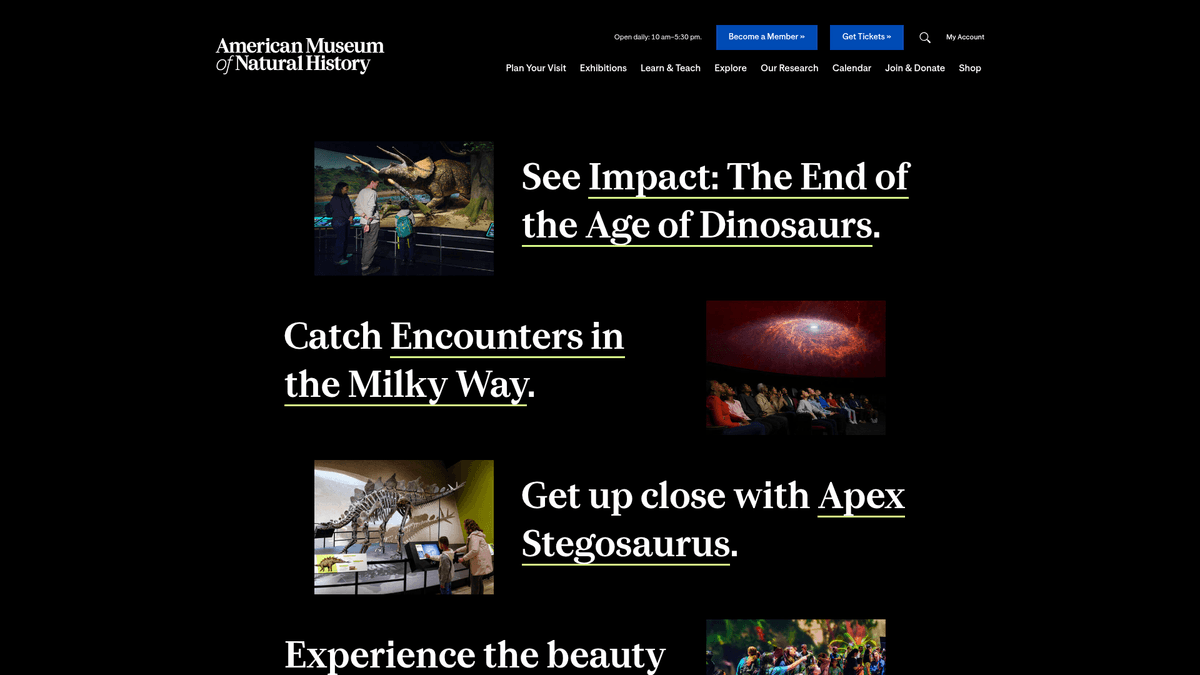
ニューヨーク市にあるアメリカ自然史博物館(AMNH)は、世界でも有数の科学・文化機関の一つです。1869年に設立された同博物館は、幅広い科学研究や教育プログラムを実施しており、3,400万点を超える標本や人工遺物の膨大なコレクションを収蔵しています。特に恐竜ホール、海洋生物の展示、ローズ地球宇宙センターで有名です。
ウェブサイトには、考古学、民族誌学、生物学のコレクションに関する広範なデータベースが含まれています。これらのデジタルアーカイブには、高解像度の画像、標本の詳細なメタデータ、地理的な発見データ、歴史的記録が含まれています。これらのアーカイブは、data.amnh.orgやdigitalcollections.amnh.orgを含む様々なサブドメインでホストされています。
研究者、学生、データサイエンティストにとって、このリポジトリは数十億年にわたる地球の歴史を網羅する豊富な情報を提供します。このデータのスクレイピングは、現代の生物多様性研究、デジタル保存、および歴史的な科学遠征の追跡に不可欠です。
なぜAmerican Museum of Natural Historyをスクレイピングするのか?
American Museum of Natural Historyからのデータ抽出のビジネス価値とユースケースを発見してください。
学術および科学研究
生物多様性と種のモニタリング
教育コンテンツの集約
歴史的および文化的分析
アーカイブ保存とデジタルカタログ作成
科学スタッフと出版物の追跡
スクレイピングの課題
American Museum of Natural Historyのスクレイピング時に遭遇する可能性のある技術的課題。
Cloudflareによる強力なアンチボット保護
検索結果の動的なコンテンツ読み込み
APIレスポンスにおける複雑なネストされたJSON構造
研究用サブドメインでの厳格なレート制限
フロントエンドのCSSセレクターの頻繁な変更
American Museum of Natural HistoryをAIでスクレイピング
コーディング不要。AI搭載の自動化で数分でデータを抽出。
仕組み
必要なものを記述
American Museum of Natural Historyから抽出したいデータをAIに伝えてください。自然言語で入力するだけ — コードやセレクターは不要です。
AIがデータを抽出
人工知能がAmerican Museum of Natural Historyをナビゲートし、動的コンテンツを処理し、あなたが求めたものを正確に抽出します。
データを取得
CSV、JSONでエクスポートしたり、アプリやワークフローに直接送信できる、クリーンで構造化されたデータを受け取ります。
なぜスクレイピングにAIを使うのか
AIを使えば、コードを書かずにAmerican Museum of Natural Historyを簡単にスクレイピングできます。人工知能搭載のプラットフォームが必要なデータを理解します — 自然言語で記述するだけで、AIが自動的に抽出します。
How to scrape with AI:
- 必要なものを記述: American Museum of Natural Historyから抽出したいデータをAIに伝えてください。自然言語で入力するだけ — コードやセレクターは不要です。
- AIがデータを抽出: 人工知能がAmerican Museum of Natural Historyをナビゲートし、動的コンテンツを処理し、あなたが求めたものを正確に抽出します。
- データを取得: CSV、JSONでエクスポートしたり、アプリやワークフローに直接送信できる、クリーンで構造化されたデータを受け取ります。
Why use AI for scraping:
- 複雑なナビゲーションにコーディングが不要
- 動的なJavaScriptレンダリングを自動的に処理
- データ同期のためのスケジュール実行
- ローカルIPの禁止を防ぐクラウド実行
- Google スプレッドシートやJSON APIへの直接エクスポート
American Museum of Natural History用ノーコードWebスクレイパー
AI搭載スクレイピングのポイント&クリック代替手段
Browse.ai、Octoparse、Axiom、ParseHubなどのノーコードツールは、コードを書かずにAmerican Museum of Natural Historyをスクレイピングするのに役立ちます。これらのツールは視覚的なインターフェースを使用してデータを選択しますが、複雑な動的コンテンツやアンチボット対策には苦戦する場合があります。
ノーコードツールでの一般的なワークフロー
一般的な課題
学習曲線
セレクタと抽出ロジックの理解に時間がかかる
セレクタの破損
Webサイトの変更によりワークフロー全体が壊れる可能性がある
動的コンテンツの問題
JavaScript多用サイトは複雑な回避策が必要
CAPTCHAの制限
ほとんどのツールはCAPTCHAに手動介入が必要
IPブロック
過度なスクレイピングはIPのブロックにつながる可能性がある
American Museum of Natural History用ノーコードWebスクレイパー
Browse.ai、Octoparse、Axiom、ParseHubなどのノーコードツールは、コードを書かずにAmerican Museum of Natural Historyをスクレイピングするのに役立ちます。これらのツールは視覚的なインターフェースを使用してデータを選択しますが、複雑な動的コンテンツやアンチボット対策には苦戦する場合があります。
ノーコードツールでの一般的なワークフロー
- ブラウザ拡張機能をインストールするかプラットフォームに登録する
- ターゲットWebサイトに移動してツールを開く
- ポイント&クリックで抽出するデータ要素を選択する
- 各データフィールドのCSSセレクタを設定する
- 複数ページをスクレイピングするためのページネーションルールを設定する
- CAPTCHAに対処する(多くの場合手動解決が必要)
- 自動実行のスケジュールを設定する
- データをCSV、JSONにエクスポートするかAPIで接続する
一般的な課題
- 学習曲線: セレクタと抽出ロジックの理解に時間がかかる
- セレクタの破損: Webサイトの変更によりワークフロー全体が壊れる可能性がある
- 動的コンテンツの問題: JavaScript多用サイトは複雑な回避策が必要
- CAPTCHAの制限: ほとんどのツールはCAPTCHAに手動介入が必要
- IPブロック: 過度なスクレイピングはIPのブロックにつながる可能性がある
コード例
import requests
from bs4 import BeautifulSoup

# 博物館のスタッフディレクトリのターゲットURL
url = 'https://www.amnh.org/research/staff-directory'
headers = {'User-Agent': 'Mozilla/5.0 (Windows NT 10.0; Win64; x64) AppleWebKit/537.36'}

try:
    response = requests.get(url, headers=headers)
    response.raise_for_status()
    soup = BeautifulSoup(response.text, 'html.parser')

    # スタッフメンバーを抽出
    staff_list = soup.select('.staff-member-card')
    for staff in staff_list:
        name = staff.select_one('.name').text.strip()
        print(f'Staff Name: {name}')
except Exception as e:
    print(f'Error: {e}')
いつ使うか
JavaScriptが最小限の静的HTMLページに最適。ブログ、ニュースサイト、シンプルなEコマース製品ページに理想的。
メリット
- ●最速の実行(ブラウザオーバーヘッドなし)
- ●最小限のリソース消費
- ●asyncioで簡単に並列化
- ●APIと静的ページに最適
制限事項
- ●JavaScriptを実行できない
- ●SPAや動的コンテンツで失敗
- ●複雑なアンチボットシステムで苦戦する可能性
コードでAmerican Museum of Natural Historyをスクレイピングする方法
Python + Requests
import requests
from bs4 import BeautifulSoup
# 博物館のスタッフディレクトリのターゲットURL
url = 'https://www.amnh.org/research/staff-directory'
headers = {'User-Agent': 'Mozilla/5.0 (Windows NT 10.0; Win64; x64) AppleWebKit/537.36'}
try:
response = requests.get(url, headers=headers)
response.raise_for_status()
soup = BeautifulSoup(response.text, 'html.parser')
# スタッフメンバーを抽出
staff_list = soup.select('.staff-member-card')
for staff in staff_list:
name = staff.select_one('.name').text.strip()
print(f'Staff Name: {name}')
except Exception as e:
print(f'Error: {e}')Python + Playwright
from playwright.sync_api import sync_playwright

def run():
    with sync_playwright() as p:
        browser = p.chromium.launch(headless=True)
        page = browser.new_page()
        page.goto('https://data.amnh.org/anthropology/collections')

        # 動的な結果の読み込みを待機
        page.wait_for_selector('.specimen-result-item')

        # データを抽出
        items = page.eval_on_selector_all('.specimen-result-item', 'elements => elements.map(e => e.innerText)')
        for item in items:
            print(item)

        browser.close()
run()Python + Scrapy
import scrapy

class AmnhSpider(scrapy.Spider):
    name = 'amnh'
    start_urls = ['https://www.amnh.org/exhibitions']

    def parse(self, response):
        # 展示のタイトルとリンクをスクレイピング
        for exhibit in response.css('.exhibit-card'):
            yield {
                'title': exhibit.css('.title::text').get(),
                'link': exhibit.css('a::attr(href)').get()
            }

        # ページネーションがあればたどる
        next_page = response.css('a.next::attr(href)').get()
        if next_page:
yield response.follow(next_page, self.parse)Node.js + Puppeteer
const puppeteer = require('puppeteer');

(async () => {
  const browser = await puppeteer.launch();
  const page = await browser.newPage();
  await page.goto('https://www.amnh.org/calendar');

  // カレンダーイベントの読み込みを待機
  await page.waitForSelector('.event-item');

  const events = await page.evaluate(() => {
    return Array.from(document.querySelectorAll('.event-item')).map(event => ({
      title: event.querySelector('.event-title').innerText,
      date: event.querySelector('.event-date').innerText
    }));
  });

  console.log(events);
  await browser.close();
})();American Museum of Natural Historyデータで何ができるか
American Museum of Natural Historyデータからの実用的なアプリケーションとインサイトを探索してください。
生物多様性モニタリングシステム
生物標本の記録を集計し、歴史的な種の分布マップを作成します。
実装方法:
- 1標本の発見座標と日付をスクレイピングする。
- 2マッピングのために地理データを正規化する。
- 3GISソフトウェアにデータを統合し、時間の経過に伴う個体数の変化を分析する。
Automatioを使用してAmerican Museum of Natural Historyからデータを抽出し、コードを書かずにこれらのアプリケーションを構築しましょう。
American Museum of Natural Historyデータで何ができるか
- 生物多様性モニタリングシステム
生物標本の記録を集計し、歴史的な種の分布マップを作成します。
- 標本の発見座標と日付をスクレイピングする。
- マッピングのために地理データを正規化する。
- GISソフトウェアにデータを統合し、時間の経過に伴う個体数の変化を分析する。
- 教育コンテンツハブ
学生が高品質な博物館の展示をリモートで探索できる自動ポータルを作成します。
- 高解像度の画像と詳細な展示テキストを抽出する。
- 科学分野(古生物学、動物学など)ごとにデータを分類する。
- 新しい展示データでポータルを毎週更新する。
- 研究スタッフディレクトリ
学術的なコラボレーションを促進するために、専門の科学者のデータベースを構築します。
- 研究スタッフのディレクトリから名前、役割、メールアドレスをスクレイピングする。
- 専門分野ごとにプロフィールをインデックス化する。
- 新しい研究論文やブログ投稿のアラートを設定する。
- 歴史的遺物インデックス
文化研究のために、民族誌アイテムの検索可能なカタログを開発します。
- 人類学データベースからカタログ番号と文化的な説明をスクレイピングする。
- 材料タイプと地理的起源を照合する。
- 異なる文明間の芸術的傾向を分析する。
- 博物館イベントトラッカー
競合分析や観光アプリのために、展示スケジュールやチケット価格を監視します。
- AMNHのカレンダーとチケット制の展示ページをスクレイピングする。
- イベントの日付と入場料を抽出する。
- 観光プラットフォーム向けのカレンダーフィードにデータをエクスポートする。
ワークフローを強化する AI自動化
AutomatioはAIエージェント、ウェブ自動化、スマート統合のパワーを組み合わせ、より短時間でより多くのことを達成するお手伝いをします。
American Museum of Natural Historyスクレイピングのプロのヒント
American Museum of Natural Historyからデータを正常に抽出するための専門家のアドバイス。
メインのマーケティングサイトをスクレイピングするのではなく、data.amnh.orgのような構造化データを持つサブドメインをターゲットにします。
ネットワークタブでバックグラウンドのXHRリクエストを確認し、検索インターフェースで使用されている隠れたJSON APIを見つけます。
セキュリティブロックを回避するため、リクエスト間に少なくとも3秒の遅延を設定してください。
大量のデータセットをスクレイピングする場合は、Cloudflareの保護をバイパスするためにレジデンシャルプロキシを使用してください。
博物館は定期的にフロントエンドのアーキテクチャを更新するため、CSSセレクターの変更を定期的に確認してください。
異なるブラウザやデバイスを模倣するために、User-Agent文字列をローテーションさせます。
関連 Web Scraping

How to Scrape GitHub | The Ultimate 2025 Technical Guide

How to Scrape Pollen.com: Local Allergy Data Extraction Guide

How to Scrape Britannica: Educational Data Web Scraper

How to Scrape RethinkEd: A Technical Data Extraction Guide

How to Scrape Wikipedia: The Ultimate Web Scraping Guide

How to Scrape Weather.com: A Guide to Weather Data Extraction

How to Scrape Worldometers for Real-Time Global Statistics
How to Scrape Poll-Maker: A Comprehensive Web Scraping Guide
American Museum of Natural Historyについてのよくある質問
American Museum of Natural Historyに関するよくある質問への回答を見つけてください