
RethinkEdをスクレイピングする方法:技術的なデータ抽出ガイド
RethinkEdをスクレイピングして、K-12カリキュラムデータ、ウェルネスリソース、EdTech成功事例を抽出する方法を学びましょう。Cloudflareや動的なJSコンテンツの処理方法も解説します。
ボット対策検出
- Cloudflare
- エンタープライズ級のWAFとボット管理。JavaScriptチャレンジ、CAPTCHA、行動分析を使用。ステルス設定でのブラウザ自動化が必要。
- Google reCAPTCHA
- GoogleのCAPTCHAシステム。v2はユーザー操作が必要、v3はリスクスコアリングでサイレント動作。CAPTCHAサービスで解決可能。
- レート制限
- 時間あたりのIP/セッションごとのリクエストを制限。ローテーションプロキシ、リクエスト遅延、分散スクレイピングで回避可能。
- IPブロック
- 既知のデータセンターIPとフラグ付きアドレスをブロック。効果的に回避するにはレジデンシャルまたはモバイルプロキシが必要。
- ブラウザフィンガープリント
- ブラウザの特性でボットを識別:canvas、WebGL、フォント、プラグイン。スプーフィングまたは実際のブラウザプロファイルが必要。
RethinkEdについて
RethinkEdが提供するものと抽出可能な貴重なデータを発見してください。
RethinkEd:K-12教育支援のリーダー
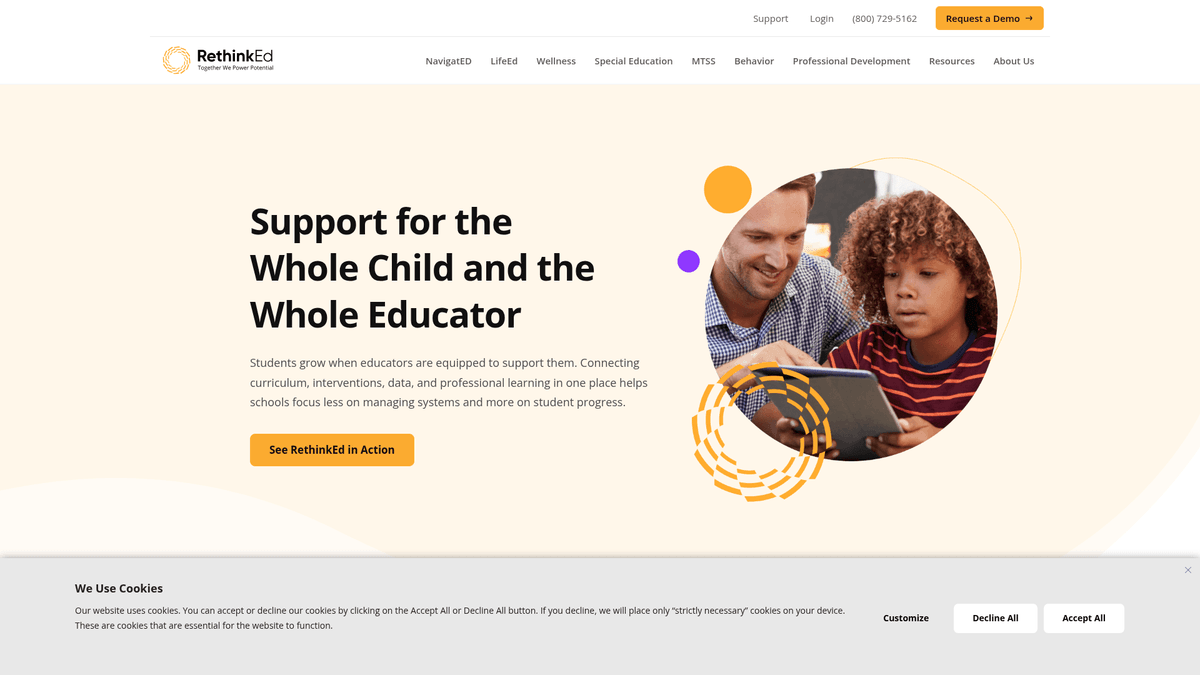
RethinkEdは、Rethink Autism, Inc.が運営する包括的なデジタルプラットフォームであり、学生の学業および行動面のニーズを支援することに特化しています。このサイトは教育者や管理者向けのセントラルハブとして機能し、社会性と情動の学習(SEL)、メンタルヘルス、特別支援教育管理のためのエビデンスに基づいたカリキュラムを提供しています。データ駆動型の介入を通じて生徒の成果を向上させることを目指すK-12学区にとって、極めて重要なリソースです。
データ豊富な教育リソース
ウェブサイトには、専門的なK-12アカデミックカリキュラムの説明、ウェルネススキルフレームワーク、全米の学区からの詳細な成功事例など、重要なデータセットが含まれています。さらに、現代の教育テクノロジーのインフラを詳述するブログ、ウェビナー、技術ドキュメントの膨大なライブラリもホストされています。プラットフォームは、特別支援教育やメンタルヘルス支援の最新基準を反映するために、頻繁にコンテンツを更新しています。
RethinkEdデータの戦略的価値
EdTech開発者や教育研究者にとって、RethinkEdのスクレイピングは市場動向や介入戦略に関する洞察を提供します。ウェルネスカリキュラムや学区の成果を分析することで、組織は深い競合分析を行い、より情報に基づいた教育製品を開発できます。このデータは、生徒のウェルネスや教師の専門能力開発における業界をリードする benchmark に対してサービスを比較検討する際に非常に価値があります。
なぜRethinkEdをスクレイピングするのか?
RethinkEdからのデータ抽出のビジネス価値とユースケースを発見してください。
K-12の特別支援教育およびウェルネスカリキュラム開発のトレンドを監視する。
EdTechの提供内容と製品ポジショニングの競合分析を行う。
教育効果の研究のために成功事例やケーススタディを収集する。
システム互換性のベンチマーキングのために技術要件を抽出する。
教育者トレーニングのための専門能力開発リソースのデータベースを構築する。
業界をリードするSELフレームワークと行動介入戦略を追跡する。
スクレイピングの課題
RethinkEdのスクレイピング時に遭遇する可能性のある技術的課題。
標準的なリクエストをブロックする強力なCloudflare Bot Management。
安全なログインウォールの背後に制限された主要な学生および学区データ。
ElementorおよびReactコンポーネントによる動的なコンテンツレンダリング。
高頻度のクローラーに対してIP禁止をトリガーする巧妙なレート制限。
リードフォームやログインページでのreCAPTCHA v2/v3の実装。
RethinkEdをAIでスクレイピング
コーディング不要。AI搭載の自動化で数分でデータを抽出。
仕組み
必要なものを記述
RethinkEdから抽出したいデータをAIに伝えてください。自然言語で入力するだけ — コードやセレクターは不要です。
AIがデータを抽出
人工知能がRethinkEdをナビゲートし、動的コンテンツを処理し、あなたが求めたものを正確に抽出します。
データを取得
CSV、JSONでエクスポートしたり、アプリやワークフローに直接送信できる、クリーンで構造化されたデータを受け取ります。
なぜスクレイピングにAIを使うのか
AIを使えば、コードを書かずにRethinkEdを簡単にスクレイピングできます。人工知能搭載のプラットフォームが必要なデータを理解します — 自然言語で記述するだけで、AIが自動的に抽出します。
How to scrape with AI:
- 必要なものを記述: RethinkEdから抽出したいデータをAIに伝えてください。自然言語で入力するだけ — コードやセレクターは不要です。
- AIがデータを抽出: 人工知能がRethinkEdをナビゲートし、動的コンテンツを処理し、あなたが求めたものを正確に抽出します。
- データを取得: CSV、JSONでエクスポートしたり、アプリやワークフローに直接送信できる、クリーンで構造化されたデータを受け取ります。
Why use AI for scraping:
- Cloudflareなどの高度なアンチボット対策を自動的にバイパスします。
- 複雑なコーディングなしで、JavaScriptを多用したElementorレイアウトを処理します。
- ビジュアルセレクターツールにより、入れ子になったWordPress構造のナビゲーションを簡素化します。
- スケジュール実行により、新しいリソースの追加を長期的に追跡できます。
RethinkEd用ノーコードWebスクレイパー
AI搭載スクレイピングのポイント&クリック代替手段
Browse.ai、Octoparse、Axiom、ParseHubなどのノーコードツールは、コードを書かずにRethinkEdをスクレイピングするのに役立ちます。これらのツールは視覚的なインターフェースを使用してデータを選択しますが、複雑な動的コンテンツやアンチボット対策には苦戦する場合があります。
ノーコードツールでの一般的なワークフロー
一般的な課題
学習曲線
セレクタと抽出ロジックの理解に時間がかかる
セレクタの破損
Webサイトの変更によりワークフロー全体が壊れる可能性がある
動的コンテンツの問題
JavaScript多用サイトは複雑な回避策が必要
CAPTCHAの制限
ほとんどのツールはCAPTCHAに手動介入が必要
IPブロック
過度なスクレイピングはIPのブロックにつながる可能性がある
RethinkEd用ノーコードWebスクレイパー
Browse.ai、Octoparse、Axiom、ParseHubなどのノーコードツールは、コードを書かずにRethinkEdをスクレイピングするのに役立ちます。これらのツールは視覚的なインターフェースを使用してデータを選択しますが、複雑な動的コンテンツやアンチボット対策には苦戦する場合があります。
ノーコードツールでの一般的なワークフロー
- ブラウザ拡張機能をインストールするかプラットフォームに登録する
- ターゲットWebサイトに移動してツールを開く
- ポイント&クリックで抽出するデータ要素を選択する
- 各データフィールドのCSSセレクタを設定する
- 複数ページをスクレイピングするためのページネーションルールを設定する
- CAPTCHAに対処する(多くの場合手動解決が必要)
- 自動実行のスケジュールを設定する
- データをCSV、JSONにエクスポートするかAPIで接続する
一般的な課題
- 学習曲線: セレクタと抽出ロジックの理解に時間がかかる
- セレクタの破損: Webサイトの変更によりワークフロー全体が壊れる可能性がある
- 動的コンテンツの問題: JavaScript多用サイトは複雑な回避策が必要
- CAPTCHAの制限: ほとんどのツールはCAPTCHAに手動介入が必要
- IPブロック: 過度なスクレイピングはIPのブロックにつながる可能性がある
コード例
import requests
from bs4 import BeautifulSoup

# Define headers to mimic a real browser session
headers = {
    'User-Agent': 'Mozilla/5.0 (Windows NT 10.0; Win64; x64) AppleWebKit/537.36 (KHTML, like Gecko) Chrome/120.0.0.0 Safari/537.36',
    'Accept-Language': 'en-US,en;q=0.9'
}

url = 'https://www.rethinked.com/resources/'

try:
    # Sending request to the resource hub
    response = requests.get(url, headers=headers, timeout=15)

    if response.status_code == 200:
        soup = BeautifulSoup(response.text, 'html.parser')
        # Locate resource articles within the grid
        articles = soup.find_all('article')
        for article in articles:
            title = article.find('h2')
            if title:
                print(f'Resource Found: {title.get_text(strip=True)}')
    else:
        print(f'Access Denied. Status Code: {response.status_code}. Cloudflare may be blocking the script.')
except Exception as e:
    print(f'Connection Error: {e}')
いつ使うか
JavaScriptが最小限の静的HTMLページに最適。ブログ、ニュースサイト、シンプルなEコマース製品ページに理想的。
メリット
- ●最速の実行(ブラウザオーバーヘッドなし)
- ●最小限のリソース消費
- ●asyncioで簡単に並列化
- ●APIと静的ページに最適
制限事項
- ●JavaScriptを実行できない
- ●SPAや動的コンテンツで失敗
- ●複雑なアンチボットシステムで苦戦する可能性
コードでRethinkEdをスクレイピングする方法
Python + Requests
import requests
from bs4 import BeautifulSoup
# Define headers to mimic a real browser session
headers = {
'User-Agent': 'Mozilla/5.0 (Windows NT 10.0; Win64; x64) AppleWebKit/537.36 (KHTML, like Gecko) Chrome/120.0.0.0 Safari/537.36',
'Accept-Language': 'en-US,en;q=0.9'
}
url = 'https://www.rethinked.com/resources/'
try:
# Sending request to the resource hub
response = requests.get(url, headers=headers, timeout=15)
if response.status_code == 200:
soup = BeautifulSoup(response.text, 'html.parser')
# Locate resource articles within the grid
articles = soup.find_all('article')
for article in articles:
title = article.find('h2')
if title:
print(f'Resource Found: {title.get_text(strip=True)}')
else:
print(f'Access Denied. Status Code: {response.status_code}. Cloudflare may be blocking the script.')
except Exception as e:
print(f'Connection Error: {e}')Python + Playwright
import asyncio
from playwright.async_api import async_playwright

async def scrape_rethinked():
    async with async_playwright() as p:
        # Launch a headed or headless browser
        browser = await p.chromium.launch(headless=True)
        # Create a new context with custom User-Agent
        context = await browser.new_context(
            user_agent='Mozilla/5.0 (Windows NT 10.0; Win64; x64) AppleWebKit/537.36 (KHTML, like Gecko) Chrome/121.0.0.0 Safari/537.36'
        )
        page = await context.new_page()

        # Navigate to the Success Stories page
        await page.goto('https://www.rethinked.com/success-stories/', wait_until='networkidle')

        # Wait for Elementor post items to render
        await page.wait_for_selector('.elementor-post__title')

        stories = await page.query_selector_all('.elementor-post__title')
        for story in stories:
            text = await story.inner_text()
            print(f'Success Story: {text.strip()}')

        await browser.close()

asyncio.run(scrape_rethinked())Python + Scrapy
import scrapy

class RethinkEdSpider(scrapy.Spider):
    name = 'rethink_spider'
    allowed_domains = ['rethinked.com']
    start_urls = ['https://www.rethinked.com/resources/']

    def parse(self, response):
        # Iterate through Elementor post elements
        for item in response.css('article.elementor-post'):
            yield {
                'title': item.css('h2.elementor-post__title a::text').get(default='').strip(),
                'link': item.css('a.elementor-post__read-more::attr(href)').get(),
                'category': item.css('.elementor-post__badge::text').get(),
                'excerpt': item.css('.elementor-post__excerpt p::text').get(),
            }

        # Follow pagination link for next page
        next_page = response.css('a.next.page-numbers::attr(href)').get()
        if next_page:
yield response.follow(next_page, self.parse)Node.js + Puppeteer
const puppeteer = require('puppeteer');

(async () => {
  const browser = await puppeteer.launch({ headless: true });
  const page = await browser.newPage();

  // Set a realistic User-Agent
  await page.setUserAgent('Mozilla/5.0 (Macintosh; Intel Mac OS X 10_15_7) AppleWebKit/537.36 (KHTML, like Gecko) Chrome/120.0.0.0 Safari/537.36');

  try {
    await page.goto('https://www.rethinked.com/resources/', { waitUntil: 'networkidle2' });

    // Extract data from the page content
    const resources = await page.evaluate(() => {
      const items = Array.from(document.querySelectorAll('article'));
      return items.map(el => ({
        title: el.querySelector('h2')?.innerText.trim(),
        url: el.querySelector('a')?.href,
        badge: el.querySelector('.elementor-post__badge')?.innerText.trim()
      }));
    });

    console.log(resources);
  } catch (err) {
    console.error('Scraping failed:', err);
  } finally {
    await browser.close();
  }
})();RethinkEdデータで何ができるか
RethinkEdデータからの実用的なアプリケーションとインサイトを探索してください。
カリキュラムのベンチマーキング
教育出版社は、自社のSELおよびアカデミックカリキュラムをRethinkEdのエビデンスに基づいたモデルと比較できます。
実装方法:
- 1カリキュラムページからモジュールの説明と学習目標を抽出する。
- 2学年レベルと主題別にコンテンツを分類する。
- 3キーワード密度を分析して、中心的な教育重点領域を特定する。
Automatioを使用してRethinkEdからデータを抽出し、コードを書かずにこれらのアプリケーションを構築しましょう。
RethinkEdデータで何ができるか
- カリキュラムのベンチマーキング
教育出版社は、自社のSELおよびアカデミックカリキュラムをRethinkEdのエビデンスに基づいたモデルと比較できます。
- カリキュラムページからモジュールの説明と学習目標を抽出する。
- 学年レベルと主題別にコンテンツを分類する。
- キーワード密度を分析して、中心的な教育重点領域を特定する。
- 学区向けセールスプロスペクティング
EdTechのセールスチームは、すでに高品質なデジタル介入に投資している学区を特定できます。
- Success Storiesセクションから学区名と所在地をスクレイピングする。
- ケーススタディで言及されている具体的な結果や課題を抽出する。
- このデータを使用して、補完的な教育サービスのアウトリーチを調整する。
- メンタルヘルスのトレンド分析
研究者は、K-12教育におけるメンタルヘルスとウェルネスに関するトピックの進化を追跡できます。
- Wellnessカテゴリーのすべてのブログ投稿からタイトルと概要を収集する。
- ウェビナーのトランスクリプトや説明文に対して感情分析を行う。
- 「回復力」や「不安」などの特定の用語の頻度を経時的にマッピングする。
- テクニカル SEO モニタリング
競合他社はRethinkEdのコンテンツマーケティング戦略を追跡し、自社の検索エンジンランキングを向上させることができます。
- Resourcesハブを監視して、新しいブログ投稿やホワイトペーパーを確認する。
- メタタイトルとメタディスクリプションをスクレイピングして、ターゲットキーワードを特定する。
- カテゴリーごとに公開されたコンテンツの量を追跡して、彼らの注力ポイントを把握する。
- 専門能力開発データベース
教育機関は、トレーニング目的でウェビナーや記事のライブラリを構築できます。
- すべての専門能力開発ビデオのタイトル、説明、カテゴリーを抽出する。
- 著者情報をスクレイピングして、業界の専門家(SME)を特定する。
- 内部スタッフのトレーニング用に、検索可能なリポジトリにデータを保存する。
ワークフローを強化する AI自動化
AutomatioはAIエージェント、ウェブ自動化、スマート統合のパワーを組み合わせ、より短時間でより多くのことを達成するお手伝いをします。
RethinkEdスクレイピングのプロのヒント
RethinkEdからデータを正常に抽出するための専門家のアドバイス。
CloudflareのASNベースのブロックを回避するために、高品質なレジデンシャルプロキシを使用してください。
JA3 fingerprintingによる検出を避けるため、headless browserでStealth Modeを有効にします。
人間の読書スピードを模倣してリクエストレートを下げ、429エラーを回避します。
ログインが必要な複数のページからデータをスクレイピングする場合は、cookieセッションを維持してください。
信頼性の高いデータ抽出を行うために、Elementorフレームワークの特定のCSSセレクターをターゲットにします。
WordPressのアップデート後のレイアウト変更を確認するため、サイトのResourcesセクションを監視してください。
関連 Web Scraping

How to Scrape GitHub | The Ultimate 2025 Technical Guide

How to Scrape Pollen.com: Local Allergy Data Extraction Guide

How to Scrape Britannica: Educational Data Web Scraper

How to Scrape Worldometers for Real-Time Global Statistics

How to Scrape Wikipedia: The Ultimate Web Scraping Guide

How to Scrape Weather.com: A Guide to Weather Data Extraction

How to Scrape American Museum of Natural History (AMNH)
How to Scrape Poll-Maker: A Comprehensive Web Scraping Guide
RethinkEdについてのよくある質問
RethinkEdに関するよくある質問への回答を見つけてください