
WebElements 스크래핑 방법: 주기율표 데이터 가이드
WebElements에서 정확한 화학 원소 데이터를 추출하세요. 연구 및 AI 애플리케이션을 위해 원자량, 물리적 특성 및 발견 기록을 스크래핑하는 방법을 알아봅니다.
WebElements 정보
WebElements이 제공하는 것과 추출할 수 있는 가치 있는 데이터를 알아보세요.
WebElements는 셰필드 대학교의 Mark Winter가 관리하는 최고의 온라인 주기율표 사이트입니다. 1993년에 개설된 이 사이트는 World Wide Web 최초의 주기율표였으며, 이후 학생, 학자 및 전문 화학자들에게 권위 있는 리소스로 자리 잡았습니다. 이 사이트는 표준 원자량부터 복잡한 전자 배치에 이르기까지 모든 알려진 화학 원소에 대한 심층적이고 구조화된 데이터를 제공합니다.
WebElements 스크래핑의 가치는 고품질의 peer-reviewed 과학 데이터에 있습니다. 교육용 도구를 제작하는 개발자, 주기율표 전반에 걸친 경향 분석을 수행하는 연구원, 또는 machine learning models를 훈련시키는 재료 과학자들에게 WebElements는 수동으로 수집하기 어려운, 신뢰할 수 있고 기술적으로 풍부한 source of truth를 제공합니다.
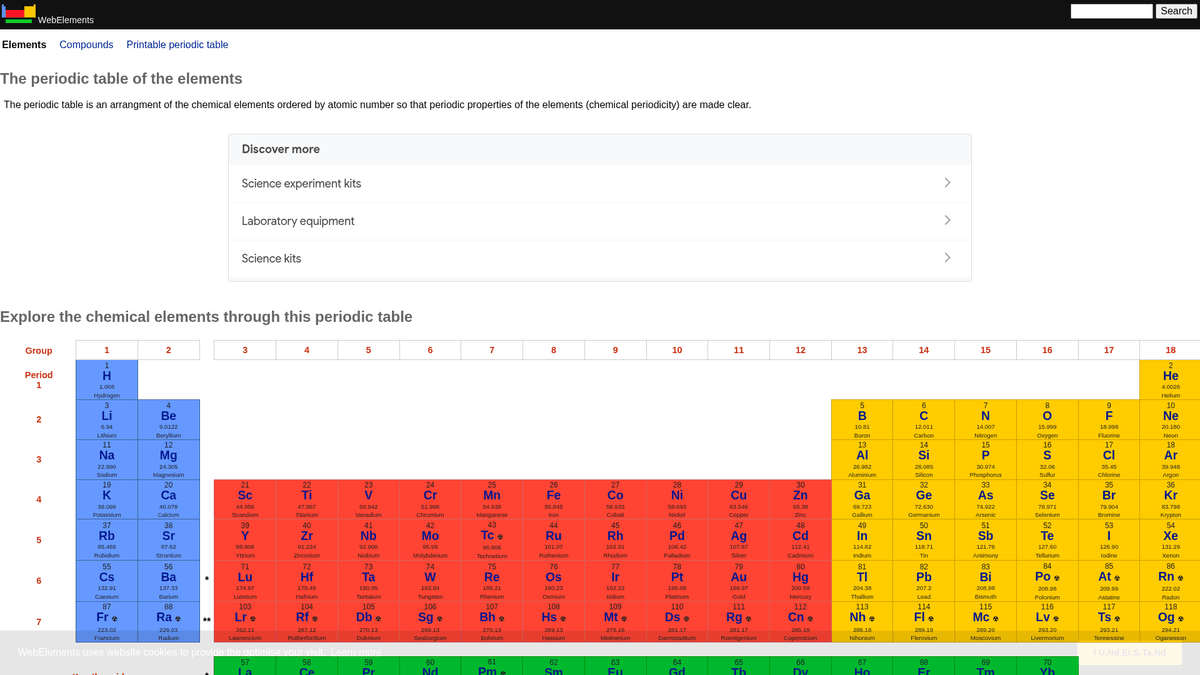
왜 WebElements을 스크래핑해야 하나요?
WebElements에서 데이터 추출의 비즈니스 가치와 사용 사례를 알아보세요.
교육용 도구 개발을 위한 고품질 과학 데이터 수집.
재료 과학 연구 및 machine learning models를 위한 원소 속성 집계.
화학 사양을 활용한 실험실 인벤토리 시스템의 자동 채우기.
원소 발견 및 과학적 진보에 대한 역사적 분석.
학술 논문을 위한 포괄적인 화학 속성 dataset 생성.
스크래핑 과제
WebElements 스크래핑 시 겪을 수 있는 기술적 과제.
데이터가 원소별로 여러 하위 페이지(/history, /compounds 등)에 분산되어 있습니다.
오래된 table 기반 HTML 레이아웃으로 인해 정밀한 selection logic이 필요합니다.
도움을 검색할 때 Selenium의 'WebElement' 클래스와 도메인 이름이 혼동될 수 있습니다.
AI로 WebElements 스크래핑
코딩 불필요. AI 기반 자동화로 몇 분 만에 데이터 추출.
작동 방식
필요한 것을 설명하세요
WebElements에서 어떤 데이터를 추출하고 싶은지 AI에게 알려주세요. 자연어로 입력하기만 하면 됩니다 — 코딩이나 셀렉터가 필요 없습니다.
AI가 데이터를 추출
인공지능이 WebElements을 탐색하고, 동적 콘텐츠를 처리하며, 요청한 것을 정확히 추출합니다.
데이터 받기
CSV, JSON으로 내보내거나 앱과 워크플로에 직접 전송할 수 있는 깨끗하고 구조화된 데이터를 받으세요.
스크래핑에 AI를 사용하는 이유
AI를 사용하면 코드를 작성하지 않고도 WebElements을 쉽게 스크래핑할 수 있습니다. 인공지능 기반 플랫폼이 원하는 데이터를 이해합니다 — 자연어로 설명하기만 하면 AI가 자동으로 추출합니다.
How to scrape with AI:
- 필요한 것을 설명하세요: WebElements에서 어떤 데이터를 추출하고 싶은지 AI에게 알려주세요. 자연어로 입력하기만 하면 됩니다 — 코딩이나 셀렉터가 필요 없습니다.
- AI가 데이터를 추출: 인공지능이 WebElements을 탐색하고, 동적 콘텐츠를 처리하며, 요청한 것을 정확히 추출합니다.
- 데이터 받기: CSV, JSON으로 내보내거나 앱과 워크플로에 직접 전송할 수 있는 깨끗하고 구조화된 데이터를 받으세요.
Why use AI for scraping:
- 계층적인 원소 구조를 통한 No-code 내비게이션.
- 복잡한 과학적 table 추출을 자동으로 처리.
- Cloud 실행을 통해 로컬 가동 중단 없이 전체 dataset 추출 가능.
- 과학 분석 도구에서 직접 사용할 수 있도록 CSV/JSON으로 간편하게 내보내기.
- 예약된 모니터링을 통해 업데이트된 원소 데이터를 감지 가능.
WebElements을 위한 노코드 웹 스크래퍼
AI 기반 스크래핑의 포인트 앤 클릭 대안
Browse.ai, Octoparse, Axiom, ParseHub와 같은 여러 노코드 도구를 사용하면 코드 작성 없이 WebElements을 스크래핑할 수 있습니다. 이러한 도구는 일반적으로 시각적 인터페이스를 사용하여 데이터를 선택하지만, 복잡한 동적 콘텐츠나 봇 방지 조치에서는 어려움을 겪을 수 있습니다.
노코드 도구의 일반적인 워크플로
일반적인 문제점
학습 곡선
셀렉터와 추출 로직을 이해하는 데 시간이 걸림
셀렉터 깨짐
웹사이트 변경으로 전체 워크플로우가 깨질 수 있음
동적 콘텐츠 문제
JavaScript가 많은 사이트는 복잡한 해결 방법 필요
CAPTCHA 제한
대부분의 도구는 CAPTCHA에 수동 개입 필요
IP 차단
공격적인 스크래핑은 IP 차단으로 이어질 수 있음
WebElements을 위한 노코드 웹 스크래퍼
Browse.ai, Octoparse, Axiom, ParseHub와 같은 여러 노코드 도구를 사용하면 코드 작성 없이 WebElements을 스크래핑할 수 있습니다. 이러한 도구는 일반적으로 시각적 인터페이스를 사용하여 데이터를 선택하지만, 복잡한 동적 콘텐츠나 봇 방지 조치에서는 어려움을 겪을 수 있습니다.
노코드 도구의 일반적인 워크플로
- 브라우저 확장 프로그램 설치 또는 플랫폼 가입
- 대상 웹사이트로 이동하여 도구 열기
- 포인트 앤 클릭으로 추출할 데이터 요소 선택
- 각 데이터 필드에 대한 CSS 셀렉터 구성
- 여러 페이지 스크래핑을 위한 페이지네이션 규칙 설정
- CAPTCHA 처리 (주로 수동 해결 필요)
- 자동 실행을 위한 스케줄링 구성
- 데이터를 CSV, JSON으로 내보내기 또는 API로 연결
일반적인 문제점
- 학습 곡선: 셀렉터와 추출 로직을 이해하는 데 시간이 걸림
- 셀렉터 깨짐: 웹사이트 변경으로 전체 워크플로우가 깨질 수 있음
- 동적 콘텐츠 문제: JavaScript가 많은 사이트는 복잡한 해결 방법 필요
- CAPTCHA 제한: 대부분의 도구는 CAPTCHA에 수동 개입 필요
- IP 차단: 공격적인 스크래핑은 IP 차단으로 이어질 수 있음
코드 예제
import requests
from bs4 import BeautifulSoup
import time

# Target URL for a specific element (e.g., Gold)
url = 'https://www.webelements.com/gold/'
headers = {'User-Agent': 'Mozilla/5.0 (Windows NT 10.0; Win64; x64) AppleWebKit/537.36 (KHTML, like Gecko) Chrome/91.0.4472.124 Safari/537.36'}

def scrape_element(element_url):
    try:
        response = requests.get(element_url, headers=headers)
        response.raise_for_status()
        soup = BeautifulSoup(response.text, 'html.parser')

        # Extracting the element name from the H1 tag
        name = soup.find('h1').get_text().strip()

        # Extracting Atomic Number using table label logic
        atomic_number = soup.find('th', string=lambda s: s and 'Atomic number' in s).find_next('td').text.strip()

        print(f'Element: {name}, Atomic Number: {atomic_number}')
    except Exception as e:
        print(f'An error occurred: {e}')

# Following robots.txt recommendations
time.sleep(1)
scrape_element(url)
사용 시기
JavaScript가 최소한인 정적 HTML 페이지에 가장 적합합니다. 블로그, 뉴스 사이트, 단순 이커머스 제품 페이지에 이상적입니다.
장점
- ●가장 빠른 실행 속도 (브라우저 오버헤드 없음)
- ●최소한의 리소스 소비
- ●asyncio로 쉽게 병렬화 가능
- ●API와 정적 페이지에 적합
제한 사항
- ●JavaScript 실행 불가
- ●SPA 및 동적 콘텐츠에서 실패
- ●복잡한 봇 방지 시스템에 어려움
코드로 WebElements 스크래핑하는 방법
Python + Requests
import requests
from bs4 import BeautifulSoup
import time
# Target URL for a specific element (e.g., Gold)
url = 'https://www.webelements.com/gold/'
headers = {'User-Agent': 'Mozilla/5.0 (Windows NT 10.0; Win64; x64) AppleWebKit/537.36 (KHTML, like Gecko) Chrome/91.0.4472.124 Safari/537.36'}
def scrape_element(element_url):
try:
response = requests.get(element_url, headers=headers)
response.raise_for_status()
soup = BeautifulSoup(response.text, 'html.parser')
# Extracting the element name from the H1 tag
name = soup.find('h1').get_text().strip()
# Extracting Atomic Number using table label logic
atomic_number = soup.find('th', string=lambda s: s and 'Atomic number' in s).find_next('td').text.strip()
print(f'Element: {name}, Atomic Number: {atomic_number}')
except Exception as e:
print(f'An error occurred: {e}')
# Following robots.txt recommendations
time.sleep(1)
scrape_element(url)Python + Playwright
from playwright.sync_api import sync_playwright

def run():
    with sync_playwright() as p:
        browser = p.chromium.launch(headless=True)
        page = browser.new_page()
        # Elements are linked from the main periodic table
        page.goto('https://www.webelements.com/iron/')

        # Wait for the property table to be present
        page.wait_for_selector('table')

        element_data = {
            'name': page.inner_text('h1'),
            'density': page.locator('th:has-text("Density") + td').inner_text().strip()
        }

        print(element_data)
        browser.close()

run()Python + Scrapy
import scrapy

class ElementsSpider(scrapy.Spider):
    name = 'elements'
    start_urls = ['https://www.webelements.com/']

    def parse(self, response):
        # Follow every element link in the periodic table
        for link in response.css('table a[title]::attr(href)'):
            yield response.follow(link, self.parse_element)

    def parse_element(self, response):
        yield {
            'name': response.css('h1::text').get().strip(),
            'symbol': response.xpath('//th[contains(text(), "Symbol")]/following-sibling::td/text()').get().strip(),
            'atomic_number': response.xpath('//th[contains(text(), "Atomic number")]/following-sibling::td/text()').get().strip(),
}Node.js + Puppeteer
const puppeteer = require('puppeteer');

(async () => {
  const browser = await puppeteer.launch();
  const page = await browser.newPage();
  await page.goto('https://www.webelements.com/silver/');

  const data = await page.evaluate(() => {
    const name = document.querySelector('h1').innerText;
    const meltingPoint = Array.from(document.querySelectorAll('th'))
      .find(el => el.textContent.includes('Melting point'))
      ?.nextElementSibling.innerText;
    return { name, meltingPoint };
  });

  console.log('Extracted Data:', data);
  await browser.close();
})();WebElements 데이터로 할 수 있는 것
WebElements 데이터의 실용적인 응용 프로그램과 인사이트를 탐색하세요.
재료 과학 AI 트레이닝
원소 특성을 기반으로 새로운 합금의 성질을 예측하기 위한 machine learning models 학습.
구현 방법:
- 1모든 금속 원소의 물리적 특성을 추출합니다.
- 2밀도 및 녹는점과 같은 값을 정제하고 정규화합니다.
- 3데이터를 회귀 또는 예측 재료 model에 입력합니다.
- 4기존 실험 합금 데이터와 대조하여 예측 결과를 검증합니다.
Automatio를 사용하여 WebElements에서 데이터를 추출하고 코드 작성 없이 이러한 애플리케이션을 구축하세요.
WebElements 데이터로 할 수 있는 것
- 재료 과학 AI 트레이닝
원소 특성을 기반으로 새로운 합금의 성질을 예측하기 위한 machine learning models 학습.
- 모든 금속 원소의 물리적 특성을 추출합니다.
- 밀도 및 녹는점과 같은 값을 정제하고 정규화합니다.
- 데이터를 회귀 또는 예측 재료 model에 입력합니다.
- 기존 실험 합금 데이터와 대조하여 예측 결과를 검증합니다.
- 교육용 앱 콘텐츠
peer-reviewed 데이터를 활용하여 화학 전공생을 위한 인터랙티브 주기율표 구축.
- 원자 번호, 기호 및 원소 설명을 스크래핑합니다.
- 역사적 배경과 발견 세부 정보를 추출합니다.
- 주기율표의 족(group)과 구역(block)별로 데이터를 정리합니다.
- 시각적 결정 구조를 포함한 사용자 인터페이스에 통합합니다.
- 화학적 경향성 분석
주기 및 족에 따른 이온화 에너지나 원자 반지름과 같은 주기적 경향성 시각화.
- 모든 원소의 속성 데이터를 번호순으로 수집합니다.
- 원소를 각각의 족으로 분류합니다.
- 그래프 라이브러리를 사용하여 추세를 시각화합니다.
- 특정 구역의 변칙적인 데이터 포인트를 식별하고 분석합니다.
- 실험실 재고 관리
물리적 안전 및 밀도 데이터를 사용하여 화학 물질 관리 시스템 자동 업데이트.
- 내부 인벤토리 리스트를 WebElements 항목에 매핑합니다.
- 밀도, 저장 위험성 및 녹는점 데이터를 스크래핑합니다.
- API를 통해 중앙 실험실 데이터베이스를 업데이트합니다.
- 위험성이 높은 원소에 대해 자동 안전 경고를 생성합니다.
워크플로를 강화하세요 AI 자동화
Automatio는 AI 에이전트, 웹 자동화 및 스마트 통합의 힘을 결합하여 더 짧은 시간에 더 많은 것을 달성할 수 있도록 도와줍니다.
WebElements 스크래핑 프로 팁
WebElements에서 성공적으로 데이터를 추출하기 위한 전문가 조언.
사이트의 robots.txt 파일에 명시된 Crawl-delay
1을 준수하세요.
데이터베이스 일관성을 위해 Atomic Number를 primary key로 사용하세요.
원소별 전체 dataset을 확보하려면 'history' 및 'compounds' 하위 페이지를 크롤링하세요.
사이트 구조가 매우 전통적이고 안정적이므로 table 기반의 selector에 집중하세요.
중요한 연구에 사용하는 경우 IUPAC standards에 따라 데이터를 검증하세요.
더 쉬운 분석을 위해 밀도나 녹는점과 같은 수치 데이터는 floats 형태로 저장하세요.
관련 Web Scraping

How to Scrape GitHub | The Ultimate 2025 Technical Guide

How to Scrape Pollen.com: Local Allergy Data Extraction Guide

How to Scrape Britannica: Educational Data Web Scraper

How to Scrape RethinkEd: A Technical Data Extraction Guide

How to Scrape Wikipedia: The Ultimate Web Scraping Guide

How to Scrape Weather.com: A Guide to Weather Data Extraction

How to Scrape Worldometers for Real-Time Global Statistics

How to Scrape American Museum of Natural History (AMNH)
WebElements에 대한 자주 묻는 질문
WebElements에 대한 일반적인 질문에 대한 답변 찾기