

How to Scrape 2Captcha: Extract CAPTCHA Solving Rates and Pricing Stats
Learn how to scrape 2Captcha.com to monitor CAPTCHA solving prices, performance metrics, and service availability. Essential for optimizing automation costs.
Free to start: 1,000 credits, no card, nothing to install.
About 2Captcha
Learn what 2Captcha offers and what valuable data can be extracted from it.
About 2Captcha
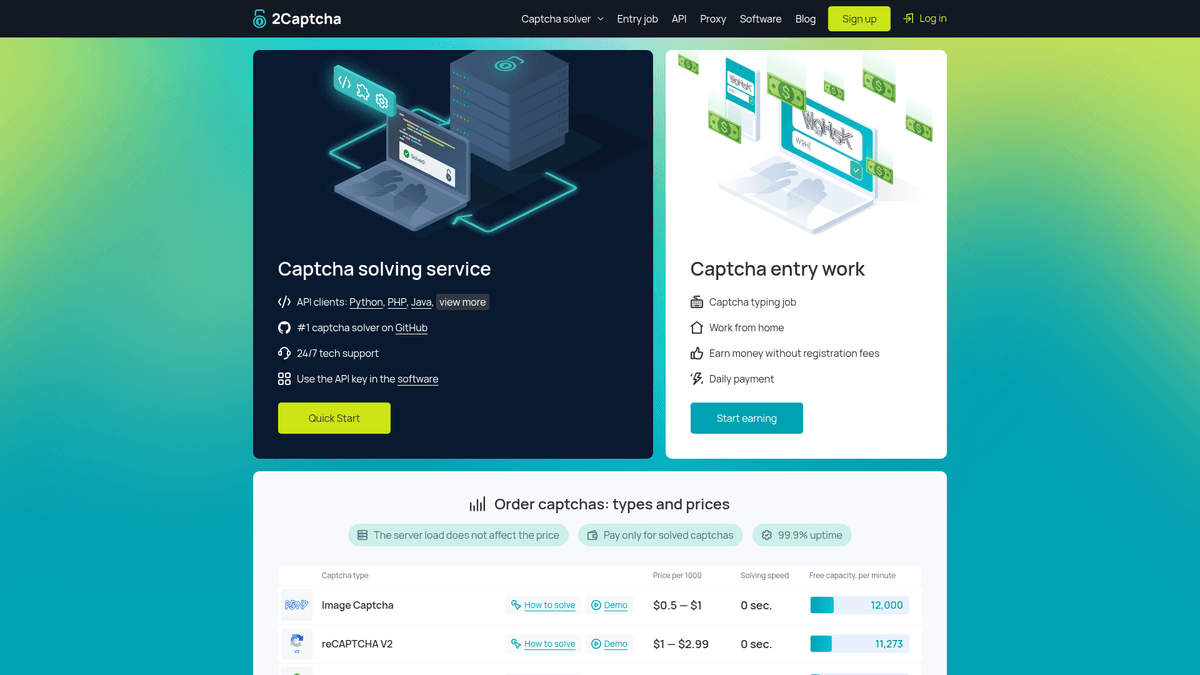
2Captcha is a prominent automated CAPTCHA recognition service that connects developers and businesses with a global workforce of human solvers. The platform specializes in bypassing digital hurdles such as reCAPTCHA (v2/v3/Enterprise), hCaptcha, FunCaptcha, and Cloudflare Turnstile, facilitating automated data collection at scale.
Data Value for Scrapers
For scrapers, the website serves as a critical data source for market intelligence. It hosts public dashboards displaying real-time solving rates, average waiting times, and accuracy statistics across different CAPTCHA types. This data is indispensable for developers who need to estimate the costs and time requirements for large-scale web scraping projects, ensuring their automation pipelines remain cost-effective and efficient.
Operational Intelligence
By monitoring 2Captcha's internal metrics, companies can optimize their automation pipelines. Tracking the "Free Capacity" or "Average Speed" allows for dynamic shifting of workloads to periods of high availability, ensuring that scraping operations remain both resilient and economically viable.
Why Scrape 2Captcha?
Discover the business value and use cases for extracting data from 2Captcha.
Real-Time Price Monitoring
Track fluctuating costs for various CAPTCHA solving types to optimize your automation budget and adjust your bidding strategies accordingly.
Service Speed Benchmarking
Extract average solving times for different services like reCAPTCHA and hCaptcha to identify the most efficient periods for running your own scrapers.
Worker Capacity Planning
Monitor the number of active workers and system load to predict potential delays or throughput limitations in your large-scale data extraction projects.
Competitive Market Intelligence
Analyze 2Captcha's supported methods and updates to stay ahead of market trends in the anti-bot bypass and automation industry.
Historical Cost Auditing
Maintain a long-term database of pricing changes to conduct financial forecasting and audit your operational expenditures over time.
Service Availability Tracking
Scrape status indicators and error rates to build a custom uptime monitor for your automation infrastructure's third-party dependencies.
Scraping Challenges
Technical challenges you may encounter when scraping 2Captcha.
Cloudflare and Turnstile Protection
2Captcha uses the very technologies it solves, such as Cloudflare Turnstile, to protect its own site from automated data extraction.
JavaScript Rendering Requirements
The real-time dashboards and pricing tables are rendered dynamically via JavaScript, making it impossible to scrape with simple HTTP libraries.
Aggressive Rate Limiting
The site monitors request frequency closely and will quickly issue temporary IP bans or 403 Forbidden errors if it detects bot-like behavior.
Login Wall for Deep Analytics
While general pricing is public, more detailed account statistics and historical worker data require authenticated sessions and secure cookie management.
Frequent DOM Mutations
The platform updates its user interface and dashboard layout regularly, which can break brittle scrapers relying on static CSS selectors.
Scrape 2Captcha with AI
No coding required. Extract data in minutes with AI-powered automation.
How It Works
Describe What You Need
Tell the AI what data you want to extract from 2Captcha. Just type it in plain language — no coding or selectors needed.
AI Extracts the Data
Our artificial intelligence navigates 2Captcha, handles dynamic content, and extracts exactly what you asked for.
Get Your Data
Receive clean, structured data ready to export as CSV, JSON, or send directly to your apps and workflows.
Why Use AI for Scraping
No-Code Web Scrapers for 2Captcha
Point-and-click alternatives to AI-powered scraping
Several no-code tools like Browse.ai, Octoparse, Axiom, and ParseHub can help you scrape 2Captcha. These tools use visual interfaces to select elements, but they come with trade-offs compared to AI-powered solutions.
Typical Workflow with No-Code Tools
Common Challenges
Learning curve
Understanding selectors and extraction logic takes time
Selectors break
Website changes can break your entire workflow
Dynamic content issues
JavaScript-heavy sites often require complex workarounds
CAPTCHA limitations
Most tools require manual intervention for CAPTCHAs
IP blocking
Aggressive scraping can get your IP banned
Code Examples
import requests
from bs4 import BeautifulSoup

# Target URL for pricing data
url = "https://2captcha.com/pricing"
# Headers to simulate a browser request
headers = {"User-Agent": "Mozilla/5.0 (Windows NT 10.0; Win64; x64) AppleWebKit/537.36 (KHTML, like Gecko) Chrome/118.0.0.0 Safari/537.36"}

try:
    # Sending GET request
    response = requests.get(url, headers=headers)
    response.raise_for_status()
    # Parsing HTML content
    soup = BeautifulSoup(response.text, 'html.parser')
    # Locating pricing rows
    rows = soup.select("table.pricing-table tr")
    for row in rows:
        cols = row.find_all("td")
        if cols:
            print(f"Type: {cols[0].get_text(strip=True)} | Price: {cols[1].get_text(strip=True)}")
except Exception as e:
    print(f"Scraping failed: {e}")
When to Use
Best for static HTML pages where content is loaded server-side. The fastest and simplest approach when JavaScript rendering isn't required.
Advantages
- ●Fastest execution (no browser overhead)
- ●Lowest resource consumption
- ●Easy to parallelize with asyncio
- ●Great for APIs and static pages
Limitations
- ●Cannot execute JavaScript
- ●Fails on SPAs and dynamic content
- ●May struggle with complex anti-bot systems
from playwright.sync_api import sync_playwright

def scrape_2captcha_stats():
    with sync_playwright() as p:
        # Launch headless browser
        browser = p.chromium.launch(headless=True)
        page = browser.new_page()
        # Navigate to statistics page
        page.goto("https://2captcha.com/statistics")
        # Wait for dynamic table to load
        page.wait_for_selector(".stats-table")
        # Extract data using JS execution
        stats = page.evaluate('''() => {
            const data = [];
            const rows = document.querySelectorAll(".stats-table tr");
            rows.forEach(row => {
                const cells = row.querySelectorAll("td");
                if (cells.length > 0) {
                    data.push({ type: cells[0].innerText, speed: cells[1].innerText });
                }
            });
            return data;
        }''')
        print(stats)
        browser.close()

scrape_2captcha_stats()
When to Use
Use when content loads dynamically via JavaScript, or when you need to interact with the page (clicks, scrolls, form fills). Handles modern anti-bot detection better.
Advantages
- ●Executes JavaScript like a real browser
- ●Handles SPAs and dynamic content
- ●Better anti-bot evasion with stealth plugins
- ●Can take screenshots and PDFs
Limitations
- ●Slower than HTTP requests
- ●Higher memory/CPU usage
- ●More complex to set up
import scrapy

class TwoCaptchaSpider(scrapy.Spider):
    name = '2captcha_spider'
    start_urls = ['https://2captcha.com/pricing']

    def parse(self, response):
        # Loop through pricing items in the DOM
        for item in response.css('div.pricing-item'):
            yield {
                'type': item.css('h3::text').get(),
                'price': item.css('span.price::text').get(),
                'description': item.css('p.desc::text').get()
            }
When to Use
Ideal for large-scale crawling projects that need to scrape thousands of pages. Built-in support for rate limiting, retries, and data pipelines.
Advantages
- ●Built for scale (millions of pages)
- ●Automatic request throttling
- ●Built-in data export pipelines
- ●Middleware system for proxies/headers
Limitations
- ●Steeper learning curve
- ●Overkill for small projects
- ●No native JavaScript rendering
const puppeteer = require('puppeteer');

(async () => {
    // Launch browser instance
    const browser = await puppeteer.launch();
    const page = await browser.newPage();
    // Go to pricing page and wait for content
    await page.goto('https://2captcha.com/pricing', { waitUntil: 'networkidle2' });
    // Evaluate page content
    const results = await page.evaluate(() => {
        const items = Array.from(document.querySelectorAll('.pricing-row'));
        return items.map(item => ({
            title: item.querySelector('.title')?.innerText,
            rate: item.querySelector('.rate')?.innerText
        }));
    });
    console.log(results);
    await browser.close();
})();
When to Use
Choose this if you're in a Node.js/JavaScript ecosystem or need tight integration with frontend tools. Similar capabilities to Playwright.
Advantages
- ●Native JavaScript/TypeScript support
- ●Chrome DevTools Protocol access
- ●Large ecosystem and community
- ●Good for JS-heavy projects
Limitations
- ●Chrome-only (vs Playwright's multi-browser)
- ●Similar overhead to Playwright
- ●Less mature stealth options
What You Can Do With 2Captcha Data
Explore practical applications and insights from 2Captcha data.
Cost Efficiency Benchmarking
Scraping prices allows businesses to compare 2Captcha against competitors like Anti-Captcha or CapMonster to minimize operational costs.
How to implement:
- 1Scrape pricing tables from multiple CAPTCHA solving providers daily.
- 2Store data in a centralized SQL database.
- 3Generate a cost-per-solve comparison report.
- 4Automatically switch API providers based on the lowest current rate.
Use Automatio to extract data from 2Captcha and build these applications without writing code.
Service Uptime and Speed Monitoring
By scraping solving speed statistics, developers can determine the best times of day to run large-scale scraping jobs.
How to implement:
- 1Extract the 'Average Waiting Time' for reCAPTCHA v2 every 15 minutes.
- 2Plot historical speed data to identify peak congestion hours.
- 3Configure your scraper to pause during high-latency periods.
Use Automatio to extract data from 2Captcha and build these applications without writing code.
Lead Generation for Proxy Services
Proxy providers can use 2Captcha worker trends to identify regions with high demand for residential IPs.
How to implement:
- 1Scrape worker count data by geographic region if available.
- 2Analyze which regions are under-represented.
- 3Target marketing efforts for proxy sales in those specific regions.
Use Automatio to extract data from 2Captcha and build these applications without writing code.
Competitive Market Analysis
Market researchers use feature availability data to track the rollout of new CAPTCHA solving capabilities across the industry.
How to implement:
- 1Monitor the 'Supported API Methods' list on 2Captcha.
- 2Compare supported CAPTCHA types against competitor service lists.
- 3Identify gaps in the market where new solving technologies are needed.
Use Automatio to extract data from 2Captcha and build these applications without writing code.
Load Balancing for Scraping Pipelines
High-volume data aggregators use capacity metrics to distribute their CAPTCHA requests across different providers.
How to implement:
- 1Fetch the 'Free Capacity per Minute' metric in real-time.
- 2Implement a threshold-based load balancer in your scraping logic.
- 3Redirect traffic to 2Captcha only when capacity is above 50% to ensure stability.
Use Automatio to extract data from 2Captcha and build these applications without writing code.
Supercharge your workflow with AI Automation
Automatio combines the power of AI agents, web automation, and smart integrations to help you accomplish more in less time.
What to get right first
Expert advice for successfully extracting data from 2Captcha.
Use Residential Proxies
2Captcha is highly sensitive to datacenter IP ranges; using residential proxies significantly increases your success rate and prevents immediate blocking.
Simulate Human Interactions
Incorporate random wait times, mouse movements, and variable scrolling patterns to evade behavioral detection systems on the dashboard.
Handle Login Cookies Securely
If scraping the user dashboard, ensure your scraper persists cookies across sessions to avoid triggering security alerts caused by frequent new logins.
Monitor Response Headers
Always check for 'X-Cloudflare-Status' or similar headers to identify if your requests are being silently throttled or flagged for verification.
Implement Smart Retry Logic
Configure your scraper to pause and retry after a delay if it encounters a 429 Too Many Requests error to prevent a temporary block from becoming permanent.
Scrape Off-Peak Hours
Target times when global traffic to the solving network is lower to experience faster page loads and less aggressive monitoring from their security team.
Related Web Scraping
GitHub Scraper: Repos, Stars and Languages in a table
How to Scrape Pollen.com: Local Allergy Data Extraction Guide

How to Scrape Britannica: Educational Data Web Scraper
Worldometer Scraper: Population and Median Age in a table
Wikipedia Scraper: Titles, Sizes and Edit Dates in a table
How to Scrape Weather.com: A Guide to Weather Data Extraction
How to Scrape Poll-Maker: A Comprehensive Web Scraping Guide
How to Scrape Maven.com for Course and Instructor Data
Frequently Asked Questions
Find answers to common questions about 2Captcha
Is it legal to scrape 2Captcha?
Scraping public pricing and statistics from 2Captcha is generally legal as long as the data is publicly accessible and the process does not disrupt their services. However, you should always review their Terms of Service and respect any data privacy regulations in your specific jurisdiction.
Does 2Captcha have an official API for statistics?
Yes, 2Captcha provides an API for submitting and receiving CAPTCHAs, but it lacks comprehensive endpoints for all the real-time market data found on their dashboard. Web scraping remains the most reliable method for gathering broad competitive intelligence and detailed pricing trends.
How do I avoid getting blocked by 2Captcha?
To avoid blocks, use high-reputation residential proxies and avoid making too many requests in a short period. Implementing browser automation that mimics human behavior, such as variable scrolling and mouse movements, is also essential for bypassing their security measures.
What format is the scraped data available in?
When using tools like Automatio, you can export the scraped 2Captcha data into various formats including JSON, CSV, or Google Sheets. JSON is typically preferred for developers who want to feed this data directly into their own automation pipelines or monitoring dashboards.
How often should I scrape 2Captcha for pricing and speed stats?
Pricing changes are usually infrequent and can be monitored once or twice daily. However, solving speeds and system capacity fluctuate minute-by-minute, so scraping every 15 to 30 minutes is recommended if you need real-time operational data.
Which proxies work best for 2Captcha scraping?
Residential proxies are the most effective because they appear as legitimate home users. Datacenter proxies are often pre-flagged by anti-bot providers like Cloudflare and are likely to result in immediate 403 Forbidden errors or constant CAPTCHA challenges.
Do I need to be logged in to scrape 2Captcha data?
General pricing tables are accessible without an account, but detailed user-specific stats, historical balance data, and advanced worker metrics require you to be logged in. In these cases, your scraper must be able to handle secure session authentication and cookie persistence.
Can I scrape 2Captcha using a headless browser?
Yes, a headless browser is actually required because the site relies heavily on JavaScript for rendering its real-time data. Tools like Playwright, Puppeteer, or Automatio are ideal as they can execute the JavaScript and capture the data after it has fully loaded.