

How to Scrape BetaList | BetaList Web Scraper Guide
Learn how to scrape BetaList to extract startup leads, founder data, and tech trends. Master bypassing Cloudflare and dynamic content for market research.
Free to start: 1,000 credits, no card, nothing to install.
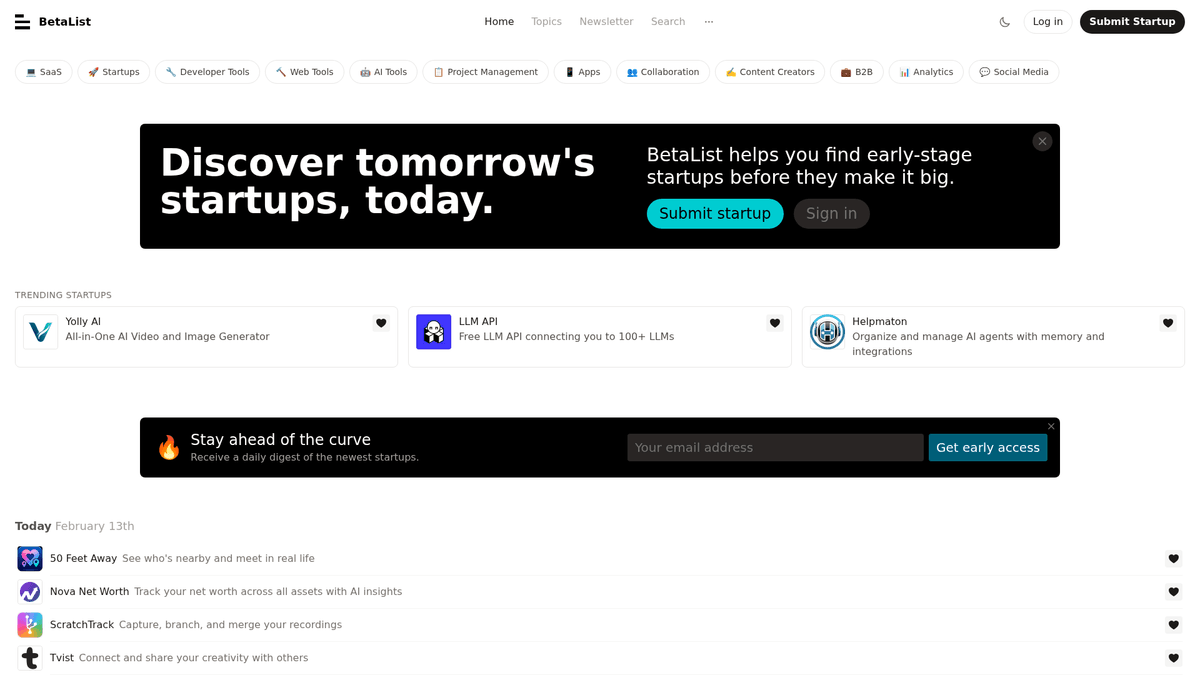
About BetaList
Learn what BetaList offers and what valuable data can be extracted from it.
The Premier Startup Discovery Platform
BetaList is a widely recognized discovery platform dedicated to early-stage internet startups. Founded by Marc Köhlbrugge, it serves as a launchpad for founders to connect with early adopters, gather feedback, and build initial traction before entering mainstream markets like Product Hunt or the App Store.
Data-Rich Startup Profiles
The platform provides a vast directory of listings across sectors such as SaaS, Artificial Intelligence, Fintech, and E-commerce. Each listing contains rich metadata, including startup taglines, detailed product descriptions, high-resolution screenshots, founder profiles, and social media links. This data provides a snapshot of the newest innovations in the tech ecosystem.
Strategic Value for Data Scraping
For researchers and businesses, scraping BetaList is essential for identifying emerging trends and sourcing high-quality B2B leads. Investors use the platform to spot high-potential startups in their infancy, while service providers (agencies, developers, and marketers) use it to reach out to founders who are actively seeking growth and support tools.
Why Scrape BetaList?
Discover the business value and use cases for extracting data from BetaList.
B2B Sales Lead Generation
BetaList captures startups at their earliest stage, making it an ideal source for agencies and service providers to find new companies in need of marketing, legal, or development help.
Venture Capital Deal Flow
Investors and VCs use BetaList data to discover emerging tech companies before they gain mainstream popularity on larger platforms like Product Hunt or Crunchbase.
Market Trend Analysis
By scraping category tags and submission dates, researchers can identify which tech niches, such as Generative AI or Web3, are currently seeing the highest entrepreneurial activity.
Competitive Intelligence
SaaS companies can monitor new entrants in their specific industry niche to keep track of innovative features and shifting market positioning from potential competitors.
Founder Networking and Outreach
Scraping founder names and their Twitter handles allows recruiters and consultants to reach out directly to entrepreneurs who are actively building and launching new products.
Scraping Challenges
Technical challenges you may encounter when scraping BetaList.
Cloudflare Bot Mitigation
BetaList uses Cloudflare to protect its directory, which often blocks standard automated scripts and requires sophisticated header management or browser-based tools.
Infinite Scroll Loading
The startup list uses dynamic loading via infinite scroll, meaning data is not present in the initial HTML and requires a scraper that can simulate user interaction and execute JavaScript.
Dynamic DOM Structure
The website uses modern frontend frameworks where elements are injected dynamically, requiring the scraper to wait for specific selectors to appear before attempting to extract data.
Aggressive Rate Limiting
Rapidly sending requests to startup detail pages can trigger temporary IP bans, making it necessary to implement random delays and high-quality proxy rotation.
Scrape BetaList with AI
No coding required. Extract data in minutes with AI-powered automation.
How It Works
Describe What You Need
Tell the AI what data you want to extract from BetaList. Just type it in plain language — no coding or selectors needed.
AI Extracts the Data
Our artificial intelligence navigates BetaList, handles dynamic content, and extracts exactly what you asked for.
Get Your Data
Receive clean, structured data ready to export as CSV, JSON, or send directly to your apps and workflows.
Why Use AI for Scraping
No-Code Web Scrapers for BetaList
Point-and-click alternatives to AI-powered scraping
Several no-code tools like Browse.ai, Octoparse, Axiom, and ParseHub can help you scrape BetaList. These tools use visual interfaces to select elements, but they come with trade-offs compared to AI-powered solutions.
Typical Workflow with No-Code Tools
Common Challenges
Learning curve
Understanding selectors and extraction logic takes time
Selectors break
Website changes can break your entire workflow
Dynamic content issues
JavaScript-heavy sites often require complex workarounds
CAPTCHA limitations
Most tools require manual intervention for CAPTCHAs
IP blocking
Aggressive scraping can get your IP banned
Code Examples
import requests
from bs4 import BeautifulSoup

# Note: BetaList uses Cloudflare; requests alone may get a 403 Forbidden.
# You typically need a bypass or to use a session with realistic headers.
url = 'https://betalist.com/topics/saas'
headers = {
    'User-Agent': 'Mozilla/5.0 (Windows NT 10.0; Win64; x64) AppleWebKit/537.36 (KHTML, like Gecko) Chrome/119.0.0.0 Safari/537.36',
    'Accept': 'text/html,application/xhtml+xml,application/xml;q=0.9,image/avif,image/webp,*/*;q=0.8'
}

try:
    response = requests.get(url, headers=headers)
    response.raise_for_status()
    soup = BeautifulSoup(response.text, 'html.parser')

    # Target the startup card containers
    for card in soup.select('.startupCard'):
        name = card.select_one('.startupCard__name').get_text(strip=True)
        tagline = card.select_one('.startupCard__tagline').get_text(strip=True)
        print(f'Scraped: {name} - {tagline}')
except Exception as e:
    print(f'Request failed: {e}')
When to Use
Best for static HTML pages where content is loaded server-side. The fastest and simplest approach when JavaScript rendering isn't required.
Advantages
- ●Fastest execution (no browser overhead)
- ●Lowest resource consumption
- ●Easy to parallelize with asyncio
- ●Great for APIs and static pages
Limitations
- ●Cannot execute JavaScript
- ●Fails on SPAs and dynamic content
- ●May struggle with complex anti-bot systems
from playwright.sync_api import sync_playwright

def run():
    with sync_playwright() as p:
        # Launch a real browser to handle JavaScript and anti-bot
        browser = p.chromium.launch(headless=True)
        page = browser.new_page()
        page.goto('https://betalist.com/', wait_until='networkidle')

        # Scroll down to trigger lazy loading
        page.evaluate('window.scrollTo(0, document.body.scrollHeight)')
        page.wait_for_timeout(2000)

        # Extract startup data
        startups = page.query_selector_all('.startupCard')
        for item in startups:
            name = item.query_selector('.startupCard__name').inner_text()
            tagline = item.query_selector('.startupCard__tagline').inner_text()
            print({'startup': name.strip(), 'tagline': tagline.strip()})

        browser.close()

run()
When to Use
Use when content loads dynamically via JavaScript, or when you need to interact with the page (clicks, scrolls, form fills). Handles modern anti-bot detection better.
Advantages
- ●Executes JavaScript like a real browser
- ●Handles SPAs and dynamic content
- ●Better anti-bot evasion with stealth plugins
- ●Can take screenshots and PDFs
Limitations
- ●Slower than HTTP requests
- ●Higher memory/CPU usage
- ●More complex to set up
import scrapy

class BetalistSpider(scrapy.Spider):
    name = 'betalist_spider'
    start_urls = ['https://betalist.com/topics/ai']

    def parse(self, response):
        # Scrapy is fast but might need a middleware for Cloudflare
        for startup in response.css('.startupCard'):
            yield {
                'name': startup.css('.startupCard__name::text').get().strip(),
                'tagline': startup.css('.startupCard__tagline::text').get().strip(),
                'link': response.urljoin(startup.css('a::attr(href)').get())
            }

        # Handle simple numbered pagination
        next_page = response.css('a.pagination__next::attr(href)').get()
        if next_page:
            yield response.follow(next_page, self.parse)
When to Use
Ideal for large-scale crawling projects that need to scrape thousands of pages. Built-in support for rate limiting, retries, and data pipelines.
Advantages
- ●Built for scale (millions of pages)
- ●Automatic request throttling
- ●Built-in data export pipelines
- ●Middleware system for proxies/headers
Limitations
- ●Steeper learning curve
- ●Overkill for small projects
- ●No native JavaScript rendering
const puppeteer = require('puppeteer');

(async () => {
  const browser = await puppeteer.launch({ headless: true });
  const page = await browser.newPage();

  // Mimic a real user browser to avoid immediate detection
  await page.setUserAgent('Mozilla/5.0 (Windows NT 10.0; Win64; x64) Chrome/110.0.0.0 Safari/537.36');
  await page.goto('https://betalist.com/');

  // Wait for content to render via JS
  await page.waitForSelector('.startupCard');

  const results = await page.evaluate(() => {
    const cards = Array.from(document.querySelectorAll('.startupCard'));
    return cards.map(c => ({
      title: c.querySelector('.startupCard__name').innerText.trim(),
      description: c.querySelector('.startupCard__tagline').innerText.trim()
    }));
  });

  console.log(results);
  await browser.close();
})();
When to Use
Choose this if you're in a Node.js/JavaScript ecosystem or need tight integration with frontend tools. Similar capabilities to Playwright.
Advantages
- ●Native JavaScript/TypeScript support
- ●Chrome DevTools Protocol access
- ●Large ecosystem and community
- ●Good for JS-heavy projects
Limitations
- ●Chrome-only (vs Playwright's multi-browser)
- ●Similar overhead to Playwright
- ●Less mature stealth options
What You Can Do With BetaList Data
Explore practical applications and insights from BetaList data.
Lead Enrichment for Sales Teams
B2B agencies use BetaList data to build a pipeline of newly launched startups that need marketing or growth services.
How to implement:
- 1Scrape startup names and founder profile links from the 'Today' section.
- 2Visit founder profiles to extract Twitter/X handles.
- 3Use a third-party API (like Clay or Apollo) to find the founder's email.
- 4Launch a personalized email sequence referencing their recent BetaList launch.
Use Automatio to extract data from BetaList and build these applications without writing code.
VC Investment Signal Monitoring
Venture capitalists track the growth in upvotes for new startups to identify early viral success.
How to implement:
- 1Scrape BetaList categories weekly to capture all new submissions.
- 2Store the heart/upvote count in a database.
- 3Compare the heart count over a 7-day period to identify 'breakout' startups.
- 4Assign an analyst to reach out to founders with high growth metrics.
Use Automatio to extract data from BetaList and build these applications without writing code.
SaaS Competitor Intelligence
Product managers monitor BetaList to see when new competitors enter their specific niche.
How to implement:
- 1Scrape listings tagged with relevant topics (e.g., 'Project Management').
- 2Extract the product description and screenshots.
- 3Use AI (like GPT-4) to summarize the competitor's unique selling proposition (USP).
- 4Update the internal competitive landscape document monthly.
Use Automatio to extract data from BetaList and build these applications without writing code.
Emerging Tech Trend Reports
Journalists and analysts create data-driven reports on which industries are seeing the most startup activity.
How to implement:
- 1Scrape the last 6 months of startup data from BetaList.
- 2Quantify the number of startups per category tag.
- 3Visualize the rise of specific keywords (e.g., 'LLM', 'Sustainability').
- 4Publish a 'State of Startups' report for subscribers or stakeholders.
Use Automatio to extract data from BetaList and build these applications without writing code.
Supercharge your workflow with AI Automation
Automatio combines the power of AI agents, web automation, and smart integrations to help you accomplish more in less time.
What to get right first
Expert advice for successfully extracting data from BetaList.
Scrape Detail Pages for Founders
The main list only shows summaries; configure your scraper to click into each startup URL to extract valuable data like founder Twitter handles and social links.
Target Topic-Specific URLs
To improve efficiency and data quality, scrape specific category URLs like /topics/saas or /topics/ai instead of crawling the entire site.
Use Residential Proxies
To avoid 403 Forbidden errors from BetaList's security filters, use residential proxies which appear as real home users rather than data center bots.
Implement Random Wait Times
Simulate human behavior by adding random delays between 3 and 8 seconds between actions to reduce the likelihood of triggering rate limits.
Check Page Metadata
Inspect the page source for hydration scripts or JSON-LD blocks, as they often contain structured data that is more reliable to scrape than raw HTML elements.
Related Web Scraping
How to Scrape Biluppgifter.se: Vehicle Data Extraction Guide
How to Scrape CSS Author: A Comprehensive Web Scraping Guide
How to Scrape Bilregistret.ai: Swedish Vehicle Data Extraction Guide

How to Scrape The AA (theaa.com): A Technical Guide for Car & Insurance Data
How to Scrape Car.info | Vehicle Data & Valuation Extraction Guide
How to Scrape GoAbroad Study Abroad Programs

How to Scrape ResearchGate: Publication and Researcher Data
Statista Scraper: Titles, Regions and Dates in a table
Frequently Asked Questions
Find answers to common questions about BetaList
Is it legal to scrape BetaList?
Scraping publicly available data from BetaList for research or lead generation is generally legal. However, you should ensure you are not violating their Terms of Service and that you respect privacy laws like GDPR when handling founder contact information.
Does BetaList have an official API?
BetaList does not currently offer a public, documented API for third-party developers. To get structured data from the platform, you will need to use a web scraping tool like Automatio or a browser automation library like Playwright.
How can I avoid getting blocked by BetaList?
The most effective way to avoid blocks is to use a browser-based scraper that can handle JavaScript and Cloudflare challenges. Additionally, rotating residential proxies and using realistic User-Agent strings will help you stay under the radar.
What format is the scraped data available in?
Depending on the tool you use, you can export BetaList data into CSV, JSON, or Excel formats. For lead generation, CSV is popular for CRM uploads, while developers often prefer JSON for building internal startup databases.
How often should I scrape BetaList for new leads?
Since BetaList updates with new startup submissions every day, a daily scraping schedule is recommended for sales teams. For market researchers, a weekly or monthly crawl is usually sufficient to capture broad industry trends.
Can I scrape founder social media links?
Yes, founder links, especially Twitter/X handles, are usually listed on the individual startup pages. Your scraper needs to be configured to visit each startup's detail page to reliably extract these specific social media profiles.
What proxies work best for BetaList scraping?
Residential proxies are highly recommended because they are less likely to be flagged by Cloudflare compared to data center proxies. They provide a much higher success rate when scraping sites with active bot protection.
Does BetaList require a login to view startups?
No, BetaList does not require a user account to view its directory or startup profile pages. This makes it easier to scrape as you don't have to manage login sessions, cookies, or account-level rate limits.