

How to Scrape CSS Author: A Comprehensive Web Scraping Guide
Scrape CSS Author to extract design resources and AI tool reviews. Leverage the WordPress REST API for structured data on mockups and templates.
Free to start: 1,000 credits, no card, nothing to install.
About CSS Author
Learn what CSS Author offers and what valuable data can be extracted from it.
Overview of CSS Author
CSS Author is a leading online platform and blog dedicated to providing high-quality resources for web designers and developers. Founded to curate and share the best tools, templates, and coding tutorials, the site serves as a comprehensive hub for creative professionals looking to stay ahead of industry trends.
Available Data and Resources
The website features a wide array of listings including AI coding agents, Webflow templates, sustainable design tools, and Figma plugins. Each post is detailed with expert reviews, making it a rich source of structured information for the tech community.
Value of Scraped Data
Scraping CSS Author is highly valuable for competitive intelligence, trend monitoring, and content aggregation. By extracting data from their curated lists and tool reviews, businesses and developers can gain a strategic overview of the evolving web design ecosystem.
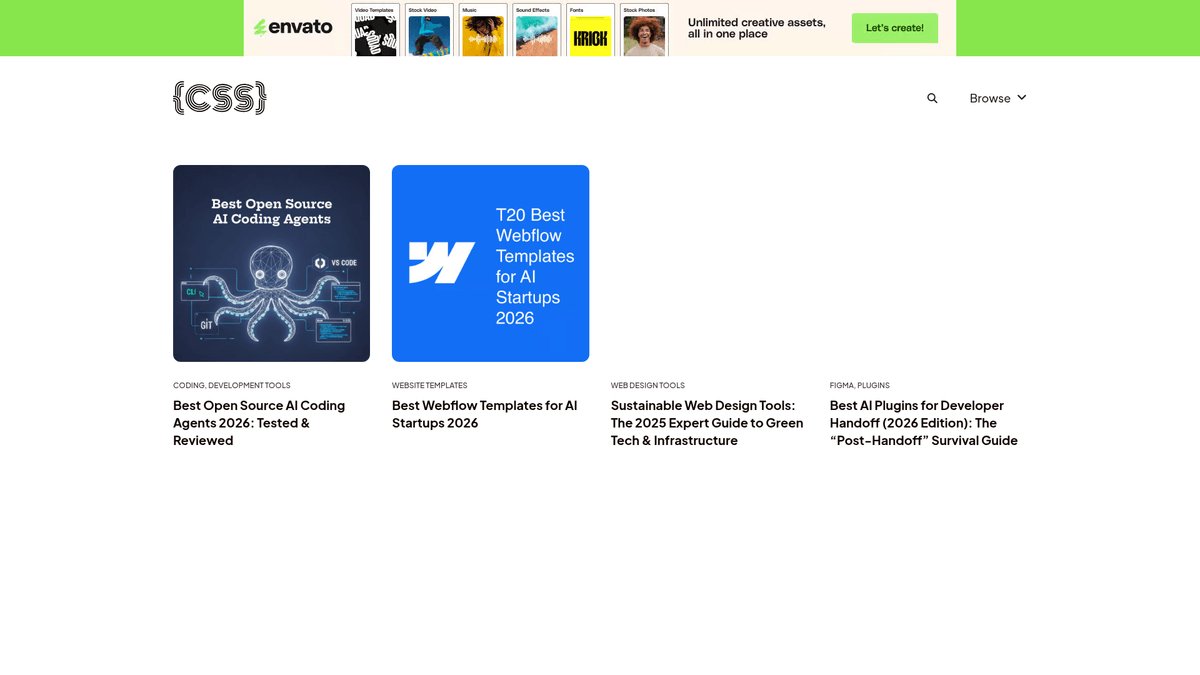
Why Scrape CSS Author?
Discover the business value and use cases for extracting data from CSS Author.
Design Resource Aggregation
Collect links to thousands of free PSD mockups, UI kits, and fonts to build a comprehensive searchable directory for creative professionals.
AI Tool Trend Analysis
Track the rapid emergence of new AI coding agents and development tools by scraping their frequent reviews and comparison articles.
Content Strategy Benchmarking
Analyze the categorization and tagging structure of a high-authority blog to optimize your own content management system and SEO strategy.
Outbound Link Auditing
Identify the software and platforms being frequently recommended to find lucrative affiliate opportunities or potential marketing partners.
Technical Tutorial Collection
Extract code snippets and step-by-step CSS tutorials to create a localized knowledge base for front-end development training.
Scraping Challenges
Technical challenges you may encounter when scraping CSS Author.
Cloudflare WAF Challenges
The site is protected by Cloudflare, which can trigger CAPTCHAs or 403 Forbidden errors if it detects non-browser-like behavior.
REST API Rate Limits
While the WordPress REST API is accessible, making high-frequency requests without proper delays can lead to temporary IP blacklisting.
Dynamic Loading UX
The frontend uses a 'Load More' button rather than standard pagination, requiring a tool that can interact with the DOM to load all items.
Media Resolution Mapping
Featured images are often stored as IDs in the primary JSON response, requiring secondary API calls to the media endpoint to retrieve actual URLs.
HTML Entity Cleaning
Scraped titles and excerpts from the API often contain encoded characters like & or – that must be decoded for use.
Scrape CSS Author with AI
No coding required. Extract data in minutes with AI-powered automation.
How It Works
Describe What You Need
Tell the AI what data you want to extract from CSS Author. Just type it in plain language — no coding or selectors needed.
AI Extracts the Data
Our artificial intelligence navigates CSS Author, handles dynamic content, and extracts exactly what you asked for.
Get Your Data
Receive clean, structured data ready to export as CSV, JSON, or send directly to your apps and workflows.
Why Use AI for Scraping
No-Code Web Scrapers for CSS Author
Point-and-click alternatives to AI-powered scraping
Several no-code tools like Browse.ai, Octoparse, Axiom, and ParseHub can help you scrape CSS Author. These tools use visual interfaces to select elements, but they come with trade-offs compared to AI-powered solutions.
Typical Workflow with No-Code Tools
Common Challenges
Learning curve
Understanding selectors and extraction logic takes time
Selectors break
Website changes can break your entire workflow
Dynamic content issues
JavaScript-heavy sites often require complex workarounds
CAPTCHA limitations
Most tools require manual intervention for CAPTCHAs
IP blocking
Aggressive scraping can get your IP banned
Code Examples
import requests
from bs4 import BeautifulSoup

# CSS Author uses WordPress, making the REST API the most efficient endpoint
api_url = 'https://cssauthor.com/wp-json/wp/v2/posts'

headers = {
    'User-Agent': 'Mozilla/5.0 (Windows NT 10.0; Win64; x64) AppleWebKit/537.36 (KHTML, like Gecko) Chrome/91.0.4472.124 Safari/537.36'
}

def fetch_posts(page=1):
    try:
        response = requests.get(api_url, headers=headers, params={'page': page, 'per_page': 10})
        response.raise_for_status()
        posts = response.json()
        for post in posts:
            print(f"Title: {post['title']['rendered']}")
            print(f"Link: {post['link']}")
            print("---")
    except Exception as e:
        print(f"Error: {e}")

if __name__ == '__main__':
    fetch_posts(1)
When to Use
Best for static HTML pages where content is loaded server-side. The fastest and simplest approach when JavaScript rendering isn't required.
Advantages
- ●Fastest execution (no browser overhead)
- ●Lowest resource consumption
- ●Easy to parallelize with asyncio
- ●Great for APIs and static pages
Limitations
- ●Cannot execute JavaScript
- ●Fails on SPAs and dynamic content
- ●May struggle with complex anti-bot systems
from playwright.sync_api import sync_playwright

def run():
    with sync_playwright() as p:
        browser = p.chromium.launch(headless=True)
        page = browser.new_page()
        page.goto('https://cssauthor.com/mockups/')

        # Wait for the post grid elements to load
        page.wait_for_selector('.brx-posts-grid')

        # Handle 'Load More' button if present
        if page.is_visible('button.brx-load-more-button'):
            page.click('button.brx-load-more-button')
            page.wait_for_timeout(2000)

        # Extracting titles from the rendered DOM
        titles = page.query_selector_all('.brx-post-title')
        for title in titles:
            print(title.inner_text())

        browser.close()

run()
When to Use
Use when content loads dynamically via JavaScript, or when you need to interact with the page (clicks, scrolls, form fills). Handles modern anti-bot detection better.
Advantages
- ●Executes JavaScript like a real browser
- ●Handles SPAs and dynamic content
- ●Better anti-bot evasion with stealth plugins
- ●Can take screenshots and PDFs
Limitations
- ●Slower than HTTP requests
- ●Higher memory/CPU usage
- ●More complex to set up
import scrapy
import json

class CssAuthorSpider(scrapy.Spider):
    name = 'css_author_spider'
    start_urls = ['https://cssauthor.com/wp-json/wp/v2/posts?per_page=20']

    def parse(self, response):
        posts = json.loads(response.text)
        for post in posts:
            yield {
                'id': post['id'],
                'title': post['title']['rendered'],
                'link': post['link'],
                'date': post['date']
            }

        # Logic for following next page in the REST API
        current_page = int(response.url.split('page=')[-1]) if 'page=' in response.url else 1
        next_page = f"https://cssauthor.com/wp-json/wp/v2/posts?per_page=20&page={current_page + 1}"
        yield scrapy.Request(next_page, callback=self.parse)
When to Use
Ideal for large-scale crawling projects that need to scrape thousands of pages. Built-in support for rate limiting, retries, and data pipelines.
Advantages
- ●Built for scale (millions of pages)
- ●Automatic request throttling
- ●Built-in data export pipelines
- ●Middleware system for proxies/headers
Limitations
- ●Steeper learning curve
- ●Overkill for small projects
- ●No native JavaScript rendering
const puppeteer = require('puppeteer');

(async () => {
  const browser = await puppeteer.launch();
  const page = await browser.newPage();
  await page.goto('https://cssauthor.com/free-fonts/');

  // Extracting basic info from listing page
  const fonts = await page.evaluate(() => {
    const items = Array.from(document.querySelectorAll('.brx-post-title a'));
    return items.map(item => ({
      name: item.innerText,
      url: item.href
    }));
  });

  console.log(fonts);
  await browser.close();
})();
When to Use
Choose this if you're in a Node.js/JavaScript ecosystem or need tight integration with frontend tools. Similar capabilities to Playwright.
Advantages
- ●Native JavaScript/TypeScript support
- ●Chrome DevTools Protocol access
- ●Large ecosystem and community
- ●Good for JS-heavy projects
Limitations
- ●Chrome-only (vs Playwright's multi-browser)
- ●Similar overhead to Playwright
- ●Less mature stealth options
What You Can Do With CSS Author Data
Explore practical applications and insights from CSS Author data.
Design Tool Directory
Create a high-quality searchable portal for web design professionals to find the best tools.
How to implement:
- 1Scrape all 'Best of' articles and resource lists.
- 2Extract specific tool names, descriptions, and compatibility tags.
- 3Categorize tools based on the original site structure.
- 4Launch a front-end portal with search and filter capabilities.
Use Automatio to extract data from CSS Author and build these applications without writing code.
Market Trend Monitoring
Track the popularity and emergence of new web technologies like AI agents and no-code builders.
How to implement:
- 1Monitor the CSS Author API daily for new publication topics.
- 2Use keyword analysis to identify emerging software trends.
- 3Map the frequency of specific tool mentions over time.
- 4Generate trend reports for marketing teams.
Use Automatio to extract data from CSS Author and build these applications without writing code.
SEO Competitor Research
Identify high-ranking keywords and content strategies within the web development blog niche.
How to implement:
- 1Extract all post titles, meta tags, and excerpts from the blog.
- 2Cross-reference titles with search volume data.
- 3Identify topics with high engagement and low competition.
- 4Develop a content roadmap based on discovered gaps.
Use Automatio to extract data from CSS Author and build these applications without writing code.
Affiliate Link Analysis
Analyze the monetization strategy by tracking outbound links to software platforms.
How to implement:
- 1Scrape post content for external outbound URLs.
- 2Identify links containing affiliate tracking parameters.
- 3Categorize linked products by price point and category.
- 4Assess the most profitable niches in the design space.
Use Automatio to extract data from CSS Author and build these applications without writing code.
Supercharge your workflow with AI Automation
Automatio combines the power of AI agents, web automation, and smart integrations to help you accomplish more in less time.
What to get right first
Expert advice for successfully extracting data from CSS Author.
Target the WordPress API
Use the /wp-json/wp/v2/posts endpoint for significantly faster and more reliable data extraction compared to HTML scraping.
Filter API Fields
Append the _fields parameter to your API request to only download the data you need, such as title, link, and date, reducing bandwidth usage.
Observe the X-WP-Total Header
Check the HTTP response headers for X-WP-TotalPages to determine exactly how many pages you need to iterate through in your script.
Rotate Residential Proxies
If you are scraping a large volume of historical data, use residential proxies to avoid triggering rate limits on the host server.
Batch Media Requests
Instead of requesting image details one by one, batch the media IDs in a single query to the /media endpoint to resolve image URLs efficiently.
Follow robots.txt Rules
Respect the crawl-delay directives found in the site's robots.txt file to ensure your scraping activities remain ethical and undetected.
Related Web Scraping
How to Scrape Biluppgifter.se: Vehicle Data Extraction Guide
How to Scrape Bilregistret.ai: Swedish Vehicle Data Extraction Guide

How to Scrape The AA (theaa.com): A Technical Guide for Car & Insurance Data
How to Scrape Car.info | Vehicle Data & Valuation Extraction Guide
How to Scrape GoAbroad Study Abroad Programs
Statista Scraper: Titles, Regions and Dates in a table

How to Scrape ResearchGate: Publication and Researcher Data
How to Scrape Weebly Websites: Extract Data from Millions of Sites
Frequently Asked Questions
Find answers to common questions about CSS Author
Is it legal to scrape CSS Author?
Scraping public resource listings for personal use or research is generally considered legal. However, you should not scrape the full text of original articles to republish them on your own site, as this would violate copyright laws and their terms of service.
Does CSS Author provide an official API?
The site does not have a bespoke developer API, but since it runs on WordPress, it has a fully functional REST API. You can access it by appending /wp-json/wp/v2/ to the main domain, which returns data in a structured JSON format.
How do I avoid being blocked by Cloudflare?
To bypass Cloudflare, you must use a scraper that mimics a real user by sending legitimate headers, rotating User-Agents, and using residential proxies. Avoiding high-speed requests that don't match human browsing patterns is also critical.
What is the best format for the scraped data?
JSON is the ideal format because it maps directly to the site's REST API structure. However, if you are using the data for spreadsheets, CSV is a great alternative that is supported by most scraping tools like Automatio.
How often should I scrape CSS Author for updates?
The site typically publishes new content daily or several times a week. Running your scraper once every 24 hours is usually sufficient to capture all new freebies and reviews without putting unnecessary load on their servers.
Which proxies work best for CSS Author?
Residential proxies are the most effective because they use IP addresses assigned by ISPs to home users, making them very difficult for Cloudflare to distinguish from regular site visitors.
How can I extract the actual download links for mockups?
Download links are often found within the 'content.rendered' field of the API response or inside specific button selectors on the HTML page. You may need to follow one level deeper into the linked third-party sites like Gumroad or Behance to get the direct file URL.
Does the site require JavaScript to be enabled for scraping?
If you are scraping the HTML frontend, JavaScript is helpful for triggering the 'Load More' button. However, if you use the REST API, you can scrape all the data using simple HTTP requests without needing to render JavaScript.