

How to Scrape Weebly Websites: Extract Data from Millions of Sites
Learn how to scrape blog posts, product data, and contact info from Weebly sites. Extract valuable insights for market research and competitive analysis.
Free to start: 1,000 credits, no card, nothing to install.
About Weebly
Learn what Weebly offers and what valuable data can be extracted from it.
The Power of Weebly Websites
Weebly is a versatile website builder owned by Square, Inc., providing entrepreneurs and small businesses with tools to create professional blogs, online stores, and portfolios without code. It powers over 50 million websites worldwide, making it a massive repository of niche business data and consumer-facing content.
Why Scrape Weebly-Hosted Sites?
Extracting data from Weebly sites is essential for gathering competitive intelligence in specific niches. Whether you are tracking product pricing for a small e-commerce brand or building a database of professional portfolios, the platform's standardized structure allows for highly efficient automated data collection.
Valuable Data for Growth
The information hosted on Weebly spans across several industries. From local business contact details used for lead generation to structured product catalogs for market analysis, the platform provides high-quality, up-to-date data that can drive strategic business decisions and academic research.
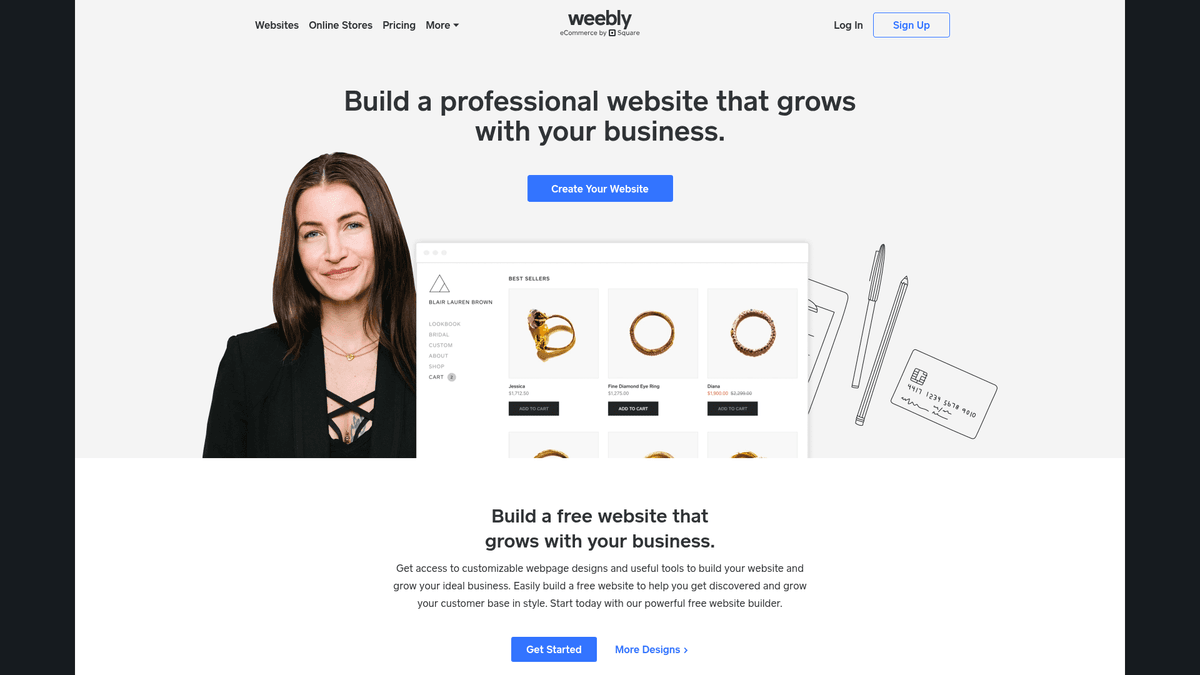
Why Scrape Weebly?
Discover the business value and use cases for extracting data from Weebly.
B2B Lead Generation
Extract contact information and business details from millions of small business websites hosted on Weebly to build targeted marketing lists.
Marketplace Analysis
Scrape the Weebly App Center to monitor trending integrations, developer offerings, and user reviews for competitive product development.
E-commerce Price Tracking
Monitor independent retail stores built on Weebly to track niche product pricing, inventory levels, and promotional strategies.
Niche Content Aggregation
Collect blog posts and articles from specialized creators who use Weebly to fuel news aggregators or research databases.
Competitor Benchmarking
Analyze the service offerings and positioning of professional service providers who host their portfolios and sites on the platform.
Historical Site Archiving
Capture and preserve the structure and content of personal or small business sites for digital archiving and trend analysis.
Scraping Challenges
Technical challenges you may encounter when scraping Weebly.
Heavy JavaScript Dependency
Many Weebly themes use React or AJAX to load content dynamically, requiring a scraper that can execute JavaScript to see the full page.
Diverse CSS Selectors
Because Weebly users customize their templates, CSS classes can vary significantly between sites, requiring flexible and robust selector logic.
Cloudflare Bot Protection
Weebly-hosted domains and the App Center often use Cloudflare to mitigate traffic, which can lead to CAPTCHAs or 403 errors for automated scripts.
Lazy-Loaded Elements
Product images and portfolio galleries frequently use lazy-loading techniques that only trigger when a user scrolls down the page.
Pagination Logic
Navigating through multi-page blog entries or extensive store categories requires specific logic to handle varied 'Next' button implementations.
Scrape Weebly with AI
No coding required. Extract data in minutes with AI-powered automation.
How It Works
Describe What You Need
Tell the AI what data you want to extract from Weebly. Just type it in plain language — no coding or selectors needed.
AI Extracts the Data
Our artificial intelligence navigates Weebly, handles dynamic content, and extracts exactly what you asked for.
Get Your Data
Receive clean, structured data ready to export as CSV, JSON, or send directly to your apps and workflows.
Why Use AI for Scraping
No-Code Web Scrapers for Weebly
Point-and-click alternatives to AI-powered scraping
Several no-code tools like Browse.ai, Octoparse, Axiom, and ParseHub can help you scrape Weebly. These tools use visual interfaces to select elements, but they come with trade-offs compared to AI-powered solutions.
Typical Workflow with No-Code Tools
Common Challenges
Learning curve
Understanding selectors and extraction logic takes time
Selectors break
Website changes can break your entire workflow
Dynamic content issues
JavaScript-heavy sites often require complex workarounds
CAPTCHA limitations
Most tools require manual intervention for CAPTCHAs
IP blocking
Aggressive scraping can get your IP banned
Code Examples
import requests; from bs4 import BeautifulSoup; headers = {'User-Agent': 'Mozilla/5.0'}; url = 'https://example.weebly.com/blog'; try: response = requests.get(url, headers=headers); response.raise_for_status(); soup = BeautifulSoup(response.text, 'html.parser'); posts = soup.find_all('div', class_='blog-post'); for post in posts: title = post.find('h2', class_='blog-title').text.strip(); print(f'Post: {title}'); except Exception as e: print(f'Error: {e}')When to Use
Best for static HTML pages where content is loaded server-side. The fastest and simplest approach when JavaScript rendering isn't required.
Advantages
- ●Fastest execution (no browser overhead)
- ●Lowest resource consumption
- ●Easy to parallelize with asyncio
- ●Great for APIs and static pages
Limitations
- ●Cannot execute JavaScript
- ●Fails on SPAs and dynamic content
- ●May struggle with complex anti-bot systems
import asyncio; from playwright.async_api import async_playwright; async def run(): async with async_playwright() as p: browser = await p.chromium.launch(); page = await browser.new_page(); await page.goto('https://example.weebly.com/store'); await page.wait_for_selector('.wsite-com-product-title'); products = await page.query_selector_all('.wsite-com-product-title'); for product in products: print(await product.inner_text()); await browser.close(); asyncio.run(run())When to Use
Use when content loads dynamically via JavaScript, or when you need to interact with the page (clicks, scrolls, form fills). Handles modern anti-bot detection better.
Advantages
- ●Executes JavaScript like a real browser
- ●Handles SPAs and dynamic content
- ●Better anti-bot evasion with stealth plugins
- ●Can take screenshots and PDFs
Limitations
- ●Slower than HTTP requests
- ●Higher memory/CPU usage
- ●More complex to set up
import scrapy; class WeeblySpider(scrapy.Spider): name = 'weebly'; start_urls = ['https://example.weebly.com/blog']; def parse(self, response): for post in response.css('.blog-post'): yield {'title': post.css('.blog-title::text').get().strip(), 'date': post.css('.blog-date::text').get()}; next_page = response.css('a.next-page::attr(href)').get(); if next_page: yield response.follow(next_page, self.parse)When to Use
Ideal for large-scale crawling projects that need to scrape thousands of pages. Built-in support for rate limiting, retries, and data pipelines.
Advantages
- ●Built for scale (millions of pages)
- ●Automatic request throttling
- ●Built-in data export pipelines
- ●Middleware system for proxies/headers
Limitations
- ●Steeper learning curve
- ●Overkill for small projects
- ●No native JavaScript rendering
const puppeteer = require('puppeteer'); (async () => { const browser = await puppeteer.launch(); const page = await browser.newPage(); await page.goto('https://example.weebly.com'); const titles = await page.evaluate(() => Array.from(document.querySelectorAll('.wsite-content-title')).map(el => el.innerText)); console.log(titles); await browser.close(); })();When to Use
Choose this if you're in a Node.js/JavaScript ecosystem or need tight integration with frontend tools. Similar capabilities to Playwright.
Advantages
- ●Native JavaScript/TypeScript support
- ●Chrome DevTools Protocol access
- ●Large ecosystem and community
- ●Good for JS-heavy projects
Limitations
- ●Chrome-only (vs Playwright's multi-browser)
- ●Similar overhead to Playwright
- ●Less mature stealth options
What You Can Do With Weebly Data
Explore practical applications and insights from Weebly data.
E-commerce Price Monitoring
Retailers can monitor competitor pricing on Weebly stores to stay competitive.
How to implement:
- 1Identify competitor Weebly store URLs
- 2Set up a daily scrape for product names and prices
- 3Compare data against internal pricing software
- 4Adjust prices automatically via API integration
Use Automatio to extract data from Weebly and build these applications without writing code.
B2B Lead Generation
Marketing agencies can find small businesses using Weebly and offer services.
How to implement:
- 1Search for 'powered by Weebly' on search engines
- 2Scrape contact pages for emails and phone numbers
- 3Categorize leads by business type
- 4Import leads into a CRM for outreach
Use Automatio to extract data from Weebly and build these applications without writing code.
Content Curation
News aggregators can pull the latest articles from niche Weebly blogs.
How to implement:
- 1Create a list of high-quality Weebly blog URLs
- 2Scrape titles, summaries, and images
- 3Format data for a central news feed
- 4Update the feed every few hours
Use Automatio to extract data from Weebly and build these applications without writing code.
Market Sentiment Analysis
Researchers can analyze comments and reviews on Weebly sites for brand feedback.
How to implement:
- 1Extract customer reviews and comments
- 2Use natural language processing to determine sentiment
- 3Report on common customer pain points
- 4Track sentiment changes over time
Use Automatio to extract data from Weebly and build these applications without writing code.
Historical Site Archiving
Digital historians can archive portfolios or personal sites built on Weebly.
How to implement:
- 1Crawl the entire sitemap of a Weebly domain
- 2Download all HTML, images, and documents
- 3Store data in a structured database or cloud storage
- 4Verify data integrity periodically
Use Automatio to extract data from Weebly and build these applications without writing code.
Supercharge your workflow with AI Automation
Automatio combines the power of AI agents, web automation, and smart integrations to help you accomplish more in less time.
What to get right first
Expert advice for successfully extracting data from Weebly.
Check the Sitemap First
Most Weebly sites have a sitemap.xml file at the root directory which provides a clean list of all URLs, making crawling much faster and more efficient.
Target Prefix Classes
Look for CSS classes starting with 'wsite-' as these are standard Weebly system classes that are more likely to be consistent across different themes.
Use Residential Proxies
If you are scraping sites protected by Cloudflare, residential proxies are significantly more effective than datacenter IPs at avoiding detection.
Simulate Human Behavior
Incorporate random delays and mouse movements into your scraping flow to minimize the footprint of your bot and prevent triggering rate limits.
Monitor for Dynamic IDs
Avoid using element IDs for selectors as they are often generated dynamically; stick to stable class names or relative XPath expressions instead.
Leverage Headless Mode
Always use a browser-based scraper like Playwright or Automatio to ensure that all dynamic elements on the Weebly platform are fully rendered.
Related Web Scraping
How to Scrape Biluppgifter.se: Vehicle Data Extraction Guide
How to Scrape CSS Author: A Comprehensive Web Scraping Guide
How to Scrape Bilregistret.ai: Swedish Vehicle Data Extraction Guide

How to Scrape The AA (theaa.com): A Technical Guide for Car & Insurance Data
How to Scrape Car.info | Vehicle Data & Valuation Extraction Guide

How to Scrape GoAbroad Study Abroad Programs

How to Scrape ResearchGate: Publication and Researcher Data
Statista Scraper: Titles, Regions and Dates in a table
Frequently Asked Questions
Find answers to common questions about Weebly
Is it legal to scrape Weebly websites?
Scraping public data from Weebly sites is generally legal, provided you are not accessing private or gated information. Always ensure you are in compliance with the site's robots.txt file and do not violate any regional data privacy laws like GDPR or CCPA.
Does Weebly have an official API for data extraction?
Weebly provides a Developer API, but it is primarily intended for site owners to manage their own content or for developers to build apps for the App Center. It is not designed for bulk scraping of external Weebly-hosted websites that you do not own.
How can I avoid getting blocked by Weebly?
To avoid blocks, you should use high-quality rotating residential proxies and implement realistic wait times between requests. Additionally, ensure your scraper mimics a real browser by providing accurate User-Agent strings and handling cookies properly.
What format will the extracted data be in?
When using a tool like Automatio, you can export your data in several structured formats including CSV, JSON, and XML. This allows for easy integration into your existing workflows, such as importing leads directly into a CRM or a Google Sheet.
Do I need to know how to code to scrape Weebly?
No, you do not need coding skills if you use a visual scraper like Automatio. These tools allow you to select the data you want visually, while the tool handles the complex backend tasks like DOM traversal and request management.
What is the best way to handle Weebly's dynamic content?
The most effective way is to use a headless browser or a visual scraping tool that supports JavaScript execution. This ensures that elements like product grids and interactive galleries are fully loaded before the scraper attempts to pull the data.
How often should I scrape a Weebly site for updates?
The frequency depends on the nature of the data; for e-commerce prices, once a day is usually sufficient. For blogs or news-related content, you might want to scrape every few hours, but always be mindful not to overload the target server with too many requests.
Can I scrape the Weebly App Center for reviews?
Yes, you can scrape app titles, developer names, ratings, and individual reviews from the App Center. This is a common practice for market research to understand what features users value most in e-commerce apps.
Which proxies work best for scraping Weebly domains?
Residential proxies are highly recommended because they utilize IP addresses from real home users, making it much harder for anti-bot systems like Cloudflare to identify and block your scraper compared to datacenter IPs.