

How to Scrape GoAbroad Study Abroad Programs
Extract study abroad program data, reviews, and provider details from GoAbroad. Gain insights for educational market research and program price comparisons.
Free to start: 1,000 credits, no card, nothing to install.
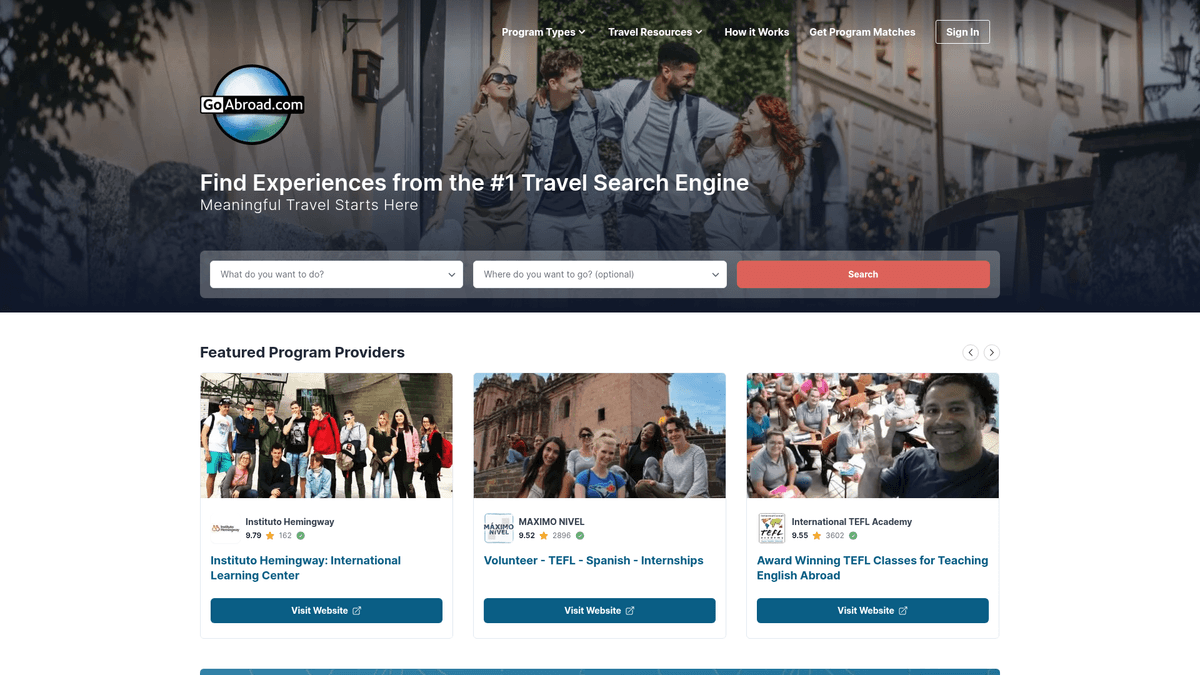
About GoAbroad
Learn what GoAbroad offers and what valuable data can be extracted from it.
Global Marketplace for International Education
GoAbroad.com is a premier search engine and directory for international education and experiential travel. It acts as a comprehensive marketplace where users can discover study abroad programs, internships, volunteer opportunities, and language schools across the globe. Managed by a global team, the platform aims to provide the most updated resources for meaningful travel experiences.
Structured Data for Market Intelligence
The website contains highly structured data for thousands of programs, including academic field requirements, cost information, and geographic availability. It also features a massive collection of verified student reviews, providing qualitative insights into the participant experience. This data is essential for academic consultants and providers who need to monitor global education trends.
Strategic Business Value
Scraping GoAbroad is highly valuable for program providers who need to perform competitive analysis and track destination popularity. It allows researchers to identify emerging niches in the international education sector and optimize pricing strategies based on real-time market data aggregated across thousands of listings.
Why Scrape GoAbroad?
Discover the business value and use cases for extracting data from GoAbroad.
Market Trend Analysis
Identify emerging study abroad destinations and popular academic subjects to stay ahead of international education trends.
Competitive Price Benchmarking
Extract tuition and program fees across thousands of providers to ensure your offerings remain competitive in the global market.
B2B Lead Generation
Build a comprehensive directory of educational organizations, universities, and language schools for partnership outreach.
Student Sentiment Research
Scrape and analyze verified participant reviews to understand common pain points and success factors in different regions.
Program Curriculum Research
Catalog specific courses and certifications offered worldwide to help students find programs that align with their career goals.
Scraping Challenges
Technical challenges you may encounter when scraping GoAbroad.
JavaScript Rendering
The site is built on Next.js, meaning data is often hydrated client-side and requires a headless browser for full visibility.
Load More Pagination
Listings are revealed through a button interaction rather than numbered pages, necessitating a scraper that can simulate clicks.
IP Rate Limiting
Aggressive request patterns can trigger defensive measures, requiring the use of high-quality rotating proxies to maintain access.
Dynamic Media Attributes
Images and icons use optimized srcset attributes, making it necessary to parse complex HTML to find high-resolution assets.
Scrape GoAbroad with AI
No coding required. Extract data in minutes with AI-powered automation.
How It Works
Describe What You Need
Tell the AI what data you want to extract from GoAbroad. Just type it in plain language — no coding or selectors needed.
AI Extracts the Data
Our artificial intelligence navigates GoAbroad, handles dynamic content, and extracts exactly what you asked for.
Get Your Data
Receive clean, structured data ready to export as CSV, JSON, or send directly to your apps and workflows.
Why Use AI for Scraping
No-Code Web Scrapers for GoAbroad
Point-and-click alternatives to AI-powered scraping
Several no-code tools like Browse.ai, Octoparse, Axiom, and ParseHub can help you scrape GoAbroad. These tools use visual interfaces to select elements, but they come with trade-offs compared to AI-powered solutions.
Typical Workflow with No-Code Tools
Common Challenges
Learning curve
Understanding selectors and extraction logic takes time
Selectors break
Website changes can break your entire workflow
Dynamic content issues
JavaScript-heavy sites often require complex workarounds
CAPTCHA limitations
Most tools require manual intervention for CAPTCHAs
IP blocking
Aggressive scraping can get your IP banned
Code Examples
import requests
from bs4 import BeautifulSoup
import json

url = 'https://www.goabroad.com/study-abroad/search/italy/study-abroad-1'
headers = {'User-Agent': 'Mozilla/5.0 (Windows NT 10.0; Win64; x64) AppleWebKit/537.36 (KHTML, like Gecko) Chrome/91.0.4472.124 Safari/537.36'}

try:
    response = requests.get(url, headers=headers)
    soup = BeautifulSoup(response.text, 'html.parser')
    # GoAbroad often hides data in a Next.js script tag called __NEXT_DATA__
    next_data = soup.find('script', id='__NEXT_DATA__')
    if next_data:
        data = json.loads(next_data.string)
        print('Successfully extracted hydration data')

    # Fallback for basic parsing if hydration data isn't needed
    listings = soup.select('.listing-card')
    for item in listings:
        title = item.select_one('h4').text.strip()
        print(f'Program Found: {title}')
except Exception as e:
    print(f'Error: {e}')
When to Use
Best for static HTML pages where content is loaded server-side. The fastest and simplest approach when JavaScript rendering isn't required.
Advantages
- ●Fastest execution (no browser overhead)
- ●Lowest resource consumption
- ●Easy to parallelize with asyncio
- ●Great for APIs and static pages
Limitations
- ●Cannot execute JavaScript
- ●Fails on SPAs and dynamic content
- ●May struggle with complex anti-bot systems
from playwright.sync_api import sync_playwright

def scrape_goabroad():
    with sync_playwright() as p:
        browser = p.chromium.launch(headless=True)
        page = browser.new_page()
        page.goto('https://www.goabroad.com/study-abroad/search/italy/study-abroad-1')
        page.wait_for_selector('.listing-card')

        # Click Load More button to reveal more listings
        for _ in range(3):
            load_more = page.query_selector('button:has-text("Load More")')
            if load_more:
                load_more.click()
                page.wait_for_timeout(2000)

        programs = page.query_selector_all('.listing-card')
        for prog in programs:
            title = prog.query_selector('h4').inner_text()
            print(f'Program: {title}')
        browser.close()

scrape_goabroad()
When to Use
Use when content loads dynamically via JavaScript, or when you need to interact with the page (clicks, scrolls, form fills). Handles modern anti-bot detection better.
Advantages
- ●Executes JavaScript like a real browser
- ●Handles SPAs and dynamic content
- ●Better anti-bot evasion with stealth plugins
- ●Can take screenshots and PDFs
Limitations
- ●Slower than HTTP requests
- ●Higher memory/CPU usage
- ●More complex to set up
import scrapy

class GoAbroadSpider(scrapy.Spider):
    name = 'goabroad'
    start_urls = ['https://www.goabroad.com/study-abroad/search/italy/study-abroad-1']

    def parse(self, response):
        # Extract programs from the initial page
        for program in response.css('.listing-card'):
            yield {
                'title': program.css('h4::text').get(),
                'provider': program.css('.provider-name::text').get(),
                'rating': program.css('.rating-score::text').get()
            }

        # Follow pagination if available
        next_page = response.css('a.pagination-next::attr(href)').get()
        if next_page:
            yield response.follow(next_page, self.parse)
When to Use
Ideal for large-scale crawling projects that need to scrape thousands of pages. Built-in support for rate limiting, retries, and data pipelines.
Advantages
- ●Built for scale (millions of pages)
- ●Automatic request throttling
- ●Built-in data export pipelines
- ●Middleware system for proxies/headers
Limitations
- ●Steeper learning curve
- ●Overkill for small projects
- ●No native JavaScript rendering
const puppeteer = require('puppeteer');

(async () => {
  const browser = await puppeteer.launch();
  const page = await browser.newPage();
  await page.goto('https://www.goabroad.com/study-abroad/search/italy/study-abroad-1');
  await page.waitForSelector('.listing-card');

  const data = await page.evaluate(() => {
    return Array.from(document.querySelectorAll('.listing-card')).map(el => ({
      title: el.querySelector('h4')?.innerText,
      provider: el.querySelector('.provider-name')?.innerText
    }));
  });

  console.log(data);
  await browser.close();
})();
When to Use
Choose this if you're in a Node.js/JavaScript ecosystem or need tight integration with frontend tools. Similar capabilities to Playwright.
Advantages
- ●Native JavaScript/TypeScript support
- ●Chrome DevTools Protocol access
- ●Large ecosystem and community
- ●Good for JS-heavy projects
Limitations
- ●Chrome-only (vs Playwright's multi-browser)
- ●Similar overhead to Playwright
- ●Less mature stealth options
What You Can Do With GoAbroad Data
Explore practical applications and insights from GoAbroad data.
Educational Price Comparison Tool
Create a tool for students to compare the costs of TEFL certifications or study abroad semesters globally.
How to implement:
- 1Scrape cost data and duration for specific program types.
- 2Convert all prices into a base currency like USD using a conversion API.
- 3Build a web dashboard allowing users to filter by budget and region.
Use Automatio to extract data from GoAbroad and build these applications without writing code.
Competitor Rating Monitoring
Program providers can monitor their own ratings and those of their competitors to improve service quality.
How to implement:
- 1Extract ratings and review counts for major providers monthly.
- 2Track changes in average scores over time in a spreadsheet.
- 3Alert stakeholders when a competitor's rating drops or significantly rises.
Use Automatio to extract data from GoAbroad and build these applications without writing code.
International Lead Generation
Service providers like travel insurance companies can identify high-volume destinations for student marketing.
How to implement:
- 1Scrape listing counts per city to identify high-volume student destinations.
- 2Identify top-rated providers for potential B2B partnerships.
- 3Cross-reference location data with embassy requirements to offer relevant services.
Use Automatio to extract data from GoAbroad and build these applications without writing code.
Academic Partnership Development
Universities can identify potential partner institutions or program providers in specific regions.
How to implement:
- 1Identify top-rated providers in target geographic regions.
- 2Extract program details and reviewer demographics to assess institutional fit.
- 3Reach out to provider contacts with data-backed partnership proposals.
Use Automatio to extract data from GoAbroad and build these applications without writing code.
Student Sentiment Analysis
Marketing teams can analyze review text to identify the most valued aspects of a study abroad program.
How to implement:
- 1Scrape all qualitative review text for specific program categories.
- 2Use Natural Language Processing (NLP) to extract recurring themes like 'immersion'.
- 3Incorporate popular themes into advertising copy and program descriptions.
Use Automatio to extract data from GoAbroad and build these applications without writing code.
Supercharge your workflow with AI Automation
Automatio combines the power of AI agents, web automation, and smart integrations to help you accomplish more in less time.
What to get right first
Expert advice for successfully extracting data from GoAbroad.
Target the __NEXT_DATA__ Script
Search the page source for the JSON hydration tag which often contains all program details in a clean, structured format.
Implement Scroll Triggers
Ensure your scraper scrolls to the bottom of the page to trigger the loading of lazy-loaded images and metadata blocks.
Rotate User-Agents Frequently
Switch between different browser strings to mimic diverse traffic and avoid being flagged by basic bot detection scripts.
Throttle Request Frequency
Introduce random delays between 3 and 7 seconds between page transitions to simulate natural human browsing behavior.
Related Web Scraping
How to Scrape Biluppgifter.se: Vehicle Data Extraction Guide
How to Scrape CSS Author: A Comprehensive Web Scraping Guide
How to Scrape Bilregistret.ai: Swedish Vehicle Data Extraction Guide
How to Scrape The AA (theaa.com): A Technical Guide for Car & Insurance Data
How to Scrape Car.info | Vehicle Data & Valuation Extraction Guide
How to Scrape ResearchGate: Publication and Researcher Data
Statista Scraper: Titles, Regions and Dates in a table

How to Scrape Weebly Websites: Extract Data from Millions of Sites
Frequently Asked Questions
Find answers to common questions about GoAbroad
Is it legal to scrape GoAbroad?
Scraping publicly accessible data from GoAbroad for research or internal analysis is generally legal. However, you should always avoid scraping private user data and ensure your activity does not place an excessive load on their servers.
Does GoAbroad have an official API?
Currently, GoAbroad does not offer a public API for third-party developers. Web scraping is the most reliable method to programmatically access their database of programs and reviews.
How can I avoid getting blocked by GoAbroad?
To prevent blocking, use rotating residential proxies and maintain a human-like browsing speed. Avoiding high-frequency requests to the same directory page will help you bypass most automated rate limits.
What data format should I use for GoAbroad?
JSON is the ideal format because GoAbroad's data is highly hierarchical, featuring nested objects for providers, locations, and reviews. CSV is also suitable for simpler lead generation lists.
How often should I scrape the listings?
A weekly or monthly scraping schedule is usually sufficient to keep track of new reviews and price changes, as international education programs are not updated daily.
Can I scrape student reviews in bulk?
Yes, you can extract full review texts, dates, and reviewer names by navigating to the individual program detail pages where the feedback is hosted.
How do I handle the 'Load More' button?
You must use a browser automation tool that can detect the button's presence, click it, and wait for the new DOM elements to render before proceeding with the extraction.
Are the ratings on GoAbroad verified?
Yes, GoAbroad features verified badges for many reviews. When scraping, you should capture the verification status to ensure the reliability of your sentiment analysis.