

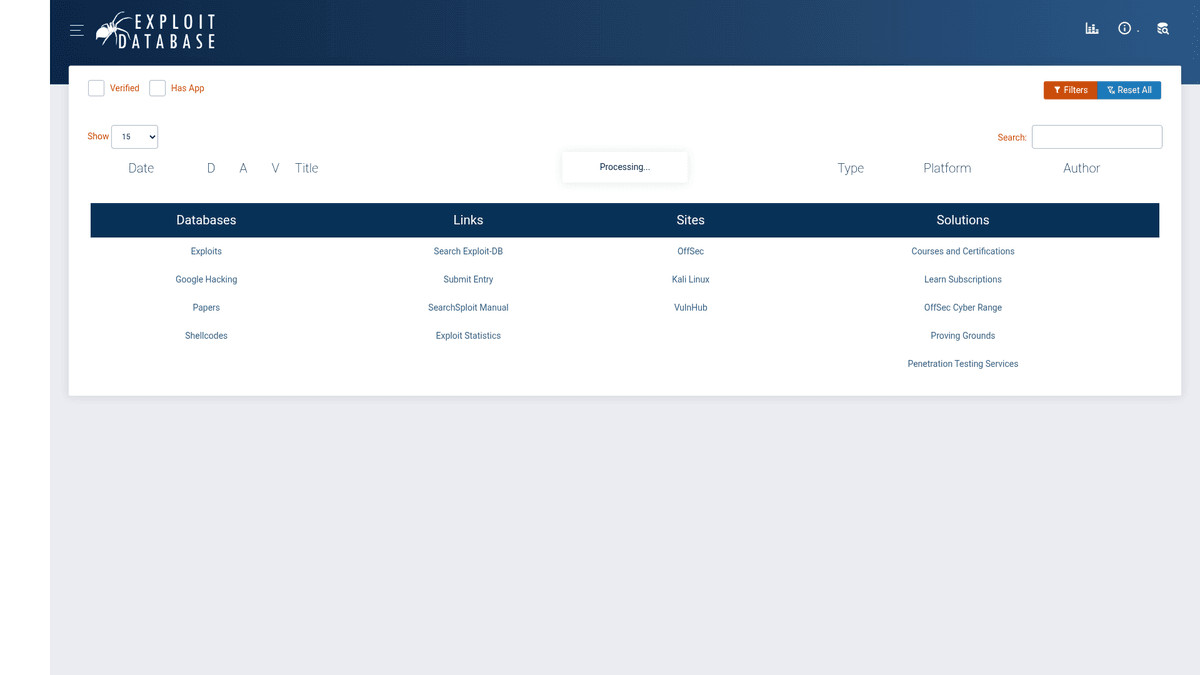
How to Scrape Exploit-DB | Exploit Database Web Scraper
Learn how to scrape Exploit-DB for vulnerability data, exploit codes, and CVE references to fuel cybersecurity research and automated threat intelligence feeds.
Free to start: 1,000 credits, no card, nothing to install.
About Exploit Database
Learn what Exploit Database offers and what valuable data can be extracted from it.
Comprehensive Vulnerability Repository
The Exploit Database (Exploit-DB) is a CVE-compliant archive of public exploits and corresponding vulnerable software, developed for use by penetration testers and vulnerability researchers. Maintained by OffSec (Offensive Security), it serves as a central hub for the cybersecurity community to share proof-of-concept code and research across various platforms and applications. The repository is one of the most trusted sources for security professionals worldwide.
Data Categorization and Depth
The website organizes data into granular categories like Remote Exploits, Web Applications, Local Exploits, and Shellcodes. Each entry typically includes the exploit title, date, author, platform, associated CVE ID, and the raw exploit code. This structured approach allows researchers to quickly pivot between different types of vulnerabilities and their historical context.
Strategic Value for Security Operations
Scraping this data is highly valuable for Security Operations Centers (SOCs) and threat intelligence teams to correlate known exploits with internal vulnerabilities. By automating the extraction of PoC code and metadata, organizations can create custom security signatures, enhance their vulnerability management lifecycle, and build robust threat intelligence feeds.
Why Scrape Exploit Database?
Discover the business value and use cases for extracting data from Exploit Database.
Threat Intelligence Enrichment
Automate the collection of new proof-of-concept exploits to feed internal security operations centers and threat intelligence platforms.
Vulnerability Prioritization
Cross-reference internal asset vulnerabilities with publicly available exploits to determine which patches require immediate application.
Security Tool Development
Integrate functional exploit code and shellcode into custom penetration testing frameworks or automated security assessment tools.
Compliance Auditing
Maintain a historical record of exploits for specific software versions to ensure systems meet regulatory security requirements.
Zero-Day Monitoring
Set up alerts for newly published exploits targeting critical infrastructure or widely used enterprise software.
Scraping Challenges
Technical challenges you may encounter when scraping Exploit Database.
JavaScript-Based Rendering
The main exploit database is rendered via jQuery DataTables, making it invisible to basic HTTP scrapers that do not execute JavaScript.
Cloudflare Anti-Bot Walls
Exploit-DB is protected by Cloudflare, which uses browser fingerprinting and TLS challenges to block non-human traffic.
Strict Rate Limiting
Repeated requests for raw exploit code files often trigger IP-based rate limiting or temporary bans if not properly managed.
Dynamic Content Loading
The site uses AJAX to load table data, requiring the scraper to either wait for network idle or intercept specific API calls.
Scrape Exploit Database with AI
No coding required. Extract data in minutes with AI-powered automation.
How It Works
Describe What You Need
Tell the AI what data you want to extract from Exploit Database. Just type it in plain language — no coding or selectors needed.
AI Extracts the Data
Our artificial intelligence navigates Exploit Database, handles dynamic content, and extracts exactly what you asked for.
Get Your Data
Receive clean, structured data ready to export as CSV, JSON, or send directly to your apps and workflows.
Why Use AI for Scraping
No-Code Web Scrapers for Exploit Database
Point-and-click alternatives to AI-powered scraping
Several no-code tools like Browse.ai, Octoparse, Axiom, and ParseHub can help you scrape Exploit Database. These tools use visual interfaces to select elements, but they come with trade-offs compared to AI-powered solutions.
Typical Workflow with No-Code Tools
Common Challenges
Learning curve
Understanding selectors and extraction logic takes time
Selectors break
Website changes can break your entire workflow
Dynamic content issues
JavaScript-heavy sites often require complex workarounds
CAPTCHA limitations
Most tools require manual intervention for CAPTCHAs
IP blocking
Aggressive scraping can get your IP banned
Code Examples
import requests
from bs4 import BeautifulSoup
# Exploit-DB uses Cloudflare; simple requests might be blocked
url = 'https://www.exploit-db.com/'
headers = {'User-Agent': 'Mozilla/5.0 (Windows NT 10.0; Win64; x64) AppleWebKit/537.36 (KHTML, like Gecko) Chrome/91.0.4472.124 Safari/537.36'}
try:
    response = requests.get(url, headers=headers)
    response.raise_for_status()
    soup = BeautifulSoup(response.text, 'html.parser')
    # Note: Main data is loaded via AJAX, initial HTML is a shell
    print('Page Title:', soup.title.text)
except Exception as e:
    print(f'Error encountered: {e}')
When to Use
Best for static HTML pages where content is loaded server-side. The fastest and simplest approach when JavaScript rendering isn't required.
Advantages
- ●Fastest execution (no browser overhead)
- ●Lowest resource consumption
- ●Easy to parallelize with asyncio
- ●Great for APIs and static pages
Limitations
- ●Cannot execute JavaScript
- ●Fails on SPAs and dynamic content
- ●May struggle with complex anti-bot systems
from playwright.sync_api import sync_playwright
def scrape_exploit_db():
    with sync_playwright() as p:
        browser = p.chromium.launch(headless=True)
        page = browser.new_page()
        page.goto('https://www.exploit-db.com/')
        # Wait for the DataTables to populate via AJAX
        page.wait_for_selector('table#exploits-table')
        rows = page.query_selector_all('table#exploits-table tbody tr')
        for row in rows[:5]:
            print(row.inner_text())
        browser.close()
scrape_exploit_db()
When to Use
Use when content loads dynamically via JavaScript, or when you need to interact with the page (clicks, scrolls, form fills). Handles modern anti-bot detection better.
Advantages
- ●Executes JavaScript like a real browser
- ●Handles SPAs and dynamic content
- ●Better anti-bot evasion with stealth plugins
- ●Can take screenshots and PDFs
Limitations
- ●Slower than HTTP requests
- ●Higher memory/CPU usage
- ●More complex to set up
import scrapy
class ExploitSpider(scrapy.Spider):
    name = 'exploit_spider'
    start_urls = ['https://www.exploit-db.com/']
    def parse(self, response):
        # Scrapy needs a JS middleware like scrapy-playwright for this site
        for exploit in response.css('table#exploits-table tbody tr'):
            yield {
                'title': exploit.css('td.title a::text').get(),
                'id': exploit.css('td.id::text').get(),
                'cve': exploit.css('td.cve a::text').get()
            }
When to Use
Ideal for large-scale crawling projects that need to scrape thousands of pages. Built-in support for rate limiting, retries, and data pipelines.
Advantages
- ●Built for scale (millions of pages)
- ●Automatic request throttling
- ●Built-in data export pipelines
- ●Middleware system for proxies/headers
Limitations
- ●Steeper learning curve
- ●Overkill for small projects
- ●No native JavaScript rendering
const puppeteer = require('puppeteer');
(async () => {
  const browser = await puppeteer.launch();
  const page = await browser.newPage();
  await page.goto('https://www.exploit-db.com/', { waitUntil: 'networkidle2' });
  const results = await page.evaluate(() => {
    const rows = Array.from(document.querySelectorAll('table#exploits-table tbody tr'));
    return rows.map(row => row.innerText);
  });
  console.log(results.slice(0, 5));
  await browser.close();
})();
When to Use
Choose this if you're in a Node.js/JavaScript ecosystem or need tight integration with frontend tools. Similar capabilities to Playwright.
Advantages
- ●Native JavaScript/TypeScript support
- ●Chrome DevTools Protocol access
- ●Large ecosystem and community
- ●Good for JS-heavy projects
Limitations
- ●Chrome-only (vs Playwright's multi-browser)
- ●Similar overhead to Playwright
- ●Less mature stealth options
What You Can Do With Exploit Database Data
Explore practical applications and insights from Exploit Database data.
Real-time Threat Intelligence Feed
Create a continuous feed of new exploits to warn security teams about emerging threats.
How to implement:
- 1Set up a scheduled scrape of the homepage daily
- 2Compare new EDB-IDs against previously scraped records
- 3Trigger Slack or email alerts for new critical exploits
Use Automatio to extract data from Exploit Database and build these applications without writing code.
Vulnerability Correlation and Patching
Help IT teams prioritize software patches based on the existence of working exploit code.
How to implement:
- 1Extract CVE IDs and associated exploit metadata
- 2Cross-reference with internal software inventory lists
- 3Flag systems with publicly available exploits for immediate patching
Use Automatio to extract data from Exploit Database and build these applications without writing code.
Automated SIEM Signature Creation
Extract proof-of-concept shellcode to develop defensive signatures for intrusion detection.
How to implement:
- 1Navigate to individual exploit pages and scrape raw code
- 2Analyze code for unique byte patterns or network strings
- 3Feed extracted patterns into SIEM or IDS/IPS rule generators
Use Automatio to extract data from Exploit Database and build these applications without writing code.
Historical Vulnerability Trend Analysis
Analyze a decade of exploit data to understand which platforms are most targeted over time.
How to implement:
- 1Scrape the entire archive including dates, platforms, and types
- 2Aggregate the data by platform and year
- 3Visualize attack trends using BI tools like Tableau or PowerBI
Use Automatio to extract data from Exploit Database and build these applications without writing code.
Academic Cybersecurity Datasets
Provide high-quality, structured data for machine learning models predicting exploit reliability.
How to implement:
- 1Scrape verified versus unverified exploits
- 2Extract the raw source code and metadata attributes
- 3Train models to classify code patterns associated with successful exploits
Use Automatio to extract data from Exploit Database and build these applications without writing code.
Supercharge your workflow with AI Automation
Automatio combines the power of AI agents, web automation, and smart integrations to help you accomplish more in less time.
What to get right first
Expert advice for successfully extracting data from Exploit Database.
Intercept XHR Requests
Instead of scraping the rendered HTML, look for the internal JSON requests made by DataTables to extract clean, structured data directly.
Use Residential Proxies
Rotate through high-quality residential IPs to avoid triggering the site's aggressive Web Application Firewall (WAF) and rate limits.
Filter by Verification
Programmatically check the 'Verified' status field to prioritize high-quality, functional exploit code for your security datasets.
Cleanse CVE Identifiers
Always normalize the extracted CVE strings into a standard format to ensure easy integration with other vulnerability databases like NVD.
Consult the GitLab Mirror
Before running a heavy scrape, check the official Exploit-DB GitLab repository for bulk CSV data which is easier to process for historical records.
Related Web Scraping

How to Scrape The AA (theaa.com): A Technical Guide for Car & Insurance Data
How to Scrape Biluppgifter.se: Vehicle Data Extraction Guide
How to Scrape Bilregistret.ai: Swedish Vehicle Data Extraction Guide
How to Scrape CSS Author: A Comprehensive Web Scraping Guide
How to Scrape Car.info | Vehicle Data & Valuation Extraction Guide

How to Scrape GoAbroad Study Abroad Programs

How to Scrape ResearchGate: Publication and Researcher Data
Statista Scraper: Titles, Regions and Dates in a table
Frequently Asked Questions
Find answers to common questions about Exploit Database
Is it legal to scrape Exploit-DB?
Scraping Exploit-DB for personal security research, academic study, or internal threat intelligence is generally considered acceptable. However, users should avoid commercial redistribution of the data and ensure they are not overloading the site's servers in a way that constitutes a denial of service.
Does Exploit-DB have an official public API?
Exploit-DB does not offer a free public REST API for general use, though they do offer subscription-based API access for high-throughput enterprise needs. Most researchers use the SearchSploit utility or custom scrapers to automate data retrieval.
How can I avoid getting blocked while scraping?
The most effective way to avoid blocks is to use a headless browser automation tool that can bypass Cloudflare and execute JavaScript. Additionally, implementing slow request intervals and rotating residential proxies will help mimic human browsing behavior.
What format is the data available in?
The exploit metadata is provided in a structured table format that can be converted to JSON or CSV, while the actual exploit code is typically stored as raw plain text or downloadable files.
How often should I scrape Exploit-DB?
For standard research, a daily scrape is usually sufficient to keep up with new entries. If you are monitoring for active zero-day threats, you may want to check the homepage every hour for new verified submissions.
What is the difference between SearchSploit and scraping?
SearchSploit is a command-line tool for searching a local offline copy of the database, whereas scraping allows you to pull the very latest data and custom fields directly from the live website in real-time.
What proxies work best for Exploit-DB?
Residential proxies are highly recommended because data center IPs are often pre-emptively blocked by security-focused WAFs. Using proxies that offer sticky sessions can also help in maintaining a consistent connection during complex multi-page scrapes.