

How to Scrape Hugging Face: The Complete Technical Guide
Master Hugging Face scraping to extract AI models, datasets, and metadata. Learn how to bypass Cloudflare and automate data collection for AI market research.
Free to start: 1,000 credits, no card, nothing to install.
About Hugging Face
Learn what Hugging Face offers and what valuable data can be extracted from it.
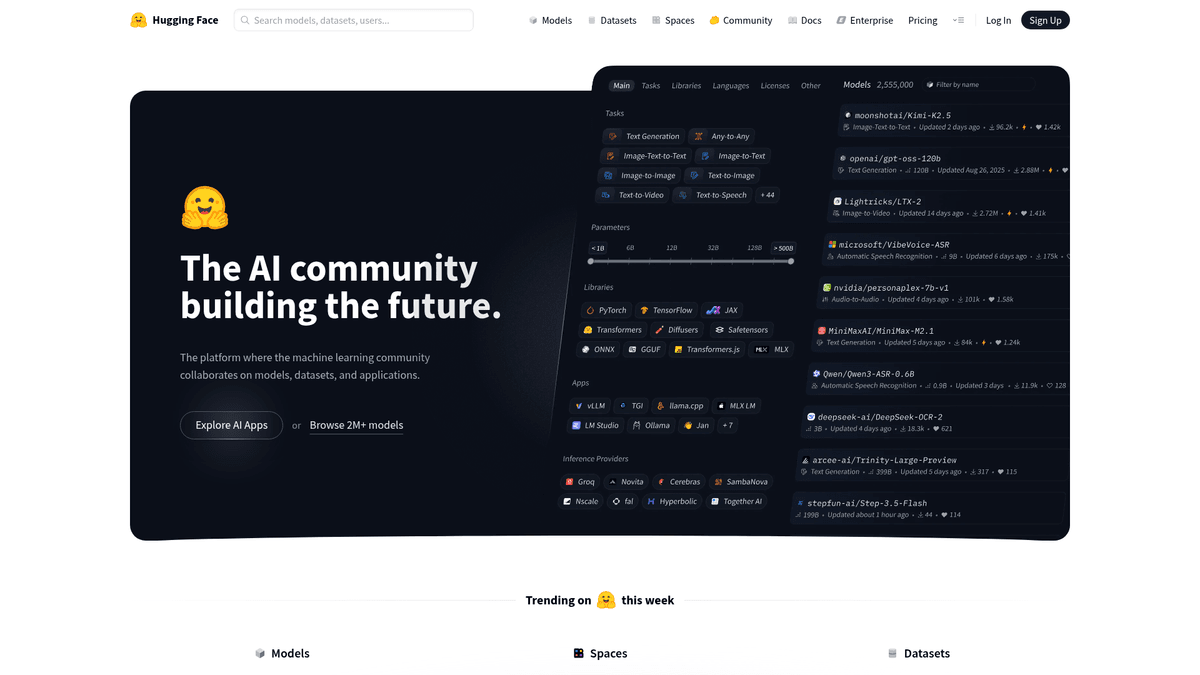
Hugging Face is the leading platform and community for machine learning and artificial intelligence, often described as the GitHub for AI. It provides a central hub where researchers and developers share, discover, and collaborate on models, datasets, and demo applications known as Spaces. It hosts contributions from major tech entities like Google, Meta, and Microsoft, alongside a massive community of independent developers. The platform contains a vast array of structured data, including model performance metrics, dataset configurations, user activity logs, and library compatibility information.
Scraping Hugging Face is highly valuable for organizations looking to perform competitive intelligence, track the adoption of specific AI frameworks, or aggregate metadata for academic research. By extracting data from the platform, users can monitor trending models, identify top contributors, and stay updated on the rapidly evolving landscape of generative AI. The platform organizes content by tasks such as Natural Language Processing (NLP), Computer Vision, and Audio, making it a critical repository for the state of the art in machine learning.
Why Scrape Hugging Face?
Discover the business value and use cases for extracting data from Hugging Face.
AI Market Trend Analysis
Scraping Hugging Face allows researchers to monitor which model architectures and AI tasks are gaining momentum by tracking download numbers and community likes over time.
Competitive Intelligence
Tech companies can track the open-source output of competitors like Meta, Google, and Mistral to stay informed about their latest releases and model benchmarks.
Lead Generation for Researchers
Extracting author and contributor profiles helps recruitment teams find high-performing AI researchers and developers active in the open-source community.
Dataset Discovery and Indexing
Building a custom searchable index of niche datasets across various languages and modalities helps data scientists find training data that is often buried in the search UI.
Investment and Commercial Research
Venture capitalists use metadata from trending models as a proxy to measure the commercial viability and developer adoption of emerging AI startups.
Scraping Challenges
Technical challenges you may encounter when scraping Hugging Face.
Cloudflare Anti-Bot Protection
Hugging Face uses Cloudflare to mitigate automated traffic, which frequently results in JS challenges or CAPTCHAs for standard scraping scripts.
Dynamic React Architecture
The website heavily utilizes client-side rendering, meaning model lists and metadata often require a full browser environment to load correctly.
Strict Rate Limiting
Sending too many requests to model cards or the internal JSON endpoints will quickly trigger '429 Too Many Requests' errors and temporary IP bans.
Unstructured Model Descriptions
While technical metadata is structured, specific model details are often trapped in Markdown-based README files that vary in format from one author to another.
Scrape Hugging Face with AI
No coding required. Extract data in minutes with AI-powered automation.
How It Works
Describe What You Need
Tell the AI what data you want to extract from Hugging Face. Just type it in plain language — no coding or selectors needed.
AI Extracts the Data
Our artificial intelligence navigates Hugging Face, handles dynamic content, and extracts exactly what you asked for.
Get Your Data
Receive clean, structured data ready to export as CSV, JSON, or send directly to your apps and workflows.
Why Use AI for Scraping
No-Code Web Scrapers for Hugging Face
Point-and-click alternatives to AI-powered scraping
Several no-code tools like Browse.ai, Octoparse, Axiom, and ParseHub can help you scrape Hugging Face. These tools use visual interfaces to select elements, but they come with trade-offs compared to AI-powered solutions.
Typical Workflow with No-Code Tools
Common Challenges
Learning curve
Understanding selectors and extraction logic takes time
Selectors break
Website changes can break your entire workflow
Dynamic content issues
JavaScript-heavy sites often require complex workarounds
CAPTCHA limitations
Most tools require manual intervention for CAPTCHAs
IP blocking
Aggressive scraping can get your IP banned
Code Examples
import requests
from bs4 import BeautifulSoup

url = 'https://huggingface.co/models?sort=downloads'
headers = {'User-Agent': 'Mozilla/5.0 (Windows NT 10.0; Win64; x64) AppleWebKit/537.36 (KHTML, like Gecko) Chrome/91.0.4472.124 Safari/537.36'}

try:
    response = requests.get(url, headers=headers)
    response.raise_for_status()
    soup = BeautifulSoup(response.text, 'html.parser')
    # Extracting model articles
    models = soup.find_all('article')
    for model in models:
        name = model.find('h4').text.strip()
        print(f'Model Name: {name}')
except Exception as e:
    print(f'Error occurred: {e}')
When to Use
Best for static HTML pages where content is loaded server-side. The fastest and simplest approach when JavaScript rendering isn't required.
Advantages
- ●Fastest execution (no browser overhead)
- ●Lowest resource consumption
- ●Easy to parallelize with asyncio
- ●Great for APIs and static pages
Limitations
- ●Cannot execute JavaScript
- ●Fails on SPAs and dynamic content
- ●May struggle with complex anti-bot systems
from playwright.sync_api import sync_playwright

def scrape_hf():
    with sync_playwright() as p:
        browser = p.chromium.launch(headless=True)
        page = browser.new_page()
        page.goto('https://huggingface.co/models')
        # Wait for model list to render
        page.wait_for_selector('article')
        models = page.query_selector_all('article h4')
        for m in models:
            print(m.inner_text())
        browser.close()

scrape_hf()
When to Use
Use when content loads dynamically via JavaScript, or when you need to interact with the page (clicks, scrolls, form fills). Handles modern anti-bot detection better.
Advantages
- ●Executes JavaScript like a real browser
- ●Handles SPAs and dynamic content
- ●Better anti-bot evasion with stealth plugins
- ●Can take screenshots and PDFs
Limitations
- ●Slower than HTTP requests
- ●Higher memory/CPU usage
- ●More complex to set up
import scrapy

class HuggingFaceSpider(scrapy.Spider):
    name = 'hf_spider'
    start_urls = ['https://huggingface.co/models']

    def parse(self, response):
        for model in response.css('article'):
            yield {
                'title': model.css('h4::text').get(),
                'author': model.css('span.text-gray-400::text').get()
            }
        # Handle pagination
        next_page = response.css('a[aria-label="Next"]::attr(href)').get()
        if next_page:
            yield response.follow(next_page, self.parse)
When to Use
Ideal for large-scale crawling projects that need to scrape thousands of pages. Built-in support for rate limiting, retries, and data pipelines.
Advantages
- ●Built for scale (millions of pages)
- ●Automatic request throttling
- ●Built-in data export pipelines
- ●Middleware system for proxies/headers
Limitations
- ●Steeper learning curve
- ●Overkill for small projects
- ●No native JavaScript rendering
const puppeteer = require('puppeteer');

(async () => {
    const browser = await puppeteer.launch();
    const page = await browser.newPage();
    await page.goto('https://huggingface.co/models');
    // Wait for the dynamic content to load
    await page.waitForSelector('article');
    const data = await page.evaluate(() => {
        return Array.from(document.querySelectorAll('article h4')).map(h => h.innerText);
    });
    console.log(data);
    await browser.close();
})();
When to Use
Choose this if you're in a Node.js/JavaScript ecosystem or need tight integration with frontend tools. Similar capabilities to Playwright.
Advantages
- ●Native JavaScript/TypeScript support
- ●Chrome DevTools Protocol access
- ●Large ecosystem and community
- ●Good for JS-heavy projects
Limitations
- ●Chrome-only (vs Playwright's multi-browser)
- ●Similar overhead to Playwright
- ●Less mature stealth options
What You Can Do With Hugging Face Data
Explore practical applications and insights from Hugging Face data.
AI Market Trend Identification
Companies benefit by identifying which AI tasks are gaining the most traction globally.
How to implement:
- 1Scrape download counts for all models within specific task categories monthly.
- 2Aggregate the data to see percentage growth by category.
- 3Identify breakout models that show sudden spikes in popularity.
Use Automatio to extract data from Hugging Face and build these applications without writing code.
Competitive Intelligence
Tech firms track the open-source output of competitors like Meta or Google to stay ahead.
How to implement:
- 1Set up a targeted scrape for specific organization profiles on Hugging Face.
- 2Monitor for new repository creations or updates to existing model cards.
- 3Alert product teams when a competitor releases a new model in a relevant domain.
Use Automatio to extract data from Hugging Face and build these applications without writing code.
Lead Generation for Tech Talent
Recruiters find top-tier AI researchers by analyzing contribution quality and community impact.
How to implement:
- 1Extract lists of authors from high-performing models with over 100k downloads.
- 2Scrape user profiles to find linked social media or personal websites.
- 3Filter for individuals with a consistent history of popular open-source contributions.
Use Automatio to extract data from Hugging Face and build these applications without writing code.
Academic Research Datasets
Researchers analyze the collaborative nature and evolution of the AI research ecosystem.
How to implement:
- 1Scrape metadata including author lists, citation counts, and organization affiliations.
- 2Map the relationships between different organizations and individual contributors.
- 3Apply network analysis to visualize the hubs of the AI research ecosystem.
Use Automatio to extract data from Hugging Face and build these applications without writing code.
Supercharge your workflow with AI Automation
Automatio combines the power of AI agents, web automation, and smart integrations to help you accomplish more in less time.
What to get right first
Expert advice for successfully extracting data from Hugging Face.
Target YAML Front Matter
Most Hugging Face README files contain a structured YAML block at the top; scraping this directly provides the most reliable metadata for tags and licenses.
Inspect Network Requests
Hugging Face often uses internal API endpoints to fetch model lists; targeting these JSON responses directly can be faster and more stable than HTML scraping.
Prioritize the Official API
For simple metadata extraction, always check the official 'huggingface_hub' Python library first as it is less likely to be blocked than the web interface.
Use Residential Proxies
To avoid the site's aggressive IP-based rate limiting, use high-quality residential proxies rather than datacenter IPs which are easily flagged.
Scrape config.json for Specs
For deep technical details like architecture type and parameter counts, extract the link to the 'config.json' file within the model's repository.
Related Web Scraping

GitHub Scraper: Repos, Stars and Languages in a table
How to Scrape Weather.com: A Guide to Weather Data Extraction
How to Scrape Pollen.com: Local Allergy Data Extraction Guide
Wikipedia Scraper: Titles, Sizes and Edit Dates in a table
Worldometer Scraper: Population and Median Age in a table

How to Scrape Britannica: Educational Data Web Scraper
How to Scrape Poll-Maker: A Comprehensive Web Scraping Guide
How to Scrape Maven.com for Course and Instructor Data
Frequently Asked Questions
Find answers to common questions about Hugging Face
Is it legal to scrape Hugging Face?
Scraping publicly available metadata for research or non-commercial purposes is generally allowed as long as you comply with their Terms of Service and robots.txt. However, you should avoid scraping copyrighted datasets hosted on the platform without explicit permission from the data owners.
Does Hugging Face have an official API?
Yes, Hugging Face provides an extensive Hub API and the 'huggingface_hub' Python library. This is the recommended method for retrieving model metadata, downloading files, and searching repositories programmatically without being blocked by anti-bot measures.
How can I avoid getting blocked by Hugging Face?
To prevent blocking, you should implement sensible rate limiting, use realistic browser headers, and rotate your IP addresses using residential proxies. Avoiding high-frequency scraping of the main search pages and respecting their crawl-delay directives is also critical for long-term access.
What format is the data extracted from Hugging Face?
If you use the official API, data is typically returned in JSON format. When using web scraping tools, you can export the extracted metadata into CSV, JSON, or structured databases like PostgreSQL for further analysis of AI trends.
How often should I scrape Hugging Face for new trends?
For tracking general industry trends, scraping once a week is usually sufficient. However, if you are monitoring competitive releases or specific high-velocity tags, a daily scrape may be necessary to capture new models as they are uploaded.
What proxies work best for Hugging Face scraping?
Residential proxies are the most effective choice because they mimic real user connections and are less likely to be flagged by Cloudflare's security filters. Datacenter proxies are often identified and throttled quickly due to their association with automated traffic.
Can I scrape gated models or datasets?
Scraping gated content requires an authenticated session and a user access token, as you must often agree to specific terms to view these repositories. You will need to include your Hugging Face API token in the request headers to access these specific pages via a scraper.
How do I handle pagination when scraping model lists?
Hugging Face uses a cursor-based pagination system for its model and dataset lists. Your scraper needs to identify the 'Next' button or the updated URL parameter (like 'p=2' or 'after=...') to navigate through multiple pages of results correctly.