

How to Scrape IQAir Air Quality Data
Learn how to scrape real-time air quality index (AQI), PM2.5, and weather data from IQAir to monitor pollution trends and build health-focused applications.
Free to start: 1,000 credits, no card, nothing to install.
About IQAir
Learn what IQAir offers and what valuable data can be extracted from it.
Global Air Quality Monitoring
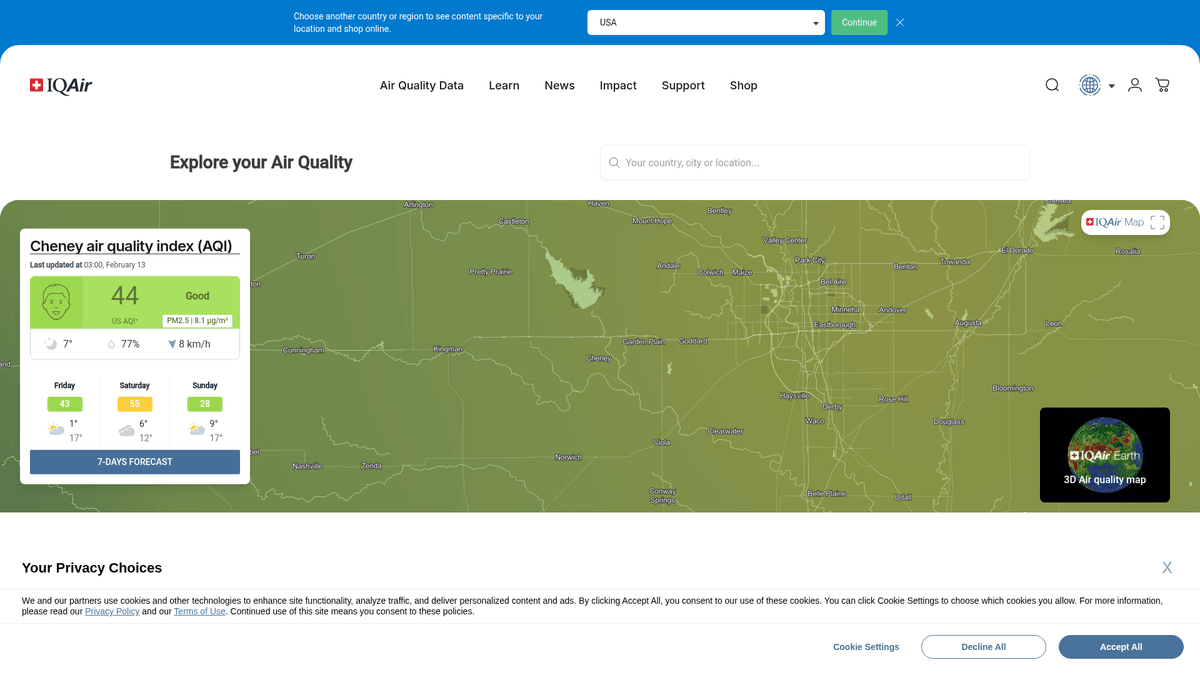
IQAir is a Swiss-based air quality technology company that operates the world's most comprehensive platform for tracking global air pollution. They aggregate data from over 30,000 monitoring stations, including official government sensors and their own proprietary AirVisual network, providing a real-time global map of air health.
Comprehensive Environmental Data
The platform provides detailed metrics including the US Air Quality Index (AQI), concentrations of specific pollutants like PM2.5, PM10, Ozone (O3), and nitrogen dioxide, alongside meteorological data such as temperature, humidity, and wind speed. It also features city-specific rankings and health recommendations based on current air conditions.
Value for Data Science and Research
Scraping this data is highly valuable for environmental researchers, urban planners, and health-tech developers. It allows for the analysis of long-term pollution trends, the impact of air quality on public health, and the correlation between environmental factors and economic indicators like real estate value or retail foot traffic.
Why Scrape IQAir?
Discover the business value and use cases for extracting data from IQAir.
Real-Time Health Alerts
Scraping allows you to build automated systems that notify sensitive populations when PM2.5 or Ozone levels exceed safe thresholds in specific cities.
Real Estate Market Analysis
Integrate air quality scores into property valuation models to determine how environmental health affects residential appeal and long-term pricing.
ESG and Corporate Compliance
Companies can monitor the air quality around their global office locations to ensure employee wellness and fulfill environmental reporting requirements.
Academic and Climate Research
Gathering historical pollution data across multiple regions helps researchers study long-term environmental trends and the efficacy of local policy changes.
Smart Home IoT Integration
Developers can use scraped AQI data to trigger smart HVAC systems or air purifiers to activate when external pollution levels rise.
Supply Chain Forecasting
Manufacturers of masks and air filters can correlate localized pollution spikes with sales data to optimize inventory distribution and marketing spend.
Scraping Challenges
Technical challenges you may encounter when scraping IQAir.
Advanced Cloudflare Protection
IQAir employs robust Cloudflare security layers that can detect and block non-browser traffic through fingerprinting and behavior analysis.
Dynamic Content Hydration
The website heavily uses JavaScript to render AQI values and interactive maps, meaning standard HTML parsers will often find empty data fields.
Regional Redirection Logic
The site often redirects users to localized subdomains based on their IP address, which can complicate attempts to scrape data for a different region.
High Data Volatility
Air quality numbers are updated hourly, requiring a highly reliable and performant infrastructure to capture temporal trends without missing data points.
Complex DOM Structure
The use of modern frameworks like React results in deeply nested and occasionally changing CSS selectors, which can break fragile scraping scripts.
Scrape IQAir with AI
No coding required. Extract data in minutes with AI-powered automation.
How It Works
Describe What You Need
Tell the AI what data you want to extract from IQAir. Just type it in plain language — no coding or selectors needed.
AI Extracts the Data
Our artificial intelligence navigates IQAir, handles dynamic content, and extracts exactly what you asked for.
Get Your Data
Receive clean, structured data ready to export as CSV, JSON, or send directly to your apps and workflows.
Why Use AI for Scraping
No-Code Web Scrapers for IQAir
Point-and-click alternatives to AI-powered scraping
Several no-code tools like Browse.ai, Octoparse, Axiom, and ParseHub can help you scrape IQAir. These tools use visual interfaces to select elements, but they come with trade-offs compared to AI-powered solutions.
Typical Workflow with No-Code Tools
Common Challenges
Learning curve
Understanding selectors and extraction logic takes time
Selectors break
Website changes can break your entire workflow
Dynamic content issues
JavaScript-heavy sites often require complex workarounds
CAPTCHA limitations
Most tools require manual intervention for CAPTCHAs
IP blocking
Aggressive scraping can get your IP banned
Code Examples
import requests
from bs4 import BeautifulSoup

# Note: IQAir uses Cloudflare; simple requests may be blocked.
# This example demonstrates the structure if anti-bot is bypassed.
url = 'https://www.iqair.com/usa/new-york/new-york-city'
headers = {
    'User-Agent': 'Mozilla/5.0 (Windows NT 10.0; Win64; x64) AppleWebKit/537.36 (KHTML, like Gecko) Chrome/119.0.0.0 Safari/537.36',
    'Accept-Language': 'en-US,en;q=0.9'
}

try:
    response = requests.get(url, headers=headers)
    if response.status_code == 200:
        soup = BeautifulSoup(response.text, 'html.parser')
        # City title is often in an h1
        city = soup.find('h1').text.strip() if soup.find('h1') else 'N/A'
        # AQI values are usually inside specific status classes
        print(f'City: {city}')
    else:
        print(f'Blocked by Cloudflare: {response.status_code}')
except Exception as e:
    print(f'Error: {e}')
When to Use
Best for static HTML pages where content is loaded server-side. The fastest and simplest approach when JavaScript rendering isn't required.
Advantages
- ●Fastest execution (no browser overhead)
- ●Lowest resource consumption
- ●Easy to parallelize with asyncio
- ●Great for APIs and static pages
Limitations
- ●Cannot execute JavaScript
- ●Fails on SPAs and dynamic content
- ●May struggle with complex anti-bot systems
from playwright.sync_api import sync_playwright

def scrape_iqair_live():
    with sync_playwright() as p:
        # Launching browser with stealth-like settings
        browser = p.chromium.launch(headless=True)
        context = browser.new_context(user_agent='Mozilla/5.0 (Windows NT 10.0; Win64; x64)...')
        page = context.new_page()

        # Navigate to a specific city page
        page.goto('https://www.iqair.com/usa/new-york/new-york-city', wait_until='networkidle')

        # Wait for the dynamic AQI value element to appear
        page.wait_for_selector('.aqi-value__value')

        # Extract data from the DOM
        data = {
            'city': page.inner_text('h1'),
            'aqi': page.inner_text('.aqi-value__value'),
            'pollutant': page.inner_text('.pollutant-level-wrapper b'),
            'temp': page.inner_text('.weather__detail--temp')
        }

        print(data)
        browser.close()

if __name__ == '__main__':
    scrape_iqair_live()
When to Use
Use when content loads dynamically via JavaScript, or when you need to interact with the page (clicks, scrolls, form fills). Handles modern anti-bot detection better.
Advantages
- ●Executes JavaScript like a real browser
- ●Handles SPAs and dynamic content
- ●Better anti-bot evasion with stealth plugins
- ●Can take screenshots and PDFs
Limitations
- ●Slower than HTTP requests
- ●Higher memory/CPU usage
- ●More complex to set up
import scrapy

class IQAirRankingSpider(scrapy.Spider):
    name = 'iqair_spider'
    start_urls = ['https://www.iqair.com/world-air-quality-ranking']

    def parse(self, response):
        # Extract data from the global ranking table
        # Note: Scrapy usually needs a JS middleware like scrapy-playwright for this site
        for row in response.css('table.ranking__table tr'):
            yield {
                'rank': row.css('td.rank::text').get(),
                'city': row.css('a.city-name::text').get(),
                'aqi': row.css('td.aqi::text').get(),
                'country': row.css('span.country-name::text').get()
            }
When to Use
Ideal for large-scale crawling projects that need to scrape thousands of pages. Built-in support for rate limiting, retries, and data pipelines.
Advantages
- ●Built for scale (millions of pages)
- ●Automatic request throttling
- ●Built-in data export pipelines
- ●Middleware system for proxies/headers
Limitations
- ●Steeper learning curve
- ●Overkill for small projects
- ●No native JavaScript rendering
const puppeteer = require('puppeteer');

(async () => {
  const browser = await puppeteer.launch({ headless: true });
  const page = await browser.newPage();

  try {
    // Emulate a real user to avoid immediate blocking
    await page.setUserAgent('Mozilla/5.0 (Windows NT 10.0; Win64; x64) AppleWebKit/537.36...');
    await page.goto('https://www.iqair.com/usa/new-york/new-york-city', { waitUntil: 'networkidle2' });

    // Capture dynamic content
    const result = await page.evaluate(() => {
      return {
        city: document.querySelector('h1')?.innerText,
        aqi: document.querySelector('.aqi-value__value')?.innerText,
        main_pollutant: document.querySelector('.pollutant-level-wrapper b')?.innerText
      };
    });

    console.log(result);
  } catch (err) {
    console.error('Scraping failed:', err);
  } finally {
    await browser.close();
  }
})();
When to Use
Choose this if you're in a Node.js/JavaScript ecosystem or need tight integration with frontend tools. Similar capabilities to Playwright.
Advantages
- ●Native JavaScript/TypeScript support
- ●Chrome DevTools Protocol access
- ●Large ecosystem and community
- ●Good for JS-heavy projects
Limitations
- ●Chrome-only (vs Playwright's multi-browser)
- ●Similar overhead to Playwright
- ●Less mature stealth options
What You Can Do With IQAir Data
Explore practical applications and insights from IQAir data.
Real Estate Health Scoring
Property platforms can use historical air quality data to provide health scores for specific neighborhoods.
How to implement:
- 1Scrape historical PM2.5 and AQI data for specific zip codes.
- 2Calculate the average number of 'Unhealthy' days per year.
- 3Integrate this score into property listing pages to inform buyers.
- 4Update the scores quarterly to reflect seasonal pollution changes.
Use Automatio to extract data from IQAir and build these applications without writing code.
Smart City IoT Integration
Smart home device manufacturers can automate indoor air purifiers based on external pollution levels.
How to implement:
- 1Setup a scheduled scrape of the local city AQI every 15 minutes.
- 2Push the live AQI value to a cloud database or webhook.
- 3Trigger IoT air purifiers to turn on high-mode when local AQI exceeds 100.
- 4Send mobile notifications to users when it is safe to open windows.
Use Automatio to extract data from IQAir and build these applications without writing code.
Healthcare Patient Monitoring
Clinics specializing in respiratory health can provide personalized alerts to sensitive patients.
How to implement:
- 1Collect real-time Ozone and PM10 concentrations for patient locations.
- 2Compare live data against medical thresholds for asthma or COPD sufferers.
- 3Send automated SMS alerts advising patients to stay indoors.
- 4Generate weekly reports for doctors on patient exposure levels.
Use Automatio to extract data from IQAir and build these applications without writing code.
E-commerce Market Intelligence
Manufacturers of N95 masks and air filters can optimize advertising spend based on air quality trends.
How to implement:
- 1Monitor the 'World Air Quality Ranking' daily to identify pollution hotspots.
- 2Analyze seasonal trends to predict when demand for filters will peak.
- 3Automate Google Ads bidding increases in cities with AQI > 150.
- 4Target inventory distribution to warehouses near predicted pollution events.
Use Automatio to extract data from IQAir and build these applications without writing code.
Supercharge your workflow with AI Automation
Automatio combines the power of AI agents, web automation, and smart integrations to help you accomplish more in less time.
What to get right first
Expert advice for successfully extracting data from IQAir.
Use Residential Proxies
Datacenter IPs are frequently flagged; using residential proxies provides the highest success rate for bypassing IQAir's security filters.
Wait for Network Idle
Ensure your scraper waits for all network requests to finish before extracting data, as AQI values are often the last elements to load.
Differentiate AQI Standards
IQAir provides both US and Chinese AQI standards; make sure your scraper targets the specific element relevant to your analysis.
Capture the Timestamp
Always scrape the 'Last Updated' timestamp alongside the AQI to ensure your data is correctly aligned in time-series models.
Monitor Selector Stability
The site structure may shift during major updates; verify your selectors regularly to avoid capturing null values during pollution events.
Implement Exponential Backoff
If you encounter a 403 or 429 error, pause your scraper and increase the delay between requests to avoid a permanent IP block.
Related Web Scraping
GitHub Scraper: Repos, Stars and Languages in a table
How to Scrape Pollen.com: Local Allergy Data Extraction Guide

How to Scrape Britannica: Educational Data Web Scraper
Worldometer Scraper: Population and Median Age in a table
Wikipedia Scraper: Titles, Sizes and Edit Dates in a table
How to Scrape Weather.com: A Guide to Weather Data Extraction
How to Scrape Poll-Maker: A Comprehensive Web Scraping Guide
How to Scrape Maven.com for Course and Instructor Data
Frequently Asked Questions
Find answers to common questions about IQAir
Is it legal to scrape IQAir?
Scraping public air quality data for personal research or non-commercial analysis is generally permitted. However, users should respect the site's robots.txt and avoid high-frequency scraping that could disrupt their service or violate their Terms of Service.
Does IQAir have an official API?
Yes, IQAir offers the AirVisual API which provides structured access to global air quality data. They offer a free tier for community and development use, while higher volume and commercial access require a paid subscription.
How do I avoid getting blocked by IQAir?
The most effective way to avoid blocks is to use residential proxies and rotate your User-Agents. Additionally, implementing a human-like browsing speed with random delays between requests will reduce the likelihood of triggering anti-bot alarms.
How often does the data on IQAir update?
The data is typically updated once per hour, matching the reporting cycles of most global monitoring stations. For most use cases, scheduling your scraper to run hourly is the most efficient approach.
What format can I export IQAir data into?
Using tools like Automatio, you can export the data into structured formats like JSON, CSV, or XML. You can also automate the flow of data directly into Google Sheets or other cloud databases.
Can I scrape historical air quality data?
Yes, IQAir provides historical data for many cities on dedicated history pages. You can scrape these pages to build a timeline of pollution levels, though the depth of history available depends on the specific monitoring station.
Do I need a headless browser to scrape IQAir?
Yes, because the site relies on JavaScript to populate the air quality values, a headless browser like Playwright, Puppeteer, or a tool like Automatio is required to ensure the data is visible before extraction.
Which proxies work best for IQAir?
Residential proxies are highly recommended because they appear as legitimate home users. Static datacenter IPs are easily identified and blocked by the Cloudflare protection IQAir uses.