

How to Scrape WebElements: Periodic Table Data Guide
Extract precise chemical element data from WebElements. Scrape atomic weights, physical properties, and discovery history for research and AI applications.
Free to start: 1,000 credits, no card, nothing to install.
About WebElements
Learn what WebElements offers and what valuable data can be extracted from it.
WebElements is a premier online periodic table maintained by Mark Winter at the University of Sheffield. Launched in 1993, it was the first periodic table on the World Wide Web and has since become a high-authority resource for students, academics, and professional chemists. The site offers deep, structured data on every known chemical element, from standard atomic weights to complex electronic configurations.
The value of scraping WebElements lies in its high-quality, peer-reviewed scientific data. For developers building educational tools, researchers conducting trend analysis across the periodic table, or materials scientists training machine learning models, WebElements provides a reliable and technically rich source of truth that is difficult to aggregate manually.
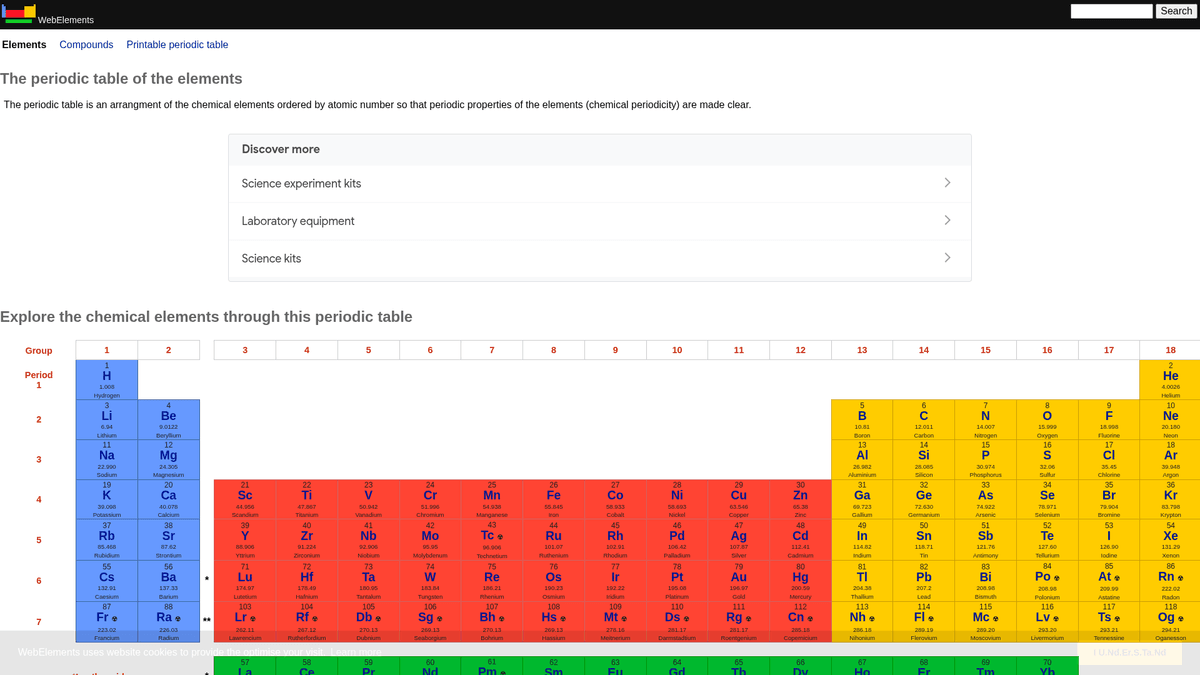
Why Scrape WebElements?
Discover the business value and use cases for extracting data from WebElements.
Scientific Database Population
Aggregate peer-reviewed atomic and chemical data into centralized databases for academic research and large-scale material analysis.
Educational Tool Development
Extract structured facts to power custom periodic table applications, mobile learning platforms, and interactive classroom flashcards.
Predictive Materials Modeling
Gather numerical properties like atomic radii and electronegativity as training features for machine learning models in materials science.
Chemical Informatics Integration
Integrate comprehensive isotope and thermodynamic data directly into laboratory management systems and stoichiometry calculation software.
Historical Scientific Timelines
Collect discovery dates, origin of names, and historical context for all 118 elements to create digital scientific chronologies.
Scraping Challenges
Technical challenges you may encounter when scraping WebElements.
Fragmented Sub-page Structure
Data for a single element is often split across multiple specific sub-URLs like /atoms, /history, or /compounds, requiring a multi-step crawl.
Special Symbol Encoding
Correctly parsing and storing scientific notation, superscripts, subscripts, and Greek characters requires strict UTF-8 handling to avoid data corruption.
Unit Normalization Requirements
Extracting raw numerical data requires programmatically stripping units such as 'pm', 'K', or 'g cm-3' and converting scientific notation into standard floats.
Label-Based Table Variations
Data is stored in generic tables without unique IDs, meaning scrapers must identify fields by checking the text content of labels rather than CSS classes.
Scrape WebElements with AI
No coding required. Extract data in minutes with AI-powered automation.
How It Works
Describe What You Need
Tell the AI what data you want to extract from WebElements. Just type it in plain language — no coding or selectors needed.
AI Extracts the Data
Our artificial intelligence navigates WebElements, handles dynamic content, and extracts exactly what you asked for.
Get Your Data
Receive clean, structured data ready to export as CSV, JSON, or send directly to your apps and workflows.
Why Use AI for Scraping
No-Code Web Scrapers for WebElements
Point-and-click alternatives to AI-powered scraping
Several no-code tools like Browse.ai, Octoparse, Axiom, and ParseHub can help you scrape WebElements. These tools use visual interfaces to select elements, but they come with trade-offs compared to AI-powered solutions.
Typical Workflow with No-Code Tools
Common Challenges
Learning curve
Understanding selectors and extraction logic takes time
Selectors break
Website changes can break your entire workflow
Dynamic content issues
JavaScript-heavy sites often require complex workarounds
CAPTCHA limitations
Most tools require manual intervention for CAPTCHAs
IP blocking
Aggressive scraping can get your IP banned
Code Examples
import requests
from bs4 import BeautifulSoup
import time

# Target URL for a specific element (e.g., Gold)
url = 'https://www.webelements.com/gold/'
headers = {'User-Agent': 'Mozilla/5.0 (Windows NT 10.0; Win64; x64) AppleWebKit/537.36 (KHTML, like Gecko) Chrome/91.0.4472.124 Safari/537.36'}

def scrape_element(element_url):
    try:
        response = requests.get(element_url, headers=headers)
        response.raise_for_status()
        soup = BeautifulSoup(response.text, 'html.parser')

        # Extracting the element name from the H1 tag
        name = soup.find('h1').get_text().strip()

        # Extracting Atomic Number using table label logic
        atomic_number = soup.find('th', string=lambda s: s and 'Atomic number' in s).find_next('td').text.strip()

        print(f'Element: {name}, Atomic Number: {atomic_number}')
    except Exception as e:
        print(f'An error occurred: {e}')

# Following robots.txt recommendations
time.sleep(1)
scrape_element(url)
When to Use
Best for static HTML pages where content is loaded server-side. The fastest and simplest approach when JavaScript rendering isn't required.
Advantages
- ●Fastest execution (no browser overhead)
- ●Lowest resource consumption
- ●Easy to parallelize with asyncio
- ●Great for APIs and static pages
Limitations
- ●Cannot execute JavaScript
- ●Fails on SPAs and dynamic content
- ●May struggle with complex anti-bot systems
from playwright.sync_api import sync_playwright

def run():
    with sync_playwright() as p:
        browser = p.chromium.launch(headless=True)
        page = browser.new_page()
        # Elements are linked from the main periodic table
        page.goto('https://www.webelements.com/iron/')

        # Wait for the property table to be present
        page.wait_for_selector('table')

        element_data = {
            'name': page.inner_text('h1'),
            'density': page.locator('th:has-text("Density") + td').inner_text().strip()
        }

        print(element_data)
        browser.close()

run()
When to Use
Use when content loads dynamically via JavaScript, or when you need to interact with the page (clicks, scrolls, form fills). Handles modern anti-bot detection better.
Advantages
- ●Executes JavaScript like a real browser
- ●Handles SPAs and dynamic content
- ●Better anti-bot evasion with stealth plugins
- ●Can take screenshots and PDFs
Limitations
- ●Slower than HTTP requests
- ●Higher memory/CPU usage
- ●More complex to set up
import scrapy

class ElementsSpider(scrapy.Spider):
    name = 'elements'
    start_urls = ['https://www.webelements.com/']

    def parse(self, response):
        # Follow every element link in the periodic table
        for link in response.css('table a[title]::attr(href)'):
            yield response.follow(link, self.parse_element)

    def parse_element(self, response):
        yield {
            'name': response.css('h1::text').get().strip(),
            'symbol': response.xpath('//th[contains(text(), "Symbol")]/following-sibling::td/text()').get().strip(),
            'atomic_number': response.xpath('//th[contains(text(), "Atomic number")]/following-sibling::td/text()').get().strip(),
        }
When to Use
Ideal for large-scale crawling projects that need to scrape thousands of pages. Built-in support for rate limiting, retries, and data pipelines.
Advantages
- ●Built for scale (millions of pages)
- ●Automatic request throttling
- ●Built-in data export pipelines
- ●Middleware system for proxies/headers
Limitations
- ●Steeper learning curve
- ●Overkill for small projects
- ●No native JavaScript rendering
const puppeteer = require('puppeteer');

(async () => {
  const browser = await puppeteer.launch();
  const page = await browser.newPage();
  await page.goto('https://www.webelements.com/silver/');

  const data = await page.evaluate(() => {
    const name = document.querySelector('h1').innerText;
    const meltingPoint = Array.from(document.querySelectorAll('th'))
      .find(el => el.textContent.includes('Melting point'))
      ?.nextElementSibling.innerText;
    return { name, meltingPoint };
  });

  console.log('Extracted Data:', data);
  await browser.close();
})();
When to Use
Choose this if you're in a Node.js/JavaScript ecosystem or need tight integration with frontend tools. Similar capabilities to Playwright.
Advantages
- ●Native JavaScript/TypeScript support
- ●Chrome DevTools Protocol access
- ●Large ecosystem and community
- ●Good for JS-heavy projects
Limitations
- ●Chrome-only (vs Playwright's multi-browser)
- ●Similar overhead to Playwright
- ●Less mature stealth options
What You Can Do With WebElements Data
Explore practical applications and insights from WebElements data.
Materials Science AI Training
Training machine learning models to predict the properties of new alloys based on elemental attributes.
How to implement:
- 1Extract physical properties for all metallic elements.
- 2Clean and normalize values like density and melting points.
- 3Input the data into regression or predictive material models.
- 4Verify predictions against existing experimental alloy data.
Use Automatio to extract data from WebElements and build these applications without writing code.
Educational App Content
Populating interactive periodic tables for chemistry students with peer-reviewed data.
How to implement:
- 1Scrape atomic numbers, symbols, and element descriptions.
- 2Extract historical context and discovery details.
- 3Organize the data by periodic group and block.
- 4Integrate into a user interface with visual crystal structures.
Use Automatio to extract data from WebElements and build these applications without writing code.
Chemical Trend Analysis
Visualizing periodic trends like ionization energy or atomic radius across periods and groups.
How to implement:
- 1Gather property data for every element in numerical order.
- 2Categorize elements into their respective groups.
- 3Use graphing libraries to visualize trends.
- 4Identify and analyze anomalous data points in specific blocks.
Use Automatio to extract data from WebElements and build these applications without writing code.
Lab Inventory Management
Auto-populating chemical management systems with physical safety and density data.
How to implement:
- 1Map internal inventory list to WebElements entries.
- 2Scrape density, storage hazards, and melting point data.
- 3Update the centralized lab database via API.
- 4Generate automated safety warnings for high-risk elements.
Use Automatio to extract data from WebElements and build these applications without writing code.
Supercharge your workflow with AI Automation
Automatio combines the power of AI agents, web automation, and smart integrations to help you accomplish more in less time.
What to get right first
Expert advice for successfully extracting data from WebElements.
Leverage Predictable URL Patterns
Elements follow a consistent /element_name/ structure, allowing you to generate target URLs programmatically for all 118 elements instead of crawling the homepage.
Identify Data via Sibling Selectors
Since the site lacks unique element IDs, identify data points by locating the label cell text (e.g., 'Melting point') and selecting the immediate next sibling 'td'.
Ensure UTF-8 Support
Always set your scraping environment to UTF-8 to correctly capture scientific characters like Å, ±, and Greek letters common in chemical notation.
Implement Crawl Delays
As an academic resource hosted by the University of Sheffield, it is best practice to follow the robots.txt delay of 1 second to avoid overloading the server.
Target Granular Sub-pages
For high-precision data such as specific isotope half-lives, scrape the dedicated /isotopes.html sub-pages rather than summary pages for better accuracy.
Related Web Scraping
GitHub Scraper: Repos, Stars and Languages in a table
How to Scrape Pollen.com: Local Allergy Data Extraction Guide
How to Scrape Britannica: Educational Data Web Scraper
Worldometer Scraper: Population and Median Age in a table
Wikipedia Scraper: Titles, Sizes and Edit Dates in a table
How to Scrape Weather.com: A Guide to Weather Data Extraction
How to Scrape Poll-Maker: A Comprehensive Web Scraping Guide
How to Scrape Maven.com for Course and Instructor Data
Frequently Asked Questions
Find answers to common questions about WebElements
Is it legal to scrape data from WebElements?
Scraping WebElements for personal research, academic study, or non-commercial educational purposes is generally acceptable under fair use. However, the data is copyrighted by the University of Sheffield and Mark Winter, so you should avoid republishing the database as a competing commercial product without explicit permission.
Does WebElements provide an official API?
WebElements does not offer a public REST API or developer endpoint for programmatic data access. To collect data at scale, you must use a web scraper to extract information directly from the HTML structure of the site.
How can I avoid getting blocked by WebElements?
The site does not use aggressive anti-bot protections like Cloudflare, but it does monitor for high-frequency traffic. You can avoid blocks by using a standard browser User-Agent and implementing a crawl delay of at least one second between requests as suggested in their robots.txt file.
What is the best format for saving the scraped chemical data?
JSON is the highly recommended format because chemical data is hierarchical; for example, one element may contain a nested list of multiple isotopes, each with its own properties. CSV is also suitable for simpler datasets containing basic periodic trends like atomic weight or symbol.
How often is the scientific data on the site updated?
Fundamental properties like atomic numbers never change, but IUPAC occasionally updates standard atomic weights or confirms properties for newer synthetic elements. WebElements typically updates these values once or twice a year, so a biannual scrape is usually sufficient to maintain a modern dataset.
Do I need a headless browser to scrape WebElements?
No, WebElements is a traditional, server-side rendered website. You can successfully extract almost all data using simple HTTP request libraries like Python's Requests or Node.js Axios, making the scraping process much faster and more efficient than using a headless browser.
What proxies work best for scraping this site?
Since the site doesn't have a high security wall, standard datacenter proxies or even a single static IP with reasonable rate limiting will work fine. There is no need for expensive residential proxies unless you are attempting to crawl the entire site in an extremely short timeframe.