

How to Scrape whatsmydns.net: A Complete Guide to DNS Data
Learn how to scrape global DNS propagation data from whatsmydns.net. Extract real-time A, MX, CNAME, and TXT records from worldwide servers automatically.
Free to start: 1,000 credits, no card, nothing to install.
About whatsmydns.net
Learn what whatsmydns.net offers and what valuable data can be extracted from it.
Global DNS Propagation Infrastructure
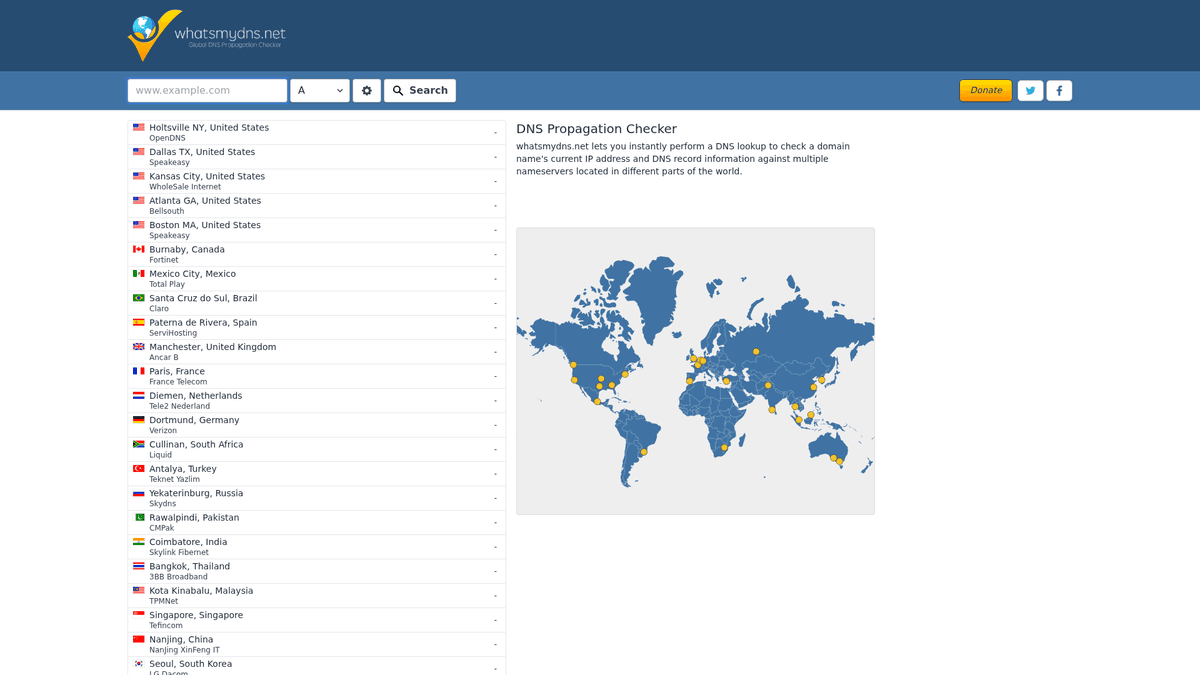
whatsmydns.net is a premier online utility designed for system administrators and developers to track DNS propagation across the globe. By querying dozens of DNS servers located in various geographic regions, it provides a comprehensive view of how a domain resolves for users in different countries. This visibility is essential for ensuring that DNS changes, such as IP migrations or mail server updates, have been successfully applied worldwide.
Comprehensive DNS Record Tracking
The platform supports a wide array of DNS record types, including A, AAAA, CNAME, MX, NS, PTR, SOA, and TXT. For each query, the site returns a detailed list of server locations, the resolved values, and the status of the propagation. This data is critical for troubleshooting technical issues that only appear in specific regions due to ISP caching or misconfigured local resolvers.
Strategic Data Value
Scraping this data allows organizations to automate technical audits and monitor infrastructure health. Instead of manually checking propagation, businesses can build automated systems that verify record accuracy every few minutes. This is particularly valuable during high-stakes events like website migrations or security updates where any delay in DNS updates can lead to downtime or service interruption for a subset of global users.
Why Scrape whatsmydns.net?
Discover the business value and use cases for extracting data from whatsmydns.net.
Global Infrastructure Monitoring
Continuously monitor your domain's health across international servers to ensure consistent accessibility and identify regional DNS outages instantly. This proactive approach helps technical teams resolve local connectivity issues before they impact a larger user base.
Automated Migration Verification
Track the propagation of new IP addresses or nameservers during a server move, ensuring all global nodes update correctly before decommissioning old assets. It provides a data-backed confirmation that the cutover was successful worldwide.
Brand Security Auditing
Monitor critical records like SPF, DKIM, and DMARC to prevent email spoofing and detect unauthorized changes that could compromise your brand's reputation. Regular scraping helps identify DNS hijacking attempts in specific geographic zones.
Competitive Intelligence
Analyze the hosting, CDN, and email infrastructure choices of competitors by scraping their MX and CNAME records across various geographic regions. This allows market researchers to map out the tech stacks used by industry leaders.
CDN Strategy Optimization
Verify that your Content Delivery Network is routing traffic to the correct edge locations globally, allowing for data-driven adjustments to your caching strategy. This ensures that users always receive content from the fastest possible server.
Troubleshooting Regional Latency
Identify specific resolvers or geographic zones where DNS resolution is failing or returning stale records, helping to diagnose complex network performance issues. It is an essential tool for debugging errors that only appear in certain countries.
Scraping Challenges
Technical challenges you may encounter when scraping whatsmydns.net.
Advanced Cloudflare Protection
The site uses Cloudflare's security layer, including Turnstile and browser fingerprinting, which requires sophisticated automation to bypass without being flagged. Simple HTTP requests will almost always be blocked by the challenge wall.
Asynchronous Result Loading
Data points are not available in the source HTML and load at different times via background AJAX calls, making static scrapers completely ineffective. The scraper must wait for each global node to report its status before extracting the values.
Aggressive Rate Limiting
Rapid, automated queries from a single IP address quickly trigger temporary bans or CAPTCHAs, necessitating the use of high-quality proxy rotation. This requires careful management of request headers and timing to mimic human behavior.
Real-time Data Volatility
DNS propagation is a fluid process where results can change within seconds, requiring fast extraction and timestamping for accurate analysis. Keeping track of these changes over time requires a robust database architecture.
Complex Selector Logic
The results table utilizes specific status icons, such as green checks or red crosses, that must be correctly parsed alongside text values to determine resolution success. This requires precise CSS or XPath targeting to interpret the visual status correctly.
Scrape whatsmydns.net with AI
No coding required. Extract data in minutes with AI-powered automation.
How It Works
Describe What You Need
Tell the AI what data you want to extract from whatsmydns.net. Just type it in plain language — no coding or selectors needed.
AI Extracts the Data
Our artificial intelligence navigates whatsmydns.net, handles dynamic content, and extracts exactly what you asked for.
Get Your Data
Receive clean, structured data ready to export as CSV, JSON, or send directly to your apps and workflows.
Why Use AI for Scraping
No-Code Web Scrapers for whatsmydns.net
Point-and-click alternatives to AI-powered scraping
Several no-code tools like Browse.ai, Octoparse, Axiom, and ParseHub can help you scrape whatsmydns.net. These tools use visual interfaces to select elements, but they come with trade-offs compared to AI-powered solutions.
Typical Workflow with No-Code Tools
Common Challenges
Learning curve
Understanding selectors and extraction logic takes time
Selectors break
Website changes can break your entire workflow
Dynamic content issues
JavaScript-heavy sites often require complex workarounds
CAPTCHA limitations
Most tools require manual intervention for CAPTCHAs
IP blocking
Aggressive scraping can get your IP banned
Code Examples
import requests
from bs4 import BeautifulSoup

# Note: Direct requests may be blocked by Cloudflare
url = 'https://www.whatsmydns.net/'
headers = {
    'User-Agent': 'Mozilla/5.0 (Windows NT 10.0; Win64; x64) Chrome/119.0.0.0 Safari/537.36',
    'Accept': 'text/html,application/xhtml+xml,xml;q=0.9,image/avif,image/webp,*/*;q=0.8'
}

def check_dns_static():
    try:
        # Accessing the homepage to get the session/cookies
        session = requests.Session()
        response = session.get(url, headers=headers)
        if response.status_code == 200:
            soup = BeautifulSoup(response.text, 'html.parser')
            # Static scraping is limited as results load via JS
            print('Page loaded successfully. JS rendering required for results.')
        else:
            print(f'Blocked: HTTP {response.status_code}')
    except Exception as e:
        print(f'Error: {e}')

check_dns_static()
When to Use
Best for static HTML pages where content is loaded server-side. The fastest and simplest approach when JavaScript rendering isn't required.
Advantages
- ●Fastest execution (no browser overhead)
- ●Lowest resource consumption
- ●Easy to parallelize with asyncio
- ●Great for APIs and static pages
Limitations
- ●Cannot execute JavaScript
- ●Fails on SPAs and dynamic content
- ●May struggle with complex anti-bot systems
from playwright.sync_api import sync_playwright

def scrape_whatsmydns():
    with sync_playwright() as p:
        browser = p.chromium.launch(headless=True)
        page = browser.new_page()

        # Use the hash-based URL to trigger a specific DNS lookup
        page.goto('https://www.whatsmydns.net/#A/google.com')

        # Wait for the results table to populate with data
        page.wait_for_selector('.results-table tr', timeout=15000)

        # Extract the results
        rows = page.query_selector_all('.results-table tr')
        for row in rows:
            location = row.query_selector('.location').inner_text()
            result_val = row.query_selector('.value').inner_text()
            print(f'[{location}] Resolved to: {result_val}')

        browser.close()

scrape_whatsmydns()
When to Use
Use when content loads dynamically via JavaScript, or when you need to interact with the page (clicks, scrolls, form fills). Handles modern anti-bot detection better.
Advantages
- ●Executes JavaScript like a real browser
- ●Handles SPAs and dynamic content
- ●Better anti-bot evasion with stealth plugins
- ●Can take screenshots and PDFs
Limitations
- ●Slower than HTTP requests
- ●Higher memory/CPU usage
- ●More complex to set up
import scrapy
from scrapy_playwright.page import PageMethod

class DNSPropagationSpider(scrapy.Spider):
    name = 'dns_spider'

    def start_requests(self):
        # Scrapy-Playwright handles the JS rendering
        yield scrapy.Request(
            'https://www.whatsmydns.net/#A/example.com',
            meta={
                'playwright': True,
                'playwright_page_methods': [
                    PageMethod('wait_for_selector', '.results-table tr')
                ]
            }
        )

    def parse(self, response):
        # Iterate through the table rows extracted via Playwright
        for row in response.css('.results-table tr'):
            yield {
                'location': row.css('.location::text').get(),
                'result': row.css('.value::text').get()
            }
When to Use
Ideal for large-scale crawling projects that need to scrape thousands of pages. Built-in support for rate limiting, retries, and data pipelines.
Advantages
- ●Built for scale (millions of pages)
- ●Automatic request throttling
- ●Built-in data export pipelines
- ●Middleware system for proxies/headers
Limitations
- ●Steeper learning curve
- ●Overkill for small projects
- ●No native JavaScript rendering
const puppeteer = require('puppeteer');

(async () => {
  const browser = await puppeteer.launch();
  const page = await browser.newPage();

  // Navigate directly to the DNS check URL
  await page.goto('https://www.whatsmydns.net/#MX/microsoft.com', { waitUntil: 'networkidle2' });

  // Wait for dynamic server rows to load
  await page.waitForSelector('.results-table tr');

  const data = await page.evaluate(() => {
    const rows = Array.from(document.querySelectorAll('.results-table tr'));
    return rows.map(row => ({
      location: row.querySelector('.location')?.innerText.trim(),
      value: row.querySelector('.value')?.innerText.trim()
    }));
  });

  console.log(data);
  await browser.close();
})();
When to Use
Choose this if you're in a Node.js/JavaScript ecosystem or need tight integration with frontend tools. Similar capabilities to Playwright.
Advantages
- ●Native JavaScript/TypeScript support
- ●Chrome DevTools Protocol access
- ●Large ecosystem and community
- ●Good for JS-heavy projects
Limitations
- ●Chrome-only (vs Playwright's multi-browser)
- ●Similar overhead to Playwright
- ●Less mature stealth options
What You Can Do With whatsmydns.net Data
Explore practical applications and insights from whatsmydns.net data.
Global Uptime Monitoring
IT managers can ensure that their services are accessible worldwide without manual checks.
How to implement:
- 1Schedule a scrape of critical domains every 30 minutes
- 2Compare scraped IP addresses against a master list of authorized IPs
- 3Trigger an automated alert via Webhook if a mismatch is detected in any region
Use Automatio to extract data from whatsmydns.net and build these applications without writing code.
CDN Usage Mapping
Marketing researchers can identify which content delivery networks competitors are using based on CNAME records.
How to implement:
- 1Scrape CNAME records for a list of top 500 industry domains
- 2Cross-reference the target domains with known CDN providers (e.g., Cloudflare, Akamai)
- 3Generate a report on market share trends for infrastructure providers
Use Automatio to extract data from whatsmydns.net and build these applications without writing code.
Zero-Downtime Migration Verification
DevOps teams can confirm full propagation before decommissioning old infrastructure.
How to implement:
- 1Execute a DNS change and lower the TTL values
- 2Scrape whatsmydns.net every 5 minutes during the migration window
- 3Decommission the old server only when 100% of global nodes report the new IP
Use Automatio to extract data from whatsmydns.net and build these applications without writing code.
Security Threat Detection
Security analysts can detect DNS poisoning or unauthorized changes to MX records.
How to implement:
- 1Monitor TXT and MX records for high-value corporate domains
- 2Scrape propagation status to find regions being served 'stale' or malicious data
- 3Identify specific geographic regions where DNS hijacking might be occurring
Use Automatio to extract data from whatsmydns.net and build these applications without writing code.
Historical DNS Record Analysis
Researchers can build a dataset of how DNS records change over time for academic or legal audits.
How to implement:
- 1Crawl records daily and store the results in a SQL database
- 2Track shifts in provider IP ranges over months or years
- 3Visualize the speed of propagation for different DNS providers using historical time-to-finish metrics
Use Automatio to extract data from whatsmydns.net and build these applications without writing code.
Supercharge your workflow with AI Automation
Automatio combines the power of AI agents, web automation, and smart integrations to help you accomplish more in less time.
What to get right first
Expert advice for successfully extracting data from whatsmydns.net.
Leverage URL Hash Parameters
Navigate directly to specific record types and domains by manipulating the URL hash, such as using #MX/domain.com, to skip manual form filling. This approach significantly speeds up the scraping process for batch domain checks.
Implement Dynamic Wait Times
Some global resolvers take longer to respond than others; set a flexible timeout of 10-15 seconds to capture results from slower regions like South America or Asia. Short timeouts will result in incomplete data sets.
Extract the Status Class
Don't just scrape the IP address; also extract the CSS class of the status icon to programmatically distinguish between a successful resolution and a timeout. This is vital for accurately reporting the propagation percentage.
Rotate User-Agent Strings
Frequently rotate between modern desktop and mobile User-Agents to mimic real human behavior and further reduce the risk of fingerprint-based detection. This makes your automation indistinguishable from a standard user.
Monitor Internal API Requests
Inspect the browser's Network tab to identify the JSON endpoints used by the site's AJAX calls, which can sometimes be queried directly for faster data retrieval. Using these endpoints can bypass the need for full page renders.
Use Residential Proxies
To avoid being identified as a data-center bot, use residential proxies which offer higher trust scores and are less likely to trigger aggressive Cloudflare blocks. They provide the most stable connection for long-duration scraping sessions.
Related Web Scraping

How to Scrape The AA (theaa.com): A Technical Guide for Car & Insurance Data
How to Scrape Biluppgifter.se: Vehicle Data Extraction Guide

How to Scrape Bilregistret.ai: Swedish Vehicle Data Extraction Guide

How to Scrape CSS Author: A Comprehensive Web Scraping Guide

How to Scrape GoAbroad Study Abroad Programs
How to Scrape Car.info | Vehicle Data & Valuation Extraction Guide

How to Scrape ResearchGate: Publication and Researcher Data
Statista Scraper: Titles, Regions and Dates in a table
Frequently Asked Questions
Find answers to common questions about whatsmydns.net
Is it legal to scrape DNS data from whatsmydns.net?
Yes, scraping publicly accessible DNS information is generally legal as it is considered public-record data. However, you must ensure your automation does not disrupt the site's service and that you comply with their terms of use regarding excessive request frequency. This allows you to gather technical insights without violating data privacy laws.
Does whatsmydns.net have a public developer API?
Currently, whatsmydns.net does not provide a public, documented API for third-party developers. Automated access is typically achieved through web scraping tools that can handle the site's JavaScript-heavy front-end and dynamic loading. This approach allows you to replicate the manual lookup process at a much larger scale.
How can I avoid being blocked by Cloudflare while scraping?
The most effective method is using a headless browser automation tool that includes stealth plugins to mask its automated nature. Additionally, rotating your IP address through residential proxies and using realistic browsing delays will help you stay under the radar. These techniques make your scraper look like a standard user browsing from a local ISP.
What is the best data format for saving DNS propagation results?
JSON is highly recommended because it allows you to store complex records like MX, which include priority levels, or TXT records as structured objects. CSV is also a viable option if you are performing simpler A-record audits for spreadsheet analysis and internal reporting. Most developers prefer JSON for its compatibility with modern monitoring dashboards.
How frequently should I run a scraper for a domain migration?
For active migrations, running a check every 1 to 4 hours is standard for monitoring global progress. Since DNS propagation can take up to 72 hours, high-frequency scraping is usually only necessary during the first few hours of a change to verify initial updates. Regular intervals provide a clear timeline of the transition process.
Which types of proxies work best for whatsmydns.net?
Residential proxies are the most reliable choice because they provide IP addresses from real home users, which are harder for Cloudflare to flag as bots. Static ISP proxies are also a good alternative if you need consistent IP addresses for long-term infrastructure monitoring. Datacenter proxies are more likely to be blocked during peak traffic times.
Can I scrape multiple record types at the same time?
While the interface only displays one record type at a time, you can automate a sequence of requests by changing the URL hash for each type. A well-designed scraper will iterate through a list of domains and record types, capturing all data in a single run or session. This enables comprehensive audits of a domain's entire DNS configuration.
What should I do if the scraper returns a red 'X' for most locations?
A red 'X' usually indicates a query timeout or that the record does not exist on that specific resolver. Ensure your scraper waits long enough for the AJAX calls to finish; if the problem persists, it may indicate a genuine propagation issue in those specific regions. You should log these failures to investigate potential ISP-level caching problems.