

How to Scrape Who.is for Domain and IP Intelligence
Learn how to scrape Who.is to extract domain ownership details, registration dates, and contact info. Get valuable B2B leads and cybersecurity intelligence...
Free to start: 1,000 credits, no card, nothing to install.
About Who.is
Learn what Who.is offers and what valuable data can be extracted from it.
Comprehensive Domain Lookup Service
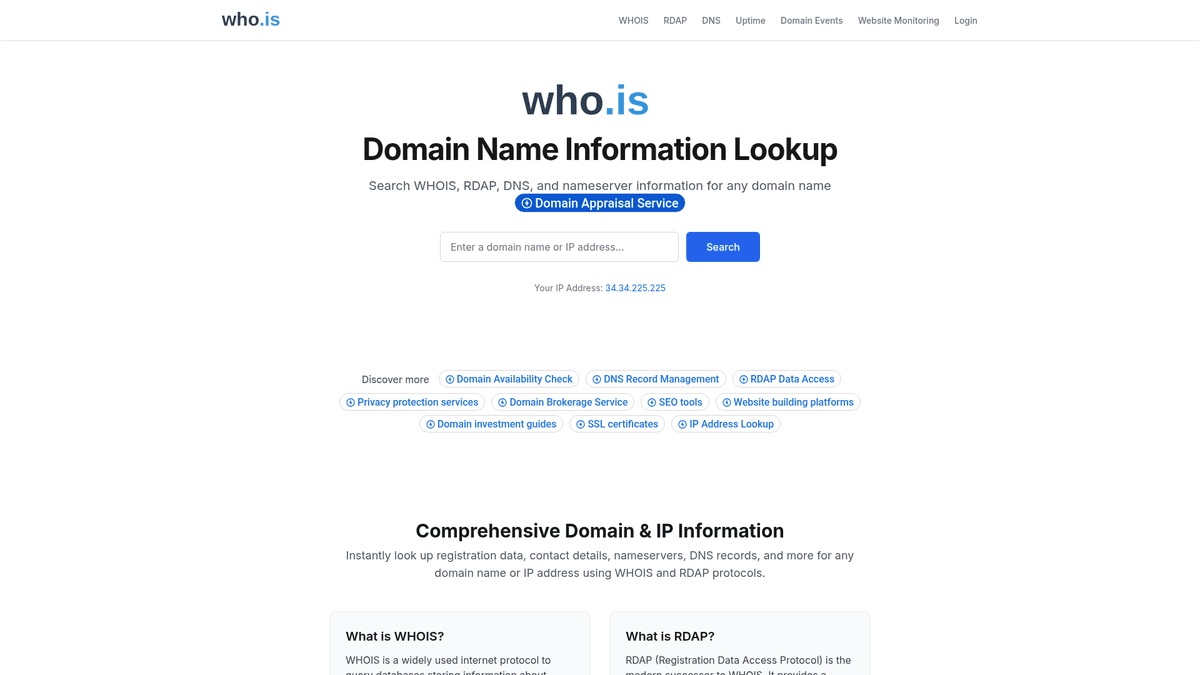
Who.is is a premier web-based tool for performing WHOIS and RDAP lookups to retrieve public registration information for domain names and IP addresses. It serves as a central hub for accessing records maintained by domain registrars and registries worldwide, offering critical insights into registration dates, expiration timelines, and nameserver configurations. The platform is widely used by IT professionals and researchers to investigate network infrastructure and identify the entities behind internet resources.
Rich Data Repository
The website displays structured and unstructured data concerning administrative, technical, and registrant contacts associated with a domain. While much personal contact data is now redacted to comply with GDPR and other privacy protocols, the site still provides essential information such as the registrar name, domain status, and various DNS records. It also offers tools for tracking IP addresses and monitoring website uptime, making it a comprehensive resource for web intelligence.
Business Value of WHOIS Scraping
Scraping Who.is data is highly valuable for cybersecurity researchers, competitive intelligence analysts, and marketing professionals. It enables the identification of newly registered businesses, tracking of domain portfolio movements, and the investigation of infrastructure used by potential threat actors. By automating the extraction of this data, organizations can stay ahead of market trends, protect their brand assets, and generate high-quality B2B leads efficiently.
Why Scrape Who.is?
Discover the business value and use cases for extracting data from Who.is.
B2B Lead Generation
Identify owners of newly registered domains to offer specialized services like web development, SEO, or branding as soon as they launch.
Cybersecurity Threat Intel
Map out the infrastructure of suspicious websites by analyzing nameservers, registrant organizations, and historical registration patterns to prevent phishing attacks.
Domain Expiration Tracking
Monitor high-value domains for expiration and redemption status to place competitive backorders the moment they become available for public registration.
Brand Protection
Detect typosquatting and trademark infringement by scraping Who.is for registration details of domains that closely mimic your corporate identity.
Competitive Market Research
Analyze the domain portfolios of competitors to uncover hidden projects, new product launches, or geographic expansions based on their registration activity.
Scraping Challenges
Technical challenges you may encounter when scraping Who.is.
Sophisticated Bot Detection
Who.is employs Cloudflare challenges and browser integrity checks that block standard automated scripts and headless browsers without proper stealth configurations.
Strict Per-IP Rate Limits
The site enforces tight limits on the number of lookups allowed from a single IP address, leading to immediate temporary bans for high-frequency scrapers.
Data Redaction (GDPR)
Privacy regulations have significantly limited the amount of personal data visible in WHOIS records, requiring scrapers to find alternative data points like nameservers.
Unstructured Raw Text
Most domain data is presented as a raw text block which varies by registrar, making it difficult to extract clean data without advanced regex or parsing logic.
Scrape Who.is with AI
No coding required. Extract data in minutes with AI-powered automation.
How It Works
Describe What You Need
Tell the AI what data you want to extract from Who.is. Just type it in plain language — no coding or selectors needed.
AI Extracts the Data
Our artificial intelligence navigates Who.is, handles dynamic content, and extracts exactly what you asked for.
Get Your Data
Receive clean, structured data ready to export as CSV, JSON, or send directly to your apps and workflows.
Why Use AI for Scraping
No-Code Web Scrapers for Who.is
Point-and-click alternatives to AI-powered scraping
Several no-code tools like Browse.ai, Octoparse, Axiom, and ParseHub can help you scrape Who.is. These tools use visual interfaces to select elements, but they come with trade-offs compared to AI-powered solutions.
Typical Workflow with No-Code Tools
Common Challenges
Learning curve
Understanding selectors and extraction logic takes time
Selectors break
Website changes can break your entire workflow
Dynamic content issues
JavaScript-heavy sites often require complex workarounds
CAPTCHA limitations
Most tools require manual intervention for CAPTCHAs
IP blocking
Aggressive scraping can get your IP banned
Code Examples
import requests
from bs4 import BeautifulSoup

# Who.is uses Cloudflare, so high-quality headers are critical
headers = {
    'User-Agent': 'Mozilla/5.0 (Windows NT 10.0; Win64; x64) AppleWebKit/537.36 (KHTML, like Gecko) Chrome/91.0.4472.124 Safari/537.36',
    'Accept-Language': 'en-US,en;q=0.9'
}
url = 'https://who.is/whois/example.com'

try:
    response = requests.get(url, headers=headers)
    response.raise_for_status()
    soup = BeautifulSoup(response.text, 'html.parser')

    # WHOIS data is typically inside pre tags or specific div classes
    whois_block = soup.find('pre')
    if whois_block:
        print(f'WHOIS Data: {whois_block.get_text().strip()}')
    else:
        print('Data block not found or blocked by anti-bot.')
except requests.exceptions.RequestException as e:
    print(f'Request failed: {e}')
When to Use
Best for static HTML pages where content is loaded server-side. The fastest and simplest approach when JavaScript rendering isn't required.
Advantages
- ●Fastest execution (no browser overhead)
- ●Lowest resource consumption
- ●Easy to parallelize with asyncio
- ●Great for APIs and static pages
Limitations
- ●Cannot execute JavaScript
- ●Fails on SPAs and dynamic content
- ●May struggle with complex anti-bot systems
from playwright.sync_api import sync_playwright

def scrape_whois(domain):
    with sync_playwright() as p:
        # Headless mode should be used with stealth plugins if possible
        browser = p.chromium.launch(headless=True)
        context = browser.new_context(user_agent='Mozilla/5.0 (Windows NT 10.0; Win64; x64) Chrome/110.0.0.0 Safari/537.36')
        page = context.new_page()

        # Navigate to the lookup page
        page.goto(f'https://who.is/whois/{domain}')

        # Wait for the results container to render
        page.wait_for_selector('.query-results', timeout=10000)

        # Extract the inner text of the results
        results = page.inner_text('.query-results')
        print(f'Results for {domain}:
{results}')

        browser.close()

scrape_whois('google.com')
When to Use
Use when content loads dynamically via JavaScript, or when you need to interact with the page (clicks, scrolls, form fills). Handles modern anti-bot detection better.
Advantages
- ●Executes JavaScript like a real browser
- ●Handles SPAs and dynamic content
- ●Better anti-bot evasion with stealth plugins
- ●Can take screenshots and PDFs
Limitations
- ●Slower than HTTP requests
- ●Higher memory/CPU usage
- ●More complex to set up
import scrapy

class WhoisSpider(scrapy.Spider):
    name = 'whois_spider'

    def start_requests(self):
        # Domains to look up
        domains = ['example.com', 'test.org']
        for domain in domains:
            yield scrapy.Request(
                url=f'https://who.is/whois/{domain}',
                callback=self.parse,
                meta={'proxy': 'http://your-residential-proxy:port'}
            )

    def parse(self, response):
        # Extracting domain name and the raw WHOIS text
        yield {
            'domain': response.css('h1::text').get(),
            'raw_data': response.css('.query-results pre::text').get(),
            'registrar': response.xpath("//div[contains(text(), 'Registrar')]/following-sibling::div/text()").get()
        }
When to Use
Ideal for large-scale crawling projects that need to scrape thousands of pages. Built-in support for rate limiting, retries, and data pipelines.
Advantages
- ●Built for scale (millions of pages)
- ●Automatic request throttling
- ●Built-in data export pipelines
- ●Middleware system for proxies/headers
Limitations
- ●Steeper learning curve
- ●Overkill for small projects
- ●No native JavaScript rendering
const puppeteer = require('puppeteer');

(async () => {
  const browser = await puppeteer.launch({ headless: true });
  const page = await browser.newPage();

  // Set a realistic user agent
  await page.setUserAgent('Mozilla/5.0 (Windows NT 10.0; Win64; x64) AppleWebKit/537.36 (KHTML, like Gecko) Chrome/110.0.0.0 Safari/537.36');

  await page.goto('https://who.is/whois/example.com');

  // Wait for the main preformatted text block containing WHOIS data
  try {
    await page.waitForSelector('pre', { timeout: 5000 });

    const whoisData = await page.evaluate(() => {
      const pre = document.querySelector('pre');
      return pre ? pre.innerText : 'Data not found';
    });

    console.log(whoisData);
  } catch (err) {
    console.log('Timeout or blocking detected:', err.message);
  }

  await browser.close();
})();
When to Use
Choose this if you're in a Node.js/JavaScript ecosystem or need tight integration with frontend tools. Similar capabilities to Playwright.
Advantages
- ●Native JavaScript/TypeScript support
- ●Chrome DevTools Protocol access
- ●Large ecosystem and community
- ●Good for JS-heavy projects
Limitations
- ●Chrome-only (vs Playwright's multi-browser)
- ●Similar overhead to Playwright
- ●Less mature stealth options
What You Can Do With Who.is Data
Explore practical applications and insights from Who.is data.
B2B Sales Outreach
Sales teams can identify the decision-makers behind newly registered domains to offer services like web design or hosting.
How to implement:
- 1Monitor daily lists of new domain registrations.
- 2Extract registrant names and organization details from Who.is.
- 3Filter leads by industry-related keywords found in the domain names.
- 4Import high-intent contacts into an automated email marketing platform.
Use Automatio to extract data from Who.is and build these applications without writing code.
Cybersecurity Threat Mapping
Security analysts use WHOIS data to map out infrastructure used by malicious actors or phishing campaigns.
How to implement:
- 1Input a known malicious domain into the scraper.
- 2Extract associated nameservers and registrant organization IDs.
- 3Search for other domains sharing these same infrastructure identifiers.
- 4Block the identified network ranges in corporate security firewalls.
Use Automatio to extract data from Who.is and build these applications without writing code.
Domain Acquisition Monitoring
Investors can track domains they wish to purchase by monitoring their expiration dates and status changes.
How to implement:
- 1Compile a list of target high-value domains for acquisition.
- 2Schedule daily scrapes to check the 'Expires' date and 'Domain Status'.
- 3Set automated alerts for domains entering the 'Redemption Period'.
- 4Place professional backorders as soon as the domain is released to the market.
Use Automatio to extract data from Who.is and build these applications without writing code.
Brand Protection Analysis
Companies can monitor for typosquatting or fraudulent websites using their trademarks to protect customers.
How to implement:
- 1Perform automated searches for variations and common typos of the brand name.
- 2Extract registrant and registrar info for any suspicious matching domains.
- 3Analyze nameservers to determine the hosting provider of the fraudulent site.
- 4File legal takedown requests with the identified registrars and hosting companies.
Use Automatio to extract data from Who.is and build these applications without writing code.
Supercharge your workflow with AI Automation
Automatio combines the power of AI agents, web automation, and smart integrations to help you accomplish more in less time.
What to get right first
Expert advice for successfully extracting data from Who.is.
Prioritize Residential Proxies
Use residential IP addresses to mimic real home users, as datacenter proxies are often blacklisted immediately by the site's anti-bot firewall.
Implement Random Delays
Configure jitter between 10 to 20 seconds between lookups to simulate natural human browsing patterns and avoid triggering behavioral detection.
Use Regex for Raw Parsing
Since the data structure changes per registrar, applying regular expressions to the 'Raw WHOIS' field is the most reliable way to extract email addresses and phone numbers.
Check the RDAP Tab
Always check the RDAP section on Who.is if available, as it often provides more structured data compared to the traditional WHOIS text block.
Monitor Status Codes
Scrape the 'Domain Status' field specifically to identify if a domain is in 'clientHold' or 'pendingDelete' status for investment purposes.
Related Web Scraping
How to Scrape Biluppgifter.se: Vehicle Data Extraction Guide
How to Scrape CSS Author: A Comprehensive Web Scraping Guide
How to Scrape Bilregistret.ai: Swedish Vehicle Data Extraction Guide

How to Scrape The AA (theaa.com): A Technical Guide for Car & Insurance Data
How to Scrape Car.info | Vehicle Data & Valuation Extraction Guide
How to Scrape GoAbroad Study Abroad Programs

How to Scrape ResearchGate: Publication and Researcher Data
Statista Scraper: Titles, Regions and Dates in a table
Frequently Asked Questions
Find answers to common questions about Who.is
Is it legal to scrape Who.is?
Scraping publicly available WHOIS data is generally legal for legitimate research, provided you comply with the site's Terms of Service and data privacy laws. However, harvesting personal data for spamming is a violation of international anti-spam regulations like CAN-SPAM and GDPR.
Does Who.is have an official API?
Who.is does not provide a free public API for high-volume automated data extraction. Developers usually need to build custom web scrapers or subscribe to expensive third-party WHOIS API providers for structured data access.
How do I avoid getting blocked by Who.is?
The most effective way to avoid blocks is to use high-quality residential proxies and rotate them frequently. Additionally, ensuring your scraper handles JavaScript challenges and includes realistic browser headers will help maintain access.
What format is the scraped data in?
The data is primarily extracted in a raw text format from the 'pre' HTML tags. Using a tool like Automatio allows you to structure this data into columns such as 'Registrar', 'Expiry Date', and 'Name Servers' for easy export to CSV or JSON.
How often should I scrape Who.is for domain monitoring?
For tracking domain expirations, scraping once every 24 hours is typically sufficient. If you are monitoring high-velocity threat intelligence, you may need to increase the frequency while ensuring your proxy rotation is robust enough to handle the load.
What proxies work best for Who.is?
Residential proxies are the gold standard for Who.is because they are significantly harder for Cloudflare to identify as bots compared to datacenter IPs. High-quality mobile proxies also work well but are generally more expensive for large-scale operations.
Does Who.is require JavaScript for scraping?
Yes, Who.is uses JavaScript for its bot protection challenges and for rendering certain dynamic data elements in the RDAP view. A simple HTTP request library will likely fail, so a browser-based scraping solution is recommended.
Can I scrape redacted contact information?
If a registrant's information is redacted due to GDPR or a WHOIS privacy service, it is not possible to scrape the original hidden data from the public web interface. You can only extract the 'REDACTED FOR PRIVACY' text or the privacy provider's contact details.