
How to Scrape Chambers and Partners | Legal Rankings Guide
Learn how to scrape Chambers and Partners for legal rankings. Extract lawyer profiles, firm data, and market insights for research and recruitment.
Anti-Bot Protection Detected
- Cloudflare
- Enterprise-grade WAF and bot management. Uses JavaScript challenges, CAPTCHAs, and behavioral analysis. Requires browser automation with stealth settings.
- Google reCAPTCHA
- Google's CAPTCHA system. v2 requires user interaction, v3 runs silently with risk scoring. Can be solved with CAPTCHA services.
- Rate Limiting
- Limits requests per IP/session over time. Can be bypassed with rotating proxies, request delays, and distributed scraping.
- Browser Fingerprinting
- Identifies bots through browser characteristics: canvas, WebGL, fonts, plugins. Requires spoofing or real browser profiles.
- IP Blocking
- Blocks known datacenter IPs and flagged addresses. Requires residential or mobile proxies to circumvent effectively.
About Chambers and Partners
Learn what Chambers and Partners offers and what valuable data can be extracted from it.
The Legal Gold Standard
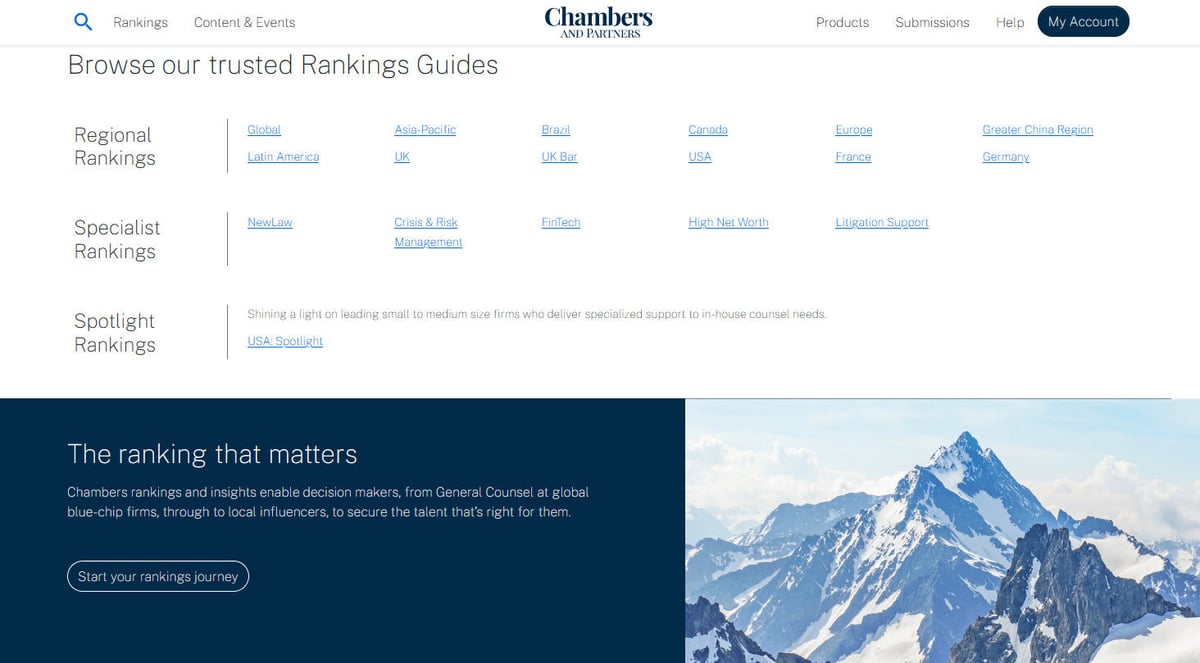
Chambers and Partners is recognized globally as the premier legal directory, ranking the most outstanding law firms and individual lawyers across more than 200 jurisdictions. Their rankings are based on thousands of in-depth interviews with clients and peers, providing a unique look into the legal market. For data scientists and legal tech companies, this website serves as a foundational source for identifying top-tier legal talent and firm prestige.
Structured Legal Data
The platform contains a wealth of structured information, including Ranking Bands (1-6), specialized practice area categories, and comprehensive editorial reviews. Every ranking is accompanied by detailed biographical data for lawyers and historical performance data for firms, making it a goldmine for longitudinal studies of the legal profession.
Strategic Scraping Value
Scraping this data allows organizations to perform competitive intelligence, track lateral lawyer movements, and benchmark firm performance against the market. Whether you are building a recruitment tool or a legal analytics platform, the data found on Chambers.com provides high-signal insights that are unavailable through standard public records.
Why Scrape Chambers and Partners?
Discover the business value and use cases for extracting data from Chambers and Partners.
Strategic Market Intelligence
Analyze the legal landscape to understand which law firms are dominating specific practice areas and how market share is shifting between global and regional players.
High-Value Talent Acquisition
Identify 'Band 1' and 'Up-and-Coming' lawyers for lateral recruitment or executive search, ensuring you target the most prestigious professionals in the industry.
Legal Tech Lead Generation
Export lists of top-ranked firms to prioritize sales outreach for litigation support software, practice management tools, and other high-end legal services.
Benchmarking and Auditing
Corporate legal departments can scrape ranking data to verify the prestige of their external counsel and compare current providers against alternative high-ranked firms.
Historical Performance Tracking
Collect data across multiple years to identify long-term trends in firm performance, growth trajectories, and the emergence of new legal niches.
Scraping Challenges
Technical challenges you may encounter when scraping Chambers and Partners.
Sophisticated Anti-Bot Barriers
Chambers employs advanced security measures like Akamai and Cloudflare that detect automated behavior through deep browser fingerprinting and TLS inspection.
Dynamic React-Based Architecture
The website is a Single Page Application (SPA), meaning rankings are loaded dynamically via JavaScript; standard scrapers often fail to see any data without full browser rendering.
Complex Navigation Structures
Data is nested deep within a hierarchy of guides, countries, and practice areas, requiring advanced recursive crawling logic to traverse the entire database effectively.
Annual URL and Selector Shifts
Every year, Chambers launches new guides that often come with structural updates or URL changes, which can break static scraping scripts that rely on fixed patterns.
Aggressive IP Rate Limiting
High-frequency requests are quickly flagged and blocked, necessitating the use of sophisticated proxy rotation and human-like request pacing.
Scrape Chambers and Partners with AI
No coding required. Extract data in minutes with AI-powered automation.
How It Works
Describe What You Need
Tell the AI what data you want to extract from Chambers and Partners. Just type it in plain language — no coding or selectors needed.
AI Extracts the Data
Our artificial intelligence navigates Chambers and Partners, handles dynamic content, and extracts exactly what you asked for.
Get Your Data
Receive clean, structured data ready to export as CSV, JSON, or send directly to your apps and workflows.
Why Use AI for Scraping
AI makes it easy to scrape Chambers and Partners without writing any code. Our AI-powered platform uses artificial intelligence to understand what data you want — just describe it in plain language and the AI extracts it automatically.
How to scrape with AI:
- Describe What You Need: Tell the AI what data you want to extract from Chambers and Partners. Just type it in plain language — no coding or selectors needed.
- AI Extracts the Data: Our artificial intelligence navigates Chambers and Partners, handles dynamic content, and extracts exactly what you asked for.
- Get Your Data: Receive clean, structured data ready to export as CSV, JSON, or send directly to your apps and workflows.
Why use AI for scraping:
- True Browser Rendering: Automatio fully renders the dynamic React environment of Chambers, ensuring that all lawyer profiles and ranking tables are visible and extractable.
- Automated Anti-Bot Evasion: Built-in rotation of residential proxies and browser fingerprints allows Automatio to mimic real human traffic and bypass security layers like Akamai.
- Visual No-Code Mapping: The point-and-click interface lets you easily map complex legal data fields without writing custom parsing logic for nested HTML structures.
- Recursive Logic for Deep Guides: Automatio can be configured to automatically click through every jurisdiction and practice area to build a comprehensive global legal database.
- Scheduled Annual Extraction: Set your scraper to run automatically when new guides are released, ensuring your competitive intelligence remains up-to-date with zero manual effort.
No-Code Web Scrapers for Chambers and Partners
Point-and-click alternatives to AI-powered scraping
Several no-code tools like Browse.ai, Octoparse, Axiom, and ParseHub can help you scrape Chambers and Partners. These tools use visual interfaces to select elements, but they come with trade-offs compared to AI-powered solutions.
Typical Workflow with No-Code Tools
Common Challenges
Learning curve
Understanding selectors and extraction logic takes time
Selectors break
Website changes can break your entire workflow
Dynamic content issues
JavaScript-heavy sites often require complex workarounds
CAPTCHA limitations
Most tools require manual intervention for CAPTCHAs
IP blocking
Aggressive scraping can get your IP banned
No-Code Web Scrapers for Chambers and Partners
Several no-code tools like Browse.ai, Octoparse, Axiom, and ParseHub can help you scrape Chambers and Partners. These tools use visual interfaces to select elements, but they come with trade-offs compared to AI-powered solutions.
Typical Workflow with No-Code Tools
- Install browser extension or sign up for the platform
- Navigate to the target website and open the tool
- Point-and-click to select data elements you want to extract
- Configure CSS selectors for each data field
- Set up pagination rules to scrape multiple pages
- Handle CAPTCHAs (often requires manual solving)
- Configure scheduling for automated runs
- Export data to CSV, JSON, or connect via API
Common Challenges
- Learning curve: Understanding selectors and extraction logic takes time
- Selectors break: Website changes can break your entire workflow
- Dynamic content issues: JavaScript-heavy sites often require complex workarounds
- CAPTCHA limitations: Most tools require manual intervention for CAPTCHAs
- IP blocking: Aggressive scraping can get your IP banned
Code Examples
import requests
from bs4 import BeautifulSoup

# Note: Chambers uses Cloudflare; standard requests may be blocked.
headers = {
    'User-Agent': 'Mozilla/5.0 (Windows NT 10.0; Win64; x64) AppleWebKit/537.36 (KHTML, like Gecko) Chrome/119.0.0.0 Safari/537.36'
}

def scrape_chambers_firm(url):
    try:
        response = requests.get(url, headers=headers, timeout=15)
        response.raise_for_status()
        soup = BeautifulSoup(response.text, 'html.parser')
        # Simplified selector - actual selectors may vary due to JS rendering
        firms = soup.find_all('h3', class_='firm-name')
        for firm in firms:
            print(firm.get_text(strip=True))
    except Exception as e:
        print(f'Blocked or error: {e}')

scrape_chambers_firm('https://chambers.com/legal-guide/usa-5')
When to Use
Best for static HTML pages where content is loaded server-side. The fastest and simplest approach when JavaScript rendering isn't required.
Advantages
- ●Fastest execution (no browser overhead)
- ●Lowest resource consumption
- ●Easy to parallelize with asyncio
- ●Great for APIs and static pages
Limitations
- ●Cannot execute JavaScript
- ●Fails on SPAs and dynamic content
- ●May struggle with complex anti-bot systems
How to Scrape Chambers and Partners with Code
Python + Requests
import requests
from bs4 import BeautifulSoup
# Note: Chambers uses Cloudflare; standard requests may be blocked.
headers = {
'User-Agent': 'Mozilla/5.0 (Windows NT 10.0; Win64; x64) AppleWebKit/537.36 (KHTML, like Gecko) Chrome/119.0.0.0 Safari/537.36'
}
def scrape_chambers_firm(url):
try:
response = requests.get(url, headers=headers, timeout=15)
response.raise_for_status()
soup = BeautifulSoup(response.text, 'html.parser')
# Simplified selector - actual selectors may vary due to JS rendering
firms = soup.find_all('h3', class_='firm-name')
for firm in firms:
print(firm.get_text(strip=True))
except Exception as e:
print(f'Blocked or error: {e}')
scrape_chambers_firm('https://chambers.com/legal-guide/usa-5')Python + Playwright
from playwright.sync_api import sync_playwright

def run():
    with sync_playwright() as p:
        browser = p.chromium.launch(headless=True)
        page = browser.new_page()
        # Using a mobile user agent or stealth can help avoid detection
        page.goto('https://chambers.com/legal-guide/uk-1', wait_until='networkidle')

        # Wait for ranking cards to load via JavaScript
        page.wait_for_selector('.ranking-card')

        rankings = page.eval_on_selector_all('.ranking-card', "cards => cards.map(c => c.innerText)")
        for info in rankings:
            print(info)

        browser.close()

run()Python + Scrapy
import scrapy

class ChambersRankingSpider(scrapy.Spider):
    name = 'chambers_spider'
    start_urls = ['https://chambers.com/search?q=litigation']

    custom_settings = {
        'DOWNLOAD_DELAY': 3,
        'CONCURRENT_REQUESTS': 1,
        'USER_AGENT': 'Mozilla/5.0 (Windows NT 10.0; Win64; x64) Chrome/118.0.0.0 Safari/537.36'
    }

    def parse(self, response):
        for item in response.css('.search-result-item'):
            yield {
                'name': item.css('.title-link::text').get(),
                'firm': item.css('.firm-link::text').get(),
                'url': response.urljoin(item.css('a::attr(href)').get())
            }

        next_page = response.css('a.pagination-next::attr(href)').get()
        if next_page:
yield response.follow(next_page, self.parse)Node.js + Puppeteer
const puppeteer = require('puppeteer');

(async () => {
  const browser = await puppeteer.launch({ headless: true });
  const page = await browser.newPage();
  await page.setViewport({ width: 1280, height: 800 });

  // Navigate to a specific jurisdiction ranking
  await page.goto('https://chambers.com/legal-guide/global-2', { waitUntil: 'networkidle2' });

  const data = await page.evaluate(() => {
    const items = Array.from(document.querySelectorAll('.ranking-row'));
    return items.map(item => ({
      name: item.querySelector('.name')?.innerText,
      band: item.querySelector('.band-indicator')?.innerText
    }));
  });

  console.log(data);
  await browser.close();
})();What You Can Do With Chambers and Partners Data
Explore practical applications and insights from Chambers and Partners data.
Legal Talent Mapping
Recruitment agencies use this data to identify top-performing lawyers for lateral placement opportunities.
How to implement:
- 1Scrape Band 1 and 'Up and Coming' lawyers in specific jurisdictions.
- 2Extract current firm affiliation and historical ranking stability.
- 3Cross-reference data with professional social networks for contact outreach.
Use Automatio to extract data from Chambers and Partners and build these applications without writing code.
What You Can Do With Chambers and Partners Data
- Legal Talent Mapping
Recruitment agencies use this data to identify top-performing lawyers for lateral placement opportunities.
- Scrape Band 1 and 'Up and Coming' lawyers in specific jurisdictions.
- Extract current firm affiliation and historical ranking stability.
- Cross-reference data with professional social networks for contact outreach.
- Competitive Benchmarking
Law firms analyze their rankings against peer firms to identify market strengths and weaknesses.
- Extract ranking data for the firm and its top 5 competitors across all practice areas.
- Calculate the percentage of 'Band 1' rankings vs competitors.
- Visualize the data in a dashboard to track market position year-over-year.
- Legal Tech Lead Generation
SaaS companies targeting specific legal niches use the rankings to find firms with high-value clients.
- Identify firms ranked in niche categories like Fintech, Cybersecurity, or Energy.
- Scrape office locations and department head contact details.
- Segment marketing campaigns based on the firm's specific ranking tier.
- Academic Market Research
Researchers study the concentration of legal expertise and the evolution of legal categories over decades.
- Scrape archived ranking editions to build a historical dataset.
- Analyze the correlation between law school prestige and high Chambers rankings.
- Map the globalization of legal services by tracking international firm rankings.
- B2B Service Targeting
Financial service providers use ranking data to find stable, high-revenue firms for partnerships.
- Filter firms that have maintained Band 1 status for over 5 years.
- Extract key managing partner information from editorial reviews.
- Tailor outreach based on the firm's described growth trajectory in the editorial text.
Supercharge your workflow with AI Automation
Automatio combines the power of AI agents, web automation, and smart integrations to help you accomplish more in less time.
What to get right first
Expert advice for successfully extracting data from Chambers and Partners.
Use Residential Proxies
Because Chambers uses strict reputation-based blocking, residential proxies are essential to avoid the immediate bans associated with datacenter IP ranges.
Monitor Backend JSON Requests
Inspect the network traffic to find the internal API endpoints that populate the ranking tables; scraping these directly is often faster and more reliable than HTML parsing.
Incorporate Human Delays
Simulate a real researcher by adding random pauses between page loads and mimicking mouse movements to reduce the likelihood of triggering behavioral anti-bot alerts.
Capture the Chambers Unique ID
Always extract the internal unique ID for lawyers and firms; this allows you to track entities accurately even if their names or firm affiliations change over time.
Implement Incremental Crawling
Since rankings only update annually, set your scraper to skip URLs that have already been successfully processed to save on proxy costs and bandwidth.
Related Web Scraping
How to Scrape The AA (theaa.com): A Technical Guide for Car & Insurance Data
How to Scrape CSS Author: A Comprehensive Web Scraping Guide
How to Scrape Bilregistret.ai: Swedish Vehicle Data Extraction Guide
How to Scrape Biluppgifter.se: Vehicle Data Extraction Guide
How to Scrape Car.info | Vehicle Data & Valuation Extraction Guide
How to Scrape GoAbroad Study Abroad Programs
How to Scrape ResearchGate: Publication and Researcher Data
How to Scrape Statista: The Ultimate Guide to Market Data Extraction
Frequently Asked Questions
Find answers to common questions about Chambers and Partners