
How to Scrape NoCodeList: The Complete Web Scraping Guide
Scrape NoCodeList to extract data on 350+ no-code tools, pricing, and features. Perfect for competitive analysis and tech market research in the SaaS space.
Anti-Bot Protection Detected
- Cloudflare
- Enterprise-grade WAF and bot management. Uses JavaScript challenges, CAPTCHAs, and behavioral analysis. Requires browser automation with stealth settings.
- Rate Limiting
- Limits requests per IP/session over time. Can be bypassed with rotating proxies, request delays, and distributed scraping.
- Browser Fingerprinting
- Identifies bots through browser characteristics: canvas, WebGL, fonts, plugins. Requires spoofing or real browser profiles.
About NoCodeList
Learn what NoCodeList offers and what valuable data can be extracted from it.
The Premier No-Code Resource Hub
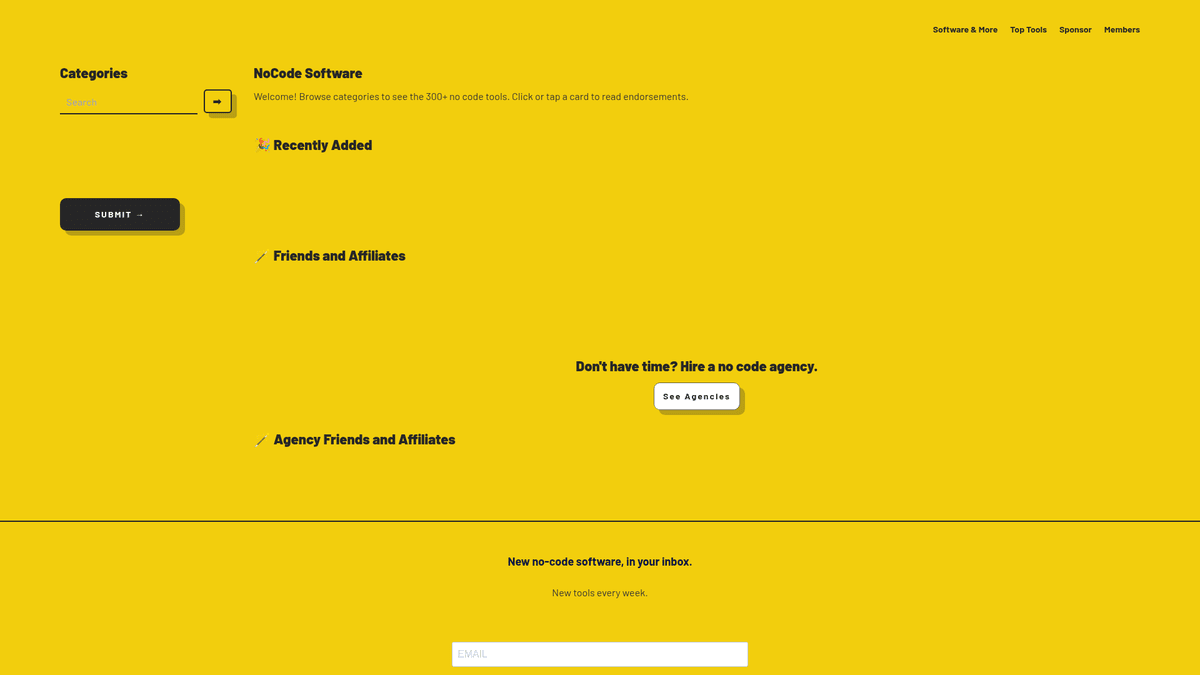
NoCodeList is a premier directory and resource hub for the no-code and low-code industry, curated by Drew Thomas. It serves as a comprehensive database featuring over 350 software tools, 130 agencies, and numerous resources designed to help entrepreneurs, developers, and businesses build digital products without writing traditional code. The platform organizes tools into specific categories like Web Apps, APIs, and Databases, providing detailed insights into each tool's utility and target audience.
Structured Data for Tech Analysis
The website provides highly structured data for each listing, including pricing tiers, supported platforms, typical customer profiles, and staff reviews. This level of detail makes it an essential site for anyone looking to understand the current landscape of the no-code ecosystem. The site is built using no-code technology itself, specifically Bildr, which makes it a Single Page Application (SPA) where content is loaded dynamically via JavaScript.
Why Scraping This Data Matters
Scraping NoCodeList is valuable for market researchers identifying emerging tech trends, SaaS founders performing competitive analysis, and lead generators looking for software companies or agencies. By aggregating this data, users can build comparison engines, track pricing changes over time, or identify gaps in the market where new tools or services could be introduced.
Why Scrape NoCodeList?
Discover the business value and use cases for extracting data from NoCodeList.
Market Trend Identification
Monitor the 'Recently Added' section to discover emerging no-code categories and software startups before they go mainstream in the broader tech market.
Competitive Pricing Benchmarks
Extract pricing data across 300+ tools to understand market averages, pricing models, and feature packaging to position your own software competitively.
Agency Lead Generation
Build a comprehensive database of no-code agencies and their specialties to identify potential partners, competitors, or service opportunities.
Tech Stack Research
Analyze the 'Showcase' and 'Endorsements' data to see which combinations of tools are most effective for building specific types of applications.
Content Aggregation
Feed a live database or dashboard for no-code communities by tracking tool updates, new endorsements, and changing feature sets automatically.
Scraping Challenges
Technical challenges you may encounter when scraping NoCodeList.
Dynamic Content Rendering
As a Bubble.io application, content is loaded via JavaScript after the initial page load, requiring a headless browser to avoid empty results.
Randomized DOM Selectors
The site's engine generates non-semantic CSS classes that can change between deployments, making traditional path-based selectors brittle and prone to breaking.
Infinite Scroll and Lazy Loading
Tool listings are populated dynamically as the user interacts, requiring automated scrolling or interaction triggers to capture the full directory.
Cloudflare Bot Management
Active protection filters out automated traffic, requiring advanced header management and browser fingerprinting to maintain access during large scrapes.
Scrape NoCodeList with AI
No coding required. Extract data in minutes with AI-powered automation.
How It Works
Describe What You Need
Tell the AI what data you want to extract from NoCodeList. Just type it in plain language — no coding or selectors needed.
AI Extracts the Data
Our artificial intelligence navigates NoCodeList, handles dynamic content, and extracts exactly what you asked for.
Get Your Data
Receive clean, structured data ready to export as CSV, JSON, or send directly to your apps and workflows.
Why Use AI for Scraping
AI makes it easy to scrape NoCodeList without writing any code. Our AI-powered platform uses artificial intelligence to understand what data you want — just describe it in plain language and the AI extracts it automatically.
How to scrape with AI:
- Describe What You Need: Tell the AI what data you want to extract from NoCodeList. Just type it in plain language — no coding or selectors needed.
- AI Extracts the Data: Our artificial intelligence navigates NoCodeList, handles dynamic content, and extracts exactly what you asked for.
- Get Your Data: Receive clean, structured data ready to export as CSV, JSON, or send directly to your apps and workflows.
Why use AI for scraping:
- Visual Data Mapping: Automatio allows you to point-and-click on elements, bypassing the need to manage Bubble's complex and randomized CSS classes manually.
- Native JavaScript Execution: The tool perfectly handles the JavaScript-heavy environment of NoCodeList, ensuring all dynamic data is rendered before the extraction begins.
- Automated Interaction Logic: Easily configure the bot to click 'Showcase' links or 'Read Endorsements' to extract deep-page data without writing complex custom scripts.
- Built-in Anti-Bot Evasion: Integrated proxy rotation and fingerprint management help you stay undetected while scraping large categories or the entire tool directory.
- Direct Spreadsheet Sync: Automatically export your findings directly to Google Sheets or Webhooks for immediate use in your market research or sales pipelines.
No-Code Web Scrapers for NoCodeList
Point-and-click alternatives to AI-powered scraping
Several no-code tools like Browse.ai, Octoparse, Axiom, and ParseHub can help you scrape NoCodeList. These tools use visual interfaces to select elements, but they come with trade-offs compared to AI-powered solutions.
Typical Workflow with No-Code Tools
Common Challenges
Learning curve
Understanding selectors and extraction logic takes time
Selectors break
Website changes can break your entire workflow
Dynamic content issues
JavaScript-heavy sites often require complex workarounds
CAPTCHA limitations
Most tools require manual intervention for CAPTCHAs
IP blocking
Aggressive scraping can get your IP banned
No-Code Web Scrapers for NoCodeList
Several no-code tools like Browse.ai, Octoparse, Axiom, and ParseHub can help you scrape NoCodeList. These tools use visual interfaces to select elements, but they come with trade-offs compared to AI-powered solutions.
Typical Workflow with No-Code Tools
- Install browser extension or sign up for the platform
- Navigate to the target website and open the tool
- Point-and-click to select data elements you want to extract
- Configure CSS selectors for each data field
- Set up pagination rules to scrape multiple pages
- Handle CAPTCHAs (often requires manual solving)
- Configure scheduling for automated runs
- Export data to CSV, JSON, or connect via API
Common Challenges
- Learning curve: Understanding selectors and extraction logic takes time
- Selectors break: Website changes can break your entire workflow
- Dynamic content issues: JavaScript-heavy sites often require complex workarounds
- CAPTCHA limitations: Most tools require manual intervention for CAPTCHAs
- IP blocking: Aggressive scraping can get your IP banned
Code Examples
import requests
from bs4 import BeautifulSoup

# Note: NoCodeList is a JS-heavy SPA; requests will only get the shell.
url = "https://nocodelist.co/software/nocode-api"
headers = {
    "User-Agent": "Mozilla/5.0 (Windows NT 10.0; Win64; x64) AppleWebKit/537.36 (KHTML, like Gecko) Chrome/91.0.4472.124 Safari/537.36"
}

try:
    response = requests.get(url, headers=headers)
    response.raise_for_status()
    soup = BeautifulSoup(response.text, 'html.parser')

    # Extracting SEO meta tags which usually contain the name and description even in SPAs
    title = soup.find('meta', property='og:title')
    desc = soup.find('meta', property='og:description')

    print(f"Tool: {title['content'] if title else 'N/A'}")
    print(f"Description: {desc['content'] if desc else 'N/A'}")
except Exception as e:
    print(f"Scraping failed: {e}")
When to Use
Best for static HTML pages where content is loaded server-side. The fastest and simplest approach when JavaScript rendering isn't required.
Advantages
- ●Fastest execution (no browser overhead)
- ●Lowest resource consumption
- ●Easy to parallelize with asyncio
- ●Great for APIs and static pages
Limitations
- ●Cannot execute JavaScript
- ●Fails on SPAs and dynamic content
- ●May struggle with complex anti-bot systems
How to Scrape NoCodeList with Code
Python + Requests
import requests
from bs4 import BeautifulSoup
# Note: NoCodeList is a JS-heavy SPA; requests will only get the shell.
url = "https://nocodelist.co/software/nocode-api"
headers = {
"User-Agent": "Mozilla/5.0 (Windows NT 10.0; Win64; x64) AppleWebKit/537.36 (KHTML, like Gecko) Chrome/91.0.4472.124 Safari/537.36"
}
try:
response = requests.get(url, headers=headers)
response.raise_for_status()
soup = BeautifulSoup(response.text, 'html.parser')
# Extracting SEO meta tags which usually contain the name and description even in SPAs
title = soup.find('meta', property='og:title')
desc = soup.find('meta', property='og:description')
print(f"Tool: {title['content'] if title else 'N/A'}")
print(f"Description: {desc['content'] if desc else 'N/A'}")
except Exception as e:
print(f"Scraping failed: {e}")Python + Playwright
from playwright.sync_api import sync_playwright

def run():
    with sync_playwright() as p:
        # Launching browser to handle JavaScript
        browser = p.chromium.launch(headless=True)
        page = browser.new_page()
        page.goto("https://nocodelist.co/software/nocode-api")

        # Wait for the dynamic content to render completely
        page.wait_for_selector("h1")

        # Extracting rendered data from the DOM
        data = {
            "name": page.inner_text("h1"),
            "pricing": page.inner_text("div:has-text('Pricing:')"),
            "description": page.inner_text("div.blog")
        }

        print(data)
        browser.close()

run()Python + Scrapy
import scrapy
from scrapy_playwright.page import PageMethod

class NoCodeSpider(scrapy.Spider):
    name = 'nocodelist'

    def start_requests(self):
        yield scrapy.Request(
            "https://nocodelist.co/",
            meta={
                "playwright": True,
                "playwright_page_methods": [
                    # Waiting for the clickable cards to appear in the SPA
                    PageMethod("wait_for_selector", ".clickable-element")
                ]
            }
        )

    def parse(self, response):
        # Scrapy-Playwright returns the fully rendered HTML
        for item in response.css('.clickable-element'):
            yield {
                'tool_name': item.css('div::text').get(),
                'link': item.attrib.get('href')
}Node.js + Puppeteer
const puppeteer = require('puppeteer');

(async () => {
  const browser = await puppeteer.launch();
  const page = await browser.newPage();
  // Using networkidle2 to ensure all dynamic components are loaded
  await page.goto('https://nocodelist.co/software/nocode-api', { waitUntil: 'networkidle2' });

  const results = await page.evaluate(() => {
    return {
      title: document.querySelector('h1')?.innerText,
      pricing: document.body.innerText.match(/Pricing: .+/)?.[0],
      customer_types: Array.from(document.querySelectorAll('h3')).find(el => el.innerText.includes('Typical Customers'))?.nextElementSibling?.innerText
    };
  });

  console.log(results);
  await browser.close();
})();What You Can Do With NoCodeList Data
Explore practical applications and insights from NoCodeList data.
SaaS Competitor Intelligence Hub
Software founders can use the data to monitor pricing and feature sets of rival no-code tools.
How to implement:
- 1Scrape NoCodeList categories relevant to your specific niche.
- 2Extract monthly and yearly pricing data for all identified competitors.
- 3Categorize 'Most Valued Features' into a detailed comparison matrix.
- 4Set up a weekly delta-check to identify when competitors update their pricing tiers.
Use Automatio to extract data from NoCodeList and build these applications without writing code.
What You Can Do With NoCodeList Data
- SaaS Competitor Intelligence Hub
Software founders can use the data to monitor pricing and feature sets of rival no-code tools.
- Scrape NoCodeList categories relevant to your specific niche.
- Extract monthly and yearly pricing data for all identified competitors.
- Categorize 'Most Valued Features' into a detailed comparison matrix.
- Set up a weekly delta-check to identify when competitors update their pricing tiers.
- No-Code Agency Lead Gen
Business development teams can identify software tools that lack certified agency partners.
- Crawl the software listings and extract the 'Agencies specialize in' field.
- Filter for high-growth tools that show zero or very few agencies listed.
- Cross-reference the tool's popularity via external social traffic data.
- Reach out to the software company to propose an agency partnership program.
- Niche Tech Directory Creation
Marketers can create hyper-specific 'Best of' lists for industries like Real Estate or Fintech.
- Scrape the entire database including the 'Typical Customers' attribute.
- Filter the data based on industry-specific keywords like 'FinTech' or 'Real Estate'.
- Export the filtered list to a new CMS like Webflow.
- Add original editorial content to create a high-SEO value niche directory.
- Historical SaaS Pricing Analysis
Market analysts can track how the no-code economy is inflating by monitoring pricing data.
- Perform a full baseline scrape of all software pricing tiers across the site.
- Store the extracted data in a time-series database.
- Repeat the scrape every quarter to capture updates.
- Analyze the percentage change in 'Starter' vs 'Pro' plans across different categories.
Supercharge your workflow with AI Automation
Automatio combines the power of AI agents, web automation, and smart integrations to help you accomplish more in less time.
What to get right first
Expert advice for successfully extracting data from NoCodeList.
Use a Headless Browser
Because NoCodeList is a SPA built on Bubble, you must use tools like Playwright or Automatio that execute JavaScript to see the content.
Target Sitemaps for Direct Access
Check the sitemap to find a complete list of tool URLs, allowing you to bypass the dynamic landing page and scrape detail pages directly for higher speed.
Monitor XHR Requests
Watch the Network tab for calls to internal API endpoints, as you can often find raw JSON data that is significantly easier to parse than HTML.
Implement Scroll Delays
Since many tool lists only load more items as you scroll, add small delays to your automation to ensure the content fully populates the DOM.
Use Text-Based Selectors
Since CSS classes change often, use selectors based on ARIA roles or text content like ':has-text("Pricing")' to ensure selector stability.
Related Web Scraping
How to Scrape The AA (theaa.com): A Technical Guide for Car & Insurance Data
How to Scrape CSS Author: A Comprehensive Web Scraping Guide
How to Scrape Bilregistret.ai: Swedish Vehicle Data Extraction Guide
How to Scrape Biluppgifter.se: Vehicle Data Extraction Guide
How to Scrape Car.info | Vehicle Data & Valuation Extraction Guide
How to Scrape GoAbroad Study Abroad Programs

How to Scrape ResearchGate: Publication and Researcher Data
How to Scrape Statista: The Ultimate Guide to Market Data Extraction
Frequently Asked Questions
Find answers to common questions about NoCodeList