

How to Scrape Century 21 Property Listings
Learn how to scrape listings, prices, and agent details from Century 21. Bypass Akamai and CloudFront for high-value real estate data extraction.
Free to start: 1,000 credits, no card, nothing to install.
About Century 21
Learn what Century 21 offers and what valuable data can be extracted from it.
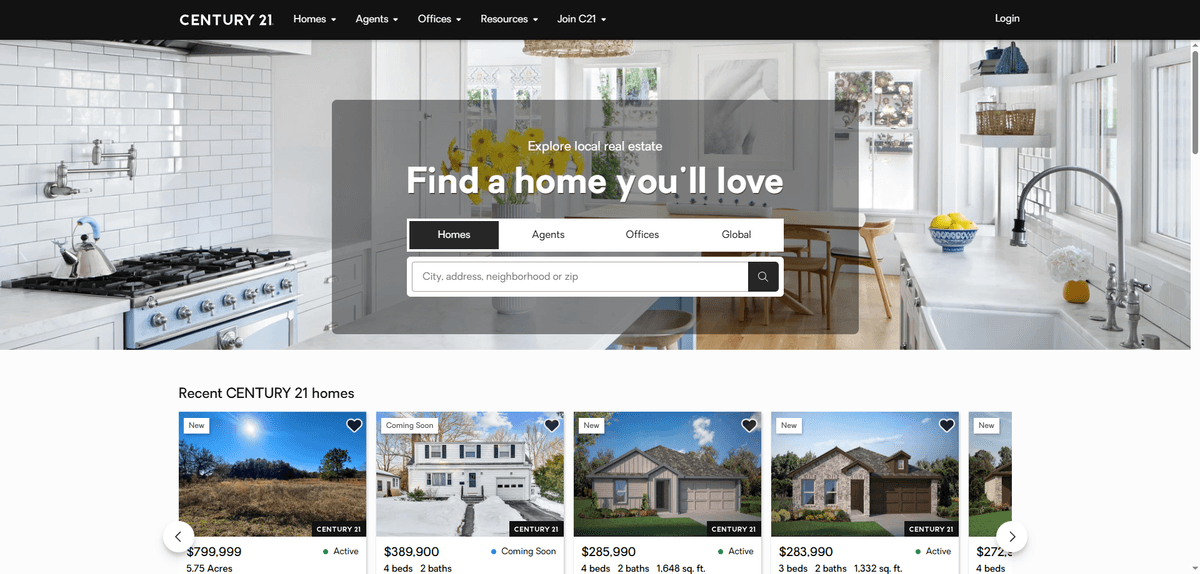
Century 21 Real Estate LLC is one of the world's largest and most recognized residential real estate franchise groups. Founded in 1971 and currently a subsidiary of Anywhere Real Estate, it operates through a massive network of thousands of independently owned and operated offices across more than 80 countries. The platform serves as a primary repository for millions of residential and commercial property listings worldwide.
The website provides comprehensive property data including pricing, architectural specifications, and agent contact details. Because it represents a vast, fragmented market, the site is a critical source for real-time real estate information. Analysts use this data to track listing volumes, price adjustments, and regional demand shifts that are often not captured quickly by official government records.
Scraping Century 21 data is highly valuable for real estate investors, prop-tech developers, and market researchers. It enables the creation of automated valuation models (AVMs), competitive benchmarking for brokerages, and lead generation for secondary services such as home insurance or mortgage lending. The data's global reach makes it particularly useful for comparing international property trends.
Why Scrape Century 21?
Discover the business value and use cases for extracting data from Century 21.
Market Trend Analysis
Monitor regional price fluctuations and inventory levels to identify emerging real estate hot-spots before they peak.
Investment Sourcing
Track the 'Days on Market' metric to find motivated sellers and identify undervalued properties for potential investment.
Competitive Intelligence
Analyze the listing volumes and success rates of competing agencies to determine localized market share.
Service Lead Generation
Identify new listings to offer professional services such as real estate photography, home staging, or mortgage brokerage.
Historical Pricing Database
Build long-term datasets to train predictive machine learning models for forecasting future real estate market cycles.
Scraping Challenges
Technical challenges you may encounter when scraping Century 21.
Advanced Anti-Bot Detection
The site uses Akamai Bot Manager and Cloudflare, which employ behavioral analysis to block automated scripts.
Dynamic Content Rendering
Listings are often loaded via JavaScript frameworks like React, requiring full browser rendering to access data.
Aggressive IP Rate Limiting
Making too many requests from a single IP address quickly triggers 403 Forbidden errors or reCAPTCHA challenges.
Regional Subdomain Variance
Different geographic subdomains may have slightly different HTML structures, requiring flexible scraping logic.
Scrape Century 21 with AI
No coding required. Extract data in minutes with AI-powered automation.
How It Works
Describe What You Need
Tell the AI what data you want to extract from Century 21. Just type it in plain language — no coding or selectors needed.
AI Extracts the Data
Our artificial intelligence navigates Century 21, handles dynamic content, and extracts exactly what you asked for.
Get Your Data
Receive clean, structured data ready to export as CSV, JSON, or send directly to your apps and workflows.
Why Use AI for Scraping
No-Code Web Scrapers for Century 21
Point-and-click alternatives to AI-powered scraping
Several no-code tools like Browse.ai, Octoparse, Axiom, and ParseHub can help you scrape Century 21. These tools use visual interfaces to select elements, but they come with trade-offs compared to AI-powered solutions.
Typical Workflow with No-Code Tools
Common Challenges
Learning curve
Understanding selectors and extraction logic takes time
Selectors break
Website changes can break your entire workflow
Dynamic content issues
JavaScript-heavy sites often require complex workarounds
CAPTCHA limitations
Most tools require manual intervention for CAPTCHAs
IP blocking
Aggressive scraping can get your IP banned
Code Examples
import requests
from bs4 import BeautifulSoup

# Realistic headers are mandatory to bypass basic CloudFront blocks
headers = {
    'User-Agent': 'Mozilla/5.0 (Windows NT 10.0; Win64; x64) AppleWebKit/537.36 (KHTML, like Gecko) Chrome/120.0.0.0 Safari/537.36',
    'Accept-Language': 'en-US,en;q=0.9'
}

def scrape_c21(url):
    try:
        # Session objects help maintain cookies across requests
        session = requests.Session()
        response = session.get(url, headers=headers, timeout=15)
        if response.status_code == 200:
            soup = BeautifulSoup(response.text, 'html.parser')
            # Selectors target common property card classes
            listings = soup.select('.property-card')
            for item in listings:
                price = item.select_one('.listing-price').text.strip() if item.select_one('.listing-price') else 'N/A'
                address = item.select_one('.property-address').text.strip() if item.select_one('.property-address') else 'N/A'
                print(f'Price: {price}, Address: {address}')
        else:
            print(f'Blocked: HTTP {response.status_code}')
    except Exception as e:
        print(f'Error: {e}')

scrape_c21('https://www.century21.com/real-estate/new-york-ny/LCNYNEWYORK/')
When to Use
Best for static HTML pages where content is loaded server-side. The fastest and simplest approach when JavaScript rendering isn't required.
Advantages
- ●Fastest execution (no browser overhead)
- ●Lowest resource consumption
- ●Easy to parallelize with asyncio
- ●Great for APIs and static pages
Limitations
- ●Cannot execute JavaScript
- ●Fails on SPAs and dynamic content
- ●May struggle with complex anti-bot systems
from playwright.sync_api import sync_playwright

def run(playwright):
    # Launching a browser to handle JavaScript-heavy property cards
    browser = playwright.chromium.launch(headless=True)
    context = browser.new_context(user_agent='Mozilla/5.0 (Windows NT 10.0; Win64; x64) AppleWebKit/537.36')
    page = context.new_page()

    # Navigate and wait for the network to settle
    page.goto('https://www.century21.com/real-estate/new-york-ny/LCNYNEWYORK/', wait_until='networkidle')

    # Ensure the property container is visible before extraction
    page.wait_for_selector('.property-card')

    listings = page.query_selector_all('.property-card')
    for listing in listings:
        price_el = listing.query_selector('.listing-price')
        addr_el = listing.query_selector('.property-address')
        if price_el and addr_el:
            print(f'Price: {price_el.inner_text()} | Address: {addr_el.inner_text()}')

    browser.close()

with sync_playwright() as playwright:
    run(playwright)
When to Use
Use when content loads dynamically via JavaScript, or when you need to interact with the page (clicks, scrolls, form fills). Handles modern anti-bot detection better.
Advantages
- ●Executes JavaScript like a real browser
- ●Handles SPAs and dynamic content
- ●Better anti-bot evasion with stealth plugins
- ●Can take screenshots and PDFs
Limitations
- ●Slower than HTTP requests
- ●Higher memory/CPU usage
- ●More complex to set up
import scrapy

class C21Spider(scrapy.Spider):
    name = 'c21_spider'
    start_urls = ['https://www.century21.com/real-estate/new-york-ny/LCNYNEWYORK/']

    def parse(self, response):
        # Scrapy's CSS selectors are efficient for bulk property extraction
        for property in response.css('.property-card'):
            yield {
                'price': property.css('.listing-price::text').get(default='').strip(),
                'address': property.css('.property-address::text').get(default='').strip(),
                'details_url': response.urljoin(property.css('a::attr(href)').get())
            }

        # Locate and follow the next page button
        next_page = response.css('a.next-page::attr(href)').get()
        if next_page:
            yield response.follow(next_page, self.parse)
When to Use
Ideal for large-scale crawling projects that need to scrape thousands of pages. Built-in support for rate limiting, retries, and data pipelines.
Advantages
- ●Built for scale (millions of pages)
- ●Automatic request throttling
- ●Built-in data export pipelines
- ●Middleware system for proxies/headers
Limitations
- ●Steeper learning curve
- ●Overkill for small projects
- ●No native JavaScript rendering
const puppeteer = require('puppeteer-extra');
const StealthPlugin = require('puppeteer-extra-plugin-stealth');
puppeteer.use(StealthPlugin());

(async () => {
  // Using Stealth plugin to mask Puppeteer from Akamai detection
  const browser = await puppeteer.launch({ headless: true });
  const page = await browser.newPage();

  await page.goto('https://www.century21.com/real-estate/new-york-ny/LCNYNEWYORK/', { waitUntil: 'networkidle2' });

  const results = await page.evaluate(() => {
    const data = [];
    document.querySelectorAll('.property-card').forEach(card => {
      data.push({
        price: card.querySelector('.listing-price')?.innerText.trim(),
        address: card.querySelector('.property-address')?.innerText.trim(),
      });
    });
    return data;
  });

  console.log(results);
  await browser.close();
})();
When to Use
Choose this if you're in a Node.js/JavaScript ecosystem or need tight integration with frontend tools. Similar capabilities to Playwright.
Advantages
- ●Native JavaScript/TypeScript support
- ●Chrome DevTools Protocol access
- ●Large ecosystem and community
- ●Good for JS-heavy projects
Limitations
- ●Chrome-only (vs Playwright's multi-browser)
- ●Similar overhead to Playwright
- ●Less mature stealth options
What You Can Do With Century 21 Data
Explore practical applications and insights from Century 21 data.
Dynamic Price Alerting
Investors can track price reductions in specific zip codes to find motivated sellers immediately.
How to implement:
- 1Select a target geographic area on Century 21.
- 2Scrape active listings daily and store them in a database.
- 3Compare current prices against the previously recorded price for the same Listing ID.
- 4Send an automated alert if a price drops by more than a defined percentage.
Use Automatio to extract data from Century 21 and build these applications without writing code.
Brokerage Performance Benchmarking
Real estate office owners can monitor Century 21's listing volume to gauge their own local market share.
How to implement:
- 1Extract Office Name and Agent Name from regional search results.
- 2Aggregate the total number of listings per office.
- 3Calculate the median listing price for each competing office.
- 4Identify high-performing agents for potential recruitment.
Use Automatio to extract data from Century 21 and build these applications without writing code.
Mortgage Lead Generation
Lenders can identify properties entering the 'New' status to offer financing solutions to potential buyers.
How to implement:
- 1Scrape new listings daily using the Days on Website or 'New' badge filters.
- 2Filter listings by price bracket relevant to your lending products.
- 3Extract the listing agent contact details for B2B referral outreach.
- 4Monitor property status changes to time marketing efforts.
Use Automatio to extract data from Century 21 and build these applications without writing code.
Prop-Tech Content Aggregation
Developers can populate new real estate apps with live inventory to provide value to their user base.
How to implement:
- 1Scrape full property details including images and amenities.
- 2Normalize the data into a standard JSON format for your API.
- 3Upload data to your application's backend database.
- 4Refresh data every 24 hours to ensure listing accuracy.
Use Automatio to extract data from Century 21 and build these applications without writing code.
Supercharge your workflow with AI Automation
Automatio combines the power of AI agents, web automation, and smart integrations to help you accomplish more in less time.
What to get right first
Expert advice for successfully extracting data from Century 21.
Prioritize Residential Proxies
Data center IPs are easily flagged by Akamai; residential proxies provide better success rates by mimicking real household traffic.
Use Stealth Browser Plugins
Utilize libraries like puppeteer-extra-plugin-stealth to hide automated browser fingerprints from advanced bot detectors.
Extract from JSON-LD Tags
Check the HTML source for script tags with type application/ld+json, which often contain pre-formatted listing data.
Implement Random Delays
Avoid a fixed cadence for requests; randomizing wait times between 3-10 seconds helps evade behavioral detection.
Target Mobile User-Agents
Sometimes mobile versions of the site have fewer anti-bot checks or simpler DOM structures compared to desktop versions.
Related Web Scraping
How to Scrape RE/MAX (remax.com) Real Estate Listings
How to Scrape Geolocaux | Geolocaux Web Scraper Guide

How to Scrape SeLoger Bureaux & Commerces
How to Scrape Rent.com: A Guide to Real Estate Data Extraction
How to Scrape HotPads: A Complete Guide to Extracting Rental Data

How to Scrape Apartments.com | Apartments.com Web Scraper Guide
How to Scrape Homes.com: Real Estate Data Extraction Guide
How to Scrape BureauxLocaux: Commercial Real Estate Data Guide
Frequently Asked Questions
Find answers to common questions about Century 21
Is it legal to scrape property listings from Century 21?
Scraping public real estate data for personal or research purposes is generally allowed, but you must avoid overloading their servers. Always consult Century 21's Terms of Service and local laws regarding commercial data reuse.
Does Century 21 provide an official API?
Century 21's data is part of the Anywhere Developers Portal. While it exists, access is usually restricted to franchise partners and requires approved credentials, making scraping the primary method for third-party researchers.
How do I bypass the 403 Forbidden error on Century 21?
This error is usually triggered by CloudFront or Akamai security. To bypass it, you must use high-quality residential proxies and rotate your User-Agent headers frequently to avoid fingerprinting.
What format can I export the data into?
Using tools like Automatio or custom scripts, you can export Century 21 data into CSV, Excel, JSON, or directly into a database via API webhooks for seamless integration.
How often should listing data be scraped?
Since the real estate market is dynamic, scraping once every 24 hours is standard for tracking new listings and price updates. For highly active urban markets, twice-daily updates may be beneficial.
Does Century 21 require a login for property data?
Most property listing data is publicly available without a login. However, some advanced history or saved search features may require a user account, which complicates the scraping process.
Which scraping library is best for Century 21?
Playwright or Puppeteer are recommended because they can execute JavaScript, which is necessary to render the property card components that are invisible to basic HTTP request libraries.