

How to Scrape Rent.com: A Guide to Real Estate Data Extraction
Scrape Rent.com listings, prices, and amenities easily. Use our guide to bypass DataDome and extract real estate data for market analysis. Get started now!
Free to start: 1,000 credits, no card, nothing to install.
About Rent.com
Learn what Rent.com offers and what valuable data can be extracted from it.
Rent.com Platform Overview
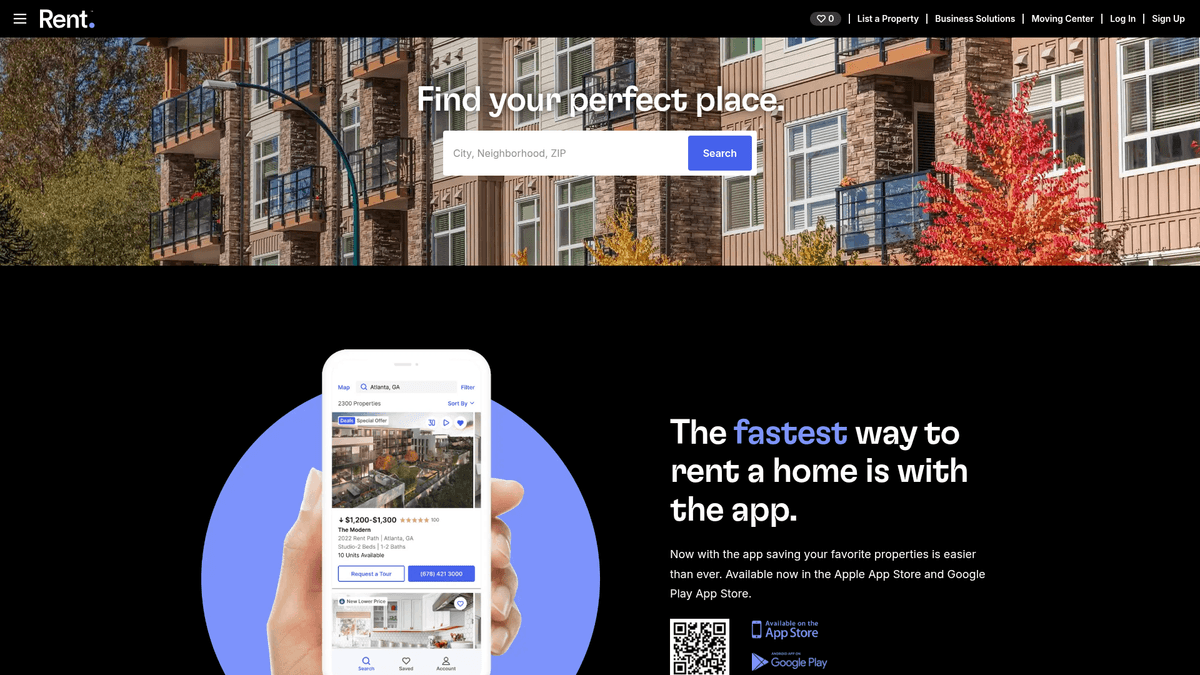
Rent.com is a premier online destination for residential rentals across the United States. As part of the Rent. family (owned by Redfin), it provides a high-trust environment for apartment hunting. The site consolidates millions of listings from property managers and independent landlords, offering a comprehensive view of the national rental market.
Data Richness and Structure
The platform is a goldmine for structured data extraction. Each listing contains precise rental price ranges, floor plans, square footage, and specific amenities. Furthermore, it provides metadata such as pet policies, utility inclusions, and contact details. This data is updated in real-time, making it essential for market analysis.
Strategic Value for Scraping
Scraping this data enables real-time competitive intelligence and accurate housing market forecasting. Investors and agencies use this information to identify undervalued neighborhoods and track vacancy rates. By extracting Rent.com data, businesses can build proprietary databases that power decision-making in the fast-paced real estate sector.
Why Scrape Rent.com?
Discover the business value and use cases for extracting data from Rent.com.
Real-Time Market Monitoring
Scraping Rent.com allows you to track rent fluctuations across thousands of zip codes simultaneously to understand local demand shifts.
Lead Generation for Home Services
Extracting property manager contact details and new listing dates provides a constant stream of high-intent leads for movers and insurance providers.
Investment Feasibility Studies
Investors can calculate potential rental yields by aggregating price-per-square-foot data and comparing it against property sale values in target markets.
Competitor Amenity Benchmarking
Identify which amenities are standard in specific neighborhoods to ensure your own property listings remain competitive and attractive to renters.
Urban Development Research
Analyze the volume of new versus long-standing listings to measure the rate of urban growth and neighborhood gentrification over time.
Price Index Creation
Gathering historical pricing data enables the creation of proprietary rent indexes that help forecast future housing market trends.
Scraping Challenges
Technical challenges you may encounter when scraping Rent.com.
Advanced Akamai & DataDome Blocking
Rent.com utilizes sophisticated bot management that detects headless browsers through hardware fingerprinting and TLS analysis.
React-Based Dynamic Loading
The site heavily relies on JavaScript for rendering listings, meaning simple HTML parsers will fail to see the content without a browser environment.
Aggressive IP Reputation Checks
Common datacenter IP ranges are often pre-emptively blacklisted, requiring the use of high-quality residential proxies to avoid 403 errors.
Structural Data Obfuscation
Class names are often randomized or generated at build-time, which can break traditional CSS selectors during regular site updates.
Lazy Loading and Infinite Scroll
Listing cards frequently load as the user scrolls, necessitating automated interactions to ensure the full list is visible for extraction.
Scrape Rent.com with AI
No coding required. Extract data in minutes with AI-powered automation.
How It Works
Describe What You Need
Tell the AI what data you want to extract from Rent.com. Just type it in plain language — no coding or selectors needed.
AI Extracts the Data
Our artificial intelligence navigates Rent.com, handles dynamic content, and extracts exactly what you asked for.
Get Your Data
Receive clean, structured data ready to export as CSV, JSON, or send directly to your apps and workflows.
Why Use AI for Scraping
No-Code Web Scrapers for Rent.com
Point-and-click alternatives to AI-powered scraping
Several no-code tools like Browse.ai, Octoparse, Axiom, and ParseHub can help you scrape Rent.com. These tools use visual interfaces to select elements, but they come with trade-offs compared to AI-powered solutions.
Typical Workflow with No-Code Tools
Common Challenges
Learning curve
Understanding selectors and extraction logic takes time
Selectors break
Website changes can break your entire workflow
Dynamic content issues
JavaScript-heavy sites often require complex workarounds
CAPTCHA limitations
Most tools require manual intervention for CAPTCHAs
IP blocking
Aggressive scraping can get your IP banned
Code Examples
import requests
from bs4 import BeautifulSoup

# Custom headers are mandatory to simulate a real browser request
url = 'https://www.rent.com/georgia/atlanta-apartments'
headers = {
    'User-Agent': 'Mozilla/5.0 (Windows NT 10.0; Win64; x64) AppleWebKit/537.36 (KHTML, like Gecko) Chrome/119.0.0.0 Safari/537.36',
    'Accept-Language': 'en-US,en;q=0.9'
}

try:
    response = requests.get(url, headers=headers)
    if response.status_code == 200:
        soup = BeautifulSoup(response.content, 'html.parser')
        # Rent.com uses data-tag attributes for stable selection
        listings = soup.find_all('div', {'data-tag': 'listing-card'})
        for item in listings:
            name = item.find('span', {'data-tag': 'property-title'}).get_text(strip=True)
            price = item.find('div', {'data-tag': 'property-price'}).get_text(strip=True)
            print(f'Property: {name} | Price: {price}')
    else:
        print(f'Access denied by bot protection. Status: {response.status_code}')
except Exception as e:
    print(f'An error occurred: {e}')
When to Use
Best for static HTML pages where content is loaded server-side. The fastest and simplest approach when JavaScript rendering isn't required.
Advantages
- ●Fastest execution (no browser overhead)
- ●Lowest resource consumption
- ●Easy to parallelize with asyncio
- ●Great for APIs and static pages
Limitations
- ●Cannot execute JavaScript
- ●Fails on SPAs and dynamic content
- ●May struggle with complex anti-bot systems
import asyncio
from playwright.async_api import async_playwright

async def scrape_rent_data():
    async with async_playwright() as p:
        # Using a stealth-like approach is necessary for Rent.com
        browser = await p.chromium.launch(headless=True)
        context = await browser.new_context(user_agent='Mozilla/5.0 (Windows NT 10.0; Win64; x64) AppleWebKit/537.36')
        page = await context.new_page()

        # Navigate to a specific city listing page
        await page.goto('https://www.rent.com/california/los-angeles-apartments')

        # Wait for dynamic property cards to appear in the DOM
        await page.wait_for_selector('[data-tag="listing-card"]')

        listings = await page.query_selector_all('[data-tag="listing-card"]')
        for item in listings:
            title_el = await item.query_selector('[data-tag="property-title"]')
            price_el = await item.query_selector('[data-tag="property-price"]')
            if title_el and price_el:
                print(f'{await title_el.inner_text()} - {await price_el.inner_text()}')

        await browser.close()

asyncio.run(scrape_rent_data())
When to Use
Use when content loads dynamically via JavaScript, or when you need to interact with the page (clicks, scrolls, form fills). Handles modern anti-bot detection better.
Advantages
- ●Executes JavaScript like a real browser
- ●Handles SPAs and dynamic content
- ●Better anti-bot evasion with stealth plugins
- ●Can take screenshots and PDFs
Limitations
- ●Slower than HTTP requests
- ●Higher memory/CPU usage
- ●More complex to set up
import scrapy

class RentDotComSpider(scrapy.Spider):
    name = 'rent_spider'
    start_urls = ['https://www.rent.com/texas/austin-apartments']

    def parse(self, response):
        # Extracting property data using data-tag attributes
        for listing in response.css('[data-tag="listing-card"]'):
            yield {
                'name': listing.css('[data-tag="property-title"]::text').get(),
                'price': listing.css('[data-tag="property-price"]::text').get(),
                'address': listing.css('[data-tag="property-address"]::text').get()
            }

        # Basic pagination handling for Rent.com
        next_page = response.css('a[data-tag="pagination-next"]::attr(href)').get()
        if next_page:
            yield response.follow(next_page, self.parse)
When to Use
Ideal for large-scale crawling projects that need to scrape thousands of pages. Built-in support for rate limiting, retries, and data pipelines.
Advantages
- ●Built for scale (millions of pages)
- ●Automatic request throttling
- ●Built-in data export pipelines
- ●Middleware system for proxies/headers
Limitations
- ●Steeper learning curve
- ●Overkill for small projects
- ●No native JavaScript rendering
const puppeteer = require('puppeteer-extra');
const StealthPlugin = require('puppeteer-extra-plugin-stealth');
puppeteer.use(StealthPlugin());

(async () => {
  const browser = await puppeteer.launch({ headless: true });
  const page = await browser.newPage();

  // Navigate to Rent.com with a network idle wait
  await page.goto('https://www.rent.com/florida/miami-apartments', { waitUntil: 'networkidle2' });

  // Ensure listings are loaded before extraction
  await page.waitForSelector('[data-tag="listing-card"]');

  const properties = await page.evaluate(() => {
    const results = [];
    document.querySelectorAll('[data-tag="listing-card"]').forEach(el => {
      results.push({
        title: el.querySelector('[data-tag="property-title"]')?.innerText,
        price: el.querySelector('[data-tag="property-price"]')?.innerText
      });
    });
    return results;
  });

  console.log(properties);
  await browser.close();
})();
When to Use
Choose this if you're in a Node.js/JavaScript ecosystem or need tight integration with frontend tools. Similar capabilities to Playwright.
Advantages
- ●Native JavaScript/TypeScript support
- ●Chrome DevTools Protocol access
- ●Large ecosystem and community
- ●Good for JS-heavy projects
Limitations
- ●Chrome-only (vs Playwright's multi-browser)
- ●Similar overhead to Playwright
- ●Less mature stealth options
What You Can Do With Rent.com Data
Explore practical applications and insights from Rent.com data.
Rental Price Indexing
Create a regional price index to track market health and inflation for real estate investors.
How to implement:
- 1Scrape rental prices across major US cities on a monthly basis.
- 2Normalize the data based on bedroom count and square footage.
- 3Calculate median prices per neighborhood and visualize trends in a dashboard.
Use Automatio to extract data from Rent.com and build these applications without writing code.
Competitor Inventory Tracking
Property managers can monitor nearby buildings to adjust their own occupancy and pricing strategies.
How to implement:
- 1Identify specific competitor properties listed on Rent.com.
- 2Track changes in unit availability and move-in promotions.
- 3Adjust own rental rates dynamically based on competitor vacancy levels.
Use Automatio to extract data from Rent.com and build these applications without writing code.
Lead Gen for Moving Services
Identify properties with high turnover or upcoming availability to target potential moving leads.
How to implement:
- 1Scrape listing availability dates and new posting alerts.
- 2Identify properties in specific high-demand zip codes.
- 3Automate outreach to property managers for relocation service partnerships.
Use Automatio to extract data from Rent.com and build these applications without writing code.
Real Estate Data Aggregation
Build a search platform for a niche market segment, such as pet-friendly or luxury units.
How to implement:
- 1Extract specialized attributes like pet policies and high-end amenities.
- 2Store the data in a structured SQL database.
- 3Build a custom UI that offers advanced filters not available on major sites.
Use Automatio to extract data from Rent.com and build these applications without writing code.
Investment Yield Modeling
Analyze potential ROI for multi-family acquisitions by comparing market rents with purchase prices.
How to implement:
- 1Scrape current rental income for properties in a target investment area.
- 2Cross-reference data with local property sale listings.
- 3Calculate potential cap rates and annual yields for financial modeling.
Use Automatio to extract data from Rent.com and build these applications without writing code.
Supercharge your workflow with AI Automation
Automatio combines the power of AI agents, web automation, and smart integrations to help you accomplish more in less time.
What to get right first
Expert advice for successfully extracting data from Rent.com.
Leverage Data-Test Attributes
Focus your selectors on 'data-test' or 'data-tag' attributes as these are used for internal testing and are much more stable than CSS classes.
Parse the Hidden JSON State
Look for the __NEXT_DATA__ script tag in the page source; it often contains the entire property dataset in a structured JSON format.
Simulate Natural Human Jitter
Incorporate random delays and varying scroll speeds between requests to avoid triggering behavioral detection systems used by the site.
Prioritize Neighborhood Scores
Don't just scrape prices; extract the Walk Score and Transit Score data to provide deeper context for your rental market analysis.
Monitor for Listing Removals
Track when listings disappear to estimate the 'days on market' metric, which is a key indicator of neighborhood demand.
Use Mobile User-Agents
Sometimes the mobile version of the site has lighter bot protection or a simpler HTML structure that is easier to scrape.
Related Web Scraping
How to Scrape Century 21 Property Listings
How to Scrape Geolocaux | Geolocaux Web Scraper Guide
How to Scrape Homes.com: Real Estate Data Extraction Guide
How to Scrape RE/MAX (remax.com) Real Estate Listings
How to Scrape HotPads: A Complete Guide to Extracting Rental Data
How to Scrape Apartments.com | Apartments.com Web Scraper Guide

How to Scrape SeLoger Bureaux & Commerces
How to Scrape BureauxLocaux: Commercial Real Estate Data Guide
Frequently Asked Questions
Find answers to common questions about Rent.com
Is it legal to scrape Rent.com?
Scraping public data for research or analysis is generally legal in the United States under current case law. However, you must ensure you are not infringing on copyrighted photos or overloading their servers in a way that constitutes a denial of service.
Does Rent.com offer an official API for developers?
No, Rent.com does not provide a public, self-service API for external developers. Professional access is usually restricted to enterprise partners and B2B clients through negotiated contracts with Redfin.
How do I bypass the DataDome block on Rent.com?
Bypassing DataDome requires a combination of high-quality residential proxies and a browser automation tool that can handle JavaScript challenges. Using a stealth-optimized browser that mimics human fingerprints is essential to avoid being flagged.
What format can I export my Rent.com data into?
Using modern scraping tools, you can export the extracted listings into CSV, JSON, or Excel formats. This makes it easy to import the data directly into your CRM, database, or Google Sheets for immediate use.
How often should I scrape property listings?
For most real estate research, a weekly or bi-weekly scrape is sufficient to capture market trends. If you are a property manager tracking competitors, a daily scrape may be necessary to monitor price changes and move-in specials.
What kind of proxies are best for Rent.com?
Residential proxies are strongly recommended because they route your traffic through home internet connections. Datacenter proxies are easily identified by Akamai and DataDome, often resulting in immediate 403 Forbidden errors.
Can I extract property manager phone numbers?
Yes, contact details are typically visible on the listing detail pages. By automating a click from the search results to the detail page, you can extract phone numbers and office names for your lead generation campaigns.
Does Rent.com require a login to see listings?
No, the majority of the property listings on Rent.com are public and can be viewed without an account. This makes it much easier to scrape as you don't have to manage session cookies or risk account bans.