

How to Scrape Homes.com: Real Estate Data Extraction Guide
Learn how to scrape property listings, prices, and agent contact details from Homes.com. Scale your real estate research and lead generation with this guide.
Free to start: 1,000 credits, no card, nothing to install.
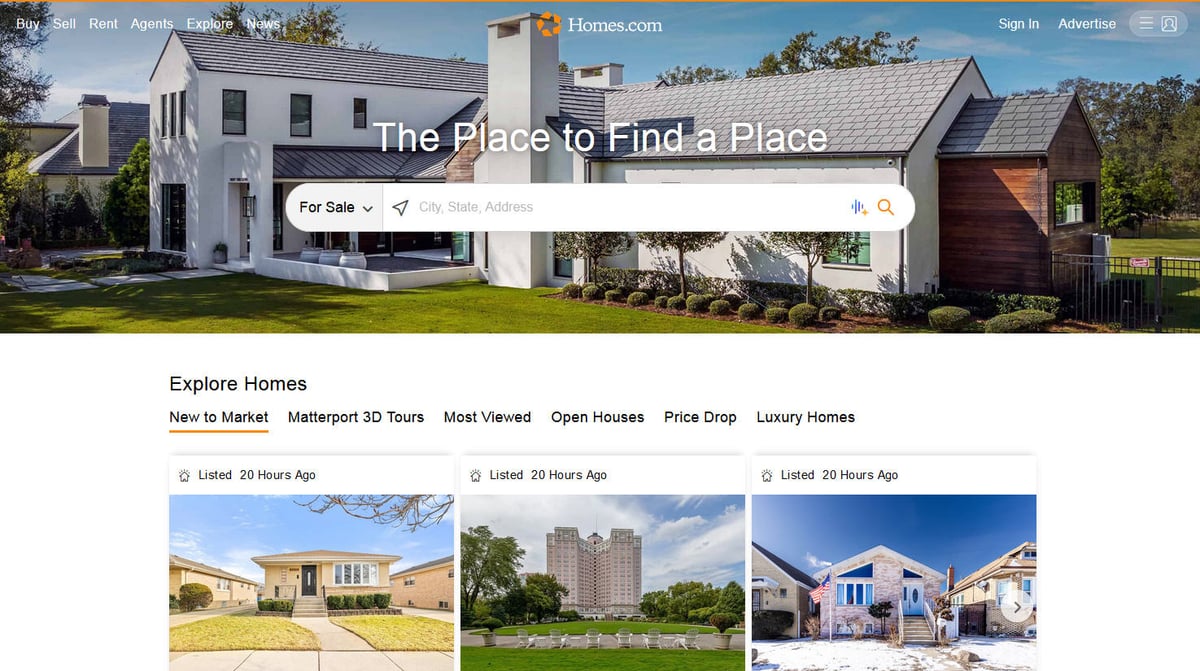
About Homes.com
Learn what Homes.com offers and what valuable data can be extracted from it.
Homes.com is a premier residential real estate marketplace in the United States, currently owned and operated by CoStar Group. It provides a comprehensive platform for home buyers and renters to search for single-family homes, condos, and townhouses across the country. The site is widely recognized for its 'Your Listing, Your Lead' business model, which prioritizes connecting consumers directly with the actual listing agent for every property. The platform hosts a massive inventory of data, including current market prices, square footage, property specifications, school ratings, and high-quality neighborhood imagery. It also integrates deep historical data such as property tax records and past sales history, making it one of the most content-rich resources for US real estate market participants. Scraping Homes.com is highly valuable for market analysts, investors, and home-service providers. The data allows for real-time tracking of housing inventory, price fluctuations, and competitor benchmarking.
Why Scrape Homes.com?
Discover the business value and use cases for extracting data from Homes.com.
Real-Time Inventory Tracking
Monitor when new properties are listed or moved to pending status to track market velocity in specific zip codes.
Investment Opportunity Identification
Extract price-per-square-foot and historical tax data to find undervalued homes compared to neighborhood averages.
B2B Lead Generation
Collect listing agent names and brokerage details to build targeted outreach lists for home-related services.
Market Trend Analysis
Aggregate school rankings and price appreciation trends to identify emerging neighborhoods for long-term investment.
Competitive Price Benchmarking
Compare your listings against similar properties on the platform to optimize pricing strategies for faster sales.
Scraping Challenges
Technical challenges you may encounter when scraping Homes.com.
Akamai Bot Manager Detection
Homes.com utilizes sophisticated security that detects automated browser patterns and fingerprints, leading to immediate IP bans.
React-Based Dynamic Loading
The website relies heavily on JavaScript to render listing details, meaning traditional HTTP requests often return empty or incomplete data.
IP Reputation Filtering
Most datacenter and VPN IP ranges are pre-emptively blocked, requiring the use of high-quality residential proxies for successful access.
Lazy-Loaded Data Elements
Property images and detailed amenities are only loaded as a user scrolls down the page, making simple extraction scripts miss critical data.
Scrape Homes.com with AI
No coding required. Extract data in minutes with AI-powered automation.
How It Works
Describe What You Need
Tell the AI what data you want to extract from Homes.com. Just type it in plain language — no coding or selectors needed.
AI Extracts the Data
Our artificial intelligence navigates Homes.com, handles dynamic content, and extracts exactly what you asked for.
Get Your Data
Receive clean, structured data ready to export as CSV, JSON, or send directly to your apps and workflows.
Why Use AI for Scraping
No-Code Web Scrapers for Homes.com
Point-and-click alternatives to AI-powered scraping
Several no-code tools like Browse.ai, Octoparse, Axiom, and ParseHub can help you scrape Homes.com. These tools use visual interfaces to select elements, but they come with trade-offs compared to AI-powered solutions.
Typical Workflow with No-Code Tools
Common Challenges
Learning curve
Understanding selectors and extraction logic takes time
Selectors break
Website changes can break your entire workflow
Dynamic content issues
JavaScript-heavy sites often require complex workarounds
CAPTCHA limitations
Most tools require manual intervention for CAPTCHAs
IP blocking
Aggressive scraping can get your IP banned
Code Examples
import requests; from bs4 import BeautifulSoup; url = 'https://www.homes.com/for-sale/atlanta-ga/'; headers = {'User-Agent': 'Mozilla/5.0 (Windows NT 10.0; Win64; x64) AppleWebKit/537.36 (KHTML, like Gecko) Chrome/119.0.0.0 Safari/537.36'}; try: response = requests.get(url, headers=headers, timeout=10); response.raise_for_status(); soup = BeautifulSoup(response.text, 'html.parser'); listings = soup.select('li.placard-container'); for item in listings: price = item.select_one('.price-container').text.strip() if item.select_one('.price-container') else 'N/A'; print(f'Price: {price}'); except Exception as e: print(f'Error: {e}')When to Use
Best for static HTML pages where content is loaded server-side. The fastest and simplest approach when JavaScript rendering isn't required.
Advantages
- ●Fastest execution (no browser overhead)
- ●Lowest resource consumption
- ●Easy to parallelize with asyncio
- ●Great for APIs and static pages
Limitations
- ●Cannot execute JavaScript
- ●Fails on SPAs and dynamic content
- ●May struggle with complex anti-bot systems
import asyncio; from playwright.async_api import async_playwright; async def scrape(): async with async_playwright() as p: browser = await p.chromium.launch(headless=True); context = await browser.new_context(user_agent='Mozilla/5.0'); page = await context.new_page(); await page.goto('https://www.homes.com/for-sale/chicago-il/', wait_until='networkidle'); listings = await page.query_selector_all('.placard-container'); for l in listings: p_el = await l.query_selector('.price-container'); print(await p_el.inner_text()); await browser.close(); asyncio.run(scrape())When to Use
Use when content loads dynamically via JavaScript, or when you need to interact with the page (clicks, scrolls, form fills). Handles modern anti-bot detection better.
Advantages
- ●Executes JavaScript like a real browser
- ●Handles SPAs and dynamic content
- ●Better anti-bot evasion with stealth plugins
- ●Can take screenshots and PDFs
Limitations
- ●Slower than HTTP requests
- ●Higher memory/CPU usage
- ●More complex to set up
import scrapy; class HomesSpider(scrapy.Spider): name = 'homes'; start_urls = ['https://www.homes.com/for-sale/houston-tx/']; def parse(self, response): for listing in response.css('li.placard-container'): yield {'price': listing.css('.price-container::text').get(), 'address': listing.css('.address-container::text').get()}; next_p = response.css('a.next-page::attr(href)').get(); if next_p: yield response.follow(next_p, self.parse)When to Use
Ideal for large-scale crawling projects that need to scrape thousands of pages. Built-in support for rate limiting, retries, and data pipelines.
Advantages
- ●Built for scale (millions of pages)
- ●Automatic request throttling
- ●Built-in data export pipelines
- ●Middleware system for proxies/headers
Limitations
- ●Steeper learning curve
- ●Overkill for small projects
- ●No native JavaScript rendering
const puppeteer = require('puppeteer'); (async () => { const browser = await puppeteer.launch(); const page = await browser.newPage(); await page.setUserAgent('Mozilla/5.0'); await page.goto('https://www.homes.com/for-sale/miami-fl/'); await page.waitForSelector('.placard-container'); const data = await page.evaluate(() => { return Array.from(document.querySelectorAll('.placard-container')).map(c => ({ price: c.querySelector('.price-container')?.innerText })); }); console.log(data); await browser.close(); })();When to Use
Choose this if you're in a Node.js/JavaScript ecosystem or need tight integration with frontend tools. Similar capabilities to Playwright.
Advantages
- ●Native JavaScript/TypeScript support
- ●Chrome DevTools Protocol access
- ●Large ecosystem and community
- ●Good for JS-heavy projects
Limitations
- ●Chrome-only (vs Playwright's multi-browser)
- ●Similar overhead to Playwright
- ●Less mature stealth options
What You Can Do With Homes.com Data
Explore practical applications and insights from Homes.com data.
Real Estate Investment Analysis
Investors identify high-yield rental opportunities and undervalued homes in emerging markets.
How to implement:
- 1Scrape listing prices and square footage for target neighborhoods
- 2Calculate average price per square foot
- 3Filter for properties priced 15% below the local average
- 4Cross-reference with local rent estimates to determine ROI
Use Automatio to extract data from Homes.com and build these applications without writing code.
Automated Mortgage Lead Sourcing
Mortgage brokers identify potential clients by monitoring new property listings.
How to implement:
- 1Schedule daily scrapes for new For Sale listings
- 2Extract listing prices to qualify lead size
- 3Match addresses with public records to find owners
- 4Initiate outreach for pre-qualification services
Use Automatio to extract data from Homes.com and build these applications without writing code.
Market Inventory Forecasting
Economists track the total number of active listings to predict future price movements.
How to implement:
- 1Count active listings across 50 US metros weekly
- 2Extract Days on Market data
- 3Analyze correlation between supply and price
- 4Produce quarterly reports on housing market health
Use Automatio to extract data from Homes.com and build these applications without writing code.
Competitor Brokerage Benchmarking
Real estate firms monitor competitor listings to assess market share.
How to implement:
- 1Scrape listings belonging to rival brokerages
- 2Extract sales history and agent productivity metrics
- 3Compare average time-to-close against internal data
- 4Adjust marketing strategies based on competitor volume
Use Automatio to extract data from Homes.com and build these applications without writing code.
Neighborhood Amenity Mapping
Developers correlate home prices with local school ratings and walkability.
How to implement:
- 1Extract property values and neighborhood attributes
- 2Scrape school ratings and proximity data
- 3Map price appreciation against infrastructure
- 4Select locations for new developments
Use Automatio to extract data from Homes.com and build these applications without writing code.
Supercharge your workflow with AI Automation
Automatio combines the power of AI agents, web automation, and smart integrations to help you accomplish more in less time.
What to get right first
Expert advice for successfully extracting data from Homes.com.
Prioritize Residential Proxies
Always use residential proxy networks as datacenter IPs are flagged almost instantly by the site's security perimeter.
Utilize Sitemap Discovery
Check the site's robots.txt for sitemap URLs to discover direct property links instead of relying solely on search results.
Introduce Human Latency
Configure your scraper to have random wait times between page loads to mimic a real person browsing the real estate listings.
Scroll Before Extraction
Ensure your bot performs a scroll action to trigger the lazy loading of high-resolution images and detailed property tax history.
Watch for DOM Variations
Property detail pages for rentals often have different HTML structures than those for sales, so verify your selectors for both types.
Related Web Scraping
How to Scrape Century 21 Property Listings

How to Scrape Geolocaux | Geolocaux Web Scraper Guide

How to Scrape SeLoger Bureaux & Commerces
How to Scrape Rent.com: A Guide to Real Estate Data Extraction

How to Scrape RE/MAX (remax.com) Real Estate Listings
How to Scrape HotPads: A Complete Guide to Extracting Rental Data
How to Scrape Apartments.com | Apartments.com Web Scraper Guide
How to Scrape BureauxLocaux: Commercial Real Estate Data Guide
Frequently Asked Questions
Find answers to common questions about Homes.com
Is it legal to scrape data from Homes.com?
Scraping publicly available real estate listings is generally legal for personal or research purposes in the U.S. However, you must comply with the website's Terms of Service and avoid scraping private contact information or overwhelming their servers.
Does Homes.com provide an official API?
No, Homes.com does not offer a public developer API. Access to their data programmatically is typically restricted to licensed industry partners through CoStar, making web scraping the only alternative for most users.
How do I avoid getting a 403 Forbidden error?
A 403 error usually means Akamai has detected your scraper. To resolve this, use a headless browser that supports stealth plugins, utilize residential proxies, and ensure your User-Agent string is recent and valid.
What is the best format for exporting property data?
JSON is recommended because real estate listings often have nested data structures like multiple image URLs or tax history rows. CSV is also a popular choice for users who want to perform immediate analysis in Excel or Google Sheets.
How often should I scrape the listings?
For active markets, scraping once every 24 hours is usually sufficient to capture price changes and new inventory. For highly competitive areas, you might consider scraping every few hours to stay ahead of fast-moving sales.
Can I scrape agent phone numbers and emails?
Yes, agent information is visible on most listing pages. Some contact details may require a click interaction to reveal, so your scraping tool must be capable of handling browser events like 'click' or 'hover'.
Which proxies are most effective for Homes.com?
High-quality residential proxies are the most effective because they share the same IP reputation as actual home buyers. Avoid 'free' or public proxies as they are almost certainly already blacklisted by the site's security.
Do I need to be logged in to scrape data?
No, most property listings and search results are publicly accessible without an account. It is actually better to scrape while logged out to avoid linking your automated activity to a specific user account which could get banned.