
How to Scrape Charter Global | IT Services & Job Board Scraper
Learn how to scrape Charter Global (charterglobal.com) for IT services data, enterprise AI trends, and career listings. Get competitive intelligence on tech...
Anti-Bot Protection Detected
- Cloudflare
- Enterprise-grade WAF and bot management. Uses JavaScript challenges, CAPTCHAs, and behavioral analysis. Requires browser automation with stealth settings.
- Wordfence
- Rate Limiting
- Limits requests per IP/session over time. Can be bypassed with rotating proxies, request delays, and distributed scraping.
- IP Blocking
- Blocks known datacenter IPs and flagged addresses. Requires residential or mobile proxies to circumvent effectively.
About Charter Global
Learn what Charter Global offers and what valuable data can be extracted from it.
Strategic IT and Digital Solutions
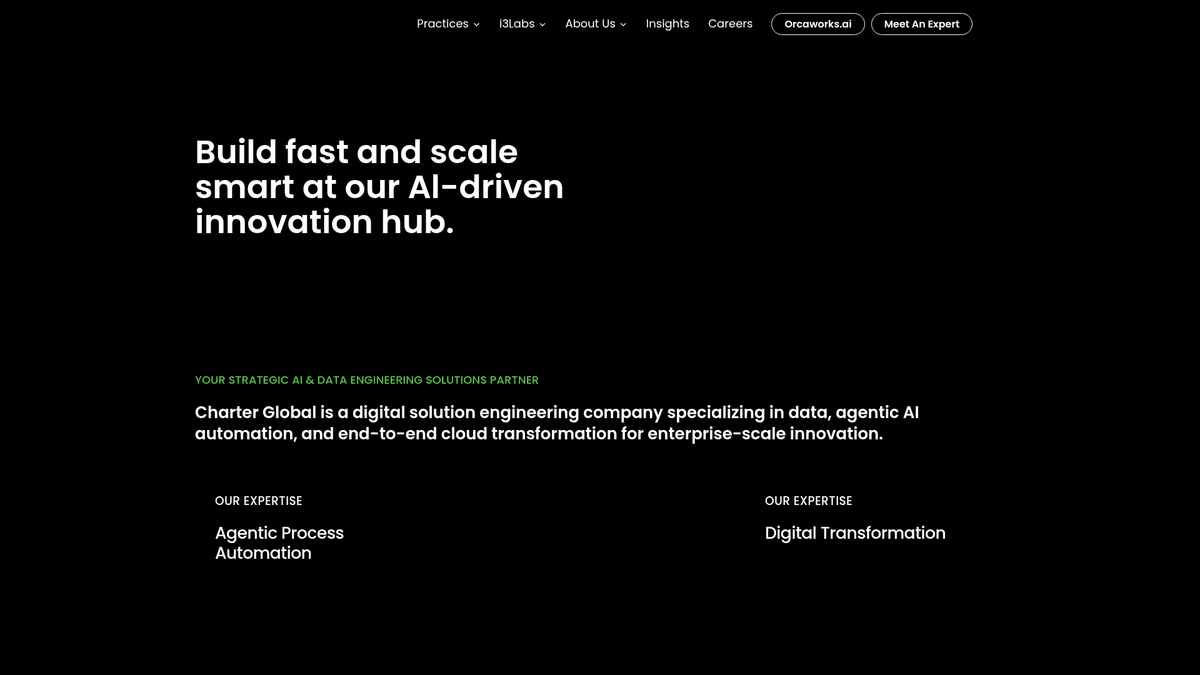
Charter Global is a prominent IT services provider specializing in digital transformation, cloud modernization, and custom software development. Headquartered in Atlanta with major development centers in India, they serve Fortune 1000 companies by implementing cutting-edge technology solutions, specifically focusing on Agentic AI and process automation.
Valuable Data Repository
The website contains a wealth of structured information including service offerings, detailed industry-specific case studies (Fintech, Healthcare, Retail), and an extensive internal job board. These resources provide insights into the technology stacks favored by large enterprises and the evolving demand for technical talent in the US and Indian markets.
Business Intelligence
Scraping Charter Global allows businesses to monitor AI and automation trends, perform competitive analysis on IT service pricing, and track regional recruitment patterns. It is an essential source for lead generation and market research within the enterprise technology sector.
Why Scrape Charter Global?
Discover the business value and use cases for extracting data from Charter Global.
IT Market Trend Analysis
Monitor the adoption and marketing of emerging technologies like Agentic AI and ML-Ops within the enterprise service sector.
Recruitment Market Insights
Extract job requirements and hiring trends in the US and India to understand which technical skills are currently in high demand.
Competitive Service Benchmarking
Track service expansions and industry-specific solution focuses to benchmark against other global IT consultancy firms.
B2B Lead Generation
Identify corporate office locations and contact information for partnership and networking opportunities within the tech ecosystem.
Technographic Research
Analyze the technical frameworks and programming languages prioritized by leading solution providers for their client projects.
Regional Growth Tracking
Monitor the volume of new job postings in specific hubs like Atlanta or Hyderabad to gauge geographic expansion.
Scraping Challenges
Technical challenges you may encounter when scraping Charter Global.
Cloudflare Protection
The site uses Cloudflare to mitigate bot traffic, which can lead to IP blocks or CAPTCHAs if requests are too frequent.
Dynamic Job Portal
The careers section often utilizes JavaScript to load job listings, making it difficult for standard HTML parsers to capture data.
Complex Site Architecture
Data is nested across multiple categories like Practices and i3Labs, requiring a recursive crawling strategy to gather all details.
Wordfence Security Limits
WordPress security plugins like Wordfence can trigger rate limits if they detect high-frequency scanning of the backend structures.
Contact Obfuscation
Email addresses and phone numbers may be encoded or require specific browser interactions to become visible to a crawler.
Scrape Charter Global with AI
No coding required. Extract data in minutes with AI-powered automation.
How It Works
Describe What You Need
Tell the AI what data you want to extract from Charter Global. Just type it in plain language — no coding or selectors needed.
AI Extracts the Data
Our artificial intelligence navigates Charter Global, handles dynamic content, and extracts exactly what you asked for.
Get Your Data
Receive clean, structured data ready to export as CSV, JSON, or send directly to your apps and workflows.
Why Use AI for Scraping
AI makes it easy to scrape Charter Global without writing any code. Our AI-powered platform uses artificial intelligence to understand what data you want — just describe it in plain language and the AI extracts it automatically.
How to scrape with AI:
- Describe What You Need: Tell the AI what data you want to extract from Charter Global. Just type it in plain language — no coding or selectors needed.
- AI Extracts the Data: Our artificial intelligence navigates Charter Global, handles dynamic content, and extracts exactly what you asked for.
- Get Your Data: Receive clean, structured data ready to export as CSV, JSON, or send directly to your apps and workflows.
Why use AI for scraping:
- No-Code Career Scraping: Effortlessly scrape the dynamic job portal using Automatio's visual builder without writing complex JavaScript wait-states.
- Bypass Anti-Bot Measures: Automatio handles the technical complexities of navigating Cloudflare and rotating proxies automatically.
- Structured Data Output: Transform unstructured service descriptions into clean, organized CSV or JSON formats for immediate business analysis.
- Scheduled Monitoring: Set up automated snapshots of the website to detect whenever new services or industry solutions are added to their portfolio.
No-Code Web Scrapers for Charter Global
Point-and-click alternatives to AI-powered scraping
Several no-code tools like Browse.ai, Octoparse, Axiom, and ParseHub can help you scrape Charter Global. These tools use visual interfaces to select elements, but they come with trade-offs compared to AI-powered solutions.
Typical Workflow with No-Code Tools
Common Challenges
Learning curve
Understanding selectors and extraction logic takes time
Selectors break
Website changes can break your entire workflow
Dynamic content issues
JavaScript-heavy sites often require complex workarounds
CAPTCHA limitations
Most tools require manual intervention for CAPTCHAs
IP blocking
Aggressive scraping can get your IP banned
No-Code Web Scrapers for Charter Global
Several no-code tools like Browse.ai, Octoparse, Axiom, and ParseHub can help you scrape Charter Global. These tools use visual interfaces to select elements, but they come with trade-offs compared to AI-powered solutions.
Typical Workflow with No-Code Tools
- Install browser extension or sign up for the platform
- Navigate to the target website and open the tool
- Point-and-click to select data elements you want to extract
- Configure CSS selectors for each data field
- Set up pagination rules to scrape multiple pages
- Handle CAPTCHAs (often requires manual solving)
- Configure scheduling for automated runs
- Export data to CSV, JSON, or connect via API
Common Challenges
- Learning curve: Understanding selectors and extraction logic takes time
- Selectors break: Website changes can break your entire workflow
- Dynamic content issues: JavaScript-heavy sites often require complex workarounds
- CAPTCHA limitations: Most tools require manual intervention for CAPTCHAs
- IP blocking: Aggressive scraping can get your IP banned
Code Examples
import requests
from bs4 import BeautifulSoup

# Target URL for service listings
url = 'https://www.charterglobal.com/services/'

# Setting a realistic User-Agent to mimic a browser
headers = {
    'User-Agent': 'Mozilla/5.0 (Windows NT 10.0; Win64; x64) AppleWebKit/537.36 (KHTML, like Gecko) Chrome/119.0.0.0 Safari/537.36'
}

def scrape_charter_services():
    try:
        # Sending the GET request with headers
        response = requests.get(url, headers=headers, timeout=15)
        response.raise_for_status()

        # Parsing HTML content
        soup = BeautifulSoup(response.text, 'html.parser')

        # Selecting service titles (adjusting for common H3/H4 selectors)
        services = soup.select('h3')
        for service in services:
            title = service.get_text(strip=True)
            if title:
                print(f'Service Found: {title}')

    except requests.exceptions.RequestException as e:
        print(f'Connection Error: {e}')

if __name__ == '__main__':
    scrape_charter_services()
When to Use
Best for static HTML pages where content is loaded server-side. The fastest and simplest approach when JavaScript rendering isn't required.
Advantages
- ●Fastest execution (no browser overhead)
- ●Lowest resource consumption
- ●Easy to parallelize with asyncio
- ●Great for APIs and static pages
Limitations
- ●Cannot execute JavaScript
- ●Fails on SPAs and dynamic content
- ●May struggle with complex anti-bot systems
How to Scrape Charter Global with Code
Python + Requests
import requests
from bs4 import BeautifulSoup
# Target URL for service listings
url = 'https://www.charterglobal.com/services/'
# Setting a realistic User-Agent to mimic a browser
headers = {
'User-Agent': 'Mozilla/5.0 (Windows NT 10.0; Win64; x64) AppleWebKit/537.36 (KHTML, like Gecko) Chrome/119.0.0.0 Safari/537.36'
}
def scrape_charter_services():
try:
# Sending the GET request with headers
response = requests.get(url, headers=headers, timeout=15)
response.raise_for_status()
# Parsing HTML content
soup = BeautifulSoup(response.text, 'html.parser')
# Selecting service titles (adjusting for common H3/H4 selectors)
services = soup.select('h3')
for service in services:
title = service.get_text(strip=True)
if title:
print(f'Service Found: {title}')
except requests.exceptions.RequestException as e:
print(f'Connection Error: {e}')
if __name__ == '__main__':
scrape_charter_services()Python + Playwright
from playwright.sync_api import sync_playwright

def run():
    with sync_playwright() as p:
        # Launching browser with headless mode
        browser = p.chromium.launch(headless=True)
        context = browser.new_context(user_agent='Mozilla/5.0 (Windows NT 10.0; Win64; x64) Chrome/120.0.0.0')
        page = context.new_page()

        # Navigating to the careers page which requires JS execution
        page.goto('https://www.charterglobal.com/careers/', wait_until='networkidle')

        # Wait for the job listing container to appear
        page.wait_for_selector('.job-title', timeout=10000)

        # Extracting data from job cards
        jobs = page.query_selector_all('.job-listing-container')
        for job in jobs:
            title = job.query_selector('.job-title').inner_text()
            location = job.query_selector('.location').inner_text()
            print(f'Job Open: {title} | Location: {location}')

        browser.close()

run()Python + Scrapy
import scrapy

class CharterGlobalSpider(scrapy.Spider):
    name = 'charter_spider'
    allowed_domains = ['charterglobal.com']
    start_urls = ['https://www.charterglobal.com/blog/']

    def parse(self, response):
        # Iterate through blog posts on the page
        for post in response.css('article'):
            yield {
                'title': post.css('h2.entry-title a::text').get(),
                'url': post.css('h2.entry-title a::attr(href)').get(),
                'date': post.css('time.entry-date::text').get()
            }

        # Handle pagination using 'Next' link
        next_page = response.css('a.next.page-numbers::attr(href)').get()
        if next_page:
yield response.follow(next_page, self.parse)Node.js + Puppeteer
const puppeteer = require('puppeteer');

(async () => {
  const browser = await puppeteer.launch({ headless: true });
  const page = await browser.newPage();

  // Mimic a real user browser session
  await page.setUserAgent('Mozilla/5.0 (Windows NT 10.0; Win64; x64) Chrome/118.0.0.0 Safari/537.36');

  try {
    await page.goto('https://www.charterglobal.com/insights/', { waitUntil: 'networkidle2' });

    // Extract insight titles
    const insights = await page.evaluate(() => {
      const elements = document.querySelectorAll('h2.entry-title');
      return Array.from(elements).map(el => el.innerText.trim());
    });

    console.log('Latest Insights:', insights);
  } catch (err) {
    console.error('Error fetching page:', err);
  }

  await browser.close();
})();What You Can Do With Charter Global Data
Explore practical applications and insights from Charter Global data.
Tech Stack Benchmarking
Analyze technology mentions in case studies to understand which stacks are preferred by Fortune 1000 companies.
How to implement:
- 1Scrape all industry case studies from the 'Insights' section.
- 2Use Natural Language Processing to extract technology keywords (e.g., AWS, Python, Salesforce).
- 3Create a heat map of technologies used across different industries like Fintech or Healthcare.
Use Automatio to extract data from Charter Global and build these applications without writing code.
What You Can Do With Charter Global Data
- Tech Stack Benchmarking
Analyze technology mentions in case studies to understand which stacks are preferred by Fortune 1000 companies.
- Scrape all industry case studies from the 'Insights' section.
- Use Natural Language Processing to extract technology keywords (e.g., AWS, Python, Salesforce).
- Create a heat map of technologies used across different industries like Fintech or Healthcare.
- IT Market Recruitment Trends
Track recruitment volumes in Atlanta and India to identify high-growth technical domains.
- Set up a daily recurring scrape of the careers portal.
- Capture job titles, specific skills required, and location data.
- Analyze month-over-month growth in specific roles like 'AI Engineer' or 'Data Architect'.
- Competitive Lead Generation
Identify companies collaborating with Charter Global to find potential B2B partners in similar industries.
- Extract client names and industry focus from public case studies.
- Categorize leads by industry and geographic location.
- Export data to CRM for targeted outreach based on shared technology interests.
- AI Service Trend Monitoring
Track the evolution of 'Agentic AI' and automation service offerings for market research.
- Scrape the main services pages for description changes.
- Analyze blog content for mentions of new proprietary AI platforms or tools.
- Benchmark service expansion against global IT consulting trends.
Supercharge your workflow with AI Automation
Automatio combines the power of AI agents, web automation, and smart integrations to help you accomplish more in less time.
What to get right first
Expert advice for successfully extracting data from Charter Global.
Use the Sitemap Index
Access /sitemap_index.xml to get a comprehensive list of all URLs for blog posts, services, and industry pages without manual crawling.
Rotate Residential Proxies
Frequently switch between high-quality residential IP addresses to prevent Cloudflare from flagging your scraper as a single bot.
Implement Random Delays
Add a random sleep timer between page requests to mimic human browsing behavior and avoid WordPress-based rate limits.
Prioritize Headless Browsers
Since the career portal is often dynamic, always use a headless browser like Playwright or Automatio for accurate job data extraction.
Target the Insights Feed
The Insights section is updated frequently; use an incremental scraper to only capture new articles based on the date field.
Related Web Scraping
How to Scrape Arc.dev: The Complete Guide to Remote Job Data
How to Scrape Fiverr | Fiverr Web Scraper Guide
How to Scrape Freelancer.com: A Complete Technical Guide
How to Scrape Upwork
How to Scrape Toptal | Toptal Web Scraper Guide
How to Scrape Guru.com: A Comprehensive Web Scraping Guide
How to Scrape Indeed: 2025 Guide for Job Market Data
How to Scrape We Work Remotely: The Ultimate Guide
Frequently Asked Questions
Find answers to common questions about Charter Global