
How to Scrape Guru.com: A Comprehensive Web Scraping Guide
Learn how to scrape Guru.com for job listings, freelancer profiles, and project budgets. Discover technical methods to bypass Cloudflare and automate data...
Anti-Bot Protection Detected
- Cloudflare
- Enterprise-grade WAF and bot management. Uses JavaScript challenges, CAPTCHAs, and behavioral analysis. Requires browser automation with stealth settings.
- Rate Limiting
- Limits requests per IP/session over time. Can be bypassed with rotating proxies, request delays, and distributed scraping.
- Google reCAPTCHA
- Google's CAPTCHA system. v2 requires user interaction, v3 runs silently with risk scoring. Can be solved with CAPTCHA services.
- IP Blocking
- Blocks known datacenter IPs and flagged addresses. Requires residential or mobile proxies to circumvent effectively.
- Browser Fingerprinting
- Identifies bots through browser characteristics: canvas, WebGL, fonts, plugins. Requires spoofing or real browser profiles.
About Guru.com
Learn what Guru.com offers and what valuable data can be extracted from it.
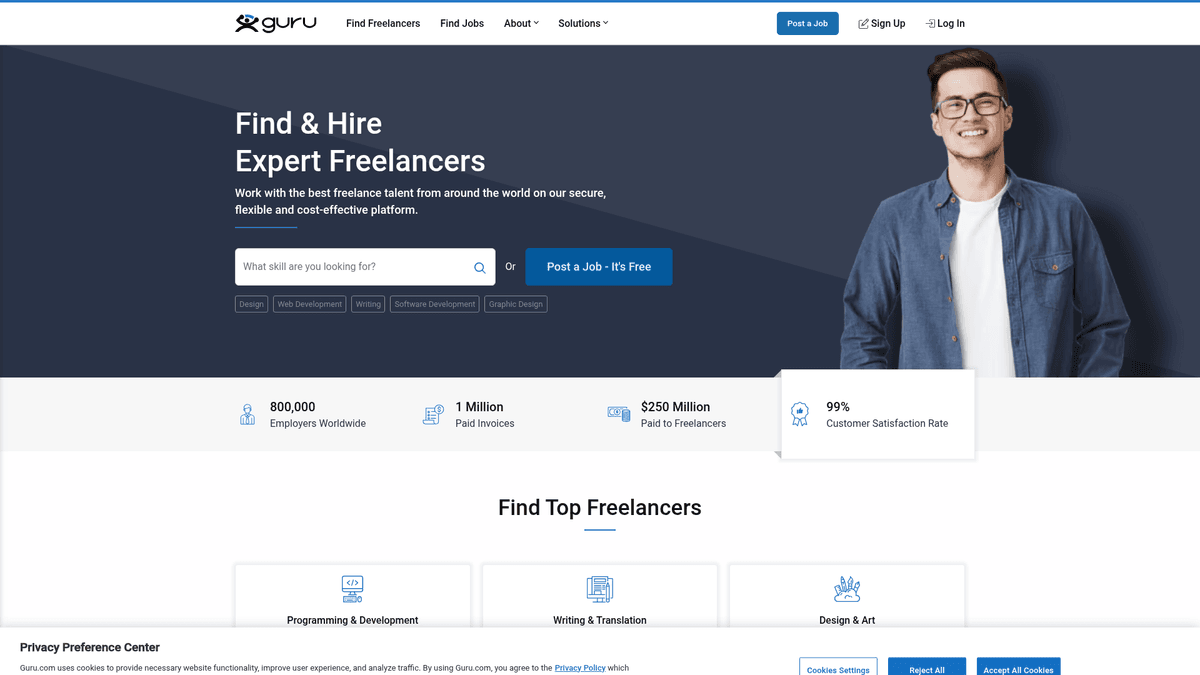
Guru.com is one of the world's oldest and most established freelance marketplaces, connecting businesses with a global network of over 800,000 professional freelancers. Established in 1998, it offers services across 9 primary categories including programming, design, writing, and engineering.
The platform facilitates the entire remote work lifecycle from job posting and hiring to project management and secure payments via its SafePay system. The website contains vast amounts of structured data such as project budgets, detailed skill requirements, and freelancer portfolios with verified work history.
This data is invaluable for businesses looking to understand current market demand for specific technical skills or identify emerging hiring trends in the gig economy. Scraping Guru.com allows for competitive intelligence, such as benchmarking average hourly rates for services or building comprehensive directories of high-quality talent for recruitment.
Why Scrape Guru.com?
Discover the business value and use cases for extracting data from Guru.com.
B2B Lead Generation
Extract active project listings to identify companies with immediate hiring needs and specific budget allocations for your agency's services.
Market Rate Benchmarking
Analyze average hourly rates and fixed-price budgets across different skill categories to optimize your own pricing strategy.
Skill Demand Tracking
Monitor the frequency of specific technology tags in job posts to identify which skills are trending among global employers.
Competitive Intelligence
Study the profiles and historical earnings of top-rated freelancers to understand the portfolios and service descriptions that win high-value contracts.
Niche Job Board Creation
Aggregate specialized listings for high-paying roles in sectors like AI development or technical writing to power a curated niche job board.
Economic Research
Gather large-scale data on remote work trends, geographic labor distribution, and project duration for academic or market analysis.
Scraping Challenges
Technical challenges you may encounter when scraping Guru.com.
Cloudflare Protection
Guru.com employs sophisticated Cloudflare security that can detect and block automated bots through browser fingerprinting and JS challenges.
Dynamic Content Loading
Many elements on the job search and freelancer listing pages are rendered via JavaScript, requiring a browser-based scraper to see the full data.
Strict Rate Limiting
Frequent requests from the same IP address will quickly trigger temporary blocks or reCAPTCHA prompts to verify human identity.
Data Obfuscation
Certain sensitive details, such as full employer history or specific project details, may be restricted or formatted inconsistently across categories.
Inconsistent Selectors
The platform's DOM structure updates periodically, which can break static scrapers that rely on rigid CSS or XPath selectors.
Scrape Guru.com with AI
No coding required. Extract data in minutes with AI-powered automation.
How It Works
Describe What You Need
Tell the AI what data you want to extract from Guru.com. Just type it in plain language — no coding or selectors needed.
AI Extracts the Data
Our artificial intelligence navigates Guru.com, handles dynamic content, and extracts exactly what you asked for.
Get Your Data
Receive clean, structured data ready to export as CSV, JSON, or send directly to your apps and workflows.
Why Use AI for Scraping
AI makes it easy to scrape Guru.com without writing any code. Our AI-powered platform uses artificial intelligence to understand what data you want — just describe it in plain language and the AI extracts it automatically.
How to scrape with AI:
- Describe What You Need: Tell the AI what data you want to extract from Guru.com. Just type it in plain language — no coding or selectors needed.
- AI Extracts the Data: Our artificial intelligence navigates Guru.com, handles dynamic content, and extracts exactly what you asked for.
- Get Your Data: Receive clean, structured data ready to export as CSV, JSON, or send directly to your apps and workflows.
Why use AI for scraping:
- Zero-Code Automation: Select job titles, budgets, and skill tags visually without ever writing a line of code or complex configuration files.
- Seamless Anti-Bot Bypass: Automatio handles Cloudflare challenges and browser headers automatically, ensuring your data extraction remains uninterrupted.
- Scheduled Monitoring: Set your scraper to run on a daily or hourly schedule to automatically capture new job postings the moment they are published.
- Handles AJAX Pagination: Easily configure the tool to navigate through multiple pages of results even when they load dynamically using modern JS techniques.
- Integrated Proxy Management: Built-in proxy rotation distributes your requests across multiple IPs to avoid detection and maintain high scraping success rates.
No-Code Web Scrapers for Guru.com
Point-and-click alternatives to AI-powered scraping
Several no-code tools like Browse.ai, Octoparse, Axiom, and ParseHub can help you scrape Guru.com. These tools use visual interfaces to select elements, but they come with trade-offs compared to AI-powered solutions.
Typical Workflow with No-Code Tools
Common Challenges
Learning curve
Understanding selectors and extraction logic takes time
Selectors break
Website changes can break your entire workflow
Dynamic content issues
JavaScript-heavy sites often require complex workarounds
CAPTCHA limitations
Most tools require manual intervention for CAPTCHAs
IP blocking
Aggressive scraping can get your IP banned
No-Code Web Scrapers for Guru.com
Several no-code tools like Browse.ai, Octoparse, Axiom, and ParseHub can help you scrape Guru.com. These tools use visual interfaces to select elements, but they come with trade-offs compared to AI-powered solutions.
Typical Workflow with No-Code Tools
- Install browser extension or sign up for the platform
- Navigate to the target website and open the tool
- Point-and-click to select data elements you want to extract
- Configure CSS selectors for each data field
- Set up pagination rules to scrape multiple pages
- Handle CAPTCHAs (often requires manual solving)
- Configure scheduling for automated runs
- Export data to CSV, JSON, or connect via API
Common Challenges
- Learning curve: Understanding selectors and extraction logic takes time
- Selectors break: Website changes can break your entire workflow
- Dynamic content issues: JavaScript-heavy sites often require complex workarounds
- CAPTCHA limitations: Most tools require manual intervention for CAPTCHAs
- IP blocking: Aggressive scraping can get your IP banned
Code Examples
import requests
from bs4 import BeautifulSoup

# Note: Guru often blocks simple requests due to Cloudflare
url = 'https://www.guru.com/d/jobs/'
headers = {
    'User-Agent': 'Mozilla/5.0 (Windows NT 10.0; Win64; x64) AppleWebKit/537.36 (KHTML, like Gecko) Chrome/91.0.4472.124 Safari/537.36'
}

try:
    response = requests.get(url, headers=headers)
    response.raise_for_status()
    soup = BeautifulSoup(response.text, 'html.parser')

    # Select job records from the listing page
    for job in soup.select('.jobRecord'):
        title = job.select_one('.jobTitle').text.strip()
        budget = job.select_one('.jobBudget').text.strip() if job.select_one('.jobBudget') else 'N/A'
        print(f'Job Title: {title} | Budget: {budget}')
except Exception as e:
    print(f'Error: {e} - Guru.com likely blocked the automated request via Cloudflare.')
When to Use
Best for static HTML pages where content is loaded server-side. The fastest and simplest approach when JavaScript rendering isn't required.
Advantages
- ●Fastest execution (no browser overhead)
- ●Lowest resource consumption
- ●Easy to parallelize with asyncio
- ●Great for APIs and static pages
Limitations
- ●Cannot execute JavaScript
- ●Fails on SPAs and dynamic content
- ●May struggle with complex anti-bot systems
How to Scrape Guru.com with Code
Python + Requests
import requests
from bs4 import BeautifulSoup
# Note: Guru often blocks simple requests due to Cloudflare
url = 'https://www.guru.com/d/jobs/'
headers = {
'User-Agent': 'Mozilla/5.0 (Windows NT 10.0; Win64; x64) AppleWebKit/537.36 (KHTML, like Gecko) Chrome/91.0.4472.124 Safari/537.36'
}
try:
response = requests.get(url, headers=headers)
response.raise_for_status()
soup = BeautifulSoup(response.text, 'html.parser')
# Select job records from the listing page
for job in soup.select('.jobRecord'):
title = job.select_one('.jobTitle').text.strip()
budget = job.select_one('.jobBudget').text.strip() if job.select_one('.jobBudget') else 'N/A'
print(f'Job Title: {title} | Budget: {budget}')
except Exception as e:
print(f'Error: {e} - Guru.com likely blocked the automated request via Cloudflare.')Python + Playwright
from playwright.sync_api import sync_playwright

def scrape_guru():
    with sync_playwright() as p:
        # Launching a headed browser can sometimes help bypass basic bot checks
        browser = p.chromium.launch(headless=True)
        context = browser.new_context(user_agent='Mozilla/5.0 (Windows NT 10.0; Win64; x64) ...')
        page = context.new_page()

        page.goto('https://www.guru.com/d/jobs/')

        # Wait for the job records to render via JS
        page.wait_for_selector('.jobRecord')

        jobs = page.query_selector_all('.jobRecord')
        for job in jobs:
            title_el = job.query_selector('.jobTitle')
            if title_el:
                print(f'Scraped Job: {title_el.inner_text().strip()}')

        browser.close()

scrape_guru()Python + Scrapy
import scrapy

class GuruSpider(scrapy.Spider):
    name = 'guru_spider'
    start_urls = ['https://www.guru.com/d/jobs/']

    def parse(self, response):
        # Scrapy requires a JS-rendering middleware like Scrapy-Playwright for Guru
        for job in response.css('.jobRecord'):
            yield {
                'title': job.css('.jobTitle::text').get(default='').strip(),
                'budget': job.css('.jobBudget::text').get(default='').strip(),
                'posted': job.css('.jobPostedDate::text').get(default='').strip(),
            }

        # Handle simple pagination link extraction
        next_page = response.css('a.next-page-selector::attr(href)').get()
        if next_page:
yield response.follow(next_page, self.parse)Node.js + Puppeteer
const puppeteer = require('puppeteer');

(async () => {
  const browser = await puppeteer.launch({ headless: true });
  const page = await browser.newPage();

  // Setting a realistic user agent
  await page.setUserAgent('Mozilla/5.0 (Windows NT 10.0; Win64; x64) AppleWebKit/537.36 (KHTML, like Gecko) Chrome/92.0.4515.107 Safari/537.36');

  await page.goto('https://www.guru.com/d/jobs/', { waitUntil: 'networkidle2' });

  const jobs = await page.evaluate(() => {
    const items = document.querySelectorAll('.jobRecord');
    return Array.from(items).map(item => ({
      title: item.querySelector('.jobTitle')?.innerText.trim(),
      budget: item.querySelector('.jobBudget')?.innerText.trim()
    }));
  });

  console.log(jobs);
  await browser.close();
})();What You Can Do With Guru.com Data
Explore practical applications and insights from Guru.com data.
Freelance Rate Benchmarking
Agencies and freelancers use data to set competitive market rates based on real project budgets.
How to implement:
- 1Scrape project budgets across key categories like 'Mobile Development'.
- 2Calculate the median hourly and fixed rates for the current quarter.
- 3Compare rates against freelancer feedback scores to determine premium pricing tiers.
Use Automatio to extract data from Guru.com and build these applications without writing code.
What You Can Do With Guru.com Data
- Freelance Rate Benchmarking
Agencies and freelancers use data to set competitive market rates based on real project budgets.
- Scrape project budgets across key categories like 'Mobile Development'.
- Calculate the median hourly and fixed rates for the current quarter.
- Compare rates against freelancer feedback scores to determine premium pricing tiers.
- Agency B2B Lead Generation
Identify companies that are actively hiring for large-scale projects to offer professional agency services.
- Filter Guru for job postings with budgets over $5,000.
- Extract the employer's location and hiring history statistics.
- Cross-reference company names on LinkedIn to identify decision-makers for direct outreach.
- Skills Demand Analysis
Educational platforms can identify high-demand skills to create relevant certification courses.
- Extract the 'Skills Required' tags from thousands of recent job postings.
- Aggregate skill frequency to identify emerging technological trends (e.g., Rust vs. Python).
- Identify 'gaps' where jobs are high but available freelancer experts are low.
- Market Competitive Intelligence
Analyze competitor service offerings by monitoring freelancer portfolio descriptions and pricing.
- Scrape top-rated freelancer profiles in specific geographic regions.
- Extract service descriptions, portfolios, and quoted hourly rates.
- Map out the competitive landscape for specific professional services like 'Technical Writing'.
Supercharge your workflow with AI Automation
Automatio combines the power of AI agents, web automation, and smart integrations to help you accomplish more in less time.
What to get right first
Expert advice for successfully extracting data from Guru.com.
Use Residential Proxies
Traffic from residential IP addresses is less likely to be flagged by Guru's security systems compared to data center server IPs.
Mimic Human Behavior
Implement random delays between 5 and 15 seconds to prevent your scraper from appearing as a high-speed automated script.
Scrape Category Slugs
Targeting specific URLs like /d/jobs/skill/python/ instead of the general feed helps in gathering more relevant and structured data.
Rotate User-Agents
Switching between different mobile and desktop browser headers helps you blend in with the platform's diverse natural traffic.
Focus on Recent Postings
Use the site's built-in filters to scrape only jobs posted in the last 24 hours to maximize the efficiency of your lead generation.
Export to JSON for Nested Data
Since job listings contain lists of skills and multiple budget figures, JSON is the ideal format to preserve the data's hierarchical structure.
Related Web Scraping

How to Scrape Arc.dev: The Complete Guide to Remote Job Data

How to Scrape Toptal | Toptal Web Scraper Guide
How to Scrape Fiverr | Fiverr Web Scraper Guide

How to Scrape Freelancer.com: A Complete Technical Guide
How to Scrape Upwork
How to Scrape Indeed: 2025 Guide for Job Market Data

How to Scrape Charter Global | IT Services & Job Board Scraper
How to Scrape We Work Remotely: The Ultimate Guide
Frequently Asked Questions
Find answers to common questions about Guru.com