
How to Scrape 2Captcha: Extract CAPTCHA Solving Rates and Pricing Stats
Learn how to scrape 2Captcha.com to monitor CAPTCHA solving prices, performance metrics, and service availability. Essential for optimizing automation costs.
Anti-Bot Protection Detected
- Cloudflare
- Enterprise-grade WAF and bot management. Uses JavaScript challenges, CAPTCHAs, and behavioral analysis. Requires browser automation with stealth settings.
- Rate Limiting
- Limits requests per IP/session over time. Can be bypassed with rotating proxies, request delays, and distributed scraping.
- IP Blocking
- Blocks known datacenter IPs and flagged addresses. Requires residential or mobile proxies to circumvent effectively.
About 2Captcha
Learn what 2Captcha offers and what valuable data can be extracted from it.
About 2Captcha
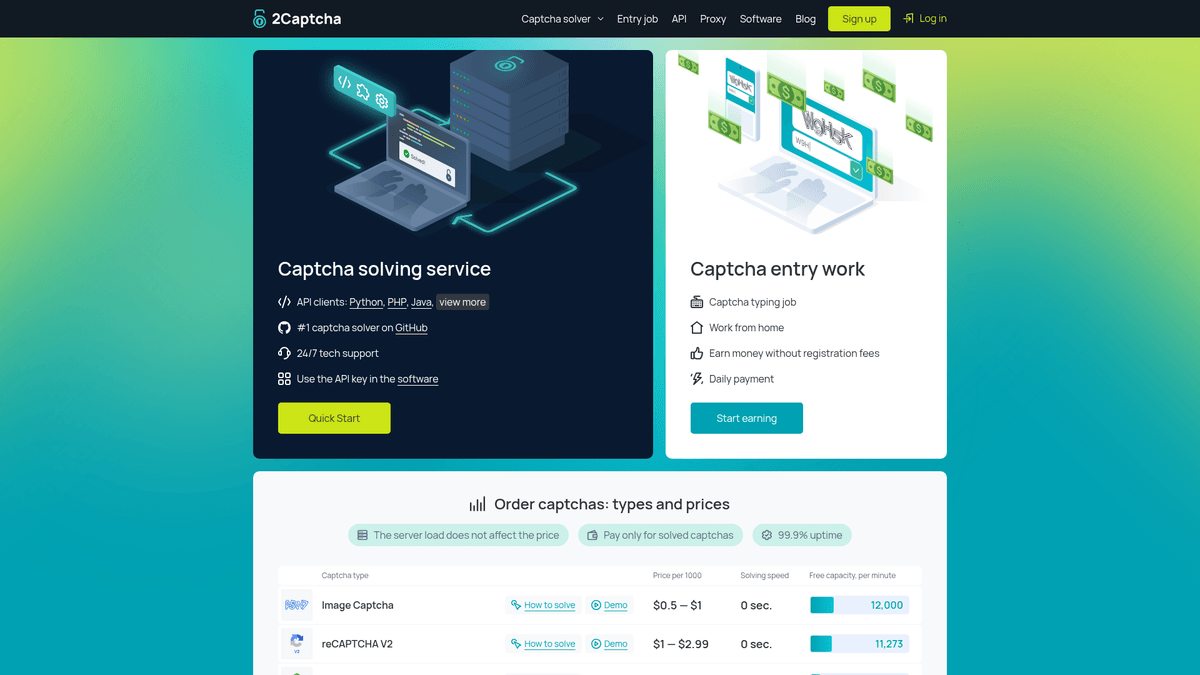
2Captcha is a prominent automated CAPTCHA recognition service that connects developers and businesses with a global workforce of human solvers. The platform specializes in bypassing digital hurdles such as reCAPTCHA (v2/v3/Enterprise), hCaptcha, FunCaptcha, and Cloudflare Turnstile, facilitating automated data collection at scale.
Data Value for Scrapers
For scrapers, the website serves as a critical data source for market intelligence. It hosts public dashboards displaying real-time solving rates, average waiting times, and accuracy statistics across different CAPTCHA types. This data is indispensable for developers who need to estimate the costs and time requirements for large-scale web scraping projects, ensuring their automation pipelines remain cost-effective and efficient.
Operational Intelligence
By monitoring 2Captcha's internal metrics, companies can optimize their automation pipelines. Tracking the "Free Capacity" or "Average Speed" allows for dynamic shifting of workloads to periods of high availability, ensuring that scraping operations remain both resilient and economically viable.
Why Scrape 2Captcha?
Discover the business value and use cases for extracting data from 2Captcha.
Real-Time Price Monitoring
Track fluctuating costs for various CAPTCHA solving types to optimize your automation budget and adjust your bidding strategies accordingly.
Service Speed Benchmarking
Extract average solving times for different services like reCAPTCHA and hCaptcha to identify the most efficient periods for running your own scrapers.
Worker Capacity Planning
Monitor the number of active workers and system load to predict potential delays or throughput limitations in your large-scale data extraction projects.
Competitive Market Intelligence
Analyze 2Captcha's supported methods and updates to stay ahead of market trends in the anti-bot bypass and automation industry.
Historical Cost Auditing
Maintain a long-term database of pricing changes to conduct financial forecasting and audit your operational expenditures over time.
Service Availability Tracking
Scrape status indicators and error rates to build a custom uptime monitor for your automation infrastructure's third-party dependencies.
Scraping Challenges
Technical challenges you may encounter when scraping 2Captcha.
Cloudflare and Turnstile Protection
2Captcha uses the very technologies it solves, such as Cloudflare Turnstile, to protect its own site from automated data extraction.
JavaScript Rendering Requirements
The real-time dashboards and pricing tables are rendered dynamically via JavaScript, making it impossible to scrape with simple HTTP libraries.
Aggressive Rate Limiting
The site monitors request frequency closely and will quickly issue temporary IP bans or 403 Forbidden errors if it detects bot-like behavior.
Login Wall for Deep Analytics
While general pricing is public, more detailed account statistics and historical worker data require authenticated sessions and secure cookie management.
Frequent DOM Mutations
The platform updates its user interface and dashboard layout regularly, which can break brittle scrapers relying on static CSS selectors.
Scrape 2Captcha with AI
No coding required. Extract data in minutes with AI-powered automation.
How It Works
Describe What You Need
Tell the AI what data you want to extract from 2Captcha. Just type it in plain language — no coding or selectors needed.
AI Extracts the Data
Our artificial intelligence navigates 2Captcha, handles dynamic content, and extracts exactly what you asked for.
Get Your Data
Receive clean, structured data ready to export as CSV, JSON, or send directly to your apps and workflows.
Why Use AI for Scraping
AI makes it easy to scrape 2Captcha without writing any code. Our AI-powered platform uses artificial intelligence to understand what data you want — just describe it in plain language and the AI extracts it automatically.
How to scrape with AI:
- Describe What You Need: Tell the AI what data you want to extract from 2Captcha. Just type it in plain language — no coding or selectors needed.
- AI Extracts the Data: Our artificial intelligence navigates 2Captcha, handles dynamic content, and extracts exactly what you asked for.
- Get Your Data: Receive clean, structured data ready to export as CSV, JSON, or send directly to your apps and workflows.
Why use AI for scraping:
- Visual Data Selection: Select dynamic pricing elements and worker statistics visually without needing to manually inspect complex, obfuscated code.
- Automated Anti-Bot Bypass: Automatio handles Cloudflare challenges and browser fingerprinting out of the box, allowing you to access protected data without extra configuration.
- Built-in Proxy Rotation: Easily route your scraping requests through high-quality residential proxies directly within the Automatio workflow to bypass IP-based rate limits.
- Persistent Session Handling: Maintain login states and session cookies automatically, enabling you to scrape protected dashboard data without re-authenticating for every run.
- Cloud-Based Scheduling: Set your scrapers to run on a schedule to capture solving speed fluctuations every few minutes without keeping your local machine running.
No-Code Web Scrapers for 2Captcha
Point-and-click alternatives to AI-powered scraping
Several no-code tools like Browse.ai, Octoparse, Axiom, and ParseHub can help you scrape 2Captcha. These tools use visual interfaces to select elements, but they come with trade-offs compared to AI-powered solutions.
Typical Workflow with No-Code Tools
Common Challenges
Learning curve
Understanding selectors and extraction logic takes time
Selectors break
Website changes can break your entire workflow
Dynamic content issues
JavaScript-heavy sites often require complex workarounds
CAPTCHA limitations
Most tools require manual intervention for CAPTCHAs
IP blocking
Aggressive scraping can get your IP banned
No-Code Web Scrapers for 2Captcha
Several no-code tools like Browse.ai, Octoparse, Axiom, and ParseHub can help you scrape 2Captcha. These tools use visual interfaces to select elements, but they come with trade-offs compared to AI-powered solutions.
Typical Workflow with No-Code Tools
- Install browser extension or sign up for the platform
- Navigate to the target website and open the tool
- Point-and-click to select data elements you want to extract
- Configure CSS selectors for each data field
- Set up pagination rules to scrape multiple pages
- Handle CAPTCHAs (often requires manual solving)
- Configure scheduling for automated runs
- Export data to CSV, JSON, or connect via API
Common Challenges
- Learning curve: Understanding selectors and extraction logic takes time
- Selectors break: Website changes can break your entire workflow
- Dynamic content issues: JavaScript-heavy sites often require complex workarounds
- CAPTCHA limitations: Most tools require manual intervention for CAPTCHAs
- IP blocking: Aggressive scraping can get your IP banned
Code Examples
import requests
from bs4 import BeautifulSoup

# Target URL for pricing data
url = "https://2captcha.com/pricing"
# Headers to simulate a browser request
headers = {"User-Agent": "Mozilla/5.0 (Windows NT 10.0; Win64; x64) AppleWebKit/537.36 (KHTML, like Gecko) Chrome/118.0.0.0 Safari/537.36"}

try:
    # Sending GET request
    response = requests.get(url, headers=headers)
    response.raise_for_status()
    # Parsing HTML content
    soup = BeautifulSoup(response.text, 'html.parser')
    # Locating pricing rows
    rows = soup.select("table.pricing-table tr")
    for row in rows:
        cols = row.find_all("td")
        if cols:
            print(f"Type: {cols[0].get_text(strip=True)} | Price: {cols[1].get_text(strip=True)}")
except Exception as e:
    print(f"Scraping failed: {e}")
When to Use
Best for static HTML pages where content is loaded server-side. The fastest and simplest approach when JavaScript rendering isn't required.
Advantages
- ●Fastest execution (no browser overhead)
- ●Lowest resource consumption
- ●Easy to parallelize with asyncio
- ●Great for APIs and static pages
Limitations
- ●Cannot execute JavaScript
- ●Fails on SPAs and dynamic content
- ●May struggle with complex anti-bot systems
How to Scrape 2Captcha with Code
Python + Requests
import requests
from bs4 import BeautifulSoup
# Target URL for pricing data
url = "https://2captcha.com/pricing"
# Headers to simulate a browser request
headers = {"User-Agent": "Mozilla/5.0 (Windows NT 10.0; Win64; x64) AppleWebKit/537.36 (KHTML, like Gecko) Chrome/118.0.0.0 Safari/537.36"}
try:
# Sending GET request
response = requests.get(url, headers=headers)
response.raise_for_status()
# Parsing HTML content
soup = BeautifulSoup(response.text, 'html.parser')
# Locating pricing rows
rows = soup.select("table.pricing-table tr")
for row in rows:
cols = row.find_all("td")
if cols:
print(f"Type: {cols[0].get_text(strip=True)} | Price: {cols[1].get_text(strip=True)}")
except Exception as e:
print(f"Scraping failed: {e}")Python + Playwright
from playwright.sync_api import sync_playwright

def scrape_2captcha_stats():
    with sync_playwright() as p:
        # Launch headless browser
        browser = p.chromium.launch(headless=True)
        page = browser.new_page()
        # Navigate to statistics page
        page.goto("https://2captcha.com/statistics")
        # Wait for dynamic table to load
        page.wait_for_selector(".stats-table")
        # Extract data using JS execution
        stats = page.evaluate('''() => {
            const data = [];
            const rows = document.querySelectorAll(".stats-table tr");
            rows.forEach(row => {
                const cells = row.querySelectorAll("td");
                if (cells.length > 0) {
                    data.push({ type: cells[0].innerText, speed: cells[1].innerText });
                }
            });
            return data;
        }''')
        print(stats)
        browser.close()

scrape_2captcha_stats()Python + Scrapy
import scrapy

class TwoCaptchaSpider(scrapy.Spider):
    name = '2captcha_spider'
    start_urls = ['https://2captcha.com/pricing']

    def parse(self, response):
        # Loop through pricing items in the DOM
        for item in response.css('div.pricing-item'):
            yield {
                'type': item.css('h3::text').get(),
                'price': item.css('span.price::text').get(),
                'description': item.css('p.desc::text').get()
}Node.js + Puppeteer
const puppeteer = require('puppeteer');

(async () => {
    // Launch browser instance
    const browser = await puppeteer.launch();
    const page = await browser.newPage();
    // Go to pricing page and wait for content
    await page.goto('https://2captcha.com/pricing', { waitUntil: 'networkidle2' });
    // Evaluate page content
    const results = await page.evaluate(() => {
        const items = Array.from(document.querySelectorAll('.pricing-row'));
        return items.map(item => ({
            title: item.querySelector('.title')?.innerText,
            rate: item.querySelector('.rate')?.innerText
        }));
    });
    console.log(results);
    await browser.close();
})();What You Can Do With 2Captcha Data
Explore practical applications and insights from 2Captcha data.
Cost Efficiency Benchmarking
Scraping prices allows businesses to compare 2Captcha against competitors like Anti-Captcha or CapMonster to minimize operational costs.
How to implement:
- 1Scrape pricing tables from multiple CAPTCHA solving providers daily.
- 2Store data in a centralized SQL database.
- 3Generate a cost-per-solve comparison report.
- 4Automatically switch API providers based on the lowest current rate.
Use Automatio to extract data from 2Captcha and build these applications without writing code.
What You Can Do With 2Captcha Data
- Cost Efficiency Benchmarking
Scraping prices allows businesses to compare 2Captcha against competitors like Anti-Captcha or CapMonster to minimize operational costs.
- Scrape pricing tables from multiple CAPTCHA solving providers daily.
- Store data in a centralized SQL database.
- Generate a cost-per-solve comparison report.
- Automatically switch API providers based on the lowest current rate.
- Service Uptime and Speed Monitoring
By scraping solving speed statistics, developers can determine the best times of day to run large-scale scraping jobs.
- Extract the 'Average Waiting Time' for reCAPTCHA v2 every 15 minutes.
- Plot historical speed data to identify peak congestion hours.
- Configure your scraper to pause during high-latency periods.
- Lead Generation for Proxy Services
Proxy providers can use 2Captcha worker trends to identify regions with high demand for residential IPs.
- Scrape worker count data by geographic region if available.
- Analyze which regions are under-represented.
- Target marketing efforts for proxy sales in those specific regions.
- Competitive Market Analysis
Market researchers use feature availability data to track the rollout of new CAPTCHA solving capabilities across the industry.
- Monitor the 'Supported API Methods' list on 2Captcha.
- Compare supported CAPTCHA types against competitor service lists.
- Identify gaps in the market where new solving technologies are needed.
- Load Balancing for Scraping Pipelines
High-volume data aggregators use capacity metrics to distribute their CAPTCHA requests across different providers.
- Fetch the 'Free Capacity per Minute' metric in real-time.
- Implement a threshold-based load balancer in your scraping logic.
- Redirect traffic to 2Captcha only when capacity is above 50% to ensure stability.
Supercharge your workflow with AI Automation
Automatio combines the power of AI agents, web automation, and smart integrations to help you accomplish more in less time.
What to get right first
Expert advice for successfully extracting data from 2Captcha.
Use Residential Proxies
2Captcha is highly sensitive to datacenter IP ranges; using residential proxies significantly increases your success rate and prevents immediate blocking.
Simulate Human Interactions
Incorporate random wait times, mouse movements, and variable scrolling patterns to evade behavioral detection systems on the dashboard.
Handle Login Cookies Securely
If scraping the user dashboard, ensure your scraper persists cookies across sessions to avoid triggering security alerts caused by frequent new logins.
Monitor Response Headers
Always check for 'X-Cloudflare-Status' or similar headers to identify if your requests are being silently throttled or flagged for verification.
Implement Smart Retry Logic
Configure your scraper to pause and retry after a delay if it encounters a 429 Too Many Requests error to prevent a temporary block from becoming permanent.
Scrape Off-Peak Hours
Target times when global traffic to the solving network is lower to experience faster page loads and less aggressive monitoring from their security team.
Related Web Scraping

How to Scrape GitHub | The Ultimate 2025 Technical Guide

How to Scrape Pollen.com: Local Allergy Data Extraction Guide

How to Scrape Britannica: Educational Data Web Scraper

How to Scrape RethinkEd: A Technical Data Extraction Guide

How to Scrape Wikipedia: The Ultimate Web Scraping Guide

How to Scrape Weather.com: A Guide to Weather Data Extraction

How to Scrape Worldometers for Real-Time Global Statistics

How to Scrape American Museum of Natural History (AMNH)
Frequently Asked Questions
Find answers to common questions about 2Captcha