
How to Scrape Maven.com for Course and Instructor Data
Learn how to scrape Maven.com to extract course details, instructor bios, pricing, and syllabi. Perfect for competitive analysis and ed-tech market research.
Anti-Bot Protection Detected
- Cloudflare
- Enterprise-grade WAF and bot management. Uses JavaScript challenges, CAPTCHAs, and behavioral analysis. Requires browser automation with stealth settings.
- Rate Limiting
- Limits requests per IP/session over time. Can be bypassed with rotating proxies, request delays, and distributed scraping.
- IP Blocking
- Blocks known datacenter IPs and flagged addresses. Requires residential or mobile proxies to circumvent effectively.
- Browser Fingerprinting
- Identifies bots through browser characteristics: canvas, WebGL, fonts, plugins. Requires spoofing or real browser profiles.
About Maven
Learn what Maven offers and what valuable data can be extracted from it.
The Leader in Cohort-Based Learning
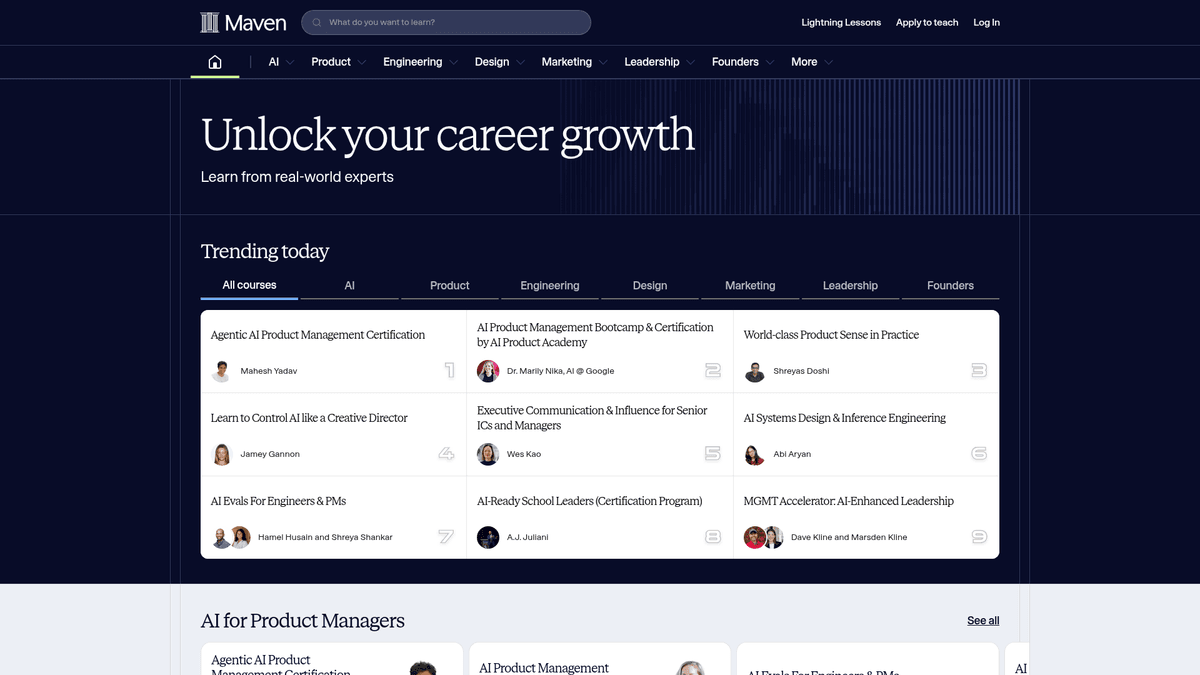
Maven is a premier online education platform specializing in cohort-based courses (CBCs) taught by industry leaders and world-class experts. Founded by Gagan Biyani and Wes Kao, the site has become the go-to marketplace for high-stakes professional education that emphasizes live interaction, community, and practical application over passive video consumption.
Rich Professional Data
The platform hosts a vast directory of courses spanning technology, business, design, and management. Each listing is highly structured, providing detailed information on syllabus modules, instructor credentials (often from Tier-1 tech companies), pricing tiers, and specific cohort start dates. Because Maven utilizes a modern tech stack (Next.js), much of this data is rendered dynamically, making it a goldmine for those who know how to extract structured web data.
Strategic Market Value
For businesses in the ed-tech and HR sectors, scraping Maven.com offers unparalleled insights into the creator economy and professional training trends. It allows for the tracking of emerging skill demands, competitive pricing analysis, and the identification of top-tier talent who are successfully monetizing their expertise through educational products.
Why Scrape Maven?
Discover the business value and use cases for extracting data from Maven.
Competitive Pricing Analysis
Monitor and compare high-ticket cohort pricing across professional niches to optimize your own course revenue strategy.
Educational Trend Research
Identify emerging technologies and skills, such as AI and Machine Learning, that are currently commanding the highest student interest.
Instructor Lead Generation
Find and qualify world-class subject matter experts from top-tier tech companies for potential recruitment, partnerships, or speaking engagements.
Curriculum Benchmarking
Extract detailed syllabus modules to understand the depth and breadth of content required to build industry-leading professional courses.
Market Demand Assessment
Analyze student enrollment windows and cohort frequencies to determine which professional development topics are truly thriving.
Content Aggregation
Build comprehensive directories or internal recommendation engines for corporate learning and development departments.
Scraping Challenges
Technical challenges you may encounter when scraping Maven.
Next.js Dynamic Rendering
Maven uses Next.js for its front-end, meaning course data is often hydrated via JavaScript after the initial page load.
Cloudflare Bot Mitigation
The platform employs Cloudflare's security layer, which can detect and block automated requests that lack proper browser fingerprinting.
Lazy Loading and Infinite Scroll
Course discovery pages often utilize infinite scroll, requiring an automation tool that can simulate user scrolling to reveal all listings.
Complex Nested Data
Extracting structured data from deeply nested syllabus components and instructor biographies requires sophisticated CSS or XPath selectors.
Scrape Maven with AI
No coding required. Extract data in minutes with AI-powered automation.
How It Works
Describe What You Need
Tell the AI what data you want to extract from Maven. Just type it in plain language — no coding or selectors needed.
AI Extracts the Data
Our artificial intelligence navigates Maven, handles dynamic content, and extracts exactly what you asked for.
Get Your Data
Receive clean, structured data ready to export as CSV, JSON, or send directly to your apps and workflows.
Why Use AI for Scraping
AI makes it easy to scrape Maven without writing any code. Our AI-powered platform uses artificial intelligence to understand what data you want — just describe it in plain language and the AI extracts it automatically.
How to scrape with AI:
- Describe What You Need: Tell the AI what data you want to extract from Maven. Just type it in plain language — no coding or selectors needed.
- AI Extracts the Data: Our artificial intelligence navigates Maven, handles dynamic content, and extracts exactly what you asked for.
- Get Your Data: Receive clean, structured data ready to export as CSV, JSON, or send directly to your apps and workflows.
Why use AI for scraping:
- Visual No-Code Extraction: Construct your Maven scraper using a point-and-click interface, eliminating the need to write complex Python or JavaScript code.
- Built-in JS Hydration: Automatio natively handles JavaScript-heavy sites, ensuring you capture cohort data exactly as a real user would see it.
- Advanced Anti-Bot Bypassing: Leverage integrated proxy rotation and fingerprinting technology to navigate Cloudflare protection without being blocked.
- Automated Scheduling: Set your scraper to run on a weekly basis to automatically track new course launches and changes in cohort pricing.
- Flexible Data Syncing: Directly export your scraped course listings into Google Sheets, CSV files, or via Webhooks for immediate business analysis.
No-Code Web Scrapers for Maven
Point-and-click alternatives to AI-powered scraping
Several no-code tools like Browse.ai, Octoparse, Axiom, and ParseHub can help you scrape Maven. These tools use visual interfaces to select elements, but they come with trade-offs compared to AI-powered solutions.
Typical Workflow with No-Code Tools
Common Challenges
Learning curve
Understanding selectors and extraction logic takes time
Selectors break
Website changes can break your entire workflow
Dynamic content issues
JavaScript-heavy sites often require complex workarounds
CAPTCHA limitations
Most tools require manual intervention for CAPTCHAs
IP blocking
Aggressive scraping can get your IP banned
No-Code Web Scrapers for Maven
Several no-code tools like Browse.ai, Octoparse, Axiom, and ParseHub can help you scrape Maven. These tools use visual interfaces to select elements, but they come with trade-offs compared to AI-powered solutions.
Typical Workflow with No-Code Tools
- Install browser extension or sign up for the platform
- Navigate to the target website and open the tool
- Point-and-click to select data elements you want to extract
- Configure CSS selectors for each data field
- Set up pagination rules to scrape multiple pages
- Handle CAPTCHAs (often requires manual solving)
- Configure scheduling for automated runs
- Export data to CSV, JSON, or connect via API
Common Challenges
- Learning curve: Understanding selectors and extraction logic takes time
- Selectors break: Website changes can break your entire workflow
- Dynamic content issues: JavaScript-heavy sites often require complex workarounds
- CAPTCHA limitations: Most tools require manual intervention for CAPTCHAs
- IP blocking: Aggressive scraping can get your IP banned
Code Examples
import requests
from bs4 import BeautifulSoup
import json

url = 'https://maven.com/courses'
headers = {
    'User-Agent': 'Mozilla/5.0 (Windows NT 10.0; Win64; x64) AppleWebKit/537.36 (KHTML, like Gecko) Chrome/119.0.0.0 Safari/537.36'
}

try:
    response = requests.get(url, headers=headers)
    response.raise_for_status()
    soup = BeautifulSoup(response.text, 'html.parser')

    # Maven stores its state in a JSON script tag
    script_tag = soup.find('script', id='__NEXT_DATA__')
    if script_tag:
        data = json.loads(script_tag.string)
        print('Successfully extracted course JSON data.')
    else:
        # Fallback: Scrape titles from HTML
        for title in soup.select('h3'):
            print(f'Course Found: {title.get_text(strip=True)}')
except Exception as e:
    print(f'Error: {e}')
When to Use
Best for static HTML pages where content is loaded server-side. The fastest and simplest approach when JavaScript rendering isn't required.
Advantages
- ●Fastest execution (no browser overhead)
- ●Lowest resource consumption
- ●Easy to parallelize with asyncio
- ●Great for APIs and static pages
Limitations
- ●Cannot execute JavaScript
- ●Fails on SPAs and dynamic content
- ●May struggle with complex anti-bot systems
How to Scrape Maven with Code
Python + Requests
import requests
from bs4 import BeautifulSoup
import json
url = 'https://maven.com/courses'
headers = {
'User-Agent': 'Mozilla/5.0 (Windows NT 10.0; Win64; x64) AppleWebKit/537.36 (KHTML, like Gecko) Chrome/119.0.0.0 Safari/537.36'
}
try:
response = requests.get(url, headers=headers)
response.raise_for_status()
soup = BeautifulSoup(response.text, 'html.parser')
# Maven stores its state in a JSON script tag
script_tag = soup.find('script', id='__NEXT_DATA__')
if script_tag:
data = json.loads(script_tag.string)
print('Successfully extracted course JSON data.')
else:
# Fallback: Scrape titles from HTML
for title in soup.select('h3'):
print(f'Course Found: {title.get_text(strip=True)}')
except Exception as e:
print(f'Error: {e}')Python + Playwright
from playwright.sync_api import sync_playwright

def run():
    with sync_playwright() as p:
        browser = p.chromium.launch(headless=True)
        page = browser.new_page()
        page.goto('https://maven.com/courses')

        # Wait for the courses to render
        page.wait_for_selector('h3')

        # Scroll down to trigger lazy loading
        page.evaluate('window.scrollBy(0, 1000)')

        # Extract data
        courses = page.query_selector_all('div[class*="CourseCard"]')
        for course in courses:
            title = course.query_selector('h3').inner_text()
            print(f'Scraped: {title}')

        browser.close()

run()Python + Scrapy
import scrapy

class MavenSpider(scrapy.Spider):
    name = 'maven_spider'
    start_urls = ['https://maven.com/courses']

    def parse(self, response):
        for course in response.css('div[class*="CourseCard"]'):
            yield {
                'title': course.css('h3::text').get(),
                'instructor': course.css('span[class*="InstructorName"]::text').get(),
                'price': course.css('div[class*="Price"]::text').get()
            }

        # Pagination logic (next page link if available)
        next_page = response.css('a[aria-label="Next page"]::attr(href)').get()
        if next_page:
yield response.follow(next_page, self.parse)Node.js + Puppeteer
const puppeteer = require('puppeteer');

(async () => {
  const browser = await puppeteer.launch();
  const page = await browser.newPage();
  await page.goto('https://maven.com/courses', { waitUntil: 'networkidle2' });

  const results = await page.evaluate(() => {
    return Array.from(document.querySelectorAll('h3')).map(el => el.innerText);
  });

  console.log('Courses:', results);
  await browser.close();
})();What You Can Do With Maven Data
Explore practical applications and insights from Maven data.
Ed-Tech Market Intelligence
Educational platforms use Maven data to see which cohort topics are trending and how many students are enrolling.
How to implement:
- 1Scrape course categories and student counts weekly.
- 2Identify the fastest-growing categories based on new course launches.
- 3Analyze common keywords in high-rated syllabi to inform curriculum design.
Use Automatio to extract data from Maven and build these applications without writing code.
What You Can Do With Maven Data
- Ed-Tech Market Intelligence
Educational platforms use Maven data to see which cohort topics are trending and how many students are enrolling.
- Scrape course categories and student counts weekly.
- Identify the fastest-growing categories based on new course launches.
- Analyze common keywords in high-rated syllabi to inform curriculum design.
- Competitive Pricing Benchmarking
Course creators can use the data to ensure their pricing is competitive relative to instructor seniority and course length.
- Extract pricing and duration for all courses in a specific niche.
- Calculate the average cost per hour across various categories.
- Adjust your own price points to match the market-leading cohorts.
- Strategic Instructor Recruitment
Conferences and training companies use this data to find vetted experts who have already proven their teaching ability.
- Filter for instructors with high course ratings and positive testimonials.
- Scrape instructor job titles and current companies (e.g., Google, Stripe).
- Export a list of prospects for speaking engagements or consulting outreach.
- Skill-Gap Analysis for HR
HR teams monitor Maven to see what the 'next big thing' in corporate training is for their employees.
- Monitor new course titles and module descriptions for emerging technologies.
- Track which courses are being taught by senior executives at competitor firms.
- Use findings to update internal learning and development programs.
Supercharge your workflow with AI Automation
Automatio combines the power of AI agents, web automation, and smart integrations to help you accomplish more in less time.
What to get right first
Expert advice for successfully extracting data from Maven.
Parse the JSON Script Tag
Maven often stores its page data in a __NEXT_DATA__ script tag; parsing this JSON directly is much faster and more accurate than parsing HTML.
Use Residential Proxies
To avoid being flagged by Cloudflare, use rotating residential proxies that make your scraping requests appear as legitimate home users.
Target Category Directories
Instead of scraping the entire site, focus on specific category URLs like /courses/product-management for more manageable and relevant data sets.
Scroll Before Extracting
Ensure your scraper includes a 'Scroll' action to trigger the loading of all course cards on the discovery pages before starting the extraction.
Include Random Delays
Mimic human browsing patterns by adding randomized wait times between page navigations to lower the risk of IP-based rate limiting.
Monitor for CSS Changes
As a modern platform, Maven updates its UI frequently; use resilient selectors that target data attributes rather than volatile class names.
Related Web Scraping

How to Scrape GitHub | The Ultimate 2025 Technical Guide

How to Scrape Pollen.com: Local Allergy Data Extraction Guide

How to Scrape RethinkEd: A Technical Data Extraction Guide

How to Scrape Wikipedia: The Ultimate Web Scraping Guide

How to Scrape Weather.com: A Guide to Weather Data Extraction

How to Scrape Britannica: Educational Data Web Scraper

How to Scrape Worldometers for Real-Time Global Statistics

How to Scrape American Museum of Natural History (AMNH)
Frequently Asked Questions
Find answers to common questions about Maven